Leaderboard




Popular Content
Showing content with the highest reputation on 01/15/2021 in Posts
-
Here’s an old post at MSFN. I have not done this, but I trust WinClient5270: https://msfn.org/board/topic/179952-windows-7-transformed-into-vista-really-nice/3 points
-
Definitely download, install and configure Classic Shell. This will give you a good experience of Windows Explorer on 7 that has strong similarities to WinXP. I'm on Windows 7 myself but only because Classic Shell makes Explorer and the Start Menu tolerable for me - if Classic Shell wasn't available then I would think I'd just go over to Linux Mint. In point of comparison I have to say that I do find Win7 to be a pretty good system and am overall well pleased with it.2 points
-
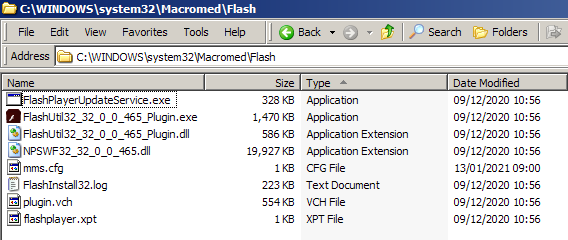
@VistaLover My Macromed/Flash folder contents look slightly different to yours: ...you have an extra exe, and an extra folder. For the Adobe thing I need this: AllowListUrlPattern=https://wwwimages.adobe.com/ ,,,direct link: https://wwwimages.adobe.com/www.adobe.com/swf/software/flash/about/flashAbout_info_small.swf @RainyShadow is spot on, http://chat.kongregate.com/gamez/0009/4075/live/myth_rider_cs3.swf is a better link than going anywhere near Kongregate's site proper. That one still works for me using: AllowListUrlPattern=https://chat.kongregate.com/ I'm really not doing anything clever! This is my mms.cfg: SilentAutoUpdateEnable=0 AutoUpdateDisable=1 DisableAnalytics=1 EOLUninstallDisable=1 EnableAllowList=0 AllowListUrlPattern=file:* AllowListUrlPattern=https://wwwimages.adobe.com/ AllowListUrlPattern=https://chat.kongregate.com/ The file:* thing is to allow local .swf files to run. Since yesterday EnableAllowList=0 is depreciated and now defaults to '1'. Ben.
 2 points
 -
From Belgium, hello @CRT and welcome to MSFN! I wish you enjoy the forums! Have a nice day. hpwamr2 points
-
Sadly, this came too late, but please try it. It's based on the same AMDXHC driver for Windows XP, but this required just a device check patch. Included are both 32-bit (x86) and 64-bit (x64) drivers, plus the "switch" driver. - The AMDXHC driver is safe to use and easily installed. - Supports all Intel USB 3.1 XHCI controllers (7, 8, 9, 100, 200 and 300 series, maybe even HEDT chipsets). - "Switch" driver may be needed if you don't get USB3 speeds on Sandy Bridge, Ivy Bridge and Haswell (*) systems (7, 8 and 9 series chipsets). To use this, I'd recommend a backup. Open Device Manager -> System Devices -> PCI Bus Update driver -> Browse my computer for driver software -> Let me pick from a list of device drivers on my computer Have Disk -> open the folder containing the HCSwitch driver files PCI Bus will be displayed, continue the installation. When finished, just restart Vista. (*) Haswell should work with Vista 32-bit (x86) only. http://www.mediafire.com/file/1kjhhl0fq1ofc2m The original Intel XHCI driver can be modded to work on Vista, but as this one works so fine, I don't have any plans to do it.1 point
-
Maybe it is caused by booting another OS that records additional attributes for the files? Do you multiboot on that PC? With one of my testing HDDs at work Win7 was doing some extensive repairs every time i had booted Win10 previously. I think turning off hybrid sleep fixed it.1 point
-
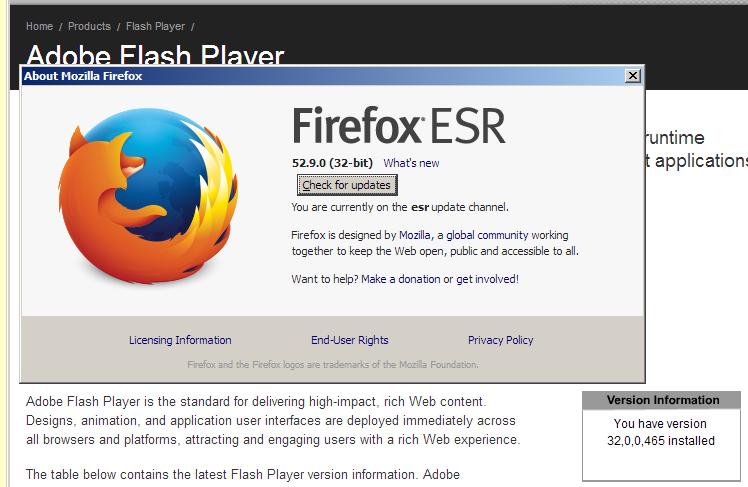
Changing this file is all that was needed to re-activate Flash v32.0.0.465 NPAPI on Firefox on Windows 7 x64.1 point
-
Everybody can check this in the event viewer (winlogon 1001 event in the application category). If you want, you can install the pstools and at the command line : PSLOGLIST -i 1001 -o Winlogon Application1 point
-
I do not use extended kernel, but I have followed those threads and can tell you that very little has been written on the subject of antivirus compatibility, so perhaps there is a real need for this thread. Dixel once suggested Malwarebytes 3.5.1 here, but did not specify free or premium. Only Malwarebytes Premium (i.e. the “trial”) has real-time protection, and btw their protection scores are not very good in independent tests, and 3.5.1 is a very old version now. If you wanted to use Malwarebytes only as a free on-demand scanner and use a real antivirus product as your main AV, then I would suggest version 2.2.1. It included an option to deselect the trial of premium during installation, and did not include the ransomware protection that did not work on Vista or XP. Edit: Definition updates for 2.2.1 were cut off in 2022, so stick with 3.5.1. If the idea of the extended kernel is to allow one to use any software that supports Windows 7, then in theory you could try current versions of any antivirus, since they all support Win7. (Avira plans to end support for Win7 and 8.1 at the end of 2021.) Of course in actual practice, an AV that does not properly support your OS can cause serious issues, so you should back up your system before installing an AV.1 point
-
New build of Serpent/UXP for XP! Test binary: Win32 https://o.rthost.win/basilisk/basilisk52-g4.7.win32-git-20210116-4b450ac-uxp-515814277-xpmod.7z Win64 https://o.rthost.win/basilisk/basilisk52-g4.7.win64-git-20210116-4b450ac-uxp-515814277-xpmod.7z source code that is comparable to my current working tree is available here: https://github.com/roytam1/UXP/commits/custom IA32 Win32 https://o.rthost.win/basilisk/basilisk52-g4.7.win32-git-20210116-4b450ac-uxp-515814277-xpmod-ia32.7z source code that is comparable to my current working tree is available here: https://github.com/roytam1/UXP/commits/ia32 NM28XP build: Win32 https://o.rthost.win/palemoon/palemoon-28.10.2a1.win32-git-20210116-5ac4ef4c7-uxp-515814277-xpmod.7z Win32 SSE https://o.rthost.win/palemoon/palemoon-28.10.2a1.win32-git-20210116-5ac4ef4c7-uxp-515814277-xpmod-sse.7z Win64 https://o.rthost.win/palemoon/palemoon-28.10.2a1.win64-git-20210116-5ac4ef4c7-uxp-515814277-xpmod.7z Official UXP changes since my last build: - Issue #1705 - Part 1: Rename nsChangeHint_CSSOverflowChange to *ScrollbarChange. (e16ed489a) - Issue #1705 - Part 2: Add a ShowScrollbar enum to be used in ScrollReflowInput. (4681e04dc) - Issue #1705 - Part 3: Rename ScrollbarStyles to ScrollStyles. (0e6a9cc60) - Issue #1705 - Part 4: Add scrollbar-width CSS keyword to CSS parser. (65da2431f) - Issue #1705 - Part 5: Implement scrollbar-width:none for all target platforms. (c05bca316) - Issue #1705 - Part 6: Remove scrollbarbutton min-{width|height} rule from theme. (764e13c91) - Issue #1710 - Check for triggering principal URI in FTP subresource check. (c0db767c2) - Issue #1705 - Part 7: Implement scrollbar-width:thin on Windows. (382fe423e) - Issue #1705 - Part 8: Implement scrollbar-width:thin on GTK. (ecc771848) - Issue #1705 - Part 9: Implement scrollbar-width:thin on Mac (cocoa). (59ef3f4ed) - Issue #1624 - Fix slot access intrinsics for objects with > 16 reserved slots (7023db88c) - Issue #1705 - Part 9b: Revert overzealous changes on Mac (cocoa). (0939fde1a) - Merge pull request 'Add scrollbar-width CSS spec' (#1707) from 1705 into master (515814277) Official Basilisk changes since my last build: - [SSUAO] Update overrides for YouTube (734d737) - [Tabbed browser] Pref detach&tear-off of tabs. (4b450ac) Official Pale-Moon changes since my last build: - [SSUAO] Update overrides for YouTube (f50a12e7c) - Issue #1845 - Pref detach&tear-off tab handling. (16479d842) - Update about box repository information (5ac4ef4c7)1 point
-
One thing you can try is get StartIsBack++ since it can skin the taskbar independently of its Start menu and the rest of Windows. Once you create and apply a Uxstyles made for taskbar in StartIsBack++, it should work as long as SIB++ works. Even if the Windows Uxstyles breaks.1 point
-
It's NOT the flag I advised ! I don't know what (don't read) google writes to the ordinary users , but according to their own documentation it does what it says, besides you may wanna read more carefully what I write , you have mixed up the two different flags : " --process-per-site - Enable the "Process Per Site" process model for all domains. This mode consolidates same-site pages so that they share a single process. More details here: - https://www.chromium.org/developers/design-documents/process-models - The class comment in site_instance.h, listing the supported process models. IMPORTANT: This isn't to be confused with --site-per-process (which is about isolation, not consolidation). You probably want the other one."1 point
-
There is Explorer++ that can be used on Vista/7/8 that will give you an "XP-esque" experience, including the "up" button.1 point
-
Yes, from experience, version X of the uninstaller will uninstall ALL (NPAPI, PPAPI, AX) Flash versions <=X This one has a digital signature (SHA-2 only) of Dec 22nd 2020 ; to be honest, I'm quite reluctant to try it out; Adobe are known to be very insidious , so I fear they may have artificially blocked any Flash version from being installed after this tool has been run... But I'm just being paranoid, I suppose... As for version 34, I think in China (and probably in Enterprise distributions) Flash hasn't died with version 32.0.0.465...1 point
-
Hello and thank you , sadly didn't work for me. Chipset H110 and Asrock mobo...1 point
-
... Whatever I posted located inside %windir%\system32\macromed\Flash was from a fresh NPAPI install here, minus the FlashPlayerTrust dir, which was inherited from years of Flash usage... Update on my issues... I had to use the latest Flash Uninstaller (v32.0.0.468) as admin, followed by a system restart to have a clean slate wrt Flash... After system booted, I installed anew latest (v32.0.0.465) Flash NPAPI, and modified the newly created mms.cfg file, as per your instructions: SilentAutoUpdateEnable=0 AutoUpdateDisable=1 DisableAnalytics=1 EOLUninstallDisable=1 EnableAllowList=0 AllowListUrlPattern=file:* AllowListUrlPattern=https://wwwimages.adobe.com/ AllowListUrlPattern=*://chat.kongregate.com/ Then, at long last, my "portable" Serpent 52 was able to load http://chat.kongregate.com/gamez/0009/4075/live/myth_rider_cs3.swf That test was performed without "portable" Flash DLLs in Serpent! However, as I've written already, I prefer to have portable Flash installations, NOT system-wide ones, and, sadly, my testing today proved that the mms.cfg file is only being read/honoured by a Flash DLL/OCX when placed (the mms.cfg file) in its (proper) location of "%windir%\system32\macromed\Flash\" In my own setup, Serpent 52 portable loads the Flash DLL from G:\PortableApps\Basilisk52Portable\Data\plugins\NPSWF32_32_0_0_465.dll ... but for the @Ben Markson method to work in my case, I still have to place modified file mms.cfg inside "C:\Windows\system32\macromed\Flash\" I can live with that as long as the portable browser installation(s) stays in the same machine, but Flash "portability" will be broken when I load my portable Serpent installation on another host... So, for truly portable and working Flash 32.0.0.465, I have to resort to using the patched (@UCyborg method) Flash DLLs ... @Ben Markson , your dedication and assistance on getting this troubleshot here has been loudly applauded ; many thanks indeed1 point
-
Welcome.. see ya round the forum(s)1 point
-
My best guess is you used a third party dark theme that changes some settings in chrome://flags to make everything look dark? Also, uBO does not install even thru dev mode from an unpacked extension folder on Chrome/Chromium. It says "could not load manifest".1 point
-
As you all will see I have changed my profile to show Windows 10 x64. And yes...most of you know why I started this thread...but because of restrictions för bank tasks via older versions of Windows I was forced to update.... But it is still CRAP!1 point
-
Good idea the guide, despite scrambled in SDI vs Driver Booster war and windows update issue. For the latter, i've used WSUSOffline v10.9.2 (last version supporting Vista) to download everything - Vista Box Checked on a clean installation of Vista SP2, and after that used a more recent WSUSOffline (don't remember the version) to download everything - Server 2008 Box Checked to get all the compatible Vista updates after Vista EOL.1 point
-
I tried adding those functions, which are actually forwarded from secur32 to sspicli.dll, the latter of which is a completely new DLL from Windows 7. Not much success thus far with launching Edge.1 point
-
Exactly. The proper Vista era only began in around 2008 AFAIK as proper drivers were not available for Vista and OEMs put XP drivers on Vista installs.1 point
-
I'm not trying to prove, that it is unusable, just trying to help win32 locate when the problem started. Also my cpu is intel core i5-5300U since it is laptop, 16 missing drivers for vista sp2 makes this unusable.1 point
-
Yes, so taking that into consideration, I will use an SSD as OS drive and an HDD as data drive on my custom desktop. I might also dualboot a Vista install with updates and one without (the clean install on the HDD and updated install on SSD), purely for testing.1 point
-
Whoops, I never knew that. Also BTW, @WinFX's bypass method to install 4.7.2 requires 4.6.1 as a prerequisite. That's why I installed it.1 point
-
No, I meant that on my laptop display, only 1366*768 resolution can be displayed (no 800 by 600, 1024 by 768 etc.), but that's the maximum supported resolution on my laptop. This could also happen with you and only 1080p resolution could be accessed by Windows 8.1, being the maximum supported resolution, so that's not a very noticable issue. You can proceed with trying to install Windows 8.1. Green signal given by me 🚦1 point
-
Wanted to addon: The graphics driver successfully installed but there is an issue that prevents the changing of screen resolutions, so on my Macbook Air clone the display can only show content on it in 1366*768 resolution {max. supported resolution}, so this is not a really big issue.1 point
-
I never thought I would get Windows 8.1 up and running without noticable bugs on that laptop and was actually astonished when it was successfully installed with all the very essential drivers. I got through the install (using a USB 2.0 flash drive and a USB 2.0 port) somehow without BSOD and later installed GPU, audio, wifi etc. Drivers through driver booster (I know it caused issues for you but not for me in this case). I was surprised at how a Windows 10 Intel HD graphics 505 driver successfully installed on Windows 8.1!! Also, that laptop has only 32GB of internal storage, so no updates.1 point
-
Welcome to this wonderful forum sir and hello from India . Hope you enjoy the forums.1 point
-
No, VM, though I can share pictures. Btw, I'm away from my computer now, so it will take some time to upload1 point
-
I have the same result on Win 7 N SP1 (European version , for those who are wondering) . And this is on a clean install without patches and with kb3125574-v4 installed , the result is the same , I'm sorry , I can't make that high quality pictures , like @Dixel made . I'm maybe mistaken , but you wrote that too about Win 7.1 point
-
Yeah, now I understand. My LCD is the culprit1 point
-
What I'm trying to say from the very beginning is : Aero and window borders are working perfectly without modifications but the control buttons present in earlier versions of VLC which matched with the look of Aero are absent in 3.x.x without the hex edit. This issue is a universal issue on Vista, as @UCyborg said. WHY don't you or Dixel understand me?? Also, I thought you knew that maximised windows in Vista turn opaque, being a longtime Vista user. This happens with all applications. Test again using a maximised window and see what happens.1 point
-
Now that you said that, I remember running 8.1 on some old 1.9GHz Dual Core AMD laptop, think it was like the TK-57 or something1 point
-
Actually sometimes they are not only security fixes. Windows 8.1 received nvme updates and usb-c reliability updates. They are important for new systems.1 point
-
Hi i430VX. When something goes glitchy in Windows 98 and you can't remember installing or changing anything it's likely registry corruption. If SCANREG /RESTORE command fails, you have more than a sound issue. Default C:\WINDOWS\SCANREG.INI settings back up and optimize the registry at every boot, not every day, with max backup copies of five. Recommend either increasing max backup copies to 10 or more or regularly making a quick backup of your C:\WINDOWS\SYSBCKUP\RB00*.CAB files, especially when the system is running well, on other media into a date-stamped directory. Note the backup count is the number of boots, not days. So the issue may be that before a problem is discovered, or while troubleshooting, the system has already re-booted several times, negating a good registry backup.1 point
-
I had hooked up a Dell external monitor to my secondary Vista desktop which does not have Vista drivers but SDI installed a driver, which I don't know whether to trust. But no major issues were caused.1 point
-
I applied that patch but WU still does not work, probably because I have .net framework 4.6.2 installed. Any way to solve? If this can be solved, I will add it to the list As for dism++, thanks a lot for suggesting. I totally forgot about it.1 point
-
What do you mean? Driver booster has updated all my Vista drivers properly and had not caused any issues for me and even I'm speaking from experience.1 point
-
Don't know why your VM behaves a little strangely, but on my main Vista laptop (fully updated till Jan. 2020) DWM always uses only about 30-40 megs of ram (out of 8 gigs). Maybe vmware tools causes memory usage to fluctuate.1 point
-
Thanks a lot!1 point
-
Ouch that is really slow for that poor ryzen.1 point
-
Hello everyone, I've been using XP for over 12 years and have not had to fiddle with it much all that time, ... Until now. It has finally decided that some software that it has aquired doesn't agree with it. It has been so long since I had to play with OS's that I have forgotten all the techniques and tricks to re-install it successfully. But thats what I think I'm going to have to do. So I've come here to get some advice on how to proceed.1 point
-
I seriously do not understand why they f****** did this. Just why?? I hate modern software companies nowadays. Everything is a f****** expensive subscription, new operating systems are pieces of junk trying to spy on you whilst looking ugly. Back to my point, why would virtualization software check if I had patched my uxtheme to sideload a new theme for example? Unbelievable! Their explanation:
1 point
-
Windows 8.1 does this as well. I really hate Windows 10 UI in general. I like aero, but I also like colorful borders that Windows 8.1 has. Windows 10 is just ugly.
1 point
-
The best I can come up with is going to application verifier x86 and adding these files from the steam folders in program files and program files (x86): steam.exe steam_monitor.exe steamservice.exe steamwebhelper.exe then going to application verifier x64 and adding these: steamwebhelper.exe html5app_steam.exe x64launcher.exe For each one, go to Compatibility on the tree to the right of the file lists and check HighVersionLie. Then click on it and type 6 in major version, 1 in minor version, 7601 in build number and 1 in service pack major. Then "OK" and then save on the main window. A hex edit may also be needed for steam.exe, steam.dll and steamservice.dll if Steam starts complaining about the OS version: And use this so it doesn't react to the files being modified: And someday, I'll find a way to make Vista NT 6.1 so none of this will be needed.1 point
-
Well, all you will obtain will be an updated definition , something like "some selfish teenage indian dude who watches anime". The "teenage" becoming (already or soon) inaccurate, time passes faster than one would expect ... Haters are gonna hate anyway. jaclaz1 point
-
My Selection of Free Filehosting (19) on: 2026/01/19 Site: Retention: https://buzzheavier.com (30 days from last download) (Mirrors sites: https://flashbang.sh and https://trashbytes.net) https://download.ru (10GB of Free Space - Unlimited retention) https://download.gg (Until 25GB by file - Unlimited retention) https://file.kiwi/en (Illimited size - deleted after 90 hours) https://filen.io (10GB of Free Space for Registered User) https://files.fm (60 days from last download) https://gofile.io (15 days (guest) or 6 months (registered) from last download) https://hexupload.net (60 days from last download) https://krakenfiles.com (1 month (guest) or 3 months (registered) from last download) https://mediafire.com (15 days (guest) or 6 months (registered) from last download) https://megaup.net (60 days from last download) https://mirrored.to (Multiple Free Filehosting sites) https://pastebin.com (You decide if you want your pastes to "expire") https://pixeldrain.com (60 days of retention) https://send.cm (30 days from last download) https://swisstransfer.com (30 days from last download) https://ufile.io (30 days without registration, 10GB for free registered User) https://upload.ee (50 days (guest) or 120 days (registered) from last download) https://workupload.com (90 days from last download) My goal is to to provide a list of Free Filehosting: 100% free and of course with NO spamming, advertising, captcha, registration, solicitation, download delay, profanity or otherwise... This includes and is not limited to links via cash sites (including rewards for downloads), affiliate marketing, and links requiring a premium/paid account to access. And from there to provoke an exchange of experience, to receive suggestions, other URLs, etc..1 point
-
From: http://imgur.com/gallery/PGNLPCb1 point
-
Nice , though there are good alternatives, this link includes a full tutorial : http://www.howtogeek.com/96780/how-to-rename-internet-explorer-to-firefoxchrome-downloader/ jaclaz1 point
.thumb.jpg.91d36bb68fca6784f84a1755a100139d.jpg)




.thumb.jpg.e861836bb05fe824ad8ec1930061ee43.jpg)

.png.3c9dc4f3b1255c45b307f0e781486565.thumb.png.22664a2751ea68c4eca6477931bbc3b9.png)