All Activity
- Today
-
 Ozzi joined the community
 - Yesterday
-
Anyone tried recently Ebay login with 78.0.3? In my case when it prompts "Checking your browser before you access Ebay" it's crashing the tab.Dunno if they made an update on Ebay, but few days ago it normally worked,
-
 gg432 joined the community
 -
 Thanks! I've now simplified my exclusions by simply excluding all files with the LNK extension from scanning. As the folders I had excluded were all full of shortcuts, I thought this was more elegant and it still seems to work. I'm still getting occasional stops and restarts of the main Panda service, but it is usable. All the Panda functions seem to be working fine when the service is running.
 -
 Sere4 joined the community
 -
 @Dave-H Panda 22 has been installed. Items added to exclusions start menu, SendTo, Recent, as you suggested. I also included Microsoft Office as well as system explorer ( task manager no connection to internet) So far it has been working as prior to 2nd of July. I' ll monitor the situation and report back.
 -
 kukl joined the community
 -
 @VistaLover The posts about Comodo Antivirus were simply intended to inform Windows XP users that there is still a perfect alternative available. However, Comodo had not deemed it necessary to release an official, static link to the final installer for Windows XP/Vista when it discontinued support for these operating systems. Having learnt from my experience of reviving Malwarebytes Anti-Malware Free/Pro 1.75.0.1300 — regarding the updating of its definitions – I have drawn my own conclusions. I never make the same mistake twice. The Windows XP haters of this world will get no further fuel from me. I will do nothing that might prompt Comodo to pull the plug, as Malwarebytes did back then, even if my fix doesn't modify or patch any Comodo related files and only restores the state that the online update function was actually supposed to carry out. One thing is clear. A cursory search for this installer will get you presumably nowhere; you’ll need to dig a bit deeper in the case of Comodo. However, success is not guaranteed as Comodo generally replaces previous installers with more current ones. Whatever the rules may be. Very often installers are then still advertised to be compatible but they aren't any longer. If you can’t find anything, alternatively, you could make do with the installer of the previous version which is still available. The online update is not essential, as you can update Comodo's definitions offline at any time. The main programme and the VirusScope recognizer DLL files will no longer be updated online anyways, due to the change from SHA-1 to SHA-512 signature. These DLL files can only be updated manually by newer, compatible ones, if any are found, of course. I only restored the online update functionality to see, if it is possible, and due to the fact that I can do such things. It’s just the way I am. Regards, AstroSkipper
 -
Update notification! Malware Hunter has been again updated on 20.07.2026 and is now available in version 1.219.0.863. It is still listed to be compatible with Windows XP. Accordingly, I will update my article to this version. Tests can be done by the users. Cheers, AstroSkipper
-
In addition to the previous article, I have updated all lists in the second, third and fourth post of this thread to the most recent facts.
-
How to secure Windows XP in 2026 - A multi-layered security strategy It is now July 2026. Since Panda Security – either unintentionally or perhaps deliberately – rendered its Panda Dome programme unusable on Windows XP from 2 July onwards due to faulty automatic updates, there are, in practical terms, hardly any anti-malware programmes with real-time protection left for this operating system supported by both programme and definition updates. Almost all well-known manufacturers of antivirus and antimalware programmes have discontinued support for Windows XP over the years. It is therefore of the utmost importance, first and foremost, to persuade Panda to correct its update routine on the server side. Windows XP enthusiasts can exert considerable influence here by reporting all issues with Panda Dome to the support team. Only if many people do this is there a realistic chance that anything might change in this regard yet. I really shouldn’t care, since I'm actually done with Panda. In any case, Windows XP users must realise that comprehensive security suites, as they used to be, practically no longer exist. System protection must therefore be organised differently. You have to build and organise it yourself using various tools that must work together harmoniously. Layer by layer, so to speak. What do you need for a secure Windows XP system? Windows XP SP3 with all essential components and available updates. Backup system: A fully functional backup system that regularly creates partition images. Firewall: A very good firewall that monitors all network traffic, including all incoming and outgoing connections, even those from Windows XP system components. Real-time protection: A programme that runs in memory, detects and reports threats. Process manager: Located in the taskbar. Startup manager: A good startup manager. On-demand scanners: One, or better still several, good on-demand scanners with a disinfection feature. Browser: An up-to-date browser with an ad blocker. Certificates: Up-to-date root certificates. And, of course, common sense. And if anyone now claims that this is impossible, I’ll respond directly: I’ve configured my Windows XP system exactly like this and haven’t had a single infection in 25 years. Windows XP is still my main operating system alongside Android. Cheers, AstroSkipper
-
Tested latest version WDMHDA.022 on Windows 98 FE with ACPI. According to the logs CORB/RIRB interface is working. Further same as earlier regarding Disable&Enable driver. Further no troubles, just tested Mute on main output: not working on my Codec VT_1705. I added two logs while playing. Wdmhda.022_N68_VT1705_WIN98FE_ACPI_DirectX_7.0_DUT.zip Added: logs with Windows 98 SE. Although looking all the same after Disable&Enable regarding changed Memory Address of hda.sys, MID&RMI are still working! WIN98SE_NO_ACPI_DX_9.0c_Wdmhda.022.zip
-
 marisasowell32323 joined the community
 - Last week
-

My Browser Builds (Part 6)
VistaLover replied to roytam1's topic in Browsers working on Older NT-Family OSes
-

My Browser Builds (Part 6)
nicolaasjan replied to roytam1's topic in Browsers working on Older NT-Family OSes
I've had the same issues with the Dutch language pack. Some things have to be changed in the .xpi file. Regarding the German language pack; @AstroSkipper should be able to help you out. -
 good point, i often said going to start with v150 or something is a little to much
 -

cyberpunk 2077 on 8.1 with almost native performance
NullEntity replied to Jaguarek62's topic in Windows 8
wake the hecc up samurai, someone found something interesting -
 gooddays joined the community
 -

My Browser Builds (Part 6)
GTAGAME replied to roytam1's topic in Browsers working on Older NT-Family OSes
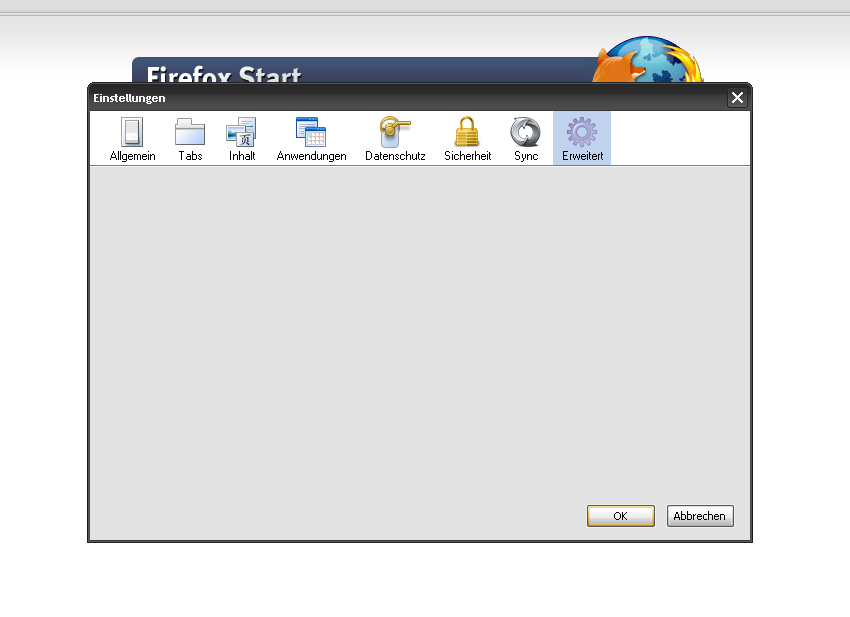
The Advanced tab in New Moon appears completely empty when using the last supported version of Pale Moon's German language pack (28.10.0). I don't know if New Moon is still being developed with these LP's in mind, sorry if this turns out to be a useless forum post.
-
 throwawayt807 joined the community
 -
I managed to fix my issue. Here's how: I installed windows NT 4.0 to virtualbox 6.0 on windows 8.1 as per this guide https://i12bretro.github.io/tutorials/0077.html. I made the VM's hard disk as a VHD file *IMPORTANT*. However, instead of installing to NTFS, I installed to FAT. (This did not require me to preformat the partition, but I expected it to). I also gave the VM 4 GB of RAM and a 1024MB hard drive. Then, after booting the VM and it working, I used the action menu in windows disk manager (create and format hard disk partitions) to mount the VHD file of the VM. Then, I used minitool partition wizard 9.0 free to copy the partition to the correct spot on my drives (and resize it to 2GB). Then, I used EasyBCD to make the new boot menu entry for it, as well as deleting the previous entry for NT 4.0, since the partition was overridden by the new install. I had to make sure that the disk that NT 4.0 is on is plugged into one of the first 3 sata ports as those are the first emulated sata/IDE controller and NT 4.0 cannot access the second one during the boot sequence. Since my NT 4.0 is within the first 131GB of the drive, I did not have to install LBA48 supporting disk drivers, but drivers such as UniATA exist. Once booted in, I installed the USB patch for windows NT 4.0 (after changing the drive letter of NT 4.0's partition to C: *important*) and force rebooted the computer to get the mouse to work (must wait approx 1 min after the computer has started for it to pick up the mouse and keyboard). Then, I removed drive letters from all partitions besides Win NT itself and the other "unknown" partition on another disk that it won't let me de-letter ("boot drives MUST have a letter"). Once in this state, my issue was fixed. Windows 7 no longer becomes a sluggish nightmare after booting into windows NT 4.0, but windows 7 can still access all drives and partitions, including NT 4.0's. I believe that I could even get NT 4.0 to see all the partitions that it could with UniATA and still not have issues, but I don't really care and would rather not find out. I did not delete NTFS.SYS or disable the service/device as I did not need to. I now have installed USB and video drivers. Besides sound, I call NT 4.0 complete. Thanks for all the help, even if the long way ended up being the answer. All that's left for my system to be complete is to install Windows 10 (throughout one process or another (I believe trying to fix windows 2000 before) it got corrupted and deleted), and make sure everything is 100% ready to go. I would love to get audio on 95, 3.1, and NT 4.0, but that would be for another thread. Again, thanks!
-
I just got a FAT16 installed NT 4.0 onto my system! I have to re-figure out USB, drive letters, graphics, and more, as well as stop NTFS.SYS from starting. I'll get back soon!
-
.thumb.png.5418fd8b15ef2381895e121a395a687d.png) (I will update this original post with updates and other things over time when necessary) GitHub page: https://github.com/TheUltraCode/ReSNM --- Brief Introduction I already did a pretty-thorough write-up on the GitHub page, so I'll spare a lot of details here. After my work on HFSLIP 1.8, I was curious if I could improve SNMsynth too, so I started work back in February of this year (2026). The final result is ReSNM. ReSNM is a Windows batch script meant to create customized .NET 1.1, 2.0 SP2, 3.0 SP2, and 3.5 SP1 installers targeting all 32-bit NT5 OSes (Windows 2000, XP, and Server 2003). It can process all updates and language packs meant for each version (including Service Pack 1 for .NET 1.1), and output self-extracting installers as well as T-13 and RunOnceEx add-ons meant for use in nLite and RVM Integrator. The first iteration of the script called SNM was authored by @Tomcat76, and supported up-to .NET 2.0/3.0 SP1 and 3.5, ending development in 2008. When Tomcat76 stopped development, @strel picked-up the torch, renaming the project to SNMsynth and adding support for .NET 2.0/3.0 SP2 and 3.5 SP1, continuing development until 2010. Finally, @Zilver (with the help of @gora) released a minor update to SNMsynth in 2013, but development never picked-up in earnest after strel. Biggest Changes Compared to SNMsynth Here's a quick run-down of the biggest changes made in ReSNM: Massive refactoring while improving/fixing existing logic. Standardized processing as much as possible between different .NET versions. Removed dependency on Oleg Scherbakov's third-party "7zSD.sfx" file, instead now uses official 7-zip one. While features like a hidden console are lost, we benefit from all of the advancements made by 7-zip in the past 15-years, as well as avoiding anti-virus false flags. Rewrote part of the created "INSTALL.cmd" script to support 4 flags/parameters and be more dynamic. The exact number of parameters supported is arbitrary and can be easily changed. Added requirement of text files that list the order in which updates are applied. This was one of the first changes I made to SNMsynth. Added requirement of "\HFXS" and "\MSTS" directories. Keeping things orderly. Mandate latest Service Packs for each .NET version. This allowed me to shrink the codebase. Considerations and Credits There are still questions I have regarding some of the code inside ReSNM, so if you are interested in helping me check out the TODO's I left inside the script. I also have left plenty of comments scattered all around the code to help you understand it better. Thanks to Tomcat76 for creating the original script, and strel, @YumeYao, and all those who contributed to this project prior. Older Download Links If you are curious about looking at the older versions of SNM, here are links to where you can find them: SNM (original by Tomcat76) SNMsynth (updated fork by strel) SNMsynth (2013) (update by Zilver & gora)
(I will update this original post with updates and other things over time when necessary) GitHub page: https://github.com/TheUltraCode/ReSNM --- Brief Introduction I already did a pretty-thorough write-up on the GitHub page, so I'll spare a lot of details here. After my work on HFSLIP 1.8, I was curious if I could improve SNMsynth too, so I started work back in February of this year (2026). The final result is ReSNM. ReSNM is a Windows batch script meant to create customized .NET 1.1, 2.0 SP2, 3.0 SP2, and 3.5 SP1 installers targeting all 32-bit NT5 OSes (Windows 2000, XP, and Server 2003). It can process all updates and language packs meant for each version (including Service Pack 1 for .NET 1.1), and output self-extracting installers as well as T-13 and RunOnceEx add-ons meant for use in nLite and RVM Integrator. The first iteration of the script called SNM was authored by @Tomcat76, and supported up-to .NET 2.0/3.0 SP1 and 3.5, ending development in 2008. When Tomcat76 stopped development, @strel picked-up the torch, renaming the project to SNMsynth and adding support for .NET 2.0/3.0 SP2 and 3.5 SP1, continuing development until 2010. Finally, @Zilver (with the help of @gora) released a minor update to SNMsynth in 2013, but development never picked-up in earnest after strel. Biggest Changes Compared to SNMsynth Here's a quick run-down of the biggest changes made in ReSNM: Massive refactoring while improving/fixing existing logic. Standardized processing as much as possible between different .NET versions. Removed dependency on Oleg Scherbakov's third-party "7zSD.sfx" file, instead now uses official 7-zip one. While features like a hidden console are lost, we benefit from all of the advancements made by 7-zip in the past 15-years, as well as avoiding anti-virus false flags. Rewrote part of the created "INSTALL.cmd" script to support 4 flags/parameters and be more dynamic. The exact number of parameters supported is arbitrary and can be easily changed. Added requirement of text files that list the order in which updates are applied. This was one of the first changes I made to SNMsynth. Added requirement of "\HFXS" and "\MSTS" directories. Keeping things orderly. Mandate latest Service Packs for each .NET version. This allowed me to shrink the codebase. Considerations and Credits There are still questions I have regarding some of the code inside ReSNM, so if you are interested in helping me check out the TODO's I left inside the script. I also have left plenty of comments scattered all around the code to help you understand it better. Thanks to Tomcat76 for creating the original script, and strel, @YumeYao, and all those who contributed to this project prior. Older Download Links If you are curious about looking at the older versions of SNM, here are links to where you can find them: SNM (original by Tomcat76) SNMsynth (updated fork by strel) SNMsynth (2013) (update by Zilver & gora) -
@HarryTri Yes I'm installing the right driver.
-
Are you sure that you are installing the correct driver? It seems to be a case of incompatibility...
-
I managed to fix it. If anyone is interested. Windows 7 will need further debugging, but I can help you with working wrapper.
-

Win10 LTSC IoT lag issues. How to resolve?
Tripredacus replied to DeathAdderSF's topic in Windows 10
Upgrade path is not a concern in that way. While technically blocked paths are blocked strictly so that MS can make money, this also means that upgrades are not tested in any way. This means that any multitude of issues can occur in practice and thus is certainly something that should be brought up when a user is reporting a technical issue after doing one. -
# [Windows 8.1 x64] Cyberpunk 2077 2.31 Steam compatibility patch I am publishing an experimental compatibility package for **Cyberpunk 2077 2.31 on Windows 8.1 x64**, tested against the Steam public build `20383525`. **Download:** [https://drive.google.com/file/d/1UFNrcPSWhEqu0jUJwUWHz1tm5gOuMK-v/view?usp=sharing] **ZIP SHA-256:** `5D8543335269D86B7456B60B6E6A3908C6C296B186DB93F8EF25EA38D371745E` > This release was tested only on **Windows 8.1 x64**, so that is the only > operating system for which it is currently recommended. The installer rejects > other Windows versions and unsupported game files. ## What it fixes The package provides a D3D12On7 raster path for the tested Steam build and fixes the known presentation problem where Cyberpunk appears frozen and updates only when another window is dragged over it. The game can be launched normally with Steam's **Play** button after adding the launch option printed by the installer. ## Performance On my tested machine, performance is close to running the game on Windows 10. It is dramatically better than my older Cyberpunk 1.63 compatibility setup, which delivered roughly half performance on the same machine. This is an observed real-world comparison, **not a controlled or standardized benchmark**. Results will vary with GPU, driver, settings and system setup. ## Tested setup - Windows 8.1 x64 - Cyberpunk 2077 2.31, Steam build `20383525` - GeForce RTX 2060 - NVIDIA driver `474.11` - 1920 x 1080 - Raster rendering only Other GPUs and drivers, GOG/Epic releases, hybrid graphics and other operating systems have not been tested. ## Required: official D3D12On7 1.1.0 package Download Microsoft's official [`Microsoft.Direct3D.D3D12On7` 1.1.0 NuGet package](https://www.nuget.org/packages/Microsoft.Direct3D.D3D12On7/1.1.0) separately and save the unchanged file next to `Install.cmd` as: `Microsoft.Direct3D.D3D12On7.1.1.0.nupkg` Expected package SHA-256: `C0C4D597537ECC1C777FA3B5523E5CCDE0B9984B88FB9F37B2385E1D687BF536` The Microsoft package is not bundled with this patch. ## Required: SecondSystem SecondSystem must already be installed and active. **It is not bundled with the patch.** Obtain it separately here: [SecondSystem from win32's Patreon](https://patreon.com/win32?utm_medium=clipboard_copy&utm_source=copyLink&utm_campaign=creatorshare_fan&utm_content=join_link) Please support its developer and follow the terms provided with it. ## Installation 1. Extract the complete ZIP. 2. Download the official D3D12On7 package above and place it beside `Install.cmd`. 3. Install and activate SecondSystem. 4. Exit both Cyberpunk 2077 and Steam completely. 5. Run `Install.cmd`. 6. Copy the exact Steam Launch Options value printed at the end. 7. Paste it into **Steam > Cyberpunk 2077 > Properties > General > Launch Options**. 8. Start the game with Steam's **Play** button. Do not append custom arguments; the included launcher intentionally uses only the fixed, validated command line. The installer validates the exact game/runtime hashes and stops before changing anything if the files are unsupported. It keeps all compatibility files local to the game directory and creates a verified uninstall record. ## Important limitations The following features must remain disabled: - Ray tracing and path tracing - DLSS - NVIDIA Reflex - Frame Generation, including XeSS Frame Generation This release is for raster rendering. Cyberpunk 2.31's newer Agility SDK path is not a Windows 8.1 target, so modern features that depend on it are outside this patch's scope. ## Removal and game updates Close the game and Steam, run `Uninstall.cmd`, then clear Steam Launch Options. The uninstaller restores any files it backed up and reverses its SecondSystem mappings. The package is locked to Steam build `20383525`. The launcher compares the full contents of the current executable with its validated local copy and refuses a mismatch. After a Steam update, uninstall this release and wait for a version explicitly validated for the new build; do not remove the version/hash safety checks. ## What is and is not included The ZIP contains the original open-source proxy, launcher, installer scripts, source code, documentation and notices. It does **not** include: - Cyberpunk 2077 files - Microsoft D3D12On7 or D3D11On12 binaries - SecondSystem - Steam files - any DRM bypass A legal Steam copy of the game is required. The installer extracts the runtime inputs from the official NuGet package separately supplied by the user and creates a local working copy. Microsoft terms still apply and may restrict this use or modification; this is not legal advice. Full installation, troubleshooting, technical and checksum information is in the included `README.md`.
-
 But based on v91?
 -
Sorry for the delay in responding again. Nothing has changed since my last report, the program is working, with my folder exclusions applied, with only occasional stops and restarts of the main Panda service. I can live with that in the short term. I'm still hoping, of course, that a fix will be applied and it will all come good again. Nobody has any definite evidence that Panda have deliberately stopped their XP version from working properly, only speculation. I will wait a while and ring AnyTech365 again if I've heard nothing from them about this. They will be as anxious as I am to get an answer from the Panda developers about this, I'm sure, as they will need to be able to give accurate support information to anyone else asking about this problem! Assuming that they do have a direct channel of communication to them, and it would be pretty stupid if they didn't, hopefully it won't be too long a wait for an answer, one way or the other.
-
@Dietmar I'm willing to try with LAN debugging if you're willing to help me get it set up and can help me find what to look for. I won't have the Intel Graphics driver symbols though.
-
 flipper1954 joined the community
 -
 No, he'll just create a new repository where he'll (apparently) upload versions that work starting with Windows XP. He responded to this in the post below.