Search the Community
Showing results for tags 'NT4'.
Found 7 results
-
EDIT: Summary: after booting into windows NT 4.0, windows 7 becomes slow and sluggish FIX: I managed to fix my issue. Here's how: I installed windows NT 4.0 to virtualbox 6.0 on windows 8.1 as per this guide https://i12bretro.github.io/tutorials/0077.html. I made the VM's hard disk as a VHD file *IMPORTANT*. However, instead of installing to NTFS, I installed to FAT. (This did not require me to preformat the partition, but I expected it to). I also gave the VM 4 GB of RAM and a 1024MB hard drive. Then, after booting the VM and it working, I used the action menu in windows disk manager (create and format hard disk partitions) to mount the VHD file of the VM. Then, I used minitool partition wizard 9.0 free to copy the partition to the correct spot on my drives (and resize it to 2GB). Then, I used EasyBCD to make the new boot menu entry for it, as well as deleting the previous entry for NT 4.0, since the partition was overridden by the new install. I had to make sure that the disk that NT 4.0 is on is plugged into one of the first 3 sata ports as those are the first emulated sata/IDE controller and NT 4.0 cannot access the second one during the boot sequence. Since my NT 4.0 is within the first 131GB of the drive, I did not have to install LBA48 supporting disk drivers, but drivers such as UniATA exist. Once booted in, I installed the USB patch for windows NT 4.0 (after changing the drive letter of NT 4.0's partition to C: *important*) and force rebooted the computer to get the mouse to work (must wait approx 1 min after the computer has started for it to pick up the mouse and keyboard). Then, I removed drive letters from all partitions besides Win NT itself and the other "unknown" partition on another disk that it won't let me de-letter ("boot drives MUST have a letter"). Once in this state, my issue was fixed. Windows 7 no longer becomes a sluggish nightmare after booting into windows NT 4.0, but windows 7 can still access all drives and partitions, including NT 4.0's. I believe that I could even get NT 4.0 to see all the partitions that it could with UniATA and still not have issues, but I don't really care and would rather not find out. I did not delete NTFS.SYS or disable the service/device as I did not need to. Start of thread: Precursor: *SKIP IF UNINTERESTED* I have a multibooted computer with 13+ entries in the bootloader. Currently, they go as follows: Win 11, 10, 8.1, 7, Vista, XP, 2K, NT 4.0, ME, 98 SE, 95, 3.1, and an Ubuntu install. All of them boot correctly (now after much disarray), and are neatly put into a single boot menu running without metro UI but on the modern BCD framework. I use 5 real mode boot sectors for ME, 98 SE, 95, 3.1, and Ubuntu using modified versions of generated files from easy bcd (based on grub4dos 0.4.6a). For NT 4.0, 2K, and XP, I also use Easy BCD (this time unmodified) to boot into them. Each operating system works fine. All operating systems above 2K have fully fledged drivers for everything, the base board is an IPIBL-LB (random HP board) with 4 drives + a CD drive. *** SKIP TO: Here's the problem: If I follow these steps, things go wrong: Boot into NT 4.0 (no issues) Restart (no issues) Boot into Windows 7 (no issues*) Once into Windows 7, after fully started, Windows 7 (but not any other operating system [ex 8.1]) will become super sluggish and slow. All drives are accessible except for the ones accessed by NT 4.0 during its boot (any time in the past, even hundreds of power cycles ago), mainly NT 4.0 itself as well as Vista and 2K. The FAT (non NTFS) drives accessed by NT 4.0 remain accessible, but NTFS drives accessed become unreadable/uninitialized in only windows 7. Trying to start a disk check on those volumes fails, and the UAC prompt takes forever to come up anyway. The system is unable to shutdown too. The current only way to fix this is to boot into another operating system and disk check anything accessed by NT 4.0. Here's what I want: Windows 7 can access all drives and not be sluggish after booting into NT 4.0 any time in the past Windows 7 can still see all partitions on all drives Here's what I don't care about: NT 4.0 not being able to see any other partition (actually ideally it shouldn't be able to) Here's my idea: NT 4.0 does not have disk drivers. It sees the drives (500+ GB) as 131 GB (No lba 48 support) - I have a disk driver I could install, but doing so seems redundant since it will only be a nightmare to reletter each drive and fix the USB drivers as well as making more partitions accessible from NT to further break 7 - If I could maybe get Vista to unletter from NT 4.0 and install NT on FAT, then it would maybe fix the issue? However I can't unletter Vista. I would also need guidance on installing NT 4.0 on FAT. Other than that I'm clueless Other info: I have removed all drive letters from NT 4.0 besides itself (now C:) and Vista (Z:) (it won't let me remove Vista as "boot drives MUST have letters" [this makes me confused]) NT 4.0 can only see 2 drives (technically 3 but it doesn't read the third), of which the picture has the layout. The full disk manager layout from 8.1 can be seen as well. This is NT 4.0 built 1381 SP6 I would really appreciate some guidance! I'm lost. Genuinely no idea where to start or how one or two partitions ruins 7 completely. Clueless, however much I might know. Sincerely, RU-B **Don't want any "Give up" vibes please**
-
 I have been working on an updated version of SeaMonkey 1.1.19 (Firefox 2) for Windows 95 and NT4. I plan to backport CSS features over from newer versions of the browser, as well as modify the browser to work better with the modern web and improve user experience on older OSes. (I plan to include an optional hosts file that blocks Facebook and Google Analytics URLs, which will speed up the web greatly.) Right now, it is just a rebrand, but I am working on newer features and I do accept contributors. GitHub Page Latest Release
 -
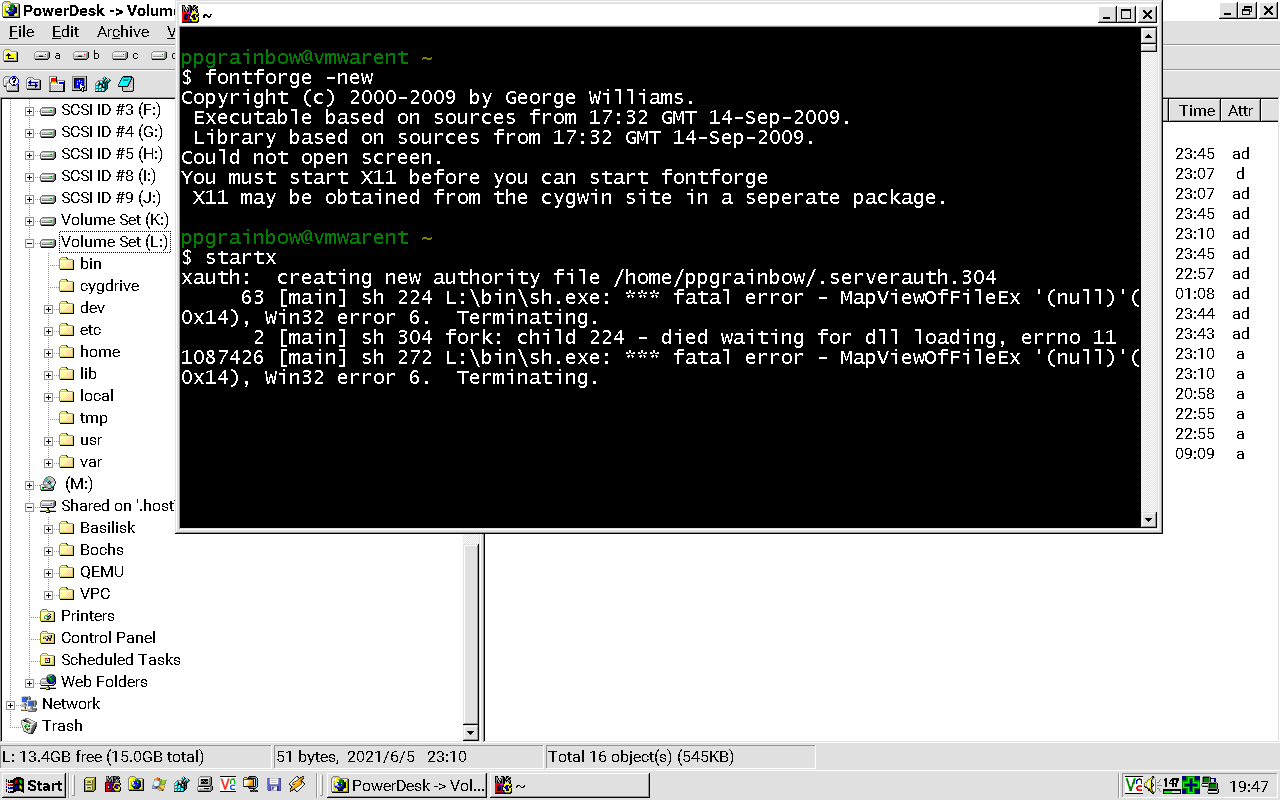
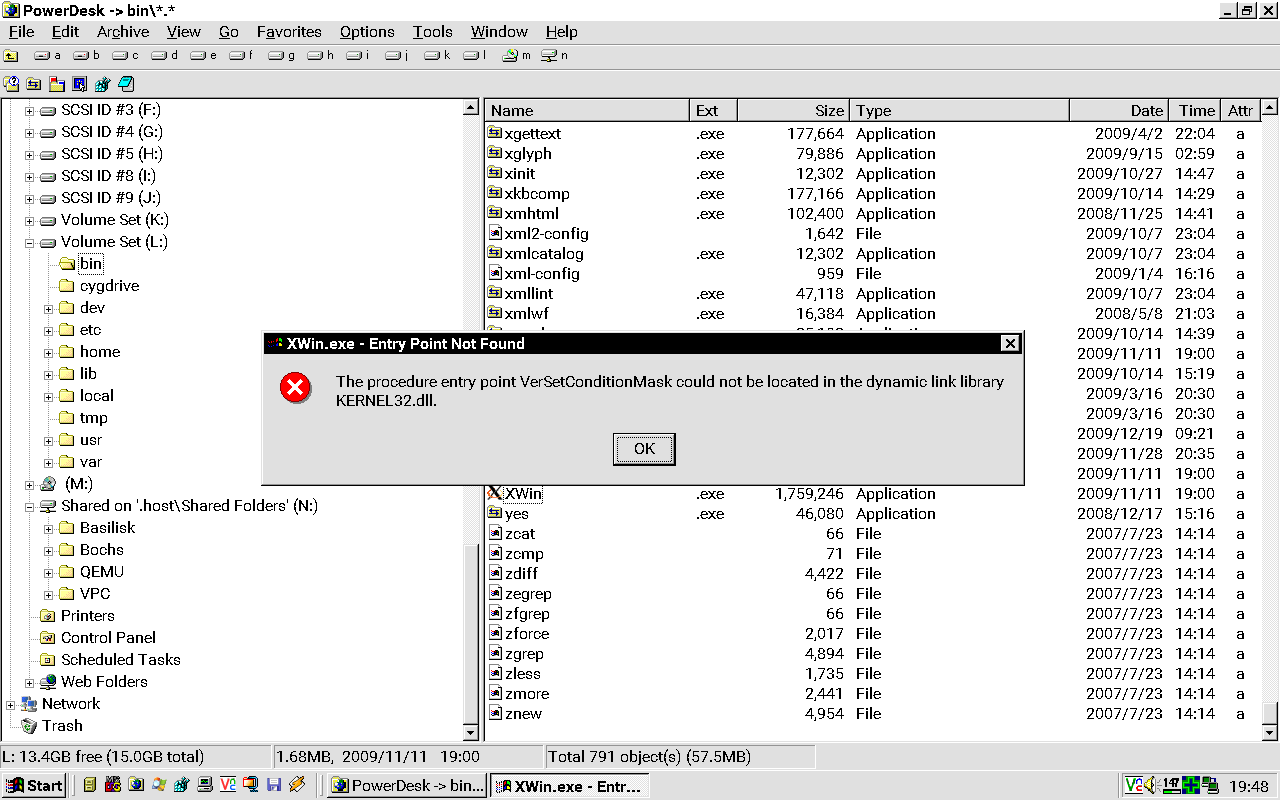
I've decided to install Cygwin 1.7 under Windows NT 4.0 Workstation. I got the utility (setup-1.7.exe) from the Cygwin Time Machine page on the CrouchingTigerHiddenFruitbat website. In order for Cygwin setup 2.661 to work properly, I had to provide this URL link here: http://ctm.crouchingtigerhiddenfruitbat.org/pub/cygwin/ So, I wanted to install the 2009-09-14 build of FontForge to use under Cygwin 1.7. I have followed all of the procedures to get FonFforge to work properly on this page: https://www.iro.umontreal.ca/~boyer/typophile/doc/ms-install.html The installation took a while and when I tried to type startx under Cygwin, I get this output: Looking to see what could be wrong here, I looked at the XWin.exe file located in L:\bin directory, when I try to execute the file, I get this error: XWin.exe failing to execute due to the missing VerSetConditionMask entry point which is not present under Windows NT 4.0 or earlier. VerSetCondition mask entry point is only present on Windows 2000 and later. Over a decade ago, I remember running FontForge on Windows 98 Second Edition under Virtual PC and I don't think that I can find an old enough version of Cygwin that will work on these versions of Windows anymore. I'm sorry if I'm not providing enough information or if I'm not making sense, but is there any way how I can get an old enough version of Cygwin with the older repositories that will work under Windows NT 4.0? Thank you for your time.

-
I have been trying out the latest version of DOSBox 0.74-3 running on Windows NT 4.0 SP6 under VMware Workstation Player 16.1.2. When starting DOSBox, I get the following output in the Command Prompt window: SDL_Init: Starting up with SDL windib video driver. Try to update your video card and directx drivers! CONFIG: Generating default configuration Writing it to C:\WINNT\Profiles\ppgrainbow\Application Data\DOSBox\dosbox-0-74-3.conf CONFIG: Writing it to C:\WINNT\Profiles\ppgrainbow\Application Data\DOSBox\dosbox-0-74-3.conf MIXER: Got different values from SDL: freq 44100, blocksize 512 MIDI:Opened device:Win32 However, when I try to close the DOSBox window, DOSBox hangs hard and robs 100% of the CPU usage! Using Process Explorer, I tried to terminate DOSBox.exe, but instead I get an error message: Error terminating process: Access is denied. Here's a screenshot of this issue: https://imgur.com/a/74tilnb The only way to resolve the issue was to perform a hard reset of the guest OS. Since Windows NT 4.0 has limited DirectX support (up to version 3 officially), how can I get around this issue?
-
 I'm trying to setup mirroring on my Windows NT 4 server with SCSI drives. I plugged in a new drive and booted. For some reason it put the new, blank drive as drive 0. How can I set which drive is Drive 0? If I use jumper will that screw up the mirroring?
 -
Would using NTLDR AND NTDETECT.COM from Win2k along with uniata driver overcome the limit or is it a hard limit of the OS
-
Hi! I found a while ago an old NT4 cd. Now I'm trying to install it on my main pc, but the installation program crashes without bsod immediately after loading all the stuff to memory and then reboots. Some specs: CPU - Intel I5 3570k, Mobo - some Asus p8z77 with UEFI bios 8GB or 4GB of ram (neither works) USB mouse & keyboard Same results with another 3rd gen I5 pc with Gigabyte mobo and 8 gigs of ram Does anyone have idea of what might cause this? Thanks -Jalmari