Dave-H
Content Type
Profiles
Forums
Events
Everything posted by Dave-H
-
 From my experience with Firefox, I guess those "api-ms" files are C++ runtime files. If you can see what version they are, you might be able to install the latest version of the same runtime version to the system, in which case it wouldn't need its own. I found with Firefox (52.9 ESR) that the browser performance was better with a system runtime.
 -
Root Certificates and Revoked Certificates for Windows XP
Dave-H replied to heinoganda's topic in Windows XP
Thanks! -
Microsoft expiring SHA-1 updates; Will this kill XP?
Dave-H replied to sunryze's topic in Windows XP
Thanks, yes I have those versions of both files. Good to know where they came from! -
Microsoft expiring SHA-1 updates; Will this kill XP?
Dave-H replied to sunryze's topic in Windows XP
Please be clear, there is no Service Pack 4 for Windows XP! There's nothing to find. All that happened, as far as I know, is that some later XP updates were installed as "SP4" updates on systems, but only in that their registry entries are listed under "SP4", and the xpsp4res.dll "Service Pack 4 Messages" file was installed. That almost certainly means that there was going to be a Service Pack 4 for XP at one time, but for whatever reason, Microsoft decided not to press ahead with it and issue it as an installable component. -
Microsoft expiring SHA-1 updates; Will this kill XP?
Dave-H replied to sunryze's topic in Windows XP
KB2868626 contains version 5.131.2600.6459 of crypt32.dll, which is the one I've got. It also contains version 5.1.2600.6459 of xpsp4res.dll. My version of xpsp4res.dll is 5.1.2600.7651 however, so where would that have come from? Presumably a later "SP4" update, as it's only the "Service Pack 4 Messages" dll. -
Microsoft expiring SHA-1 updates; Will this kill XP?
Dave-H replied to sunryze's topic in Windows XP
My rsaenh.dll is version 5.1.2600.7345. -
Root Certificates and Revoked Certificates for Windows XP
Dave-H replied to heinoganda's topic in Windows XP
Not here apparently.
-
Microsoft expiring SHA-1 updates; Will this kill XP?
Dave-H replied to sunryze's topic in Windows XP
I have quite a few updates which claim in the registry to be from "SP4" too, and have had for years. I suspect it refers to a notional Service Pack 4 for Windows XP which was mooted by Microsoft at one time but never actually issued. -
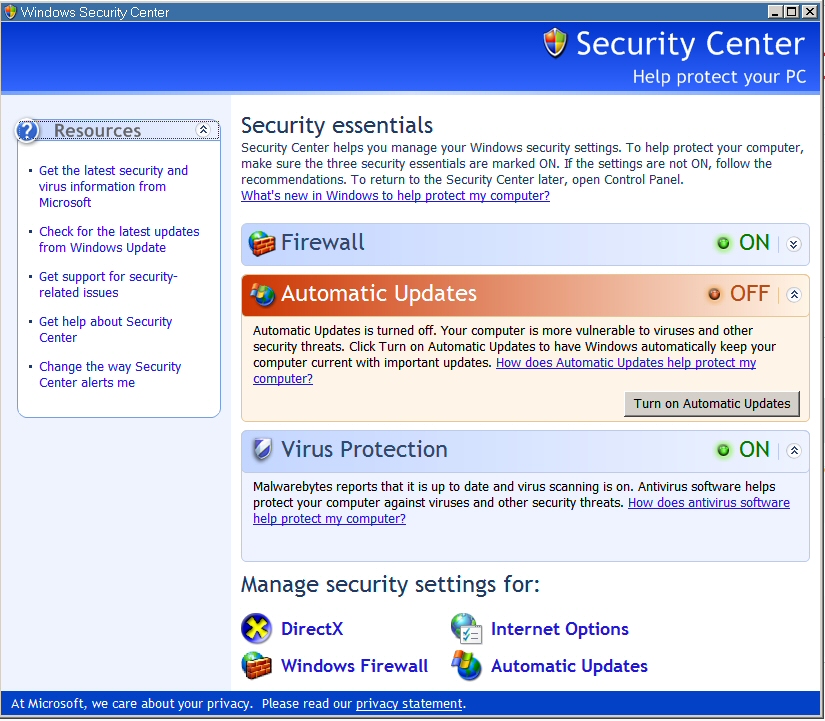
I suspect that's because the free version of Malwarebytes does not offer realtime scanning, whereas the premium paid version does. The Windows XP Security Center probably only recognises realtime scanner programs as being AV programs.
-
Yes, sadly so. I was asking XPerceniol if the catalogue was actually working for them, as they had said that it was "empty". I don't think they realised that the home page of the catalogue does look pretty empty until you actually search for something!
-
Yes it does.
-
Microsoft expiring SHA-1 updates; Will this kill XP?
Dave-H replied to sunryze's topic in Windows XP
There's no point in doing it as it will apparently install but not actually do anything as the crypt32.dll file in the hotfix is older than the one already on the system, at least that was my experience. If you have 5.131.2600.6459 as I have, that is the latest (and presumably last) version for XP. -
My Browser Builds (Part 3)
Dave-H replied to roytam1's topic in Browsers working on Older NT-Family OSes
Thanks @i430VX, understood! -
My Browser Builds (Part 3)
Dave-H replied to roytam1's topic in Browsers working on Older NT-Family OSes
Well i430VX's installer appears to install it, but doesn't seem to produce any uninstall mechanism. -
Well that's very interesting! So that tool does fetch updates and works on XP, presumably with the wsusscn2.cab that it downloaded, which shouldn't work on XP?!
-
My Browser Builds (Part 3)
Dave-H replied to roytam1's topic in Browsers working on Older NT-Family OSes
I just tried out roytam's build of Serpent, and was puzzled to find that there appears to be no uninstallation option for it. It didn't appear in Add/Remove Programs. Is that normal? I just deleted its folders, is that the only way of uninstalling it or have I missed something? I used i430VX's installer to install it. -
Unoffical Roytam1 Browser Installer - Project Thread
Dave-H replied to i430VX's topic in Software Hangout
Thanks, good to know you're aware of this! -
Keeping my fingers crossed for you!
-
Unoffical Roytam1 Browser Installer - Project Thread
Dave-H replied to i430VX's topic in Software Hangout
Firefox 52.9 ESR tells me your installer file "contains a virus or malware", and I have to override this to download it. Malwarebytes says it's clean. A false positive obviously, but just thought I'd mention it! -
Yes I could, but I'm not sure which one I would try! My instinct is to just let well alone!
-
Just for interest, I thought I would try out the "Portable Update" tool referenced in this post. It does seem to work fine still, and downloaded a new wsusscn2.cab file, containing updates from this month. The tool lists all my installed updates, and says I don't need any, which is almost certainly correct, but surely if it did decide I needed any, it wouldn't work anyway as that cab isn't SHA-1 signed? I would be interested to see what it would do if I tried to use it!
-
@XPerceniol Is the Microsoft Catalogue actually working for you? Just as an aside, you don't have to use Internet Explorer for the catalogue, just in case you weren't aware, it should work in any browser. Windows/Microsoft Update needs IE as it uses ActiveX controls, which don't work anywhere else, but the catalogue is a standard site.
-
Wow, thank you so much for all that information! Sounds like Serpent is the one to try then when I inevitably have to finally abandon Firefox 52 ESR. Good to know that there are alternatives to the Mozilla Sync system, as I would really miss that facility if I had to lose it. Keeping bookmarks and saved passwords in sync is my main concern.
-
Microsoft expiring SHA-1 updates; Will this kill XP?
Dave-H replied to sunryze's topic in Windows XP
I didn't appear to have KB968730 installed on my machine, so I downloaded it and installed it. It appeared to install OK, and its registry entries are now there, but a system file check didn't reveal any changed files. It should change CRYPT32.DLL. The version in the hotfix is 5.131.2600.5779. When I checked I found that I already have version 5.131.2600.6459, which is presumably why the hotfix didn't do anything! Where would that later version have come from though, would it have been a POSReady update? -
I suspect it's time to read the last rites over the Microsoft Update and Windows Update web sites. As I said earlier, I'm surprised that they haven't been completely taken offline by now! AFAIK there's nothing left now served by them which is still in support. What do you mean by "the catalogue is empty"? Do you mean that if you put a known existing KB number in the search field and search for it, you get no results? The screen grab you posted is quite normal until you do a search for something.