Dave-H
Content Type
Profiles
Forums
Events
Everything posted by Dave-H
-
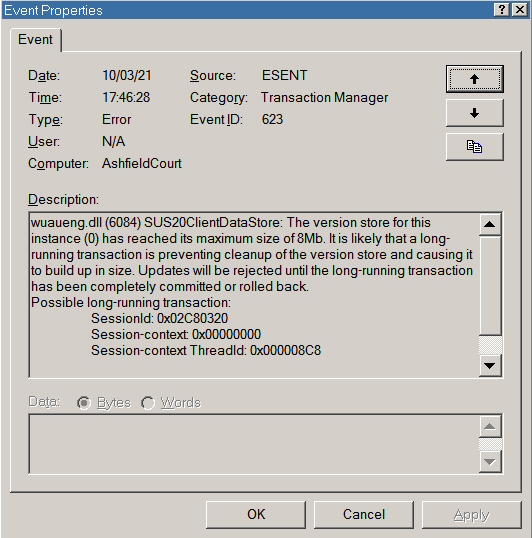
 OK, I'm beginning to think that my problem is perhaps because my update history is too large? My datastore.edb file is 134MB, and contains over 1500 entries going back over ten years. I'm wondering if it's that which is causing the errors which are resulting in it being cleared. I deleted the SoftwareDistribution folder completely and let the system recreate it. WUM then didn't show any errors, but just scanned forever without ever finding anything or completing. When I restored the original datastore.edb file from a backup it then failed, wrote the above error into the event log, and cleared the database. So, is there a known limit to how big the installed updates database can be? I can't find any reference to one anywhere. My netbook, where everything seems to work fine with exactly the same setup, has a very much smaller Windows Update history.
 -
Beware of Office 2010 Updates!
Dave-H replied to Dave-H's topic in Pinned Topics regarding Windows XP
Another incompatible MSO.DLL this month BTW! -
Just another heads up! Later today the yellow shield popped up again in the system tray of my main machine, rather unexpectedly. It was offering an update to Excel 2010, KB4493222, which is fine but a bit strange as there were five Office 2010 updates this month, and that was not one of them! In fact I found that update (alone) was rolled out in February, and I installed it then manually from the Update Catalogue, so it should have already been on the system. Anyway, it apparently installed fine, but when I checked my update record, I found that the record of all my previous over a thousand updates had been wiped, and only KB4493222 was there! I had to restore the updates record from a backup, which doesn't of course include the latest one. So, do watch out for this, that is the first time that's happened. I'm also having a problem with the Windows Update MiniTool on my main machine, although it's working fine on the netbook. The two machines are apparently set up identically, but on the main machine WUMT just scans for a while and then fails with error 0x8024402B all the time. Also after that, there is an error in my Application event log again - This error appears five times in quick succession. Has anyone else seen this?

-
LOL, I was going to correct the error in the thread title (I hate spelling mistakes in thread titles!) but I won't now as it will spoil the joke!
-
Just to update, I was subsequently offered KB2813347 on my netbook, which installed fine!
-
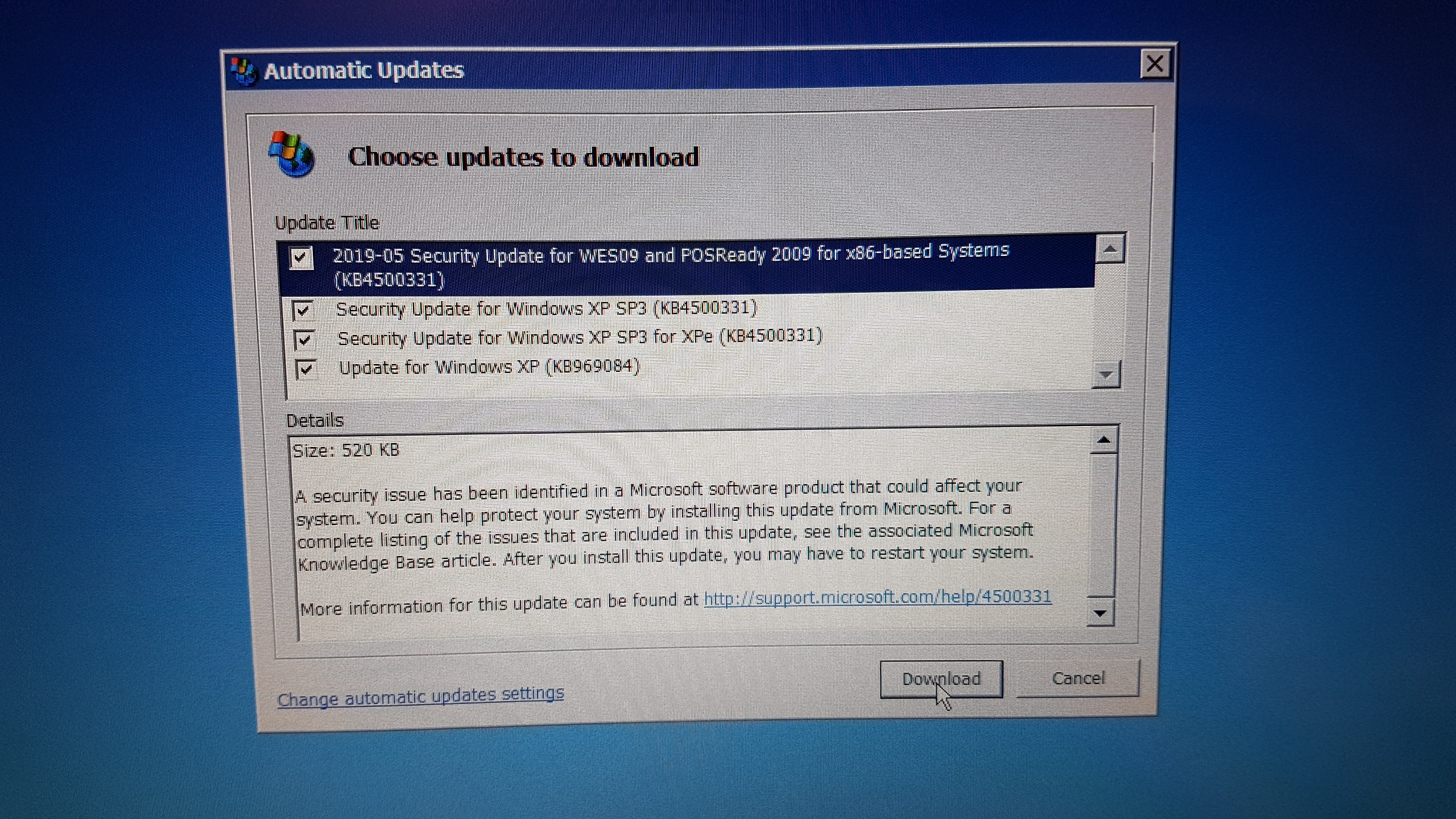
Just an update on my experience with my netbook using the WSUS update system. On my main machine I was offered KB969084, and then after that subsequently KB2813347. On my netbook I was also offered KB969084, but not KB2813347, at least not yet! I was however offered no less than three versions of KB4500331! KB969084 installed fine, as did the other three apparently, but as soon as they had installed, all three version of KB4500331 said they needed to be installed again! I installed them several times with the same result, including just trying the first version by itself, but no difference. KB4500331 replaces a file called termdd.sys in the Windows\System32\Drivers folder. When I looked, the new version was on the system in the DLLCache, but the old version was still in the Drivers folder. I deleted it, Windows File Protection immediately put the newer version in place of it from the DLLCache, and everything was then fine. It looks as if the update, despite numerous attempts, had not managed to replace the file in the Drivers folder! Strange, as it wasn't even locked, I could just delete it with no problem. Just thought I'd mention this in case anyone else runs into the same issue.
-
Another five updates today! KB4493214 (Office) KB4504702 (PowerPoint) KB4484376 (Visio) KB4504703 (Office) KB4504707 (Excel) Why we're still getting Office 2010 updates five months after support was supposedly ended I have no idea!
-
Beware of Office 2010 Updates!
Dave-H replied to Dave-H's topic in Pinned Topics regarding Windows XP
Well, another five updates today! KB4493214 (Office) KB4504702 (PowerPoint) KB4484376 (Visio) KB4504703 (Office) KB4504707 (Excel) Why we're still getting Office 2010 updates five months after support was supposedly ended I have no idea! -
Microsoft updating office products I don't have.
Dave-H replied to forjonny's topic in Microsoft Office
I'm pretty sure that the updates you're getting aren't new. They're legacy ones from probably years ago. All that's happening is that if you uninstall them, when you check for updates again the same ones are being reinstalled. Even when things go out of support, legacy updates usually stay on Microsoft's servers until they eventually remove them, but that's often many years later. As I said earlier, I have Office 2010 installed but I don't have Outlook or Access enabled in the installation. I still get updates for them, that's normal behaviour. It's not reinstalling the items you're not using, it's just parking the update files on your machine so that if you do activate any more parts of the Office suite in the future, the most up to date files are already there. If you look on your system drive root you will probably find a folder called MSOCache (it may be hidden). That's where the updates are kept. -
Microsoft updating office products I don't have.
Dave-H replied to forjonny's topic in Microsoft Office
I don't see why you're quite so against having updates on the system for things you don't use. I would just let the updates install, make sure that the parts of Office that you don't use are still disabled, and leave it at that. There won't be any more updates for Office 2007 now, so that should be the end of it, and if you do need to reactivate any other parts of Office in the future, the latest patches will already be there ready and waiting on the machine. As I said, apart from using a bit of disk space, which I doubt is an issue, there's absolutely no harm in keeping the updates there. I get that you don't like on principle having unused updates on your system, but it wouldn't worry me personally. I have considered putting more memory in my machine, just for Windows 10 of course, but as I've never seen it using more than two thirds of what's there, even when running notoriously resource hungry Adobe programs, I've never bothered. -
Is the Bluetooth device being displayed in Device Manager OK? There should be an "Intel Centrino Wireless (Bluetooth Adapter)" entry under "Bluetooth Devices". There should be a Bluetooth icon in the system tray and a "My Bluetooth" icon in "My Computer" too.
-
Microsoft updating office products I don't have.
Dave-H replied to forjonny's topic in Microsoft Office
LOL! If I were you, if you've uninstalled any of the Office 2007 updates, I would do a manual Windows Update check and let them install again, and then make sure that the Office Suite is configured the way that you want it. If you only want to use Word, disable everything else using the installation modification feature in Programs and Features. The updates for the parts of the suite you're not using will still be on the machine, but they shouldn't do any harm other than using a bit of disk space. I very much doubt if you'll be troubled by any more updates, but if you leave the existing ones uninstalled they will install again if you do another update check for any reason. -
Microsoft updating office products I don't have.
Dave-H replied to forjonny's topic in Microsoft Office
Was this a recent install of Office 2007 then? If so the first time an update check was done after the install you would have got all the updates that were available up to end of support. I'll be very surprised if you get any more in future though! If parts of the suite that you don't want have been installed by the updates, just uninstall them using the programs and features dialogue. That should still work in Office 2007 as far as I know. You shouldn't get any more updates or unwanted reconfigurations after you've done that. As for my hair, I assume you're looking at my avatar, but you should see it now after more than two months of lockdown here in England if you think that's long! As for triple booting, what can I say? I'm a computer nerd! -
Microsoft updating office products I don't have.
Dave-H replied to forjonny's topic in Microsoft Office
@forjonny If you're using Office 2007 I'm surprised you're still getting updates at all. Office 2010 supposedly went out of support last October, so surely Office 2007 must have gone out of support well before that? Did you get the update you're referring to through Windows Update, or by some other means? -
Microsoft updating office products I don't have.
Dave-H replied to forjonny's topic in Microsoft Office
I have Office 2010 installed on Windows XP on my main machine, and on Windows 10 on another machine, and I don't have Outlook installed because I don't need it. However when updates are rolled out through Windows Update I still got updates for Outlook if they are available. This does not re-enable Outlook in my Office installation though. I guess they still download and apply the updates even for sections of the Office Suite that you're not using so it's fully patched if you ever do decide to activate them. I use the click to run version of Office 2019 on Windows 10 on my main machine, and was given no choice as to what to install. If you can choose if you use the Office Deployment Tool that's good, but I've never used that. -
Microsoft updating office products I don't have.
Dave-H replied to forjonny's topic in Microsoft Office
If you install Office 2016 (IIRC) or any later version you have to install everything, there is no way of selecting which parts of the suite to install as there was on earlier versions. If you have a version earlier than 2016, you can change the configuration using the programs and features dialogue. If you only had Word installed, I'm surprised that you suddenly got everything when the program updated, I'm sure that shouldn't have happened! Which version are you actually running? -
Microsoft updating office products I don't have.
Dave-H replied to forjonny's topic in Microsoft Office
Which version of Office are you running? Later versions it's all or nothing as far as I can see, I'm a bit surprised you managed to only install Word if you're using a later version. -
This wireless driver works for me on XP - https://drivers.softpedia.com/get/NETWORK-CARD/INTEL/Intel-Centrino-Advanced-N-6235-PROSet-Wireless-Driver-Software-15-8-0-for-XP.shtml This Bluetooth driver works too (using the XP download of course) - https://www.techspot.com/downloads/drivers/essentials/intel-bluetooth/ HTH. Cheers, Dave.
-
On XP GPU-Z 1.95 shows ID information for both of my graphics cards, but strangely only the ATI card is identified by name on the "Display Device Selection" drop-down. The Nvidia card is listed just as a "Graphic Device" although the ID is correct, including showing the Nvidia logo! That may be because its driver isn't loaded of course (I only use one card at a time!) There's no information about clocks or memory for either card though.
-
Strange, I'm using CPU-Z 1.95, the latest version, on Windows XP (32 bit) and Windows 10 (64 bit) and on both installations it's showing my core speed as varying. The only anomaly I'm seeing is that the reported speed on Windows 10 is completely different from that reported by the Windows 10 Task Manager!
-
Beware of Office 2010 Updates!
Dave-H replied to Dave-H's topic in Pinned Topics regarding Windows XP
I just did a Windows Update scan on my Windows 10 netbook which has Office 2010 installed, and nothing was offered. I guess I'll have to wait and see what if anything appears next Tuesday! -
OK thanks, I guess I'll switch over to it then as it's specifically designed for Windows 9x. Can't wait to see how my Xeon compares with an 386!
-
Root Certificates and Revoked Certificates for Windows XP
Dave-H replied to heinoganda's topic in Windows XP
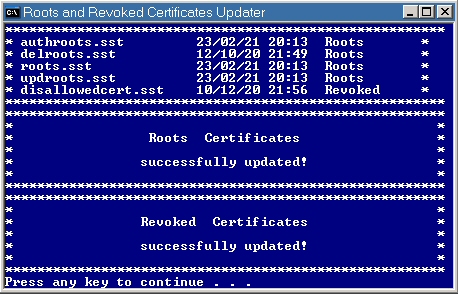
Just checked again and all is correct now. The spook has been laid to rest! -
Off-topic here of course, but actually I've now found that I've already got a version of CPU-Z on Windows 98, version 1.76, which works fine. Is there any advantage to using the "Vintage Edition" apart from the fact that it's actually newer?
-
Root Certificates and Revoked Certificates for Windows XP
Dave-H replied to heinoganda's topic in Windows XP
Thanks! I'm slightly puzzled though, I've run the updater, and one of the files isn't the same date as you've got. delroots.sst is showing 12th October 2020, and not 23rd February 2021 as on your image.