All Activity
- Past hour
-

Firefox 52 no longer working on XP
NotHereToPlayGames replied to Dave-H's topic in Browsers working on Older NT-Family OSes
If I had to fathom a guess, you have used Revo to uninstall a program or two. I used to "swear by" Revo. Until using it to uninstall AVG/Avast (don't remember which, to be honest) forced a reformat/reinstall to get XP running properly again. Granted, that was DECADES ago, but the bitter and sour taste is still present. Technically, it was THAT experience that pushed me into VMs for "testing". - Today
-
Firefox 52 no longer working on XP
NotHereToPlayGames replied to Dave-H's topic in Browsers working on Older NT-Family OSes
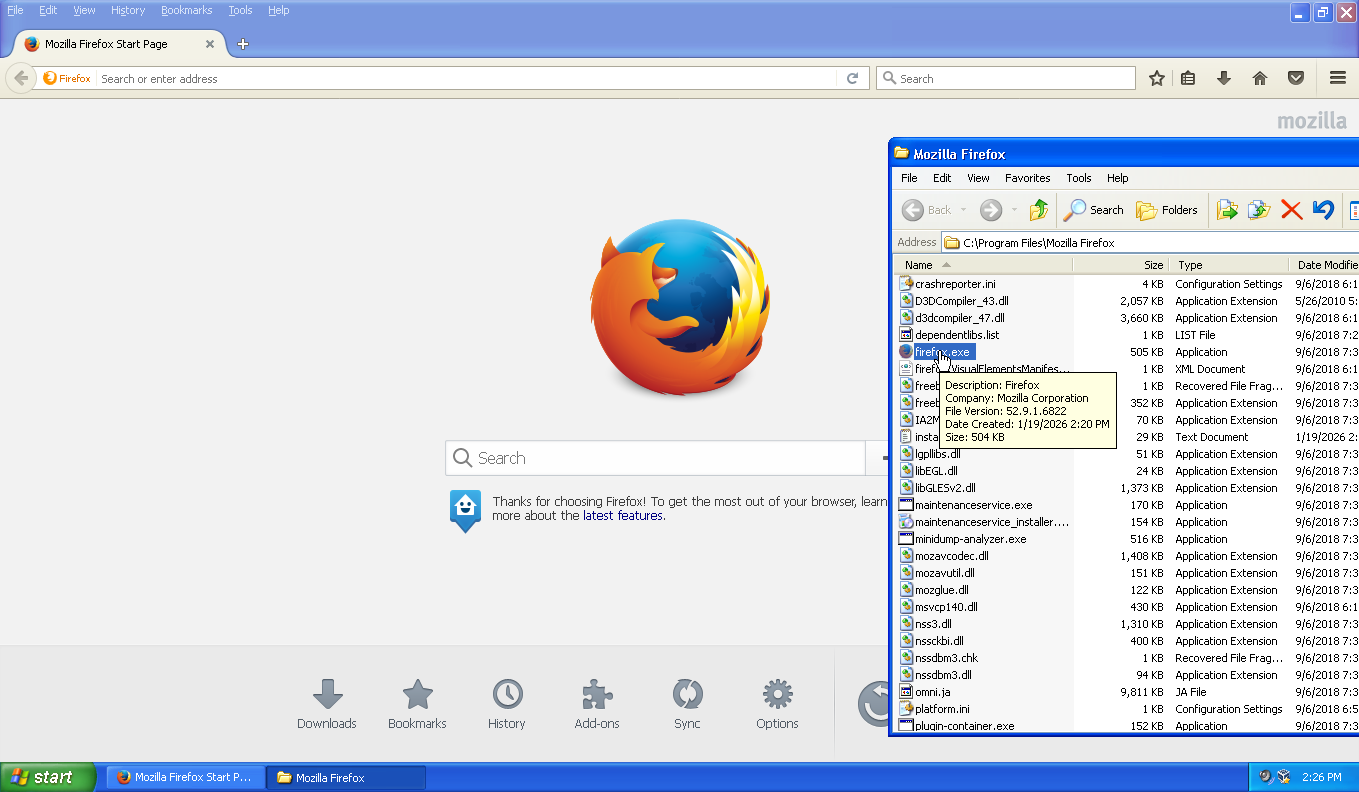
Cannot replicate. Firefox 52.9.1.6822 is working for me in XP+POS (32-bit) with *NO* extended kernel (not a fan of them, technically not a fan of POSReady but been using it experimentally). This is from inside a VM. My era-correct real-hardware for an XP+POS deployment is still undergoing experimentation.
-
Firefox 52 no longer working on XP
NotHereToPlayGames replied to Dave-H's topic in Browsers working on Older NT-Family OSes
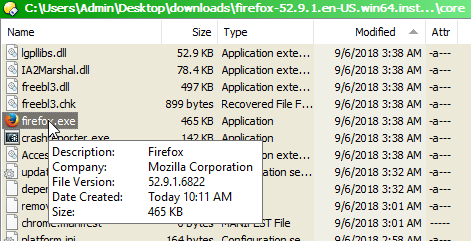
Available here - https://archive.org/download/firefox52.9.1esr (x86 and x64, I only screencap'd x64 below)
-

Firefox 52 no longer working on XP
Dave-H posted a topic in Browsers working on Older NT-Family OSes
I've had Firefox 52.9.1.6822 installed on the XP side of my machine for many years, as the last Firefox version which will run on XP. I don't use it often now as I use a much more up-to-date version of Supermium. However, I tried to run it today, and it won't run any more. I just get a popup saying - "The procedure entry point CreateThreadpoolWork could not be located in the dynamic link library KERNEL32.dll." Anyone any idea why it would have stopped working? I've not knowingly changed anything relevant since I last used it. The Firefox files seem to be as they have always been, and no system files have been knowingly changed either. -
And that (D3D9!) was all it took to return my water sewer bill to an infinite unsolveable Cloudflare captcha loop! Even as high as Chrome v144. D3D9 flag is working in Chrome v143. No video stutters in v143 *when using* D3D9. What a d@mn F'in Nightmare all of this Cloudflare sh#t is evolving into !!!
-
Solved. v141 updated a flag "behind my back" that was set in v140. Returning the #use-angle to D3D9 setting which was set in v140 but v141 updated to "D3D11 WARP" solved the video stuttering.
-
So I've now had TWO consecutive "forced updates" that both did the same exact thing on my end. That result being that Cloudflare captchas would loop endlessly and never be able to be "solved". The "are you human" checkbox would show a checkmark after solving the puzzle (only for a split second), but it would only take you to another puzzle. Endlessly. The first time was last November. The solution was a "forced update" from running Chrome v136 and manually updating to Chrome v140 (v138 technically solved, but v140 solved a different issue). The same exact thing happened yesterday. Cloudflare captchas would appear to solve but all they would do is take you to another puzzle. Manually updating from v140 to v141 solved the endless captcha loops (but presented video stutter issues that v140 did not have!). In both cases, the first sign of something happening was that Google Search would present Cloudflare captchas EACH AND EVERY TIME you visited Google Search. They would "solve" but you were presented with it EACH AND EVERY TIME you visited Google Search! In both cases, my water sewage bill would present the unsolveable endless loop! This happened EXACTLY in this manner in November. And again yesterday. Simply can not be a "coincidence". The Cloudflare captcha server-side algorithms being updated to use new coding is behind this. They (the algorithms) are getting smarter and smarter at detecting "old browsers".
-
You should probably check this https://github.com/abbodi1406/BatUtil/tree/master/OfficeUpsourcer/2007 It can create real integrated setup follow stepst and you get real FINAL Office 2007 setup.
-
When I set up my Win 7 notebook two years ago I had wanted to use TinyWall as a firewall ... it was listed as a simple firewall that worked. However, it was listed for only Windows 11 / 10 so I went with an older version of ZoneAlarm that worked with Win 7. It works good as just a firewall, no complaints. Just two days ago I discovered that there was an older TinyWall version that did work with Win 7. https://tinywall.pados.hu/ TinyWall is a lightweight, user-friendly, and secure firewall for Windows. It is also completely free. Under FAQ: The latest version of TinyWall runs on Intel- or AMD-based Windows 11 / 10. An older version, TinyWall 3.2.5, also supports Windows 8.1 / 8 / 7. Just asking if anyone is using TinyWall 3.2.5 on their Win 7 setup and if you have any comments, good or bad? Thanks ...
- Yesterday
-
Thank you.
-
My yt-dlp branch now shows: But this change is already applied in my own builds before the patch was officially merged.
-
I think they mean to say that Cleartype (?) hurts their eyes. It doesn't bother me tons (my eyesight, while not awful enough to mandate correction, isn't a perfect 20/20), but I can still tell when it's on, and I tend to prefer how sharp and crisp text is when it's off. Why add extra blur when I don't have to? Recent MacOS versions have it too, but it's more subtle and less annoying (I can still tell the difference when it's off, though). XP had it, too, and for some reason, it wasn't so bad (maybe due to the fact that it was fully optional and off by default). I don't recall Windows 2000 having it natively, but maybe it (or something like it) was backported, perhaps by way of an XP update? c
-

Upgrading XP Pro to Media Center Edition
justacruzr2 replied to justacruzr2's topic in Windows XP Media Center Edition
OK. Got it to work. But it also installed IE7 and WMP11. Wasn't sure if it would do that during a repair install. So I've downloaded nLite and .net framework 2.0 (only had 1 and 1.1 installed and nLite requires 2.0) so I can eliminate the installation of IE7 and WMP11. When I've created that custom XP Media Center Edition 2005 installation disk I will do this again. It really wasn't that hard and MS winPE was what really helped by allowing me to change the HKLM\System|WPA reg key by importing the WPA reg key from the clean install I did on a spare HDD. Of course there were some other modifications done as well to HKLM\Local Machine\Microsoft\Windows\CurrentVersion and HKLM\Local Machine\Microsoft\WindowsNT\CurrentVersion and copying the medctroc.inf over. Thanks to License Crawler for that. - Last week
-
wOAh I WOuld'VE nEvER gUESsed wowee
-
Still not clear? Strange, @NotHereToPlayGames understood very well. Most likely non-English users. Then hold on, much harder text ahead.., Blurry (definition). adjective Full of blurs; blurred. Similar: blurred Not clear, crisp, or focused; having fuzzy edges. Not clear, not with well-defined boundaries. The GNU version of the Collaborative International Dictionary of English • More at Wordnik. Courtesy of https://duckduckgo.com/ Search Assist Blurry means lacking definition or focus, often used to describe an image that is not clear or sharp, having fuzzy edges. It can also refer to something that is unclear or lacks well-defined boundaries in a figurative sense. Wiktionary Reverso
-

My Browser Builds (Part 5)
modnar replied to roytam1's topic in Browsers working on Older NT-Family OSes
Thank you! Mighty fine! When it worked, this Serpent really ate less RAM than any version to date. -

My Browser Builds (Part 5)
roytam1 replied to roytam1's topic in Browsers working on Older NT-Family OSes
reverting changes in #2895 seems help. now 32bit builds are being compiled and same filename archives will be replaced later. EDIT: all today's 32bit build archives are updated. -

My Browser Builds (Part 5)
LordGarfio replied to roytam1's topic in Browsers working on Older NT-Family OSes
Maybe DeLeaker could be useful ?. DeLeaker 2025.16 (Profiler for C++, C#, .NET and Delphi) C++ memory leak detection Deleaker is an extension for all major IDEs and a standalone application for memory leak detection - memory, GDI, and handles so far. Even the most stable of Windows applications are not immune to resource leaks. And of all the bugs and issues, memory leak detection tends to be the most difficult, especially when found in GDI objects and menus. And the golden rule of thumb is that the sooner bugs are found and dealt with, the less expensive they prove to be. While there's no shortage of tools and add-ons to help track down memory leaks, few are capable of tracking GDI resource leaks that can devastate Windows performance. Deleaker is one of the few tools capable of this, and will have a minimal impact on your application's performance. Deleaker is a memory leak detector that integrates with all major IDEs: Visual Studio, Delphi, C++ Builder, and Qt Creator. -

My Browser Builds (Part 5)
Ben Markson replied to roytam1's topic in Browsers working on Older NT-Family OSes
Using: basilisk52-g4.8.win32-git-20260117-3219d2d-uxp-aace8fa8c0-xpmod.7z Crash report: AppName: basilisk.exe AppVer: 4.8.7.8956 ModName: mozglue.dll ModVer: 4.8.7.8956 Offset: 0000fba6 After several crashes while using eBay I've gone back to: basilisk52-g4.8.win32-git-20260110-3219d2d-uxp-3e9ca11775-xpmod.7z Ben. -
My Browser Builds (Part 5)
modnar replied to roytam1's topic in Browsers working on Older NT-Family OSes
Quite. See here - a newly opened Serpent 52.9 2026.01.16 (latest): only went to majorgeeks.com and then to msfn.org Forum and basilisk.exe in TaskManager is wildly going up and down 1 full CPU core usage and memory from 700MB to 1.5GB and back down to ~700 then CPU usage stops. First I noticed that also in my XP VM which I use to get me fresh prefs.js to compare with my normal one outside VM (all of 1.3GB of dedicated VM RAM went missing while on sapphiretech.com). Edit: in the before session imgur.com, there weren't any swings, just normal behaviour; RAM usage going up till ~1.2GB (even somewhat lower than with the previous version of 1.3GB). Edit2: Could it have something to do with: - htmlparser: break when infinite loop happens (8201dadf41) ? Edit3: On videocardz.com and again on msfn.org (new session after videocardz crash) Serpent crashed with stated mozjs.dll as the point of breaking. Faulting application basilisk.exe, version 4.8.7.8956, faulting module mozjs.dll, version 0.0.0.0, fault address 0x00293c73. Both times. Edit4: Again on videocardz.com, now with different reason - xul.dll and then again on msfn Forum the upper mentioned mozjs.dll. Faulting application basilisk.exe, version 4.8.7.8956, faulting module xul.dll, version 4.8.7.8956, fault address 0x00063a79. -
My Browser Builds (Part 5)
roytam1 replied to roytam1's topic in Browsers working on Older NT-Family OSes
heard similar report on different websites but both of them are not reproducible here. EDIT: try translating in bing translator, and it does happen: > mozjs.dll!js::jit::BacktrackingAllocator::tryAllocateRegister(js::jit::BacktrackingAllocator::PhysicalRegister & r, js::jit::LiveBundle * bundle, bool * success, bool * pfixed, mozilla::Vector<js::jit::LiveBundle *,4,js::SystemAllocPolicy> & conflicting) Line 1395 C++ [Inline Frame] mozjs.dll!js::jit::BacktrackingAllocator::tryAllocateNonFixed(js::jit::LiveBundle *) Line 1221 C++ mozjs.dll!js::jit::BacktrackingAllocator::processBundle(js::jit::MIRGenerator * mir, js::jit::LiveBundle * bundle) Line 1291 C++ mozjs.dll!js::jit::BacktrackingAllocator::go() Line 835 C++ mozjs.dll!js::jit::GenerateLIR(js::jit::MIRGenerator * mir) Line 1928 C++ mozjs.dll!js::jit::CompileBackEnd(js::jit::MIRGenerator * mir) Line 1998 C++ mozjs.dll!js::HelperThread::handleIonWorkload(js::AutoLockHelperThreadState & locked) Line 1554 C++ mozjs.dll!js::HelperThread::threadLoop() Line 1918 C++ [Inline Frame] mozjs.dll!js::detail::ThreadTrampoline<void (__cdecl&)(void *),js::HelperThread *>::callMain(mozilla::IndexSequence<0>) Line 233 C++ mozjs.dll!js::detail::ThreadTrampoline<void (__cdecl&)(void *),js::HelperThread *>::Start(void * aPack) Line 227 C++ but javascript related changes only happened in https://repo.palemoon.org/MoonchildProductions/UXP/issues/2895 which doesn't look like what shows in malloc-trace shown above. and when memory usage is high (but not too high to be crashed), about:memory shows high heap-unclassified and later it gets reclaimed. hmm, so strange. EDIT2: another one to be suspected is expat library update: https://repo.palemoon.org/MoonchildProductions/UXP/issues/2889 -

My Browser Builds (Part 5)
raddy replied to roytam1's topic in Browsers working on Older NT-Family OSes
Failed for me. If i visit https://www.bing.com/translator or click some internal links on rutracker.org - new moon make me "hdd stress test" and fill ram up to 2GB. I'm return to previous palemoon-28.10.7a1.win32-git-20260110-d849524bd-uxp-3e9ca11775-xpmod.7z -
 Still going STRONG! thx Steve!
 -
Aliasing https://en.wikipedia.org/wiki/Aliasing
-
 The background images are all JPG files and already locally stored while installation.