All Activity
- Past hour
-
The tool I have been using for decades is Norton Ghost in version 2003 for very old disks with standard MBR ( no GPT, EFI or UEFI) and a more recent version 15.0 for a bit newer disks like SSDs. This is a programme that has always allowed me to clone my computers perfectly, without anything failing or going wrong. For modern computers, you’ll probably have to resort to Acronis, Macrium or Aomei if GPT with EFI/UEFI is in use.
-
https://github.com/Roti-Poulet/VulkanExtended

-
I used this to image my XP drive. https://rargb.to/torrent/acronis-true-image-build-42980-bootable-iso-crackshash-6635281.html You'll want to image the whole disk so that it copies to boot record too.
-
 360chrome: https://web.whatsapp.com/ does not work (but it was ok recently), now it requests chrome +100 (but: in the UA it is > 100). will it stay like this forever? :) (in post no. 1 of this topic, the links for download 360chrome are down - is that the end?)
 -
 Update notification! I have revised my article "My essential tools for solving problems in Windows XP — Part 2 — File extractors and packers". 7-Zip has been updated to the version 26.02. And some files in the package UniExtract2 2.0.0 RC 4 Nightly has been updated on 11.07.2025, too. Cheers, AstroSkipper
 - Today
-
The last time I 'cloned' I did a backup of the bootable partition of an HDD and a restore to a new SSD VM. This was from XP to a Linux Mint VM using Macrium Free (v7.1). I was amazed at how well it worked given the hardware changes involved. Obviously, in my case there were further activation issues with Windows XP in the VM but I didn't do anything special to restore the Macrium backup to the VM. This was some time ago but I seem to remember the restore is done having booted the VM into some kind of Macrium recovery environment from where you perform the restore. Prior to that (even longer ago) I used MiniTool Partition Wizard Free (v9.1)'s Copy Disk function to copy an XP HDD to a new HDD. In that case the HDDs and hardware was all identical. Ben.
-
> maxphyspage=39999 JFYI, MaxPhysPage measured in hehadecimal numbers. So 40000h - 39999h is 26215h, not 1. > patch9x would be roughly equivalent > i cannot run patchmem if patch9x already gets installed > i was thinking that maybe i could get the best of both worlds for combining the patches You have to think twice. patch9x just includes patchmem, what else you are waiting? >windows 95 osr 2.5 >i searched vmm.vxd 1. It's time to read patchmem manual. There is described which files installer tries to patch. 2. If I remember correctly USB supplement should install newer version of VMM.VXD to %windir\system\vmm32\ if you wish to see this working.
-
I've had XP installed on my 60GB SSD since about 2014, and somehow it's still my main OS. I have a more recent drive running Mint I can boot to as well. With the SSD now in its twilight years, though still no actual errors, I got a new 1TB SSD and tried to clone the XP disk to that. I used Clonezilla on a bootable thumb drive. Both old and new SSDs connected to SATA. I tried a couple of times using the "disk to disk" option. One time with "copy partitions" (I have two partitions on the XP disk, Windows, with programs on another) and one "expand" to fit. But neither case would boot. I unplugged the original disk and in the BIOS selected to boot from the new disk. It would begin, and then just stop at a screen showing the XP logo, the next step should be log on, but it never proceeded. I tried F8 safe mode, it showed the safe mode desktop for a second, then the same frozen logo page. If I plugged in the old disk as well, then set BIOS to boot from the new disk, after several seconds the original disk would boot. If I boot from the old disk I can see the new disk and all the files on it, looking fine. Any suggestions, aside from clean reinstall?
-
I am testing patch9x (jhrobotics) on a windows 95 osr 2.5 system with intel ich7-m chipset (dell latitude d820) with 4 GB ram. i was under the impression the patch9x would be roughly equivalent or better than patchmem from rloew, but unfortunately, it seems to be regressing in some areas. i specifically downloaded "patcher9x-0.9.91-boot.ima", used winimage to extract the contents, and only integrated the "patch9x.exe" + "CWSDPMI.exe" files in my custom 98SE boot disk iso burned to a cd, (patch9x needs to run from "a:" directory). The author of patch9x mentioned that fixes from patchmem were largely integrated with patch9x ( not fully ) but most stuff implemented and to work on w95 as well, at least in the most recent release 0.9.91, which is the one i am using, however, i cannot set maxphyspage at 40000 or higher, where as in the past with patchmem, i was able to get up to at least 48000 without problem. "maxphyspage=39999" or lower does work ( roughly 922 MB ram ). minfilecache and maxfilecache were set to 52224 throughout testing with "maxphyspage=30000" to at least up to "maxphyspage=48000". Additionally, i cannot run patchmem if patch9x already gets installed from beforehand which i do for install media ("c:\win95") in this case before running setup. i was thinking that maybe i could get the best of both worlds for combining the patches, but this doesn't appear to be possible. running "patchmem /m" says something about vmm32.vxd already being patched and vmm.vxd not found. i searched vmm.vxd in both my install media and c: drive and could not locate such file, only vmm32.vxd is present.
-

List of software that doesn't support Windows 7
Jody Thornton replied to asdf2345's topic in Windows 7
I wish they had done this with ESR 140 instead. Especially since e3k-etc and r3dFox are in a bit of a limbo state right now. I really just wanted to run ESR v140 for the rest of the summer - Yesterday
-

My Browser Builds (Part 6)
johk replied to roytam1's topic in Browsers working on Older NT-Family OSes
Sorry, I mixed dates, I meant the last one of this saturday. I just mixed (probably scrolled the page and in a hurry I wrote the previous post date by roytam). That would mean 2026-07-25 (actually build on 23th). I'll edit the above post now. -
 @Dave-H With exclusions in place, Panda has been working flawlessly. Tonight I'll remove exclusions to see what happens. Keep you posted.
 -
It was working before this happened... What kind of registry tweaks may conflict with this?
-

My Browser Builds (Part 6)
soggi replied to roytam1's topic in Browsers working on Older NT-Family OSes
There was no other build between 20260627 and 20260718. kind regards soggi -
 application firewall, Windows XP gpo mechanism for preventing run untrusted exe files
 -
 KuriuZ joined the community
 -

Country flags missing to the left of members' usernames
VistaLover replied to VistaLover's topic in Site & Forum Issues
Well, the flags are back for me now ; and so is the "Country" tab (last one, under "Apps") in my account settings! Confirmed! I didn't neglect to hit the blue "Save" button and, for good measure, I signed-out and then signed back in ; but the flags do persist when that setting has been disabled... Since I do like the flags to be displayed, this is a non-issue for me ... -
 arwinvoyager joined the community
 -
That’s exactly what I expected. What’s the point of AnyTech365 having friendly staff if the customer is still left in the dark? 👀
-
 I'm running 22.03.05. There is a more recent version 23, but it appears that isn't XP compatible, as if you try to install it on XP, you actually get 22.03.05 instead. I had no reply from the direct Panda support people responding to the report forms I sent them, which didn't surprise me at all! Nothing from the people at AnyTech365 either, which did slightly surprise me as they seemed to be pretty good. They had said that they would let me know about ongoing support for XP.
 -
Interestingly, and as if this company had read this post, the following happened: SASDEFINITIONS.EXE 345.6 MB 07.02.2026, but then SASDEFINITIONS.EXE 229.4 MB 15.05.2026 Unfortunately, the virus definition file SASDEFINITIONS.EXE was inflated again in July 2026: SASDEFINITIONS.EXE 305.8 MB 26.07.2026 Very strange what on earth they’re up to there. My guess is that the definition files and their installer are compiled extremely sloppily.
-
Which version are you currently running? 22.03.05? And do they still offer a more recent one for paid customers? And what about their support? Have you got any reply that Panda Dome is working again on Windows XP? 🤔
-
OK, me again! I hope I'm not jinxing it, but Panda Dome seems to be working properly again now for me on XP. I hadn't had a stop and restart of the main service for a few days, so yesterday I removed my shortcut files exclusion. All still seems to be working fine. Can you confirm this @Tangy? Whether they have fixed it as a result of our reports or whether they realised the problem themselves, I do not know. I just hope now that it keeps on working! It does look as if XP support is still a thing for Panda Dome, at least for now! Cheers, Dave.
-
StartAllBack 3.9.24
-
 jbeandroid joined the community
 -
 Also, it appears that the "View members flags" settings has no affect. Flags are displayed for me regardless of this setting.
 -
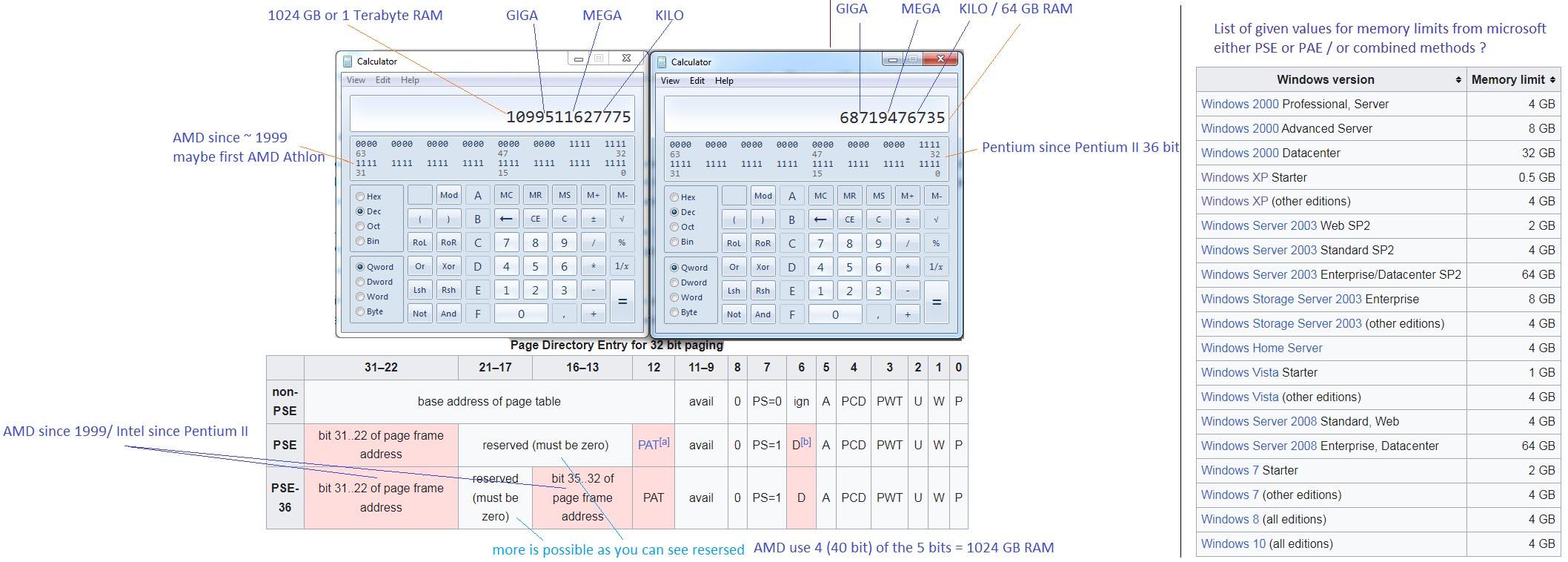
 we getting off-topic again but can you explain why ? that guy might wrote a other video where is said the oposite but the questions he answers to are asking it wrong (for example he is being asked for a short instruction list somewhere in the code - why it would be only made there ? people are seeing this problem quite often) 64 bit app´s result in bigger file sized because for example the offsets are bigger, there are things coming together (to avoid this they used the trick list, for example they didnt use always the full 64 bits or even 32 bit instructions) often x64 app´s in elder compiliers use a 32 bit instruction set instead of a 64 bit instruction set (shown in regedit_64.jpg) they are aware of this problem, bigger instructions means more demand, in the regedit (64 bit) case they use a 32 bit instruction set so in theory it is not even a x64 bit application, but it is bigger in size even tho some tricks where used then there is also useally the 4 GB question that is also a longer story in fact there are no 4 GB moves, or 4 megabytes moves, or 100 mbit/s these things are made via a assembly command and these are in common 32 bit or 64 bit (16 and 8 are only used if the data dont is smaller then 32 bit or 16 bit then 8 bit is used) now comes the good part about that, the cpu for example the TLB can see the incoming commands then there is actually no speed loss for example there was the a older question in quad-pumped questions in the LGA 775 socket question instead of pumping just 32 bit it quad pumps the 32 bit *4 aka 128 bit or more the cpu´s gone longly away from just a clockrate + the 32 wires 32 bit is not limited for 4 GB of RAM either (for the 32 bit move question it also would make no difference in speed or memsize) in a programming language it normally looks like this like memmove(offset1,offset2, 5 megabyte) https://www.geeksforgeeks.org/cpp/memmove-in-cc/ but that is always being translated into 32 bit moves maybe 64 moves (but these are not faster, the reason i tryed to explain buffering and such) , here are the norms for passing 4 GB of ram in 32 bit PSE (page size extension) and PAE (physical address extension) and paging/segments these exits since AMD athlon (1999) and for intel pentium 2 (1998?) https://msfn.org/board/uploads/monthly_2024_10/page_size_method_PSE.jpg.21624fe4f9fa5ef04f8f49d5bf6f8d52.jpg shortly said - these so called "virtual offsets (VA)" in 32 bit are not physical ones physical ones are made via paging why 4 gb isnt used for a 32 bit application then ? the reason goes rather back that in that time you barly needed more then 2 GB ram in only 1 application then you could see that microsoft didnt use the extra segments to its full potential - rather they used maybe a few kilobytes of it the next reason is the compiler, the compiler normally just knows the 32 bit offset it dont know how to generate a memflow over segments (the memmove command for example cant do that) so all the applications are compiled to have it with the 4 gb limit - but more would be possible there is no "continuous flow" question for the "32 bit move question" - 32 bit are a very small amount lets say we want to move 1024 (1 kb) that would make 32 times the 32 bit moves and for that reason if the compiler (or better said the compiled code) at some point would reach the 4 GB ram - but since its a very small piece of 32 bits the cpu could not even reconize the difference it then would just say ds:00000000 (0002:00000000) instead of ds:ffffffff (0001:ffffffff) but again a normal compiler do not know this method! also something you can test the speed if 32 bit and 64 bit are slower or faster is the heic encoder i wrote just turn off the hardware acceleration (then normal instructions are used) i can compile a 64 bit version if you want but it makes no difference the hardware acceleration use the hardware speed registers (MMX,SSE, AVX) and these can move 512 bit 256 bit 128 bit (depending on what your cpu can do) also they can interact - makes them a lot faster so in sence of speed you also dont find yourself in a better position for x64 https://msfn.org/board/topic/185879-winxp-hevcheifheic-image-encoderdecoder there is also a elder method called the ramdisc, but the ramdisc has to remap the virtual address space (it can use more then 4 gb of ram, but when it whats to see a other piece of that it has to make the pagein/remap) for a normal compiler you just set it from 32 bit to 64 bit but 64 bit applications give an error to 32 bit operating systems - so i think 32 bit has the advantage in that question you can run a 32 bit compiled app also on 64 bit - its like no problem - its not slower - often even a little faster and smaller
-
Country flags missing to the left of members' usernames
VistaLover replied to VistaLover's topic in Site & Forum Issues
Well, I hate as much as anyone to be a PITA , but, again, a member's country flag has gone AWAL ; things look more ominous now, because, unlike on the previous time, there's no sign anywhere of a member's country of origin in the form of even a tooltip (see the screenshot in my previous post); going to my MSFN account settings, https://msfn.org/board/settings/ I no longer see any setting related to "my country and/or my country's flag" ; is this now completely gone?

.jpg.074552563fa0c742c13908d259064d95.jpg)