Leaderboard




Popular Content
Showing content with the highest reputation on 05/18/2024 in all areas
-
Because MSFN would cease to exist if it weren't for - 1) People with very old hardware trying to run modern web browsers 2) People with very new hardware trying run or "look like" very old operating systems3 points
-
New build of Serpent/UXP for XP! Test binary: Win32 https://o.rthost.win/basilisk/basilisk52-g4.8.win32-git-20240518-3219d2d-uxp-e76fa74573-xpmod.7z Win64 https://o.rthost.win/basilisk/basilisk52-g4.8.win64-git-20240518-3219d2d-uxp-e76fa74573-xpmod.7z source code that is comparable to my current working tree is available here: https://github.com/roytam1/UXP/commits/custom IA32 Win32 https://o.rthost.win/basilisk/basilisk52-g4.8.win32-git-20240518-3219d2d-uxp-e76fa74573-xpmod-ia32.7z source code that is comparable to my current working tree is available here: https://github.com/roytam1/UXP/commits/ia32 NM28XP build: Win32 https://o.rthost.win/palemoon/palemoon-28.10.7a1.win32-git-20240518-d849524bd-uxp-e76fa74573-xpmod.7z Win32 IA32 https://o.rthost.win/palemoon/palemoon-28.10.7a1.win32-git-20240518-d849524bd-uxp-e76fa74573-xpmod-ia32.7z Win32 SSE https://o.rthost.win/palemoon/palemoon-28.10.7a1.win32-git-20240518-d849524bd-uxp-e76fa74573-xpmod-sse.7z Win64 https://o.rthost.win/palemoon/palemoon-28.10.7a1.win64-git-20240518-d849524bd-uxp-e76fa74573-xpmod.7z Official UXP changes picked since my last build: - PR #2514 - Don't split up happy emoji sequences (52d7e4f3db) No official Pale-Moon changes picked since my last build. Official Basilisk changes picked since my last build: - [Basilisk] fix bug with preferences not working (4a95f9d418) Update Notice: - You may delete file named icudt*.dat inside program folder when updating from old releases. * Notice: From now on, UXP rev will point to `custom` branch of my UXP repo instead of MCP UXP repo, while "official UXP changes" shows only `tracking` branch changes.3 points
-
And since you can set records both upwards and downwards, here is my result from the graphics test on the motion mark website in Thorium on my old machine:3 points
-
Do you have Enchantress update? After the Enchantress patch they had "fixed" the low volume "issue", I didn't have that issue with the volume with only the basic game set, and had to turn it down drastically to avoid hearing damage.3 points
-
@Anbima : It is still unclear to me (and probably to the rest of the members trying to help you ) what exactly you're trying to accomplish here ... 1. Are there specific HTTPS URLs that fail to load on your 360EEv13.5 copy under your XP set up? 2. Are you concerned that the browser will load HTTPS sites under plain HTTP (and you're afraid sensitive/private info of yours will be sniffed?) - it's my understanding that a secure connection will either succeed or fail altogether... AstroSkipper has provided you with one-click sloution(s) for when you want to go through the HTTPSProxy and when NOT (however, the proxy should always be running, you do get that ) ... As already told, the proxy comes with a "[BYPASS URL]" section inside its "config.ini" file, but this serves just to exclude a small number of sites from being accessed via the Proxy (the purpose of this tool being to access the overwhelming majority of the internet through it ). Can you be so kind as to link to that documentation? This is a local PAC file you're talking about... 1. Internet Explorer, unlike Mozilla Firefox "legacy" browsers (I have no idea what the case is with recent Firefox), has poor support for local PAC files loaded from disk (and configured via the "unhealthy"/legacy "file://" protocol) - so, you can still try to configure IE8's proxy settings via pointing it to your local PAC file, then configure 360EE to "Use IE proxy", but YMMV ... Later EDIT (2024-05-21): This approach doesn't seem to work ; IE8 applies the above configuration (use the local PAC file over "file://" protocol), however 360EE, for reasons best known to its Chinese devs , doesn't observe this configuration when instructed to "Use IE proxy" ... 2. Since Chrome v68, native support for loading local PAC scripts over the file:// protocol has been disabled and/or revoked: https://bugs.chromium.org/p/chromium/issues/detail?id=839566 Some mitigations are offered inside comments on that bug, e.g. https://issues.chromium.org/issues/40574814#comment9 https://issues.chromium.org/issues/40574814#comment23 You can learn more about configuring Proxies in Chrome/Chromium by reading this excellent documentation: https://chromium.googlesource.com/chromium/src/+/HEAD/net/docs/proxy.md#proxy-support-in-chrome Since HTTPSProxy is a secure proxy, used to access HTTPS URLs, the PAC syntax you quoted is wrong; change PROXY to HTTPS, e.g. function FindProxyForURL(url, host) { alert('url: \'' + url + '\', host: \'' + host + '\''); if (shExpMatch(host, "example.com")) { return "PROXY localhost:8079"; } } The "alert" line can be omitted, but it's there to generate a message in the (browser) console when a site is being successfully proxied... EDIT/CORRECTION: ProxyMII (and similar projects based on Proxomitron) actually uses two local proxies (Rear+Front); client apps (e.g. browser) connect directly to the FrontServer (localhost:8079), which is plain HTTP, while the RearServer (localhost:8081) is the one facing the web; thus, my initial advice was wrong ; "PROXY localhost:8079" must indeed be used inside a PAC implementation - apologies for any inconvenience, "errare humanum est"... In conclusion, I've offered lots of relative info you could have found yourself already by "fine-tuned" web searches ... TL;DR; Use a proxy extension inside 360EEv13.5 that has support for local PAC files, if you wish for some form of automation...2 points
-
You'll notice when/if SAB reimplements taskbar.2 points
-
Lone2 points
-
June2 points
-
Terrible, painfully slow "saving..." process, took a screengrab.2 points
-
Thanks for documenting! The file and folder structure which is expected by your app was clear to me from the very first, though. However, the structure of my Thorium installation is different and isn't supposed to be changed.2 points
-
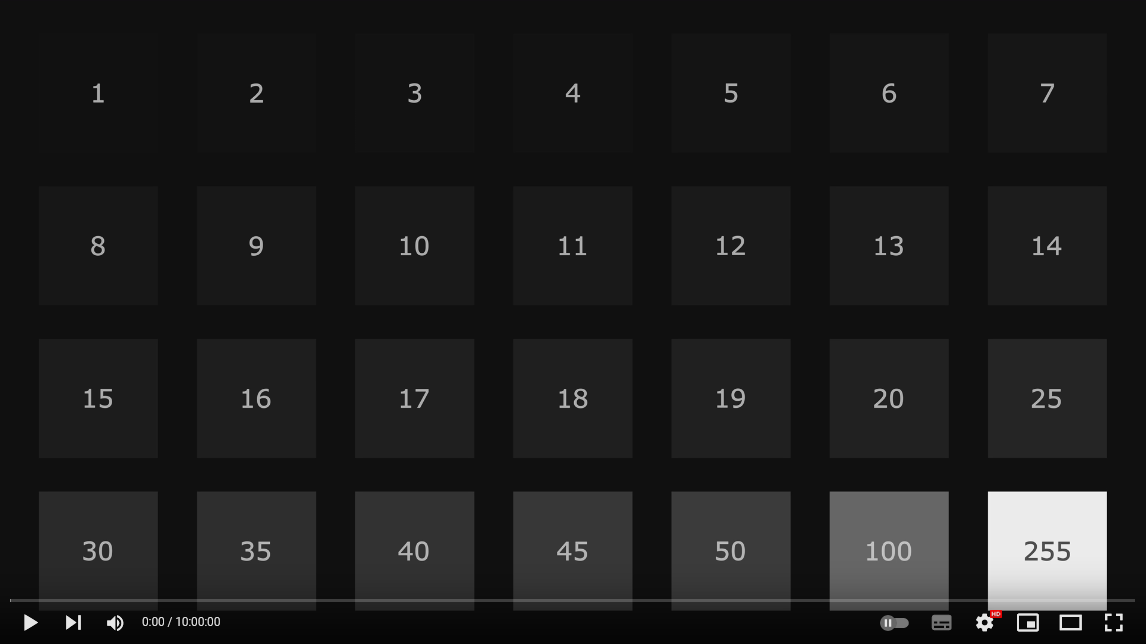
Hi everyone, I did a quick search and couldn't find any discussion of this, but at least for me with Nvidia under Win7, video playback in Firefox is still broken as of today (version 112, using Webrender). This is an older bug report related to the issue: https://bugzilla.mozilla.org/show_bug.cgi?id=1459526 The test videos on that page that still work actually do show correctly now, but still, any actual video on Youtube or Twitch looks obviously washed out, with blacks showing as grey instead. I can't find the source anymore, but I've read a couple of years ago that the fix that they did really just applies to Win10+ because they used a function that is missing in older Windows versions, and I guess the userbase for Win7 is so small now that nobody really seemed to care. Can anybody confirm this issue? As a workaround I've been running Opera additionally, which doesn't have the color range issues (though I did have to switch off HW accelerated video for performance and stability reasons), however the problem here is that whenever I run Opera I get very noticeable stutters in games that aren't traceable to any additional CPU or GPU load. The more demanding the game itself is and the more cores it uses the more frequent and worse the stutters get. Furthermore, while playing a game having any kind of video running in the background is completely impossible on Opera, it becomes a complete stutterfest. I've also noticed some severe Windows GUI performance degradation that sometimes seems to happen when running Opera for long periods of time, so considering all of that my guess is that Opera is really badly coded when it comes to interacting with the GPU driver.1 point
-
No. That is not the case. When closing the main window of ProxHTTPSProxy from my package ProxHTTPSProxy's PopMenu TLS 1.3 3V3, its entries are automatically removed from the system proxy settings. If not, you did something wrong. Close the main window of ProxHTTPSProxy and check the system proxy settings by "Open IE Proxy Settings" in the PopMenu!1 point
-
ProxHTTPSProxy can be configured to the user needs in its configuration file config.ini. And in 360Chrome, as already described by @VistaLover, you can alternatively switch between "Use IE proxy" and "Do not use proxy".1 point
-
When it comes to my package ProxHTTPSProxy's PopMenu TLS 1.3 3V3, closing the main window of ProxHTTPSProxy automatically removes its entries from the system proxy settings. This is not the case when using ProxyMII.1 point
-
That's exactly why I support the idea of MSFN, and actually the reason for all my efforts here. In my case, let Windows XP live forever or at least as long as possible.1 point
-
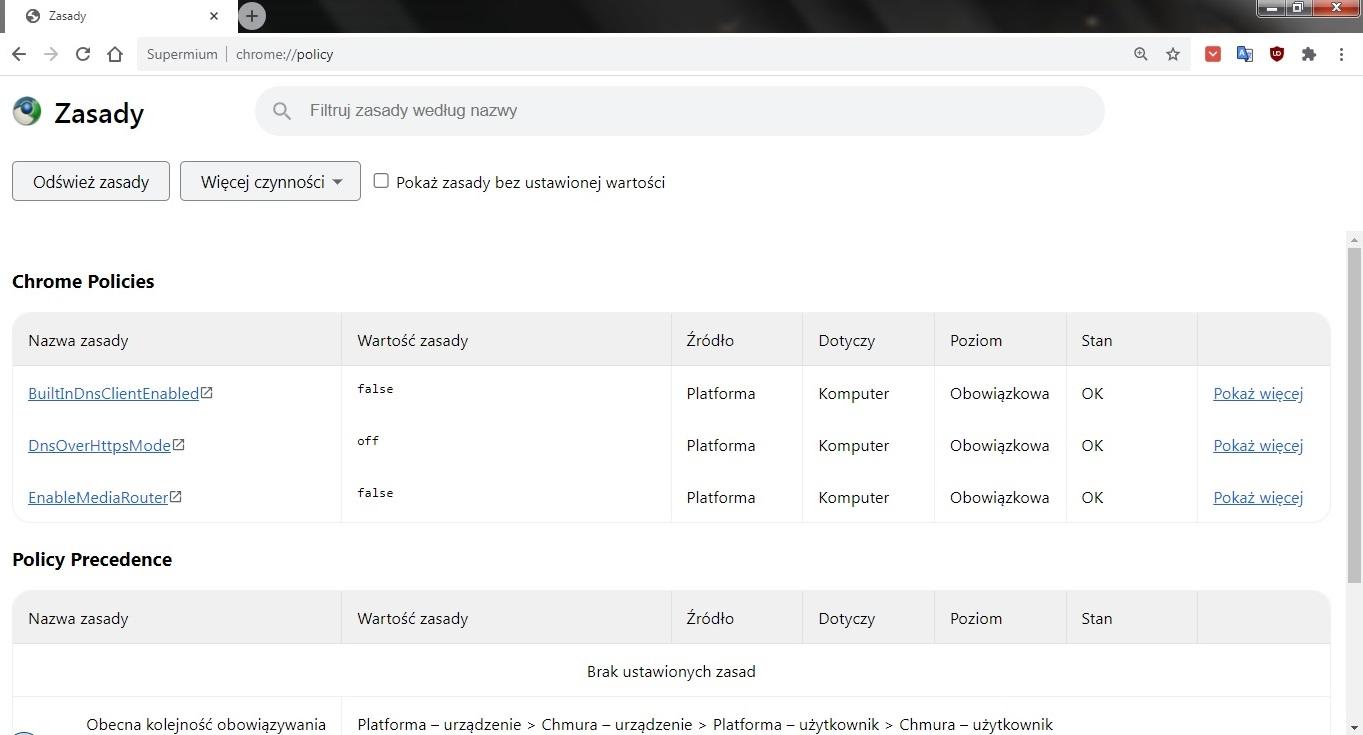
Thanks for the thread and pool. I use in Windows 7 x64: LibreWolf = 0 policies Supermium = 3 policies
 1 point
 -
For the last time, he uses Pentium 4 based on Northwood architecture clocked at 2,80 GHz. I had Northwood based Celeron clocked at 2 GHz back in the day. All rather boring, in contrast, the final Pentiums 4 were 64-bit. I tried booting XP with just one core (set it in advanced options in msconfig on BOO.INI tab). At first, it almost seemed Supermium may be usable with easier sites. At the end, I barely managed to close the browser as it made everything unresponsive. Nope, this is totally unusable.1 point
-
Off-topic, but this is a pet peeve of mine. Why doesn't Micro$oft (or anyone else, for that matter) print huge numbers like that with commas (or periods for Europe) - or, since we don't really need to know the RAM usage right down to the byte - just abbreviate it to 2.57 GB? It's virtually impossible to quickly gauge the magnitude of a long string of digits like that - instead you have to stare at it and count digits from right to left! It's as if they've forgotten that computers were invented to do drudgery like that for us!1 point
-
New regular/weekly KM-Goanna release: https://o.rthost.win/kmeleon/KM76.5.3-Goanna-20240518.7z Changelog: Out-of-tree changes: * update Goanna3 to git 10160cd03d...76c2cfb906: - import changes from `dev' branch of rmottola/Arctic-Fox: - Bug 1412825 - fix lz4 deprecated attribute with clang and c++14; r=RyanVM (059d86484b) - Bug 1245886 - Manually stop the profiler module at the end of all tests, r=me (1e00edd00c) - Bug 1262359 (part 1) - Remove unused |hashRef| parameter from nsDataHandler::ParseURI(). r=jduell. (dcae9e057a) - Bug 1262359 (part 2) - Make the filling in of two parameters optional in nsDataHandler::ParseURI(). r=jduell. (142ff6c86d) - Bug 1262359 (part 3) - Add a missing fallible nsTSubstring_CharT::Assign() variant. r=erahm. (df93f41b86) - Bug 1262359 (part 4) - Make data URL payload assignment fallible in nsDataHandler::ParseURI(). r=jduell. (05868a4269) - Bug 1262359 (part 5) - Add a missing rv check for call to nsDataHandler::ParseURI(). r=jduell. (67d8a9c642) - Bug 1263764 - Make the external string API's Truncate compatible with the internal API's Truncate. r=froydnj (b369693809) - bug 1262563 - stop passing an event to FireShowHideEvent() r=davidb (b2893a18c2) - bug 1262563 - fix how FireShowHideEvent gets the parent of a hide event target r=davidb (fbf7c39766) - bug 1262563 - make FireShowHideEvent() return void r=davidb (c77c6c1d57) - bug 1262563 - make FireShowHideEvent() a method of MaiAtkObject r=davidb (b0cc3aaf06) - Bug 1260237 - remove InvalidateChildren, r=yzen (1eecf43b01) - Bug 1251680 - get container accessible computation should take into account the HTML select, r=marcoz (553274c049) - Bug 1252857 - test value change events for closed HTML select, r=marcoz (e3248842f5) - Bug 1252857 - value change events for HTML:select have wrong target, r=marcoz (734ace8006) - Bug 1105611 - Add tests of nsIAccessibleEditableText with contentediable editors which have ::before or ::after, patch=nakano, surkov, r=yzen (3b423d91cd) - Bug 1249400 - add a test for missed hide events in case of accessible stealing, r=yzen (901c61e650) - Bug 1255009 - insert children into the tree on content insertion instead the recaching, r=yzen (8074d82484) - Bug 1255614 - make ProcessInvalidationList to insert accessibles instead the recaching, r=yzen (89a81d8b3f) - Bug 1255617 - make PutChildrenBack to insert accessibles instead the recaching, r=yzen (39548b5922) - Bug 1260187 - remove recaching version of DocAccessible::UpdateTreeOnInsertion, r=yzen (4bf8b09193) - Bug 1260277 - remove empty CacheChildren's, r=marcoz (4eabc70d60) - Bug 1256461 - merge MoveChild and SeizeChild methods, r=yzen (649b87dfad) - Bug 1260494 - rebuild child indexes by AutoTreeMutation guard, r=yzen (e49a381192) - Bug 1260862 - "remove Cache/EnsureChildren". r=mzehe (10751f0792) - Bug 1260860 - stop illicit accessible stealing, r=yzen (55621a1af3) - Bug 1260496 - get rid of CacheChildren for application accessible, r=marcoz (cde59765c3) - Bug 1250878 - add acceptable child check for HTML select, r=marcoz (6e70925079) - Bug 1252260 - get rid of HTML table CacheChildren, r=marcoz (7108ee2e06) - Bug 1261165 - remove Accessible::ChildrenFlags, r=yzen (6e6c4db99d) - Bug 1261167 - remove Accessible::TestChildCache, r=marcoz (69c9276da0) - Bug 1261170 - add a single node ProcessContentInserted method version, r=yzen (5385e407b8) - Bug 1261177 - split GetOrCreateAccessible method into two (Get and Create versions), r=yzen (ded9e7c0e5) - Bug 1261408 - detect ARIA owned children early to avoid tree moving, r=yzen (ffd090ff2c) - Bug 1261425 - coalesce mutation events by a tree structure, r=yzen (14ca8f3978) - bug 1261144 - rename AccCollector.{h,cpp} to EmbeddedObjCollector.{h,cpp} r=lsocks (386be7f834) - bug 1259023 - make nsIAccessible.parent work with proxies r=yzen (d611ef1fbf) (8655c2747d) - import changes from `dev' branch of rmottola/Arctic-Fox: - Bug 1232902. Update ANGLE to chromium/2592 (89d3d3cfad) - Bug 1251375. Update to ANGLE/2653 (98691dfd84) - bits of Bug 1225280. Update ANGLE to chromium/2572. (b5eeadcb4e) - Bug 1251375 - Cross compilation fixup. r=upstream (737d8f8554) - rename back (e1ef46b16a) - Bug 1261129: Make VP9 sample data const. r=kentuckyfriedtakahe (811eead31b) - Bug 1263839 - WebM is now actually a VP9 sample; r=me (c6568d6d98) - Bug 1263839: P2. Force re-run of VP9 benchmark based on a version check. r=kentuckyfriedtakahe (358409a235) - Bug 1235503 - Fix -Wunreachable-code warnings in dom/media/. r=jya (dc6bebb141) - Bug 1251184: [quicktime] P1. Report video/quicktime mimetype when sniffing. r=cpearce (056dda066a) - Bug 1251184: [quicktime] P2. Use external plugin if available over native playback. r=cpearce (6f34c09ab6) - Bug 1255050 - [1.1] Restrict media plugin decoder usage to Android ICS. r=snorp (ae801e040c) - Bug 1229657: [MSE] Returns NotSupportedError if mimetype is invalid or not supported. r=gerald (a81df7babf) - change errors returns (18b81f684e) - rearrange to match gecko code (333c4c5f3a) - Bug 1239607 - Let platform layer decide which codec to support and how to configure it. r=sotaro (63812a44d1) - Bug 1248507 - p1. Pass DecoderDoctorDiagnostics to PDMs&more - r=jya (4175551833) - Bug 1248507 - p2. DecoderDoctorDiagnostics boilerplate - r=jya (cb25b71956) - Bug 1208371 - Forward declare DOMMediaStream in HTMLMediaElement.h. r=jesup (896080a020) - Bug 1248507 - p3. Use DecoderDoctorDiagnostics - r=jya,bz (181966589e) - Bug 1248507 - p4. DecoderDoctor base console message - r=bz (c5704ad2fe) - Bug 1055776 - Move namespaceURI, prefix, localName from Node to Element; r=bz (ba7a18385d) - Bug 842818 - Expose WebCrypto API to workers r=baku (966e5f3e75) - Bug 1227790 - Update MediaKeyStatuses to include "released", "output-restricted" and "status-pending". r=bz (d9e7ddb298) - Bug 1256046 - Hide MozPowerManager from the Web; r=khuey,bzbarsky (ec1da24251) - Bug 1259581: Remove MOZ_MEDIA_NAVIGATOR. r=jesup (023a114462) - Bug 1254956 - Implement Node.rootNode. r=Ms2ger,smaug (0133a41059) - Bug 1264409 - Make last transaction ID available via nsIDOMWindowUtils, and pass transaction ID through MozAfterPaint. r=mattwoodrow,mrbkap (51184de1af) (76c2cfb906) * Notice: the changelog above may not always applicable to XULRunner code which K-Meleon uses. A goanna3 source tree that has kmeleon adaption patch applied is available here: https://github.com/roytam1/palemoon27/tree/kmeleon761 point
-
New build of BOC/UXP for XP! Test binary: MailNews Win32 https://o.rthost.win/boc-uxp/mailnews.win32-20240518-7bda12e7-uxp-e76fa74573-xpmod.7z BNavigator Win32 https://o.rthost.win/boc-uxp/bnavigator.win32-20240518-7bda12e7-uxp-e76fa74573-xpmod.7z source repo (excluding UXP): https://github.com/roytam1/boc-uxp/tree/custom * Notice: the profile prefix (i.e. parent folder names) are also changed since 2020-08-15 build, you may rename their names before using new binaries when updating from builds before 2020-08-15. -- New build of HBL-UXP for XP! Test binary: IceDove-UXP(mail) https://o.rthost.win/hbl-uxp/icedove.win32-20240518-id-656ea98-uxp-e76fa74573-xpmod.7z IceApe-UXP(suite) https://o.rthost.win/hbl-uxp/iceape.win32-20240518-id-656ea98-ia-93af9a0-uxp-e76fa74573-xpmod.7z source repo (excluding UXP): https://github.com/roytam1/icedove-uxp/tree/winbuild https://github.com/roytam1/iceape-uxp/tree/winbuild1 point
-
... However, the 360EE variants have proxy settings of their own, different to the ones in Google Chrome/Chromium ... @Anbima : If you opt to use just ProxyMII, then configure your IE8 browser to use this HTTPSProxy just for "Secure:" connections and once this is done (you can exit IE8 now), you can configure 360EE to use that proxy via:1 point
-
Classic taskbar works in 26120.670 - Dev and 26217.5000 - Canary. 🤞1 point
-
You'll just have to witness it yourself. The WinPenPack prevents (ie, "redirects") those registry entries. But you do have to be "smart enough" to edit the .INI file (and "smart enough" to delete any registry entries already present). I trust that you (smart enough, that is).1 point
-
No, I don't. You wanted to know for which extensions would be written entries to the registry. And I answered that all Supermium (Chrome) browsers do that, when installing extensions, either permanently when installed by installer or temporarily when fully portable. So, it doesn't matter whether you use or prefer installers or not.1 point
-
Here is a link to an official website of Avast where is clearly stated that a key for more recent Avast Free Antivirus (including the version 18) is no longer needed: https://www.avast.com/registration-free-antivirus#windows Additionally, a screenshot of this website: Kind regards, AstroSkipper1 point
-
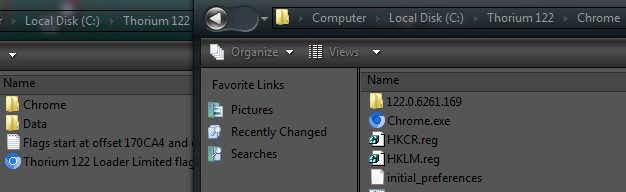
Screenshot with proper file structure, only for the loader usage. @AstroSkipper
1 point
-
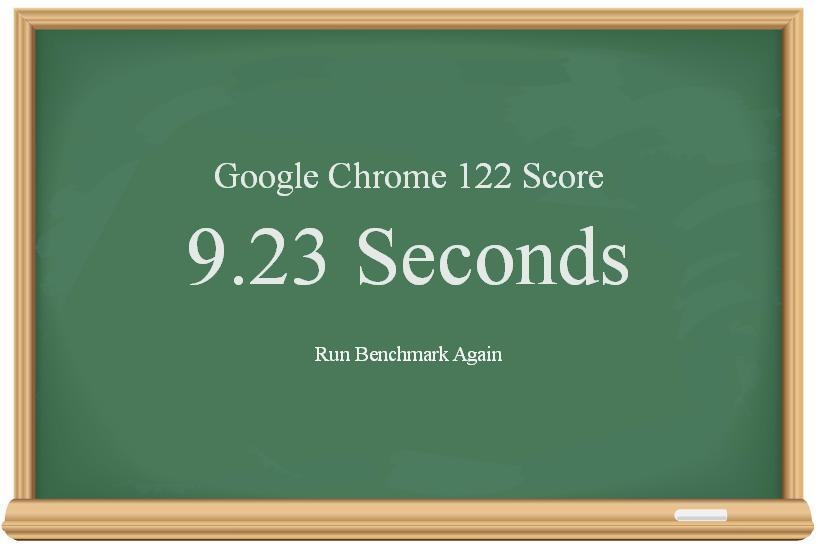
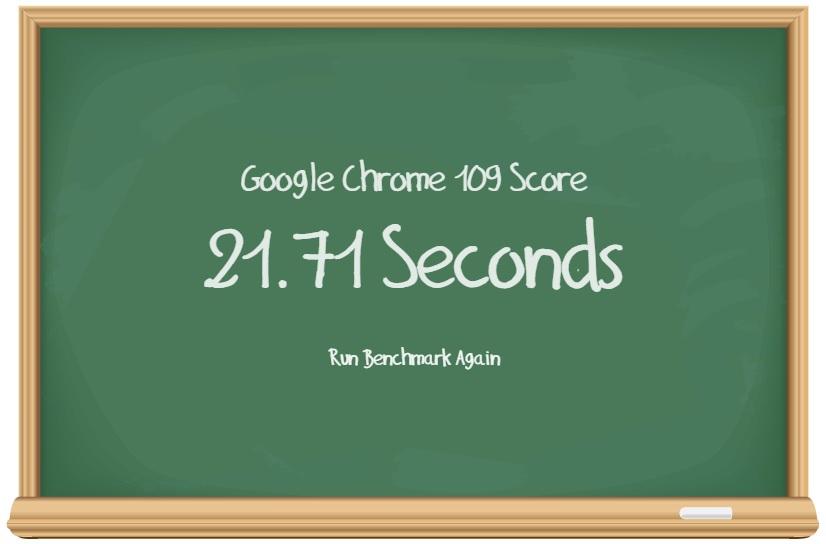
Not necessarily. Here is my chalkboard benchmark result for Thorium on XP: Now here is the same benchmark for Thorium on my Windows 7 machine that sports a 1st gen Radeon GCN variant (HD7770): As you can see, GPU rasterization isn't all that its cracked up to be... Perhaps it's faster on much newer GPUs, but you often get better performance from Chrome by disabling it. Now other GPU acceleration (video acceleration, WebGL) would probably be nice... Windows XP is perfectly capable of that... Maybe someone can write a redirection driver from DirectX12 to DirectX9 for Chrome.
1 point
-
It doesn't matter which one. When the Supermium installer is used from GitHub, it writes for each extension which is installed an entry under HKLM and HKCU -> Software -> Supermium. In the portable PAF version from PortableApps, these entries are only temporarily written into the registry and are stored locally in the programme folder when Supermium is closed as it is usual in PAF versions from PortableApps.1 point
-
If someone is interested in Supermium as a fully portable application, then have a look here: https://portableapps.com/apps/internet/supermium-portable It was already mentioned here in this thread and has just been updated. In any case, extracting the Supermium executable from GitHub (win32) and using the starter script to call up the main programme does not lead to a real, portable installation, especially when it comes to extensions whose entries have to be written into the registry. And Thorium isn't fully portable, either.1 point
-
Feature request for SAB: Preserve application taskbar order when switching between virtual desktops. The default Windows behavior basically makes the feature unusable. There is an open source implementation for Windows 11 available. https://windhawk.net/mods/virtual-desktop-taskbar-order https://github.com/m417z/my-windhawk-mods/blob/main/mods/virtual-desktop-taskbar-order.wh.cpp1 point
-
Nothing using GPU on Chromium works on XP. Waste of good hardware.1 point
-
Must1 point
-
Dust1 point
-
No, depending on the Chrome version, their user folder path is changed. 00 / 2E HEX (highlighted)
1 point
-
Wow! Good thing none of the women here at work were standing over my shoulder. HR Crisis averted.1 point
-
Bolt1 point
-
I still use this command. Of course, only if my system partition has become faulty and has to be restored by the latest image I had created, which, however, only happens very rarely. My reliable imaging system is the reason why this system partition was originally created in 2004. Since then, I never had to reinstall Windows XP from scratch. It is as immortal as the Highlander, so to speak. So I'm not afraid that Thorium or another programme will destroy my system. It is simply indestructible.1 point
-
Don't get me wrong, Thorium runs against all expectations well overall, and I've just made some more performance improvements by changing some flags I have been using. On such systems, it is essential to select the correct flags that really correspond to the hardware. In any case, one thing is true. Thorium definitely runs on Intel Pentium 4 single-core 32-bit. Thus, here is one who runs a Chrome 122 under Windows XP on a 20 years old Pentium 4 CPU. And it's me. PS: And as always, I know exactly what I'm doing.1 point
-
I suggest to simply delete that possibly infected Trojan executable file. It works without it! I think it's safe to assume it can be a part tracking/spying features. I mean, if the browser works fine without it!1 point
-
Saxon simply reported non working page error, whether it's Thorium related or not, is still to be determined, and you started your usual off-topic activities with the crap posting, link. I got absolutely another error, I assumed it was (most probably) related to MSFN website/editor, I didn't have any errors upon visiting the page directly, I didn't know it was an imgur link, I thought the image was attached, that's why I made a screenshot with spacer. png, and UCyborg already helped, so why you just start minding your own business, and leave us be? Thanks. Since you aren't suggesting any useful solutions and always behave disrespectfully, insinuating VPN, etc. Don't like our posts? Ignore. Or I'll make a very detailed report to Tripredacus, I'll explain how you always bring hostilities, how you insert personal, insulting references and spam up the forum.1 point
-
1 point
-
I increased the page file to 32GB and it helped a bit. At least now I can finish to browse the latest goods in the store where I purchase sports food without crashing.1 point
-
@Dave-H, would you be willing to try out --disable-low-res-tiling? --disable-low-res-tiling reduces cpu usage and saves power https://codereview.chromium.org/196473007/ https://stackoverflow.com/questions/66825943/how-to-reduce-chromedriver-cpu-usage-in-selenium-python1 point
-
Probably you hit the size limit. Try to delete your old attachments. It helped me, I can embed since then.1 point
-
I might, got latest Ungoogled Chromium 118 to launch, it loads web pages as well, but it normally crashes on resolving delay-imported function QueryUnbiasedInterruptTimePrecise, Win8.1 only has version without "Precise". Did a bit of reading on x64 calling convention, might explain why initial DiscardVirtualMemory hack wasn't as disastrous on 64-bit binaries, first four parameters of a function call are passed in CPU registers, not on stack. Patch for 64-bit chrome.dll version 118.0.5993.88: >chrome.dll 0000000000294616:48->EB 0000000000294617:89->13 0000000000294618:D6->CC 0000000000294619:48->CC 000000000029461A:89->CC 000000000029461B:CF->CC 000000000029461C:E8->CC 000000000029461D:2F->CC 000000000029461E:1B->CC 000000000029461F:44->CC 0000000000294620:0A->CC 0000000000294621:85->CC 0000000000294622:C0->CC 0000000000294623:74->CC 0000000000294624:1D->CC 0000000000294625:48->CC 0000000000294626:89->CC 0000000000294627:F9->CC 0000000000294628:48->CC 0000000000294629:89->CC 000000000029462A:F2->CC 0000000000299C77:48->EB 0000000000299C78:89->11 0000000000299C79:F1->CC 0000000000299C7A:4C->CC 0000000000299C7B:89->CC 0000000000299C7C:FA->CC 0000000000299C7D:E8->CC 0000000000299C7E:CE->CC 0000000000299C7F:C4->CC 0000000000299C80:43->CC 0000000000299C81:0A->CC 0000000000299C82:85->CC 0000000000299C83:C0->CC 0000000000299C84:0F->CC 0000000000299C85:84->CC 0000000000299C86:FA->CC 0000000000299C87:00->CC 0000000000299C88:00->CC 0000000000299C89:00->CC 0000000000299F38:4C->EB 0000000000299F39:89->0D 0000000000299F3A:F1->CC 0000000000299F3B:4C->CC 0000000000299F3C:89->CC 0000000000299F3D:E2->CC 0000000000299F3E:E8->CC 0000000000299F3F:0D->CC 0000000000299F40:C2->CC 0000000000299F41:43->CC 0000000000299F42:0A->CC 0000000000299F43:85->CC 0000000000299F44:C0->CC 0000000000299F45:74->CC 0000000000299F46:9A->CC 0000000005666C6E:48->EB 0000000005666C6F:89->0D 0000000005666C70:F9->CC 0000000005666C71:4C->CC 0000000005666C72:89->CC 0000000005666C73:F2->CC 0000000005666C74:E8->CC 0000000005666C75:D7->CC 0000000005666C76:F4->CC 0000000005666C77:06->CC 0000000005666C78:05->CC 0000000005666C79:85->CC 0000000005666C7A:C0->CC 0000000005666C7B:74->CC 0000000005666C7C:1D->CC 000000000BD5774C:50->00 000000000BD5774D:72->00 000000000BD5774E:65->00 000000000BD5774F:63->00 000000000BD57750:69->00 000000000BD57751:73->00 000000000BD57752:65->00 000000000BD58042:31->30 000000000BD5B02A:44->56 000000000BD5B02C:73->72 000000000BD5B02D:63->74 000000000BD5B02E:61->75 000000000BD5B02F:72->61 000000000BD5B030:64->6C 000000000BD5B031:56->41 000000000BD5B032:69->6C 000000000BD5B033:72->6C 000000000BD5B034:74->6F 000000000BD5B035:75->63 000000000BD5B036:61->00 000000000BD5B037:6C->00 000000000BD5B038:4D->00 000000000BD5B039:65->00 000000000BD5B03A:6D->00 000000000BD5B03B:6F->00 000000000BD5B03C:72->00 000000000BD5B03D:79->001 point
-
Since this thread has been revived and I missed it the first time around. I use the below to prevent custom search engines from being added - // ==UserScript== // @name - Disable OpenSearch // @version 2.0.1 // @include http*://* // @run-at document-start // ==/UserScript== //document.querySelector('[type="application/opensearchdescription+xml"]').remove(); ////////////////////////////////////////////////////////////////////////////// // Code from https://github.com/gregsadetsky/chrome-dont-add-custom-search-engines/blob/master/src/content.js // OpenSearch - e.g., https://martin-thoma.com/search-engine-autodiscovery/ // Uses CSS4 selectors, Chrome 49+ const DEBUG=false; let numseen=0, numspoiled=0; let unspoiled=[]; // called when the user clicks an element of the form (any field or button). // The parameter passed is the event object. function clickApply(e) { if(DEBUG) console.info({'form onclick':e}); // remove onclick. One fix only e.srcElement.form.removeEventListener("click", clickApply); applyFix(e.srcElement.form); } //clickApply // add a new <textarea> element function applyFix(elem) { var newelem = document.createElement('textarea'); newelem.name = ''; newelem.style.display='none'; elem.appendChild(newelem); } //applyFix // Add an extra child input to any form that only has one function spoilFormGet(elem) { if(DEBUG) { ++numseen; unspoiled.push(elem); } // Check whether the form submits to a HTTP(S) URL. // A missing or relative action will be resolved against the page URL // so it must have the same URI scheme which is all we care about var action = elem.getAttribute('action'); if(!(action && action.indexOf('://') >= 0)) action = location.href; if(!/^https?:\/\//i.test(action)) return; // Autodetection requires exactly one input of type text or search // If the type attribute is missing, it defaults to `text` // Readonly inputs do not count against this total if(elem.querySelectorAll(':scope input:-webkit-any([type="text" i],[type="search" i],[type*="search" i],[type=""],:not([type])):not([readonly])[name]:not([name=""])').length !== 1) return; // Autodetection also requires no password, file, or textarea elements if(elem.querySelector(':scope :-webkit-any(input[type="password" i],input[type="file" i],textarea)')) return; // Add a <textarea> - unlike <input>, it doesn't block implicit submission // per https://www.tjvantoll.com/2013/01/01/enter-should-submit-forms-stop-messing-with-that/ // apply the fix now, or place it in onclick. "this" is a parameter passed by foreach(). see below if (this.now === true) { // remove onclick placed during first pass elem.removeEventListener("click", clickApply); // and instead do it now; applyFix(elem); } else { elem.addEventListener('click', clickApply); } if(DEBUG) { console.info({Spoiled: elem}); ++numspoiled; unspoiled.pop(); } } //spoilFormGet var debugAutoDetect=0; // move this part of the code here, since it's called multiple times function autoDetect(now, when_called) { if(DEBUG) console.log('autoDetect: '+(++debugAutoDetect)+' ('+when_called+')'); document.querySelectorAll('form:-webkit-any([method="get" i],:not([method]))').forEach(spoilFormGet,{now}); if(DEBUG) { console.log(`Spoiled ${numspoiled}/${numseen}.`+(unspoiled.length?' Unspoiled were:':'') ); if (unspoiled.length) console.log(unspoiled); } // we reset spoil vars for next call numseen=0; numspoiled=0; unspoiled=[]; } //autoDetect function catchOpenSearch() { if(DEBUG) console.info('catchOpenSearch called'); // OpenSearch - e.g., https://martin-thoma.com/search-engine-autodiscovery/ // Uses CSS4 selectors, Chrome 49+ document.querySelectorAll('[type="application/opensearchdescription+xml" i]').forEach( function (it) { it.removeAttribute('type'); if(DEBUG) console.info({"Spoiled by type removal": it}); } ); // Suggestion service, https://www.chromium.org/tab-to-search document.querySelectorAll('url[rel="suggestions" i]').forEach( function (it) { it.removeAttribute('rel'); if(DEBUG) console.info({"Spoiled by rel removal": it}); } ); // added document.querySelectorAll('url[rel="search" i]').forEach( function (it) { it.removeAttribute('rel'); if(DEBUG) console.info({"Spoiled by rel removal": it}); } ); } //catchOpenSearch function onDOMContentLoaded() { if(DEBUG) console.log('onDOMContentLoaded'); catchOpenSearch(); // #1 call it now (i.e., DOMContentLoaded) without applying the fix // #2 call it in 1500 ms and apply the fix // #3 call when document loaded, and apply the fix. // if <form> is added/modified // dynamically before the document // is fully loaded, #1 could miss it, but not #2 & #3. Note that #2 // could fire after #3 if the page is fast to load. Once the fix // is applied, the <form> can't be found by subsequent execution // of autoDetect, so the fix can only be applied once (#1 is not // applied but delayed until #2 or #3 fires, or if the user // clicks). window.addEventListener('load', function() { if(DEBUG) console.log('onload'); catchOpenSearch(); autoDetect(true,'Load'); } ); // #3 setTimeout(function() { autoDetect(true,'Timer'); } ,1500); // #2 autoDetect(false,'onClick'); // #1 } //onDOMContentLoaded (function() { document.addEventListener('DOMContentLoaded', onDOMContentLoaded); onDOMContentLoaded(); })();1 point
-
if doesn't help, add the XAPOFX1_5.dl from the redist, too.1 point
-
Try to copy XAudio2_7.dll into the game folder.1 point
-
I can't seem to find the exact engine it runs on, I would have to buy the game first, is a "mono" based game?1 point
-
Ok, thanks for testing, so I need to look into why this happens only for me then. Some screenshots: Firefox: Opera: I have also found the topic where a missing function in Win7 is mentioned, which is DX11 DXVA, but the topic is 6 years old already so I don't know if that is relevant anymore. I will try to disable hardware video acceleration to see if that makes a difference.
1 point