Leaderboard




Popular Content
Showing content with the highest reputation on 11/26/2023 in Posts
-
Thanks, looks like the ancient quad core is still better than my Pentium G3470 (dual-core) on that machine I use for youtube.3 points
-
No sitcom, more like a skit. As an example, the playback isn't smooth for me with chrome360.1030. "Space Station Broadcast - SNL - An unexpected chain of events occurs while Captain Ed McGovern (Steve Carell) live streams from the International Space Station to children's classrooms across America... https://www.youtube.com/watch?v=Y7pf_Ue9gdw3 points
-
StartAllBack 3.7 RC3 (hope the last one)3 points
-
@Mathwiz You can change the background and text colour as you prefer. The text can also be formatted in bold type. Here is another screenshot with bold text in the status bar panel: And here is the code: #ua-status-toggle {width: 24px; height: 24px;} toolbar[iconsize="small"] #ua-status-toggle {width: 16px; height: 16px;} #ua-status-main, #ua-status-label, #ua-status-main-input, #ua-status-button-setua, #ua-status-button-resetua { background-color: black !important; color: yellow !important; font-weight: 700 !important;} Just edit the overlay.css file to your liking exactly where I added the code! Greetings from Germany, AstroSkipper2 points
-
Right! The overlay.css file inside the folder /chrome/skin is the one you have to modify. I have installed the theme FT DeepDark 14.3 theme and the extension User Agent Status 1.7.2 in Serpent 52. No problems here. The text in the status bar panel is readable. Here is a screenshot: At next, I added a bit CSS code to change the appearance of the status panel. I decided to keep the background colour which is obviously black and changed the text colour to yellow for better visibility. Here is a screenshot: Here is the download link to the modded version I made for you just for fun: https://www.mediafire.com/file/v4wa5byn6vgzeu4/ua-status-1.7.2-FT-DeepDark-mod.xpi/file Cheers, AstroSkipper2 points
-
You're welcome! As I already mentioned, the most recent versions of CustomCSSforFx will contain CSS code targeting the much more recent Firefox versions. That's why I pick only single CSS stylesheets, test them in terms of compatibility and implement them if needed or wanted. The time range for picking them is from July 2019 to August 2020 as I already wrote in a previous post. Maybe, some of the CSS files from more recent CustomCSSforFx versions will also work in Mypal 68 but surely less than in the versions that have been specially adapted for Firefox 68. Apart from that, I prefer those CSS stylesheets that do not contain unnecessary code for versions of Firefox 69 and higher.2 points
-
I don't use dark themes. Thus, it is working perfectly for me. But one thing is clear. You can change or modify extensions in every conceivable way, especially the legacy extensions for our beloved UXP browsers. I assume there is CSS code inside the extension which might be adapted for dark themes. Unpack the extension and have a look inside!2 points
-
Chrome 115 is more than a half year old, are you sure? The current Chrome is 121, mind you.2 points
-
Kind of makes one wonder whether the browser itself has bugs of the same "quality".2 points
-
Your link is outdated and doesn't work, please check and do aproper research before posting. Here is 16.22, perhaps you would want to try? https://www.filepuma.com/download/process_explorer_16.22-20946/2 points
-
Yes, I know you were a good guy during that days.2 points
-
"also" ? what else is "not true" ?2 points
-
Here's a definitive answer for you and everyone who usually love to whine about how D.Draker deletes "too many" "needed" files. No, you didn't whine, I mean the others who did. That file is an extremely bugged piece of garbage, that has millions of different versions so the developers themselves put curses on it. I'd also add Vulkan, "Swift" Shader and OpenGL to that list. "..it uses the UCRT (universal CRT) which means that by default it does not run on all Windows 7 machines." https://bugs.chromium.org/p/chromium/issues/detail?id=920704 Disable all that crap in chrome with flags, delete the files and you get a really fast browser !2 points
-
Everyone will choose for themselves, I'll be on Vista, I'm pretty sure I'll be able to make myself a ported chrome fork (be it Vista or 7). Stock up on the hardware, that's my advice. It's plenty of cheap goodies from those who moved to 11.2 points
-
// ==UserScript== // @name -- Replace Font // @version 0.1 // @exclude https://www.google.com/* // @exclude https://www.bing.com/* // ==/UserScript== var elementList = document.getElementsByTagName('*'); for (var i = elementList.length - 1; i >= 0; i--) { var elementItem = elementList; var style = getComputedStyle(elementItem, ''); elementItem.style.fontFamily = style.fontFamily.replace(/Tahoma/i, 'Arial'); elementItem.style.fontFamily = style.fontFamily.replace(/Roboto/i, 'Arial'); }1 point
-
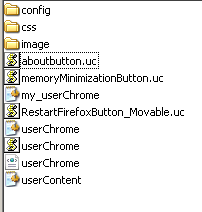
As of now I'm running 3 of your custom buttons (copied as instructed in the profile/chrome folder), TOGETHER with CustomCSSforFx 4.4.7. They are recognized by your userChrome.css, which I rename my_userChrome.css, and @imported into CustomCSSforFx's own userChrome.css In that manner, I have your buttons AND CustomCSSforFx to play around. Quite cool, actually and (still playing) . The first pic shows the content of the chrome subfolder: your config folder, the uc buttons, the userchome.xml and the empty css folder from your "requirements". The image folder, the contents of the css folder, userChrome.css and USERChrome.js are from CustomCSSforFx (replacing yours). Your userChorme.css (the one enabling your buttons) I rename my_userChorme.css, and @impoted it into CustomCSSforFx's userContent.css. Give or take required css tweaks to get (eventually) things aligned the way I want to, this is the best of both worlds. Cheers to you for leading the way, and to @roytam1 for pointing us in the direction of CustomCSSforFx
 1 point
 -
Bingo! My point precisely!1 point
-
There are many extensions to use with YouTube. I'm not familiar with that one, but I would be surprised if it's better than Enhancer for YouTube, which does everything I need, with really good controls.1 point
-
Hello @dmiranda! aboutbutton.uc.js is a JavaScript script file and does not need an entry in the userContent.css file. It has only to be copied to the chrome folder and will be recognized automatically after clearing the startup cache and restarting Mypal 68, only if all has been configured correctly (see first post of this thread), of course. It comes originally with an additional aboutbutton.css file to change the appearance of the button and its menu which has to be copied to the chrome\CSS subfolder and imported into the userChrome.css file. However, I had to fix this aboutbutton.css file as it didn't work correctly in Mypal 68. Anyway! The userContent.css file is for changing directly websites or internal sites like the about:sites. But for the custom button aboutbutton, no entries are necessary in the userContent.css file.1 point
-
BTW there's a dedicated thread for this new browser now: Perhaps the discussion should be continued over there, but first let me note that the beta version is free, but has a "time bomb" and will quit working in August 2024 (although, due to a bug, it will start working again in January 2025 and will quit working again in August 2025, and again in 2026, etc.)1 point
-
The date WITH the small taskbar!? This is madness. @Tihiy you are the man!!1 point
-
I can't agree with there being no difference. I rarely encounter videos shot with really poor camera, 480p is just blurry unless you're watching on a very small screen or inside a small window. Regarding performance, my default go-to quality is 1080p @ 60 FPS, if available. No Chromium on XP can do that here (lots of frames dropped), Firefox based browser is always preferred. UXP based browsers can play them smoothly, also the ones for XP, though you could get stutters when browser gets "crapped up" from other sites. Though even on Windows 10, Chromium stutters here with 60 FPS (both 720p and 1080p, a bit less with former). Not constantly, but enough for it to be noticeable. Firefox is OK. Interestingly, the stutters are there also with AVC1 codec, which is decodable on my GPU, but I normally just go with VP9 since my CPU can handle it and it's technically more sophisticated codec. Can't say I personally went any great lengths for YouTube, I tried Invidious and Piped, but they have issues when it comes to core functionality regarding playback, so just use few extensions and scripts at most for YouTube itself. Though I have ImprovedTube on Chromium/Firefox, I only changed a very small subset of settings.1 point
-
New build of Serpent/UXP for XP! Test binary: Win32 https://o.rthost.win/basilisk/basilisk52-g4.8.win32-git-20231125-3219d2d-uxp-b47d46219f-xpmod.7z Win64 https://o.rthost.win/basilisk/basilisk52-g4.8.win64-git-20231125-3219d2d-uxp-b47d46219f-xpmod.7z source code that is comparable to my current working tree is available here: https://github.com/roytam1/UXP/commits/custom IA32 Win32 https://o.rthost.win/basilisk/basilisk52-g4.8.win32-git-20231125-3219d2d-uxp-b47d46219f-xpmod-ia32.7z source code that is comparable to my current working tree is available here: https://github.com/roytam1/UXP/commits/ia32 NM28XP build: Win32 https://o.rthost.win/palemoon/palemoon-28.10.7a1.win32-git-20231125-d849524bd-uxp-b47d46219f-xpmod.7z Win32 IA32 https://o.rthost.win/palemoon/palemoon-28.10.7a1.win32-git-20231125-d849524bd-uxp-b47d46219f-xpmod-ia32.7z Win32 SSE https://o.rthost.win/palemoon/palemoon-28.10.7a1.win32-git-20231125-d849524bd-uxp-b47d46219f-xpmod-sse.7z Win64 https://o.rthost.win/palemoon/palemoon-28.10.7a1.win64-git-20231125-d849524bd-uxp-b47d46219f-xpmod.7z Official UXP changes picked since my last build: - Issue #2361 - Base implementation of Navigator.Clipboard (3478c01fc8) - Issue #2361 - Remove clipboard-read code (e0a7c35dcc) - Bug 1332825 - Use move semantics in MozPromise::All() and AllPromiseHolder. (543e41f3ac) - Issue #2361 - Enable Navigator.clipboard by default. (7fce3acfa9) - [WebGL] Turn on more validation/error checking in webgl (when not on Win) (acd204e85e) - [DOM] Check if rootDoc is secure context for web compat (71ce058b03) - [Network] Fix relative URL path starting with multiple slashes (d55111c4fd) - [DOM] Improve MessagePort state machine. (114daae894) - [WebGL] Flip the validation state for gl_KHR_no_validation. (56bcdf7ca0) No official Pale-Moon changes picked since my last build. No official Basilisk changes picked since my last build. Update Notice: - You may delete file named icudt*.dat inside program folder when updating from old releases. * Notice: From now on, UXP rev will point to `custom` branch of my UXP repo instead of MCP UXP repo, while "official UXP changes" shows only `tracking` branch changes.1 point
-
You misunderstood the joke completely. Those with high CPU oughta try h264ify extension, I think there were links at my account, sorry don't have them at hand right now. Or download from github. https://github.com/erkserkserks/h264ify1 point
-
@66cats, a small clarification to avoid confusions, NVCPL and all of the functions work with in all of the drivers I posted, with either Keppler, Pascal or Maxwell, except G1030.1 point
-
No, it's more like a rumour. From what I know, the problem with NVCPL causing this conflict still haven't been resolved by @win32in the later drivers, win32 please correct me if I missed the latest developments. NVCPL simply won't start (not the driver) and this causes the hang Orbit. I have a board with x58 chip, and this driver from the part 1 of my tutorial works with it. So, as another idea, you try my driver that doesn't depend on win32's ex-kernel. It works with 1080ti the OP of this topic asked about. https://msfn.org/board/topic/183688-breakthrough-new-nvidia-drivers-ported-to-vista-tutorial/ There's proof with screens it works. Want more HQ detailed screenshots? Then write to Tripredacus and demand my limit to be extended to at least 20mb. I, as the real content poster, deserve it, if he refuses, then all of you would have to entertain yourself with what's already posted, since my limit was up several years ago.1 point
-
I have spotted these ones https://iplocation.io/ip/42.101.4.38 https://iplocation.io/ip/60.188.66.38 https://iplocation.io/ip/103.235.46.9 https://iplocation.io/ip/104.193.88.123 https://iplocation.io/ip/185.10.104.115 https://iplocation.io/ip/175.4.51.38 https://iplocation.io/ip/39.156.68.81 https://iplocation.io/ip/113.105.172.38 https://iplocation.io/ip/124.239.243.38 https://iplocation.io/ip/60.188.66.38 .......1 point
-
Key word being "was". I've never met anyone that pays for a web browser. Doesn't mean they don't exist, especially for the mobile phone community. But certainly not the "norm". Agreed.1 point
-
Every Nvidia card with a BIOS newer than Sep 2013 will have a seriously boosted brightness! The plonkers started to parrot the always overbright AMD to boost the sales, would be my guess. Keep that in mind.1 point
-
Just quickly my young friend ... despite what others and society tells (brainwashes) us, it actually quite 'normal' (dare I use that ugly word Normal) to have those thoughts, but when they become more than a fleeting thought that is where we need to become concerned. Your life is precious and you don't need to change unless its to better yourself not to please other people or this toxic society. Again, I will address more but I felt it was important to address that quickly and try to shift focus on your good honest qualities and your caring personality and non-judgmental senses. Be well and just be YOU - there is nothing wrong with you and don't let anybody make you feel otherwise.1 point
-
I'm 100% certain, 1030 did update my uBlock 1.36 to 1.43 or 1.42 (quite some time ago). I can't say anything about 2044, sorry.1 point
-
I speak only for myself, even if we leave aside your fears of Russian malicious activities inside the Kaspersky software, which do have some pretty solid base, with multiple warnings, like they say, "no smoke without fire". I'd still not use it. especially if we talk about the 19.0.0.1088 version, which is proven to have the infection CVE-2019-8286[62]. So not an option for any users, not only the XP ones. The source is solid, it's not like from a random internet guy. It's scientists. https://nvd.nist.gov/vuln/detail/CVE-2019-82861 point
-
I knew Process Explorer 16.22 had no hostile IP connections, that's why I suggested it to you, enjoy, I'm glad you liked it! I also think you won't miss anything important, if don't update further. Wow! It's even more nonsensical! So you just post spam, is this how you entertain yourself? At least you got a bit of bravery to confirm your malicious activities.1 point
-
This thread was created by me for everyone who wants to use Windows XP as securely as possible. It doesn't matter whether novice, experienced or advanced user, or even expert. Therefore, antimalware programmes with real-time protection are particularly important. Unfortunately, they have become rare under Windows XP due to well-known reasons. One more reason to collect and preserve information about all available security programmes which still work under Windows XP in these days. If you are interested to create an own thread about browser security or whatever, just do it! But this thread is about all available security programmes targeting Windows XP only.1 point
-
Comodo Firewall was founded in in the United Kingdom by Melih Abdulhayoğlu in 1998. The company Xcitium, formerly known as Comodo Security Solutions, Inc., is a cybersecurity company, in the meanwhile headquartered in the USA, New Jersey, since 2004. It was a very good firewall in the past. A lot of settings could be done. I would say Comodo Firewall was rather targeting the more advanced user. Anyway! I used it in the past until I became aware of Windows Firewall Control from Sphinx. Users reported in the Comodo Forum that the last error-free working version under Windows XP has been Comodo Firewall 8.4.0.5165. More recent versions didn't seem to work properly under Windows XP although they were advertised to be compatible to this OS. That had annoyed many users. I personally never used it again after I had changed to Windows Firewall Control. But in that days, Comodo Firewall was one of the best. Unfortunately, its installation packages became bloated due to implementing an antivirus solution. These packages are called Comodo Internet Security. I don't like bloated software packages, though. Hope I could help you a bit.1 point
-
Hello @Saxon! Thank you very much for the kind words! I'll try to do my best. Researching and writing is unfortunately very time-consuming. Real life and physical health are two reasons my list of security programmes is increasing quite slowly. Comodo Varanus! That's very funny. I will do that with pleasure when I am back at my desktop computer.1 point
-
I don't think his English is that bad, maybe you overexaggerated a bit. He just used it to drag himself off the hook, when I refused to simply swallow his baseless accusations, he accused me of something I didn't do, and then tried to blame it on his poor English. And yes, I'll not provide that person with any technical answer, someone who just insulted me *right out of the blue* (I don't even know who that is!). A recent case, where our wise moderator @Tommy asked me to just ignore such cases and move on, and I respect it. So I'm answering for everyone, except that moody member. And I shall not engage in a stupid bickering that he tries to drag me into again. First he said - not working, now he says "not true". But here we need to look and check the specs https://en.wikipedia.org/wiki/Nvidia_NVDEC , despite being budget, the card RTX2060 fully supports all 1080p/1440p/2160p hardware decoding formats, so how one could explain the fact it decodes on win 10, but not on win 8 ? Maybe chrome limits it, don't you think ? That's precisely the case. Besides, he didn't provide us with any kind of proof that he says he still can decode low resolutions like 1080p. And then again, I'm still not sure why he zealously continues to talk about windows 8.1 here, this topic is win 7 exclusively , and I talk about chrome and windows 7 ! EDIT : he zealously talks in all topics about win 8.1, despite being 100% off-topic1 point
-
Yes, I'm all up for it too. legacyfan, it's a very wise decision, but it needs to be done asap, before he wakes up. Thank you, Tommy !1 point
-
I spent a lot of time to find a way for installing font without restart. Finally I found this ClickFont. It's an easy and exact solution Link: http://www.softpedia.com/get/Others/Font-Utils/Clickfont.shtml1 point
-
Here is a batch script to install Fonts in any Folder automatically. Paste the following code in notepad and save it as "ADD_Fonts.cmd" place the cmd file inside the folder of the fonts you want to install and run it or add the source folder as a parameter. for example "ADD_fonts.cmd" C:\Folder 1\Folder 2\ @ECHO OFF TITLE Adding Fonts.. REM Filename: ADD_Fonts.cmd REM Script to ADD TrueType and OpenType Fonts for Windows REM By Islam Adel REM 2012-01-16 REM How to use: REM Place the batch file inside the folder of the font files OR: REM Optional Add source folder as parameter with ending backslash and dont use quotes, spaces are allowed REM example "ADD_fonts.cmd" C:\Folder 1\Folder 2\ IF NOT "%*"=="" SET SRC=%* ECHO. ECHO Adding Fonts.. ECHO. FOR /F %%i in ('dir /b "%SRC%*.*tf"') DO CALL :FONT %%i REM OPTIONAL REBOOT REM shutdown -r -f -t 10 -c "Reboot required for Fonts installation" ECHO. ECHO Done! PAUSE EXIT :FONT ECHO. REM ECHO FILE=%~f1 SET FFILE=%~n1%~x1 SET FNAME=%~n1 SET FNAME=%FNAME:-= % IF "%~x1"==".otf" SET FTYPE=(OpenType) IF "%~x1"==".ttf" SET FTYPE=(TrueType) ECHO FILE=%FFILE% ECHO NAME=%FNAME% ECHO TYPE=%FTYPE% COPY /Y "%SRC%%~n1%~x1" "%SystemRoot%\Fonts\" reg add "HKLM\SOFTWARE\Microsoft\Windows NT\CurrentVersion\Fonts" /v "%FNAME% %FTYPE%" /t REG_SZ /d "%FFILE%" /f GOTO :EOF ADD_Fonts.cmd1 point
-
Try this script make sure the font is in the same folder as this script. Save as AddFont.vbs1 point
-
If you copy it then do reg add you could probably achieve this Example: reg add "HKLM\SOFTWARE\Microsoft\Windows NT\CurrentVersion\Fonts" /v "FontName (TrueType)" /t REG_SZ /d FontName.ttf /f1 point