Leaderboard




Popular Content
Showing content with the highest reputation on 07/14/2023 in all areas
-
Thanks for reporting, glad I'm not the only one.2 points
-
https://support.mozilla.org/en-US/kb/control-whether-firefox-automatically-fills-forms2 points
-
But running the most recent version of Serpent 55 (2023-07-14) from today, basilisk.exe is crashing in the module mozjs.dll at startup such as @DanR20 already reported. Here is a screenshot: Cheers, AstroSkipper2 points
-
Tried in XP and it's crashing there too. Also added Basilisk to Data Execution Prevention and attempted Safe Mode but both failed.2 points
-
My guess is it's OS related. I'll try it in Windows 10. Here's the full crash report: Problem Event Name: APPCRASH Application Name: basilisk.exe Application Version: 4.0.4.8577 Application Timestamp: 64b170e7 Fault Module Name: mozjs.dll Fault Module Version: 0.0.0.0 Fault Module Timestamp: 64b0ca02 Exception Code: c0000005 Exception Offset: 002de536 OS Version: 6.1.7601.2.1.0.256.48 Locale ID: 1033 Additional Information 1: 0a9e Additional Information 2: 0a9e372d3b4ad19135b953a78882e789 Additional Information 3: 0a9e Additional Information 4: 0a9e372d3b4ad19135b953a78882e7892 points
-
Several bugs with today's versions. Serpent 55 won't open, it's crashing at startup with the Fault Module Name: mozjs.dll. Tried with a new profile. In 52.0 I can't get formhistory to work in text boxes or passwords. This was always a problem on and off, if it didn't show you could re-boot and that would usually fix it but today it's not coming in at all.2 points
-
I tried on a simple Window8 (without the "1"), on an old laptop from 2012, it works good. Not sure there were drastic changes between 114 and 115.2 points
-
Western Digital green or Velociraptor.2 points
-
Avast announced yesterday that versions 9/10/11 will stop receiving definition updates in September 2023: https://forum.avast.com/index.php?topic=324295.0 This does not affect version 18.8, which also supported XP/Vista but required SSE2. For those with SSE-only processors who want real-time protection, Kaspersky 18.0.0.405 is still a viable option AFAIK: https://support.kaspersky.com/us/common/compatibility/154791 point
-
Must be something else going on, I downloaded it twice just to make sure and it won't start. I'm on Windows 7 so possibly it's related to that or drivers within the OS. The previous week's build works fine so I've gone back to that version. Same with 52 and the formhistory issue. Are you on the win64 or win32 build? I'm using win32.1 point
-
Skipping building the ICU files used to be possible until Firefox 48 or 49 by using the "--without-intl-api" configure flag. As a result of the relevant Mozilla bug report below, Mozilla decided to remove the --without-intl-api configure flag, meaning the ICU files must build and be present in the objdir/dist/bin directory in order for the browser to launch. OT: I'm trying to build Firefox 30 using Visual C++ 2008, and I do use the --without-intl-api flag in my mozconfig file. I haven't tested if that means intl.* functions will not work. https://bugzilla.mozilla.org/show_bug.cgi?id=13018821 point
-
They work fine when installed there if the rules are followed and extension doesn't make assumptions about its location. For extensions that don't require unpacking, XPI file must be named after its ID, so if its ID is {aaaaaaaa-bbbb-cccc-dddd-eeeeeeeeeeee}, full file name must be {aaaaaaaa-bbbb-cccc-dddd-eeeeeeeeeeee}.xpi. Extensions that require to be unpacked should be unpacked in a folder named after its ID, so in this hypothetical example, the folder name would be "{aaaaaaaa-bbbb-cccc-dddd-eeeeeeeeeeee}" (without quotes). ID is written inside the extension's install.rdf, under the extension's description tag, eg.: <Description rdf:about="urn:mozilla:install-manifest"> <em:id>{aaaaaaaa-bbbb-cccc-dddd-eeeeeeeeeeee}</em:id> If it requires unpacking, there will be "unpack" tag inside the same description tag set to "true", eg.: <em:unpack>true</em:unpack> Nothing unusual actually, that prompt apparently shows only if the browser already has all available extensions noted in user's profile and a new extension is added globally (so the browser detects difference between noted extensions and ones actually installed). Starting with a fresh profile, there is no prompt, globally installed extensions just default to disabled initial state.1 point
-
If you have install latest extended kernel , you don't need to install it again if you don't want to change options . The link of net framework 4.0 in the blog should installed in first , then install the others update of net framework as rollup of it including 2014 update. . To verify if net framework installed with success you should to find it in add/remove programs " client profile" and "extended" I hope you are succeed in installing the net framework 2.0 SP2 also. EDIT FOR 18/07/2023 : The extended kernel v3.1i has been released containing important additions : http://win2k.org/blog/2023/07/18/post-3457/ you can download it from wlu site : http://win2k.org/wlu/wluen.htm1 point
-
Now , install the rollup of .net 4.0 if the ngen problem still appear1 point
-
I find them to be the RUDEST and most OBNOXIOUS invention EVER. NOT because people walk around in public while on them, NOT because people stand in line at the grocery store while on them, NOT because people are so ADDICTED to the screen that they will WALK IN FRONT OF A VEHICLE. No, they are the RUDEST and most OBNOXIOUS invention EVER because if you don't answer your phone by the third ring, you are accused by the person calling you for screening your calls. RUDEST and most OBNOXIOUS invention EVER because if you don't reply to a text within two minutes, the person texting you accuses you of being mad at them. RUDEST and most OBNOXIOUS invention EVER not because of the RECIPIENT of the phone call or text message, but by the person SENDING the phone call or text message thinking THEY are so important that the recipient MUST drop anything and everything! RUDEST and most OBNOXIOUS invention EVER !!!1 point
-
I'm leaving this as a stern reminder of our forum rules. 7.a You are expected to be mature when discussing in threads. Racism, pornography, threats, profanity, or excessive vulgarity is not tolerated. You will be promptly banned. No exceptions. 7.b This community is built upon mutual respect. You are not allowed to flame other members. People who do not respect personal opinions and/or personal work will be warned in first instance. If you ignore the warning and keep on flaming, you will be banned without notice. This point going forward, especially in this thread but this applies to all threads found on MSFN. If there is any more of this found, we will be taking action. It doesn't matter if you've been here since day one or if you just joined today. The rules apply to everyone. Keep an eye on the announcements forum in the coming days for more information regarding this. This is NOT up for discussion or debate. Any private messages we receive from this will just be deleted on the spot. This point forward, these rules need to be followed. Enough warnings and excuses. @Dave-H @gunsmokingman @tain1 point
-
New build of BOC/UXP for XP! Test binary: MailNews Win32 https://o.rthost.win/boc-uxp/mailnews.win32-20230708-ef491d91-uxp-9f1550fb5-xpmod.7z BNavigator Win32 https://o.rthost.win/boc-uxp/bnavigator.win32-20230708-ef491d91-uxp-9f1550fb5-xpmod.7z source repo (excluding UXP): https://github.com/roytam1/boc-uxp/tree/custom * Notice: the profile prefix (i.e. parent folder names) are also changed since 2020-08-15 build, you may rename their names before using new binaries when updating from builds before 2020-08-15. -- New build of HBL-UXP for XP! Test binary: IceDove-UXP(mail) https://o.rthost.win/hbl-uxp/icedove.win32-20230708-id-656ea98-uxp-9f1550fb5-xpmod.7z IceApe-UXP(suite) https://o.rthost.win/hbl-uxp/iceape.win32-20230708-id-656ea98-ia-93af9a0-uxp-9f1550fb5-xpmod.7z source repo (excluding UXP): https://github.com/roytam1/icedove-uxp/tree/winbuild https://github.com/roytam1/iceape-uxp/tree/winbuild for UXP changes please see above.1 point
-
New build of Serpent/UXP for XP! Test binary: Win32 https://o.rthost.win/basilisk/basilisk52-g4.8.win32-git-20230708-3219d2d-uxp-9f1550fb5-xpmod.7z Win64 https://o.rthost.win/basilisk/basilisk52-g4.8.win64-git-20230708-3219d2d-uxp-9f1550fb5-xpmod.7z source code that is comparable to my current working tree is available here: https://github.com/roytam1/UXP/commits/custom IA32 Win32 https://o.rthost.win/basilisk/basilisk52-g4.8.win32-git-20230708-3219d2d-uxp-9f1550fb5-xpmod-ia32.7z source code that is comparable to my current working tree is available here: https://github.com/roytam1/UXP/commits/ia32 NM28XP build: Win32 https://o.rthost.win/palemoon/palemoon-28.10.7a1.win32-git-20230708-d849524bd-uxp-9f1550fb5-xpmod.7z Win32 IA32 https://o.rthost.win/palemoon/palemoon-28.10.7a1.win32-git-20230708-d849524bd-uxp-9f1550fb5-xpmod-ia32.7z Win32 SSE https://o.rthost.win/palemoon/palemoon-28.10.7a1.win32-git-20230708-d849524bd-uxp-9f1550fb5-xpmod-sse.7z Win64 https://o.rthost.win/palemoon/palemoon-28.10.7a1.win64-git-20230708-d849524bd-uxp-9f1550fb5-xpmod.7z Official UXP changes picked since my last build: - Simplify incremental GC sweeping (95a1e4b7a) - Avoid TLS lookups when checking if zones need to be marked for GC. (24b1a0f16) - Fix debug builds (890e1eb84) - Issue #1969 Follow-Up: Error reporting arguments in RelativeTimeFormat/DateTimeFormat (5a531ea80) - Issue #2259 - Add missing IsAscii* helper functions in mozilla/TextUtils.h (7716602a2) - Issue #2259 - Add mozilla::Vector -> mozilla::Span implicit conversion (9914c0616) - Issue #2259 - Add mozilla::Result<V, E> and JS::Result<> for fallible return values (4c2e37861) - Issue #2259 - Add JS::StackGCVector and JS::RootedVector (f8f7aed52) - Issue #2259 - Adjust self-hosted Array.prototype.sort to ES2018 (a7d752def) - Issue #2259 - Introduce helper for self-hosted hasOwnProperty calls in intl (adffcb127) - Issue #2259 - Update Intl.* Object-ness to ECMA-402, 4th edition (30157344f) - Issue #2046 - Introduce mozIntl.DateTimeFormat with mozExtensions (85612accf) - Issue #2259 - Implement caseFirst option in Intl.Collator (949f69ef4) - Issue #2259 - Reimplement String.prototype.toLocale{Lower,Upper}Case per ECMAScript Intl specification (8d97bd437) - Issue #2259 - Support Unicode extensions with multiple value subtags in BCP47 language tags (e3dbf7c5e) - Issue #2259 - Improve ResolveLocale performance when initializing the default Intl objects (e923c48f4) - Issue #2195 - Add support for hourCycle to Intl.DateTimeFormat (cf7bd8232) - Issue #2259 - process Unicode langtags and locale identifiers according to BCP 47 (3ee2c9dcf) - Issue #1819 - Implement Intl.Locale proposal (c10a29d96) - Issue #2259 - Performance improvements in Locale (4ad4a82a1) - Issue #2259 - Performance improvements for LanguageTag parsing (0b3079d8e) - Issue #1819 - Further align Intl.Locale to spec (e01ff1c5f) - Issue #2046 - Implement Intl.DateTimeFormat's date-/timeStyle and hourCycle options (4400677af) - Issue #1656 - Follow-up: Re-nuke the vim lines introduced in #2265 (f9c39acaa) - [multiple] Update Intl tests. (81a3a92b0) - Issue #2255 & #1240 - Simplify and enhance Maybe and Some(). https://bugzilla.mozilla.org/show_bug.cgi?id=1325351 This is a prerequisite for our BigInt V8 fast forward and potential #2255 fix. (2c0384c4a) - [network] Prepare for requiring Authorization in CORS ACAH preflight (96d1e2766) - [DOM] Filter out symlinks for webkitdirectory. (a299eaa96) - [XPCOM] Win: Update executable extension list (c292f9ffd) No official Pale-Moon changes picked since my last build. No official Basilisk changes picked since my last build. My changes picked since my last build: - webextensions: remove experiment related elements (7c4d0444b) Update Notice: - You may delete file named icudt*.dat inside program folder when updating from old releases. * Notice: From now on, UXP rev will point to `custom` branch of my UXP repo instead of MCP UXP repo, while "official UXP changes" shows only `tracking` branch changes.1 point
-
It brings a lot of good memories! I look forward to see it still kicks! Cheers, Dixel.1 point
-
You didn't answer my indirect question. Your video is not helpful at all. Mypal 68 closes when uBlock Origin is installed. And now? Do you run Mypal 68 in single-process mode? This is the only stable mode. Anyway! Running Mypal 68 under Windows 11 is not a good idea and actually nonsense. Try this browser on a computer with Windows XP or Vista! More recent OSes do not need this browser. Here is a quotation from @feodor2's GitHub page: Cheers, AstroSkipper1 point
-
Hi @dimo70! Actually, Mypal 68 is a browser targeting old operation systems. My OS is Windows XP Professional 32-Bit, and Mypal 68 runs perfectly here. I don't know why you want to run this browser under Windows 11. There, you can use much more recent browsers.1 point
-
No problem here in the third pre-release of Mypal 68.13.0. I use uBlock Origin 1.49.2, and it works without any problems. And from now on, even without changing the minversion in the file manifest.json. Thanks to @feodor2! Here is a screenshot: I assume either your installation or your profile is faulty or misconfigured. And be aware of possible incompatibilities to other extensions or scripts! I still didn't observe such incompatibilities until now, though, but they are possible, of course.1 point
-
@feodor2 Do you have any idea why the legacy extension loaders don't work properly in Mypal 68.13.0? How far along is the development at the moment regarding everything that concerns extensions? E.g. the update function of extensions and so on?1 point
-
In the meantime, I tried this legacy, bootstrapped version of Tab Mix Plus. But there are issues when I install the legacy extension loaders in Mypal 68.13.0. When using UserChromeJS, Tab Mix Plus can't be installed even if I change the minversion of Tab Mix Plus v1.0.0-pre.15 from 78 to 68. When using bootstrapLoader.xpi, I am able to install Tab Mix Plus v1.0.0-pre.15, but after restarting the browser, all installed extensions disappear in the Add-ons Manager. Therefore, no settings of the installed extensions via the Add-ons Manager are possible anymore although the extensions are still installed and seem to be working in Mypal. I think both legacy extension loaders are not really compatible with Mypal 68.13.0 at the moment. Mypal 68 is based on Firefox but also different and still in development. Especially everything related to extensions is still incomplete. All tests have been done under the following conditions: A clean, new installation of the second pre-release of Mypal 68.13.0. A clean, new profile without any other extensions installed. Mypal has been configured to be working in single-process mode. Cheers, AstroSkipper1 point
-
@feodor2 Thanks for your reply and observations! When time is available, I will compare the locale files of your latest pre-release with the files of the old German language pack. Then I can clearly see which files and entities have been changed. I did that already for MailNews from scratch and development is still in progress. The old language packs of Thunderbird 52.9 have not been working for many years. Therefore, I know what is to be done to get it working. The only real problem is always the extent of the changes. Unfortunately, it is usually a meticulous and elaborate detail work, and Mypal in English or German is actually the same for me. After comparison I will know more in any case.1 point
-
@feodor2 You mentioned the breakage of the old Firefox 68.12.esr language packs. Did you change a lot of entities in the en-US locales of your new pre-release? Or are there other reasons for the breakage? I had a quick look into them but before comparing to the old ones I thought it would be a good idea to ask the developer directly.1 point
-
Update notification! @feodor2 has uploaded a new pre-release of Mypal 68.13.0. Here is his post: and here is the link to GitHub: https://github.com/Feodor2/Mypal68/issues/160#issuecomment-1546736807 JavaScript is now at level 78 in this new pre-release. Very important is to uninstall all language packs if used before installing this version. The new pre-release of Mypal 68.13.0 doesn't seem to be compatible with the old Firefox language packs. I already installed the new pre-release, and two sites which weren't working in the old pre-release are running again: VirusTotal and Leo. More tests in the next days! In any case, @feodor2 made a great job! Thanks again for sharing your work! Cheers, AstroSkipper1 point
-
There is nothing more I can tell you. In my browser Mypal 68.13.0b, the uBlock Origin site on addons.mozilla.org doesn't appear unless the user agent is set to a higher Firefox version (>= 78). Anyway! uBlock Origin 1.47 won't work properly in Mypal 68. It is not meant to work in Mypal 68. Gorhill changed the minimum version not without reason. @Milkinis! For more information, read this post from @VistaLover:1 point
-
A user agent switcher is not necessary. Look in about:config whether there is an entry called general.useragent.override.addons.mozilla.org and check its value. If it is not existent, or the string contains a Firefox version less than 78, you can't find the uBlock Origin site on addons.mozilla.org.1 point
-
Unfortunately, I observed a new breakage of a web service. The service https://languagetool.org/de doesn't work anymore in New Moon 28 (2022-11-03). This must have been happened recently as some weeks ago it still worked. Same in Mypal 68. In 360ChromePortable 13.5.1030 rebuild 6, no problems at all. It seems to be a JavaScript problem. Here is a screenshot of New Moon with https://languagetool.org/de and the error console opened: Maybe, someone has an idea, or it can be fixed via a polyfill script. Cheers, AstroSkipper1 point
-
No problem here to access ftp://ftp.dyu.edu.tw/pub/ directly in New Moon 28. What file is it?1 point
-
What for ? You don't want me in the next life ? xD1 point
-
I'm fine, thank you, my friend. I just got back , but this time I'm not even able to be tired. I'm so angry, it gives me a good boost. Same old, same old. Still lots of commies walking the earth. Been on at least two important missions, which I can't talk about, but was interesting . And you ? How are you, my friend ? On a positive note, I met a pretty animal in the Ukraine's wilderness, that lives only there, I assume. It's a huge white water rat. Nice ...1 point
-
OMG, I'm so sorry for you ! I'd better be sick instead of you ! Get well soon ! That bloody dreaded chinovirus went to The Kingdom of Frisia !? Damn. I'm fine, thank you, my friend. I just got back , but this time I'm not even able to ger tired. I'm so angry, it gives me a good boost.1 point
-
Hi all, hope you're all fine and well , geez , too much to catch up ! Maybe in the next life ! How's my Frisian doing ? @AstroSkipper1 point
-
Too many red flags ...1 point
-
I reported in the old thread "My Browser Builds (Part 3)" an issue with leo.org when looking up a word in the dictionary. The expanding of further translations doesn't work anymore. Here is my post: This issue can be observed in the latest releases of New Moon 28 and Serpent 52 of 2022-10-27, too. Therefore, I reported this problem in the already existing issue thread (leo.org #44) of martok's palefill on GitHub. Here is the link: https://github.com/martok/palefill/issues/44#issuecomment-1295866806. Maybe, it can be polyfilled somehow. An corresponding thread in the Pale Moon forum already exists (I didn't know that). Here, you can find it: https://forum.palemoon.org/viewtopic.php?f=70&t=28785 Cheers, AstroSkipper1 point
-
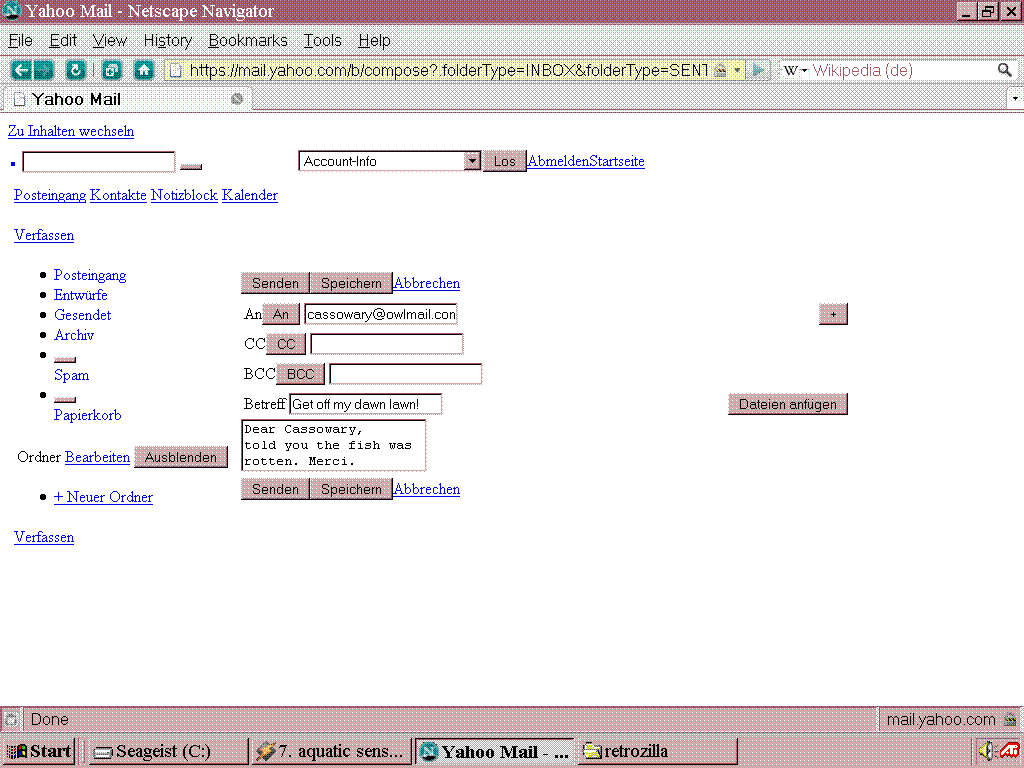
Yahoo Mail is a funny case. If you throw half of the site in the bin, you can actually access the mail without any layout styling at all in your Windows 98 webbrowser (for example Netscape 9.0.0.6), looking perfectly naked (see the image in the attachments). A textbrowser would probably load the site too. Hosts file entries will kill connections to the listed sites (look at C:\Windows\hosts): 127.0.0.1 ads.yahoo.com 127.0.0.1 geo.yahoo.com 127.0.0.1 yahoo.ivwbox.de 127.0.0.1 csc.beap.bc.yahoo.com 127.0.0.1 beap-bc.yahoo.com 127.0.0.1 geo.yahoo.com 127.0.0.1 y.analytics.yahoo.com 127.0.0.1 ad.yieldmanager.com 127.0.0.1 ivwbox.de 127.0.0.1 yui.yahooapis.com 127.0.0.1 ir2.beap.gemini.yahoo.com 127.0.0.1 eu-central-1.onemobile.yahoo.com (I probably missed some servers, that need to be blocked.) I've some old trash account there, when phone verification didn't exist. It keeps asking for a phone number since 10 years or so, but that can be skipped and access was always possible without phone number. Actually, this Seamonkey-Retrozilla has a very good mail client onboard, that supports some newer ciphers. You can start it with "retrozilla.exe -mail" (use the command line or create a starter for this). Version 2.2 works for my Posteo account on an ancient Windows 98 machine. However with that password loop that you're getting, it seems that your settings (outgoing mail and incoming mail need to be configured seperately) are wrong. Although your provider could be an a** too and have shut the option for unencrypted, SSL3, TLS1.0, TLS1.1... hope you get at least TLS1.2! Play around with the ports too. Although setting it to what your mail providers says in the documentation, should do the job. However in some cases, there is more than one port possible.
 1 point
 -
Could it be because they have different SHA-2 updates versions ? And ,as far as I know, they were later included inside of the big all-in-one rollup packs.1 point
-
It does , it's included in the updates, at least someone got it to work. Sorry , don't use win 7 myself to confirm. "After installing today's patches. I found that the cipher suites, signature algorithms and elliptic curves on Windows 7 were updated. Document is here: Microsoft Security Bulletin MS14-066 - Critical https://docs.microsoft.com/en-us/security-updates/SecurityBulletins/2014/ms14-066 User Agent: Mozilla/5.0 (Windows NT 6.1; WOW64; Trident/7.0; rv:11.0) like Gecko signature algorithms: SHA512/RSA, SHA512/ECDSA, SHA256/RSA, SHA384/RSA, SHA1/RSA, SHA256/ECDSA, SHA384/ECDSA, SHA1/ECDSA, SHA1/DSA" https://success.qualys.com/discussions/s/question/0D52L00004TnujbSAB/microsoft-updated-the-cipher-suites-on-windows-71 point
-
Here's a good example for you . memcpy (perfectly working function) was replaced with memcpy_s to ditch Vista . So you need to bring the old function back . Quite the same will be with your win8/10 https://www.tutorialspoint.com/c_standard_library/c_function_memcpy.htm https://docs.microsoft.com/en-us/cpp/c-runtime-library/reference/memcpy-s-wmemcpy-s Understood ?1 point
-
That's precisely what I'm talking about ! Why would a normal person want 120FPS in a game menu !? Now look at the GPU usage . It's 100% with max. clocks !!! Why ?!?! Who works in the IT/gaming industry these days ? 3rd graders ? Or perhaps Nvidia shills who purposely want to destroy your card ? Now look at Spellforce (2003) . With GTX Titan 6GB it's about 5-7% load in the menu and about 89% during hard scenes , like when a pack of FireAngels is approaching your base. That's a perfect example of how a game should work ! And this is with 8K resolution . Yes , you read right . SpellForce supports 8K and any custom resolution you want. Those were the glorious days of IT/gaming industry.1 point
-
I think I already wrote , this "disable siganture enforcement" will not help you if you modded the .dll or .sys files in your driver . It only works if you mod the ini (added devices). I tried modding win 7 64 bit drivers . Change just one bit - error "can't load the driver" . Switched the enforcement OFF , still the same. But you're very welcome to try . But modding 32 bit drivers was a success. Of course you would need to search for the first driver for your device .Later one will be more bloated.1 point
-
Just so you know , there's no such thing as "idling in the menu" , in fact , it's much worse than a torture test . You can try it youself , just launch (let's say sacred 2 , because you're on XP , right? So no DX11 for you) and you will see the card clocks going higher and higher with every second . Now look at the frames , it could go to 300Fps and higher ! So I suggest to turn the sync ON . And even with Vsync ON it will still torture your card , and I advise against its . You might want to skip the menu and go play as fast as you can ! I once went to make a coffee and left Road Redemption (DX11 game) in the main menu . I can't even start to describe the heat that came out of the Black Titan . I guess it was 5-7 minutes tops.1 point
-
Jakob , I can't say much sorry. But for the video drivers you would need to mod them to remove some of the code and/or dependencies , also the bloody artificial block that Intel/Nvidia put there . And that's only the top of the iceberg ! Even to test how they work , you would need to sign them! No procedure to load the unsigned drivers . This trick will not work on modified x64 drivers/systems, I tried. It's good and working only if you mod the "ini" file to add devices. bcdedit.exe /set loadoptions DDISABLE_INTEGRITY_CHECKS bcdedit.exe /set TESTSIGNING ON So I suggest to start modding 32-bit drivers and try, if there are any. As an example , I tried to mod an Nvidia driver that needed only two values to be changed , I succeeded with 32-bit version , because the 64 one wouldn't load (unsigned .sys driver). Where to start ? Extract the driver and look for the missing stuff with Dependency walker. Hope this helps. Dixel.1 point
-
This is "about climate" topic . Do you think USPS trucks pollute the atmosphere ? Yeah , I agree , it's peanuts compared to the russian tanks/rockets near our borders.1 point
-
No problem , sorry . The "easy way solution" comment has been removed a minute ago. I shall not interfere in the future.1 point
-
Nothing to do with luck , you just didn't stress it well enough . I mean , never unleashed the full potential . All that games you play simply can't make the temps go high . Try to run some real DX11 game on it and you will see much , much higher temps . All of those paid reviews from the internet , lol ! They run their cards in a well air-conditioned rooms in open cases ! So add at least 10-15+ Celsius to the testing "results". And Titan black is very hot too , can fry eggs and even meat on it. In a well ventilated case with 2x 140mm intake and 2x120mm outtake : 88Celsius playing Sacred 2. (an old game from 2008). And that is with my room temps at 18-20 Celsius ! So I sold it and now have the first Titan , less heat , but about 86 degrees too. (at least a couple degress less and less noise). The very "talented" engineers from Nvidia made the metal plate with too few holes , so the air is trapped inside . The only solution is to drill more holes.1 point
-
If it's a hardware failure, you could also try and boot up another OS. I'd use a Puppy Linux Live CD. If there is no sound on startup ("woof woof"), the speakers are probably broken. Unless something is disabled in the BIOS settings... did you have a look there? Did you work with Live CDs already? Feel free to ask.1 point