All Activity
- Yesterday
-
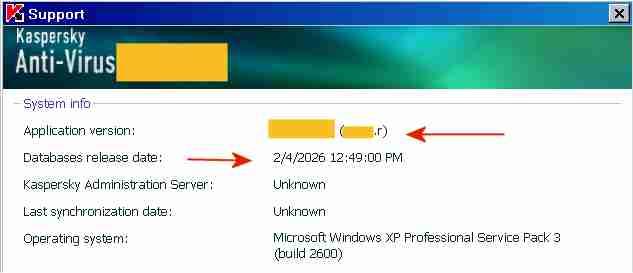
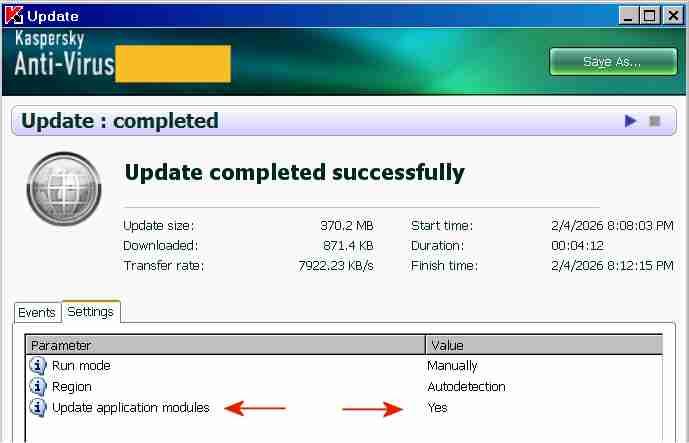
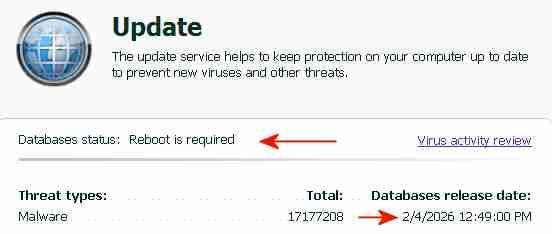
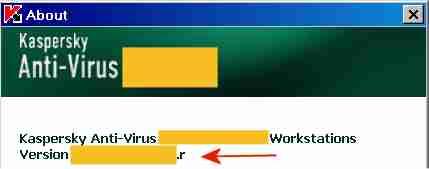
 The "AutoPatches" for My Ancient Version of Kaspersky I succeeded in updating both the application modules and the signatures of My Ancient Version of Kaspersky with a single combined update, without a license key and without activation. The screenshot above indicates the final AutoPatch "r" next to "Application version" and the Database release date "2/4/2026". Once knowing how-to, preparing future combined updates will be quite easy. The term "AutoPatches" by Kaspersky corresponds roughly to the term "Hotfix" by Microsoft. The screenshot above indicates "Update completed successfully" and "Update application modules: Yes". The signature updates were from a Kaspersky Lab update server, the application updates ("AutoPatches") were from my personal archive. Signature updates and application updates ("AutoPatches") were combined into a single update folder. The screenshot above indicates signatures of 2/4/2026 and the message: "Database status: Reboot is required". This message "Database status: Reboot is required" is displayed by My Ancient Version of Kaspersky when the update of the application modules via AutoPatches is pending. A tiny red square is added to the Kaspersky icon in the System Tray, indicating that AutoPatches are pending. During the reboot after the update, the Kaspersky driver updates and installs the program files contained in the AutoPatches and updates the registry, completely hidden and invisible to the user. StartUp Organizer, for example, does NOT notice any changes before, during and after the reboot. After rebooting and AutoPatching, the Kaspersky icon in the System Tray looks again normal, without a tiny red square. The successful installation of the AutoPatches is indicated above by the display of "r" [=version of the AutoPatches] next to the version in the About screen (Note: the About screen is displayed by right-clicking on the Kaspersky icon in the System Tray -> About) and in the Support window (2nd screenshot above). Also, LastSuccessfulUpdate in the registry contains a hex value (Unix timestamp), which confirms that the update was successful. Furthermore, virus-checking with the updated application module and the new signatures works fine. The installation of the final AutoPatches plus a signature update of My Ancient Version of Kaspersky faced three challenges: 1) The files of the final AutoPatches were removed from the Kaspersky Lab update servers and are most likely not available anywhere in the internet. 2) Kaspersky Lab does not provide license keys for My Ancient Version of Kaspersky anymore, which would permit multiple updates. My Ancient Version of Kaspersky is an unexpiring trial version and can only be updated once. An initial update with the final AutoPatches followed by a second update with current signatures is therefore not possible. Only one update is possible, either an update of the signatures from the Kaspersky Lab server or an update of the application module from my personal archive, but not both.. 3) The digital signature of the .xml file in the subfolder \index\ in the update folder impedes the combining of AutoPatches and current signatures into a single update folder. Before August 2019 the online updates from Kaspersky Lab of My Ancient Version of Kaspersky had consisted of three sub-folders: \AutoPatches\, \bases\ and \index\. After August 2019 no sub-folder \AutoPatches\ is created when downloading updates. The sub-folder \AutoPatches\ contained updates of the installed application modules, \bases\ contained the signature updates and \index\ contained only a .xml file validating \AutoPatches\ and \bases\. The .xml file in \index\ contains at the end a string which is an encoded digital signature generated using the private signing key of Kaspersky Lab. Changing text in the .xml file without updating the signature at the bottom will result in the error message "Invalid file signature" when trying to update. The final release of December 2012 of My Ancient Version of Kaspersky had been updated by several sets of "AutoPatches" supported by Kaspersky until 2017, identified by a letter of the alphabet appended to the build number of Kaspersky Anti-Virus. The last AutoPatch for My Ancient Version of Kaspersky is "r" and contains for example an updated basegui.dll, digitally signed OK 26May2014. The AutoPatches for My Ancient Version of Kaspersky were available from the Kaspersky Lab update servers until about 2018. When I tried to update in August 2019, all files of the AutoPatches for My Ancient Version of Kaspersky had been removed from the Kaspersky Lab update servers and My Ancient Version of Kaspersky could not be updated to release "r" (about 26May2014) anymore. The application modules of My Ancient Version of Kaspersky consequently remained those of the final release of December 2012, without any AutoPatches applied.. In addition Kaspersky Lab removed the text string which identified My Ancient Version of Kaspersky, from the digitally signed .xml file in \index\ downloaded from Kaspersky. Kaspersky Lab must have decided by August 2019 to definitely stop supporting My Ancient Version of Kaspersky, because they removed the application update files from their update servers and made it generally impossible to update the program with AutoPatches by removing the string permitting updates of My Ancient Version of Kaspersky from the digitally signed .xml in \index\. The final AutoPatches, including "r", probably also improve the Protection Components of My Ancient Version of Kaspersky. I have used My Ancient Version of Kaspersky only as an on-demand scanner, I have no need for the Protection Components. Nevertheless, I may eventually add the Protection Components to the installation, for further testing and to see whether activation is required to get the Protection Components to work. According to the User Guide of My Ancient Version of Kaspersky, if you select "Activate later" after installation, "you will have access to all the application's features, except for updates (only one application update will be available)".
-

Native (WDM) HD Audio driver for Windows 98se/Me
Drew Hoffman replied to Drew Hoffman's topic in Windows 9x/ME
Byte 0x42 bit 1 of config space (0x02 mask) is the Snoop flag for the ATI/AMD SB450/SB600. I am only setting that bit on those models currently, which are PID 0x437b and 0x4383, but yes I may need to do that for newer AMD chipsets as well. Looks like Mpxplay sets it for several other PCI IDs. You can test with WPCREdit if toggling that bit gives you better results. If you don't know which PCI device is the HD audio controller, it's the one with class 04 subclass 03. I should copy that entire list of PCI Config Quirks from mpxplay or the modern Linux snd-hda-intel. I had originally copied the few that were in the HDA.pas source code of Watler's driver but that list is clearly incomplete. I don't know if the Microsoft KB888111 bus driver sets all the snoop config bits but the HDA bus driver that's about to be merged into ReactOS sure does: https://github.com/coolstar/sklhdaudbus/blob/cf88f2020c836978660f3378917b0dd3274570c9/sklhdaudbus/fdo.cpp#L574 Also there still seem to be occasional race-condition bugs with stopping and then quickly starting streams on both VMware and real hardware. When changing tracks in Winamp 2.95 it may play silence or choppy like the r/w pointers have gotten out of sync and lapped each other. Sometimes the first system sound after stopping music will have a blip of music mixed in, sometimes the short click navigation sound is lost entirely on VMware but this seems to be better on real hardware. -
 I think inserting the brackets is logical and correct.
 -

Native (WDM) HD Audio driver for Windows 98se/Me
deomsh replied to Drew Hoffman's topic in Windows 9x/ME
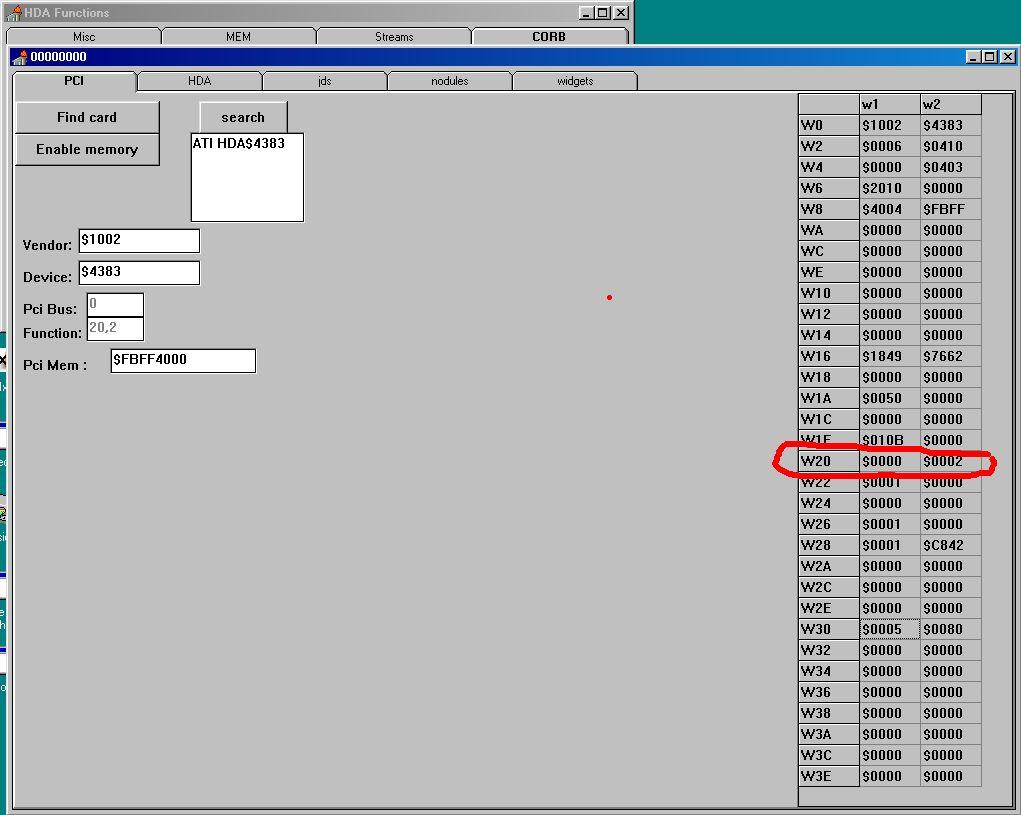
I tested latest version (WDMHDA Alpha-016) on 960GM-GS3 (AMD SB710) with codec ALC662. I got sound if listening to a music WAV-file in Mediaplayer, but first only ONE intermitting 'tone' or 'tic', and sometimes after replay a highly distorted sound, but no music. According to DXDIAG al tests from a software buffer are 'good' (said oke if I heard sound). For High Definition Audio AMD SB710 seems te be same as SB600. First I checked with Watler's tool INTELHDA.EXE (AHDA17O) at pci-level: Except for Pci-Mem same as (working) W20 $0000 $0002: Re: High Definition Audio « Reply #113 on: Dec 2nd, 2017, 4:57pm » QuoteModifyDelete Post Are the chickens happy again? I think I found something interesting with help of AHDA17L. I compared VERB response values and Register values in AHDA17L after starting Windows with and without HDA2.DLL or BUG.BAT (JUDAS21C). On the codec-level I found no real differences when starting Windows with BUG.BAT in comparison with HDA2.DLL only (apart from some minor volume-levels). Also no differences in HD Audio Controller Memory Mapped Registers. In the HD Audio Controller PCI Configuration Space Registers I found one different value in row W20. TEST: AHDA17L NO DRIVER: HDA2.DLL (98E): BUG.BAT (JUDAS21C): PCI W1:$ W2:$ W1:$ W2:$ W1:$ W2:$ W0 1002 4383 1002 4383 1002 4383 W2 0006 0410 0006 0410 0006 0410 W4 0000 0403 0000 0403 0000 0403 W6 2010 0000 2010 0000 2010 0000 W8 4004 F7FF 4004 F7FF 4004 F7FF WA 0000 0000 0000 0000 0000 0000 WC 0000 0000 0000 0000 0000 0000 WE 0000 0000 0000 0000 0000 0000 W10 0000 0000 0000 0000 0000 0000 W12 0000 0000 0000 0000 0000 0000 W14 0000 0000 0000 0000 0000 0000 W16 1849 7662 1849 7662 1849 7662 W18 0000 0000 0000 0000 0000 0000 W1A 0050 0000 0050 0000 0050 0000 W1C 0000 0000 0000 0000 0000 0000 W1E 010B 0000 010B 0000 010B 0000 W20 0000 0000 0000 0000 0000 0002 W22 0001 0000 0001 0000 0001 0000 W24 0000 0000 0000 0000 0000 0000 W26 0001 0000 0001 0000 0001 0000 W28 0001 C842 0001 C842 0001 C842 W2A 0000 0000 0000 0000 0000 0000 W2C 0000 0000 0000 0000 0000 0000 W2E 0000 0000 0000 0000 0000 0000 W30 0005 0080 0005 0080 0005 0080 W32 0000 0000 0000 0000 0000 0000 W34 0000 0000 0000 0000 0000 0000 W36 0000 0000 0000 0000 0000 0000 W38 0000 0000 0000 0000 0000 0000 W3A 0000 0000 0000 0000 0000 0000 W3C 0000 0000 0000 0000 0000 0000 W3E 0000 0000 0000 0000 0000 0000 When starting Windows with HDA2.DLL only and setting W20/W2 to 0002 enables sound immediately when playing a WAV-file in Sound Recorder. Reset to 0000 disables again, etc. When I counted right, this can be Misc Control 2 Register - R/W - 8 bits - [PCI_Reg: 42h] in the AMD SB700/710/750 Register Reference Guide. So I suspected the interface. I believe Watler's driver HDA2.DLL defaults to CORB/RIRB (Verbinterface=$1 in HDACFG.INI), but can be set to Immediate Command (ports). If I try Verbinterface=$0 I get no sound whatever with Watler's driver. So don't know if that will be a solution....
-
.thumb.jpg.e861836bb05fe824ad8ec1930061ee43.jpg) @ED_Sln Just to confirm that the flags works with the latest Ungoogled Chromium (144.0.7559.133). Regards
@ED_Sln Just to confirm that the flags works with the latest Ungoogled Chromium (144.0.7559.133). Regards -
Have problems with icons, picture attached, how to fix that? Latest win 11.
-
 The version there is significantly lower. Even between 2-3 versions, the load can be higher. Check the CPU load in Task Manager. If it is close to 100%, install the h264ify extension or https://vorapis.pages.dev/#/home/download To disable the message about unsupported OS, do the following: reg add "HKLM\Software\Policies\Chromium" /v SuppressUnsupportedOSWarning /t REG_DWORD /d 1 /f
 - Last week
-
Hi George, thanks for the driver. It installed successfully.
-
 The developer's browser from the adjacent topic does not have such oddities.
 -
 I have updated my old guide about compiling Chromium. Now compiling is 100% problems-free. I will check what the effect will be with the e3kskoy7wqk patches—he hasn't published the compilation instructions yet, I wonder if, as before, applying the patches and following the standard compilation procedure will be enough. Edit: Compiling with e3kskoy7wqk working after disabling swiftshader/GLESL tests, but I see it generatings many warnings, probably because he restored old code with methods which triggers warnings in the latest compiler. But it looks like that will work. 22621 SDK is needed.
 -
 Stuttering and freezing on YouTube is not a "bug". It's expecting too much of an old processor, an old OS, and backported browsers to NOT stutter and freeze. There are userscripts that can force h.264 and to force less-resource-hungry resolutions. Again, expecting too much is not a "bug", it's a "reality check". Another thing that I find helpful is to *INTENTIONALLY* "throttle" my internet speed. It does not cause "lags", it forces the streaming service to NOT send me UN-NEEDED 4K.
 -
@Slavich Shazam has already been fixed. Stuttering and freezing of sound and video on YouTube is usually associated with a weak processor that lacks the power to process 1080 video, especially if it is VP9 and even more so AV1.
-
Bugs identified on Windows XP SP3: 1. Sound stutters on YouTube and when switching tabs. 2. Crash when launching Shazam. 3. 1080p YouTube videos stutter. 4. A menu appears with a reminder about the lack of support for Windows XP and Windows Vista (not a bug, but annoying on these operating systems). 5. When switching from one tab to another while listening to the radio online, the speed of the sound slows down, as if it is being stretched.
-

Native (WDM) HD Audio driver for Windows 98se/Me
defuser replied to Drew Hoffman's topic in Windows 9x/ME
It is not necessary that it is a VxD driver. WDM drivers of some sound cards also support FM under Windows 98 (at least) and this is done by the same (Main) device driver (DS1.SYS): -
I should have quit while I was ahead, lol.
-

Native (WDM) HD Audio driver for Windows 98se/Me
SweetLow replied to Drew Hoffman's topic in Windows 9x/ME
The fact that something built as .SYS does not prevent it from using .VXD interfaces. More I can say - it does not prevent from exporting .VXD interfaces. Look at ACPI.SYS for example. Yes, I assume. No. But Windows 9x kernel has enough functionality for any port trapping/injecting into DOS code/interrupt handling chaining you want to use in form of VxD interfaces. P.S. >I don't have much experience or knowledge of x86 assembly. Сalling of vxd interfaces are available in C code of drivers and almost all needed headers exist, of course -
Very true! its quite a godsend
-

Flash 9 not working on NT 4.0? (consolidated thread)
Leokids123 replied to ironman14's topic in Windows 2000/2003/NT4
I've just come to conclusion that 8.5.1 is the last for 95/NT 4.0 and Shockwave 10 (9 is just 8.5.1) isn't compatible with NT 4.0 -
No; newer OpenSSL branches introduce API incompatibilities with the older branches/versions; one would have to modify the source of a given application (relying on OpenSSL 1.0.2) to implement support there for a later OpenSSL branch and recompile the source anew... FTR, the 1.0.2 branch was publicly EoL'ed in the end of 2019, with OpenSSL-1.0.2u (1.0.2.21); this LTS branch is still under Premium Support for enterprises not able to update to later branches, however the needed fee for such support is beyond the reach of private individuals; if you scavenge Russian forums, you may stumble upon some compiled leaked sources, e.g. I did find myself OpenSSL-1.0.2.zi (1.0.2.34) binaries there, but, ofc, I'm not going to post links for them here ...
-
The way I see it, we now have this ... https://github.com/e3kskoy7wqk/Firefox-for-windows-7
-
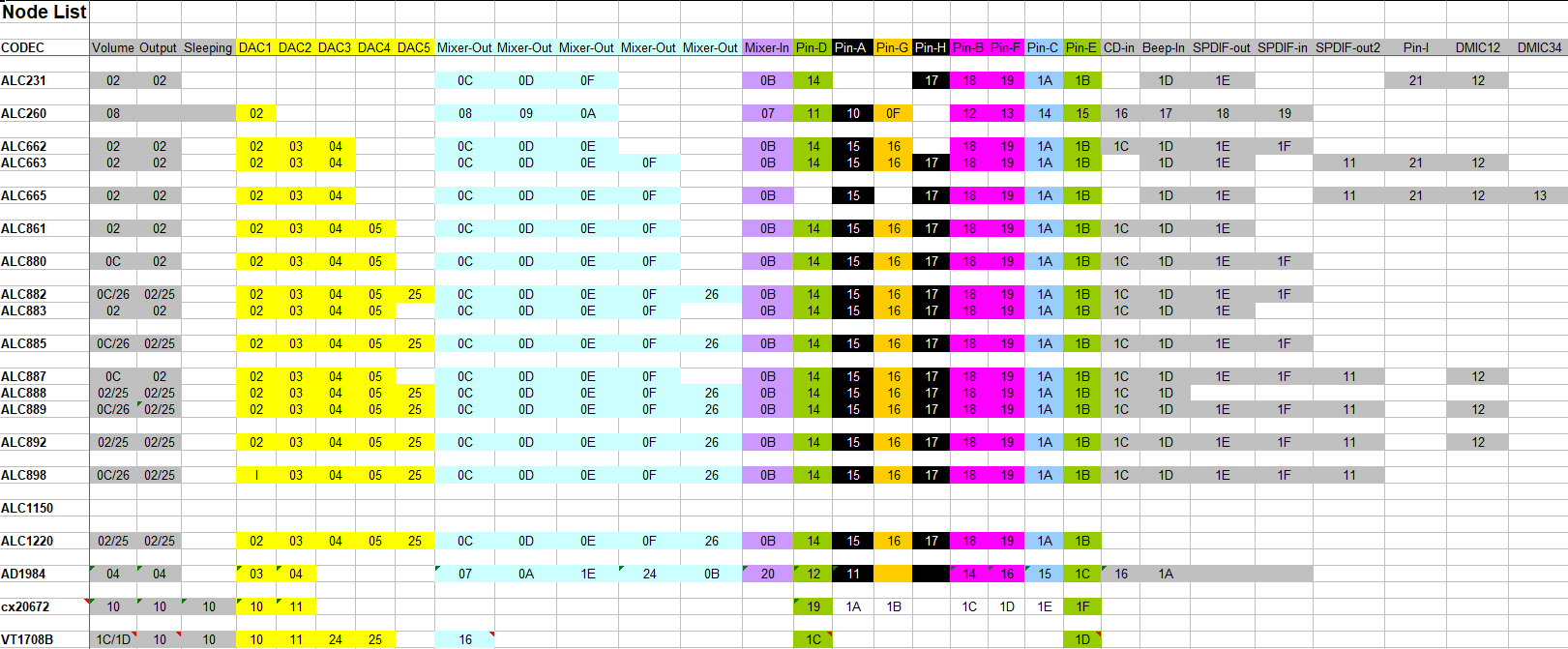
Hi @Drew Hoffman , didn't expect you in this thread.... I am aware of your project (I am reading MSFN daily). So far I had no time to test your driver, but your project looks promising, in case of Windows 98/ME. About your question: difficult to say. If you search in this thread for IDT, it seems there is one report, working with some quasi-universal version of HDAICOUT.HDA. But that's a while ago... I also 'did' one VIA codec (VT1708B) in this thread, additional verbs where needed in that case. But at home I did VT1705 on Asrock N68C-S UCC without. Somehow Realtek codecs have the 'easiest' architecture, I 'did' a few. ALC66x-ALC88x and ALC1220 have roughly the same nodes and same output pin's Apart from extra's in ALC88x. ALC231/ALC260 are already different. This is in my notes (ment for personal use): The lines in my quasi-universal version of HDAICOUT.HDA focus on a few nodes/ widgets for power up, open the playback path and to set the DAC and volume to default values. Because there are about max 200 verbs free for sending at once, and because in my approach HDAICOUT.HDA is used to sent same verb to 'all' nodes/ widgets, so type of verbs is limited. As such this quasi-universal approach is fully 'blind', no intelligence at all (hopefully some in the maker). All based on Intel's High Definition Audio Specification, NOT on specific Realtek codecs. In most of my versions of HDAICOUT.HDA I have concentrated on output's, but I had plans to make a new version to 'open' input-ampifiers too (mixers). But furthermore ignoring Connection Select will be the price to pay. So maybe you can play with '35xxx', '36xxx' or L+R combined: '37xxx', just an idea. From my notes: Set Amplifier Gain 3 Payload(s) Set Amplifier Gain 3 5 0 8 0 Mute Input Channel 0 R Set Amplifier Gain 3 5 0 0 0 UnMute Input Channel 0 R Set Amplifier Gain 3 5 0 7 F Max Input Volume Channel 0 R Set Amplifier Gain 3 6 0 8 0 Mute Input Channel 0 L Set Amplifier Gain 3 6 0 0 0 UnMute Input Channel 0 L Set Amplifier Gain 3 6 0 7 F Max Input Volume Channel 0 L Set Amplifier Gain 3 7 0 8 0 Mute Input Channel 0 R+L Set Amplifier Gain 3 7 0 0 0 UnMute Input Channel 0 R+L Set Amplifier Gain 3 7 0 7 F Max Input Volume Channel 0 R+L Set Amplifier Gain 3 7 1 7 F Max Input Volume Channel 1 R+L But in case of EAPD, Unsollicited Response and GPIO, things are different and often model-specific (laptops). In that case more information is needed. I only did a few codecs/ chipsets, always on a n=1 basis, with help of study of Linux (ALSA)-sources to find appropiate verbs. However you have a parser, should make things more easy (Watler delivers a seperate parser too in version L, but his driver does not use a parser as such). I am willing to help, but I am not a programmer, just an ordinary Joe with more spare time because I am not interested in sports (no offence to readers of this thread ment of course).
-
Native (WDM) HD Audio driver for Windows 98se/Me
Drew Hoffman replied to Drew Hoffman's topic in Windows 9x/ME
So maybe a driver that only does Adlib emulation would be better to create? It's just that SBEMUL is a SYS driver not a VxD (and i think it has to be, because it's acting as a kernel streaming filter driver) but it's using the ASM interface to VMM to install the IO handlers. The alpha of VDMSound does the same port-trapping but for its own SB16 and Adlib emulation and all written as a VxD. I guess there is no other interface to the VDM on 9x? I don't have much experience or knowledge of x86 assembly. -
Is it known yet whether Firefox 115 ESR support will be extended in February 2026? It seems it will end permanently then, because I can't find currently any information about it being extended again. In a sense this is surprising, the W7 and 8.1 market share seems to be fairly stable, and Mozilla previously indicated that they considered the market share high enough to provide 115 ESR with security updates. On the other hand, I hope Firefox 153 ESR will work on W7 and 8.1, so we can continue with updates for at least another year.
-

Questions about Win386 support info in MS-DOS 7.1 data segment
PDU replied to PDU's topic in Windows 9x/ME
Thank you, I think this helps with my question 2). According to your guess, this reform the structure to Opt_Instance_Table struct dw offset sysinittable, 0, CC ; 00 00 C9 00 CC 00 ; This makes sense 0000 + 00CC = 00CC (This is the beginning of SFT) dw offset dosdata:carpos,0, 114DH ; F9 01 C9 00 4D 11 ; This makes sense: 01F9 + 114D = 1346 (This is the begining of DPB) dw 0, 0 ; 00 00 00 00 Opt_Instance_Table ends So, this struct provides two areas for ??? purpose, excluding SFT and DPB. -

YouTube under Windows XP - Downloaders, players and browser support
Ben Markson replied to AstroSkipper's topic in Windows XP
Sorry to resurrect this again but I think the yt-dlp4vlc script has an error. I think the probe function is incorrect . . . function probe() -- Check if the input is a YouTube link return vlc.access == "http" or vlc.access == "https" and (string.match(vlc.path, "youtube%.com") or string.match(vlc.path, "youtu%.be")) . . . should be . . . function probe() -- Check if the input is a YouTube link return (vlc.access == "http" or vlc.access == "https") and (string.match(vlc.path, "youtube%.com") or string.match(vlc.path, "youtu%.be")) . . . notice the brackets around the first 'or' pair. Bit marginal but without those brackets any http url will return true. Ben.