Dave-H
Content Type
Profiles
Forums
Events
Everything posted by Dave-H
-

Firefox 52.9.0 ESR - This field is required
Dave-H replied to reboot12's topic in Browsers working on Older NT-Family OSes
Back on topic guys please. I know I made a post about Firefox Sync myself, but I didn't anticipate that it would trigger a discussion! I'm sure we could have a whole new thread about browser synchronisation systems on XP compatible browsers, but that's not what this thread was originally about. -
Firefox 52.9.0 ESR - This field is required
Dave-H replied to reboot12's topic in Browsers working on Older NT-Family OSes
Thanks @Mathwiz. I also use the latest Firefox on Windows 10 on my desktop, and on the Windows 10 side of my dual boot netbook, which also has 52.9 ESR on its XP side. So Firefox sync allows me to keep things like bookmarks and passwords in sync on five different installations, including the Android Firefox on my phone. Having said that, I have recently gone over to using 360Chrome as my default browser on XP on my main desktop, simply because FF 52.9 is now having more and more problems with sites! -
Not a paf version I'm afraid, but let me know if you'd still like 1.53.
-
FWIW, I've been using DTaskManager for many years, and it is very good, but I found the latest current version 1.57 to be very unstable on my XP system. Give it a try, but if you have problems, I have a copy of the previous version 1.53 which works fine for me.
-
Root Certificates and Revoked Certificates for Windows XP
Dave-H replied to heinoganda's topic in Windows XP
Thanks for the heads-up! -
Firefox 52.9.0 ESR - This field is required
Dave-H replied to reboot12's topic in Browsers working on Older NT-Family OSes
Confirmed here. @xper Has something been changed in the forum coding recently? It was all working fine in Firefox 52.9 ESR quite recently, but no longer does. Thread moved. -
ProxHTTPSProxy and HTTPSProxy in Windows XP for future use
Dave-H replied to AstroSkipper's topic in Windows XP
OK, the thread's locked. I didn't immediately notice that the message boxes had changed, though looking at them again now you mention it, they are a bit bigger than before, which is better for legibility. Presumably the windows do have to come up on screen large and then shrink to the top left corner? -
ProxHTTPSProxy and HTTPSProxy in Windows XP for future use
Dave-H replied to AstroSkipper's topic in Windows XP
BTW, do you think that this thread can be locked now? It doesn't seem to have any future use. -
ProxHTTPSProxy and HTTPSProxy in Windows XP for future use
Dave-H replied to AstroSkipper's topic in Windows XP
I have to say that I haven't noticed any particular changes, but of course I never saw the original and new versions side by side. I do have quite a powerful machine, so the original programs would have worked pretty fast I would have thought, I certainly wasn't aware of any unresponsiveness or lag anywhere. -
ProxHTTPSProxy and HTTPSProxy in Windows XP for future use
Dave-H replied to AstroSkipper's topic in Windows XP
Just to report that I complexly removed the original version and deployed the new one, and everything appears to be still working perfectly! Great job @AstroSkipper! -
I don't really know what to say! I'm amazed that any prospect of getting Windows 98 Update working again is remotely possible, I would have thought that Microsoft would have deleted all the necessary files from their servers years ago, but if it is still possible, then great! Mind you, I never thought that Microsoft Update would ever work again on Windows XP, but it can be made to do so, and it does!
-
ProxHTTPSProxy and HTTPSProxy in Windows XP for future use
Dave-H replied to AstroSkipper's topic in Windows XP
Thank you! -
ProxHTTPSProxy and HTTPSProxy in Windows XP for future use
Dave-H replied to AstroSkipper's topic in Windows XP
Much better! I keep meaning to ask you, why do the filenames of Configure PopMenu.exe, and Setup Min2Tray.exe have spaces in them, but the others don't? Not a problem of course, just wondering if there was a reason for that! -
ProxHTTPSProxy and HTTPSProxy in Windows XP for future use
Dave-H replied to AstroSkipper's topic in Windows XP
Certainly OpenLANSet.exe and CloseLANSet.exe aren't much liked by the scanners! -
ProxHTTPSProxy and HTTPSProxy in Windows XP for future use
Dave-H replied to AstroSkipper's topic in Windows XP
As I said earlier, the thing which some scanners might think is suspicious behaviour is the opening and closing of the IE Proxy Settings function. If you left that out temporarily, if that's possible, it would be interesting to see if you got a different result. -
ProxHTTPSProxy and HTTPSProxy in Windows XP for future use
Dave-H replied to AstroSkipper's topic in Windows XP
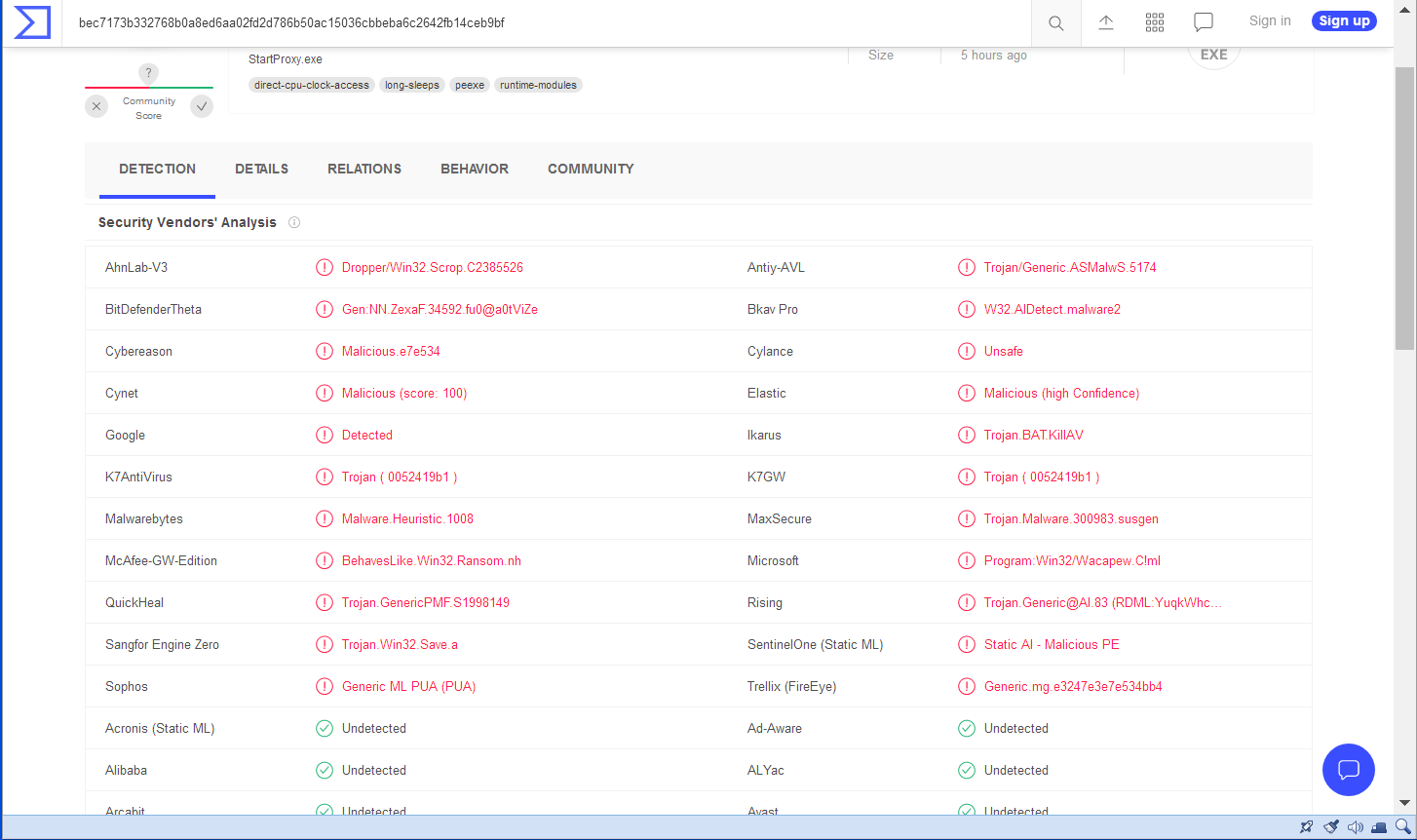
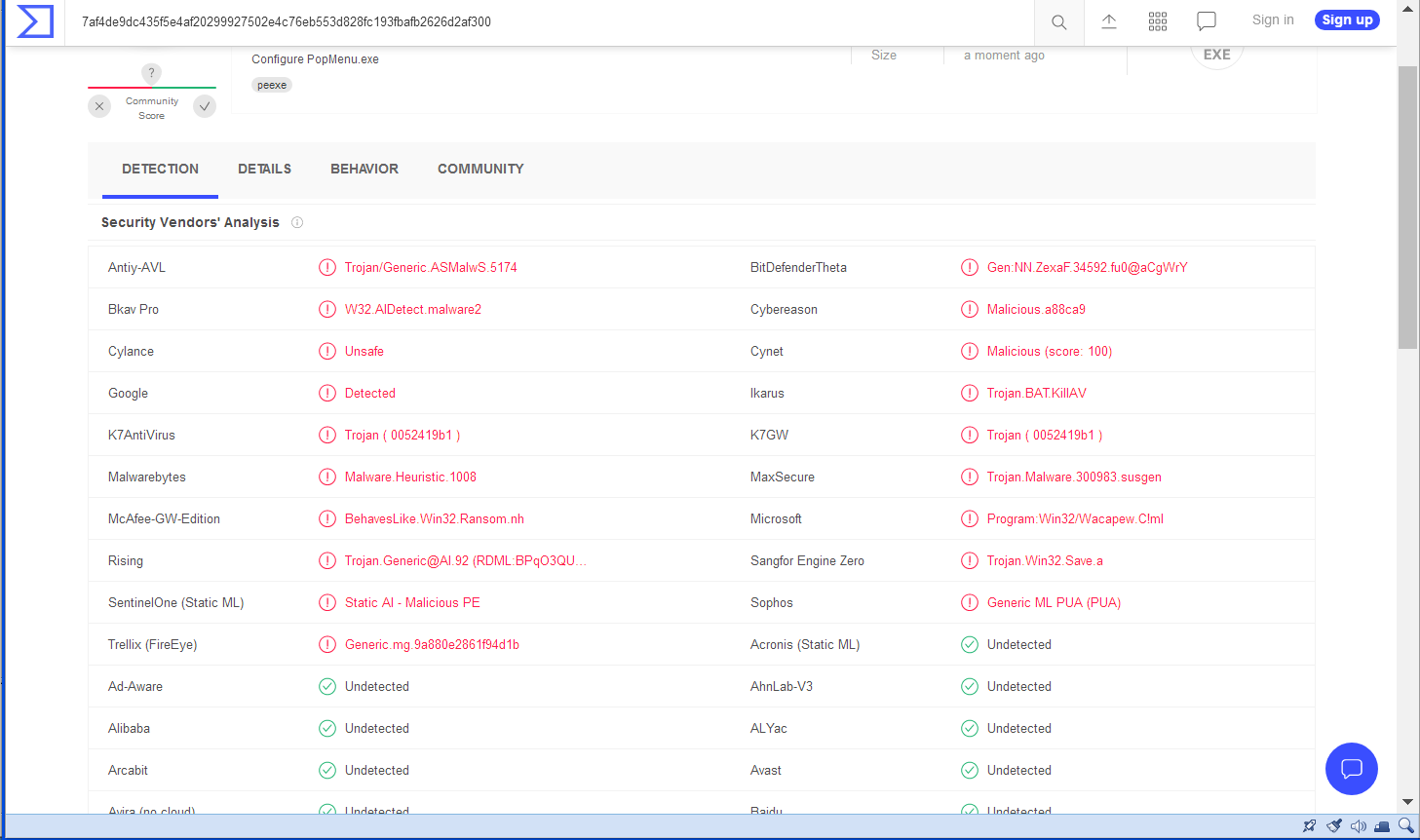
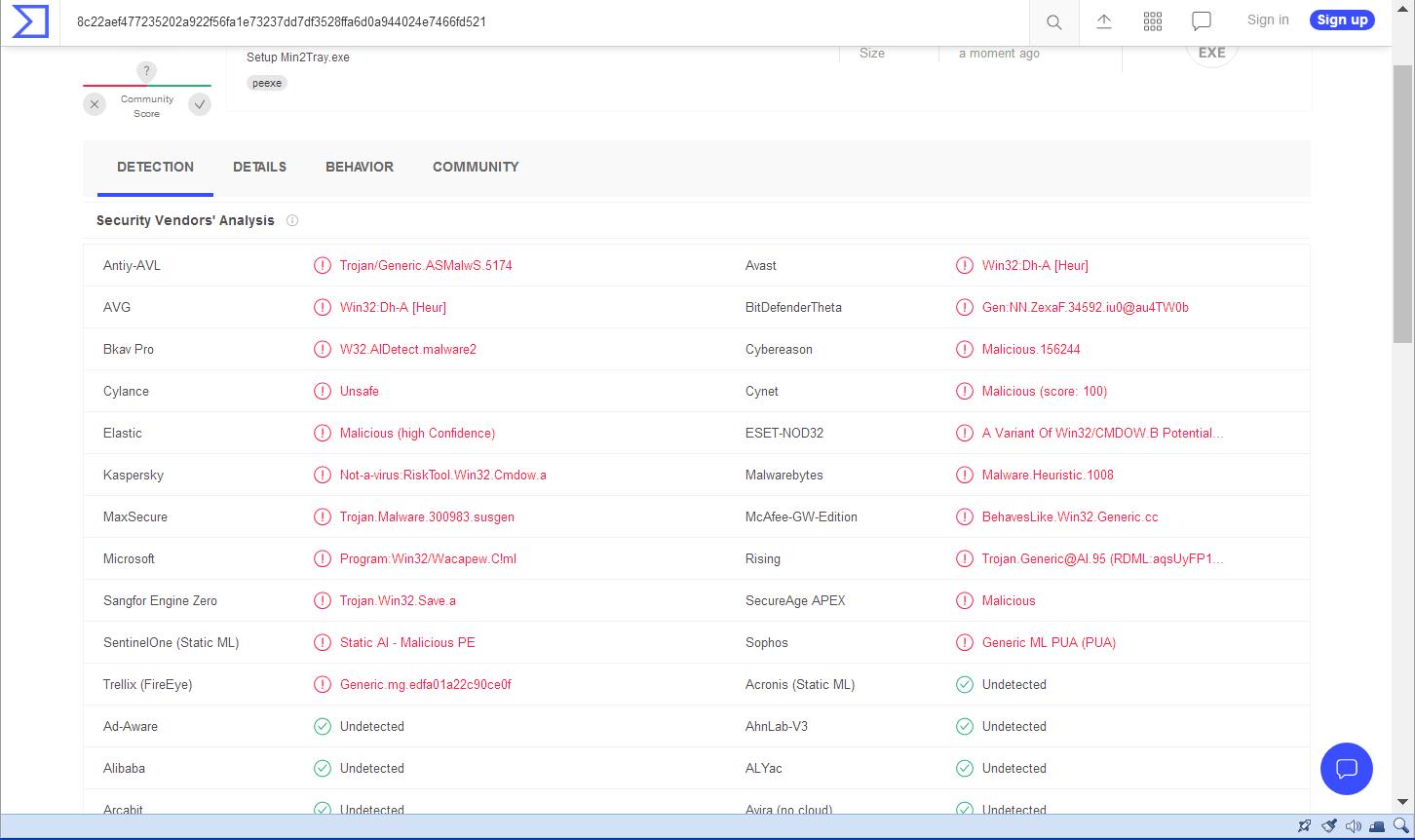
I wish I knew, I've never used VirusTotal before, but I guess they somehow run the file past many different scanners which they might be scanned by if they're downloaded and executed. There are obviously only a minority of scanners there which show a negative result, and I wonder just how many files are deemed to be completely clean! It could be a fundamental problem with batch files being called by the executables, I would guess that batch files are perhaps considered to be intrinsically vulnerable, but I'm only guessing here. What you can do about it, well I'm afraid I have no idea, this is outside my knowledge I'm afraid, -
ProxHTTPSProxy and HTTPSProxy in Windows XP for future use
Dave-H replied to AstroSkipper's topic in Windows XP
This is what I'm seeing. I assume you meant configure popmenu.exe, not configure proxy.exe, which doesn't seem to exist.
-
ProxHTTPSProxy and HTTPSProxy in Windows XP for future use
Dave-H replied to AstroSkipper's topic in Windows XP
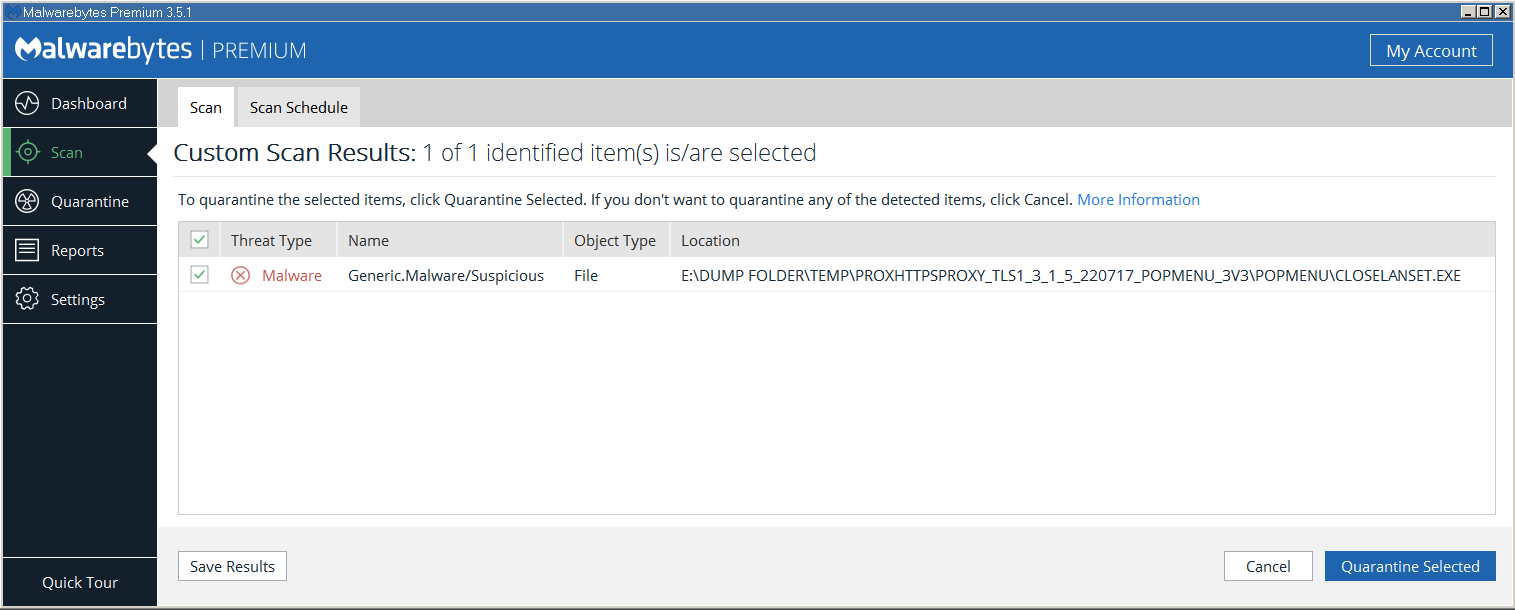
As a test, I extracted your files to a temporary folder, and scanned the folder with Malwarebytes. As you can see, it was suspicious about closelanset.exe. Quite why it would be suspicious of that I'm not sure, but I guess it considers opening Windows Control Panel applets to be suspicious behaviour, which is perhaps fair enough! Why it didn't also flag openlanset.exe is a mystery though if that's the case! Stranger still, if I scan the folder containing the actually working versions of the files, it finds absolutely nothing wrong at all, even when I then scan just the closelanset.exe file!
-
ProxHTTPSProxy and HTTPSProxy in Windows XP for future use
Dave-H replied to AstroSkipper's topic in Windows XP
No ideas to offer I'm afraid, this is not something that I have any knowledge about, but FWIW none of the versions of your programs I've used triggered any warnings for me. I'm using Malwarebytes premium, which has real-time scanning. -
“Be mindful. Be grateful. Be positive. Be true. Be kind.”
Dave-H replied to XPerceniol's topic in Funny Farm
This is a final warning. -
“Be mindful. Be grateful. Be positive. Be true. Be kind.”
Dave-H replied to XPerceniol's topic in Funny Farm
Back away from antagonistic political discussion please guys. That is not allowed here. Rule 2b. Topics devoted to political or religious debate, unless technology related, are prohibited. MSFN is a technology forum and both political and religious debates have caused many problems and distractions in the past. Political or religious links in signatures or polite, courteous comments in non-political or non-religious topics are allowed, but we cannot allow any topics in which the sole purpose is to debate political or religious issues. -
Ah, understood! I'm sure you're right, and of course if the machine is from 2006, there's no reason why it wouldn't install XP! I suspect, as @RainyShadow has said, there is a hardware fault of some sort.
-
Have you switched the BIOS to compatible mode? In my experience AHCI mode will not work unless and until you've got XP installed and can deploy a suitable driver for it.
-
ProxHTTPSProxy and HTTPSProxy in Windows XP for future use
Dave-H replied to AstroSkipper's topic in Windows XP
Just an off-topic language usage point, "waiting for the release of AstroSkipper" could imply that you're in prison or something, and we're waiting for you to be released! You would normally qualify it, "waiting for the release of AstroSkipper's software" or something like that, to make it clear that it's not you that's being released. -
ProxHTTPSProxy and HTTPSProxy in Windows XP for future use
Dave-H replied to AstroSkipper's topic in Windows XP
It takes as long as it takes! Better to be absolutely sure it's right than have to subsequently withdraw and reissue it. There was a standing joke here some years ago that whenever anyone kept asking when something was going to be released, the standard answer was 'WIR'. When It's Ready!