Dave-H
Content Type
Profiles
Forums
Events
Everything posted by Dave-H
-
'Guys' is definitely one of the many Americanisms that polluted entered British English a long time ago, but until relatively recently was only used for men. Groups of women being called 'guys' (often by women members of the group) is now common though. Personally I consider that to be slang! Anyway, having just hypocritically added to it, back on topic now please!
-
 Thanks, I'm about to go away for Christmas for a week now, but I will certainly try it when I get back on the 28th!
 -
I'm sure I've downloaded files from Mega with 360Chrome, and it worked fine.
-
Me too. Best browser ever.
-
Until the time comes when it no longer actually works on many websites, I couldn't care less how old the Chromium version is!
-
I second that! I'm sure I know what the answer will be, but this version still doesn't enable my Lenovo Flex 10 to reboot, it still just hangs on the shutdown screen. I guess this isn't something that's being addressed at the moment, but if it could be, I would be very grateful indeed.
-
You are perfectly entitled to start a new thread for users of 'vanilla' Windows 98 only, if you feel it to be necessary. This thread had gone far beyond that, to the point where trying to clean it up would be pointless and would make a nonsense of it. Any new thread must be kept strictly on topic though, or it will go the same way!
-
As far as I'm concerned, as a user, not a moderator, all that matters to me is that this browser works on almost all sites, and runs fine on XP. If it's still sending telemetry to foreign servers, despite all of the efforts of @NotHereToPlayGames, then so what? I bet it's still no worse than using the 'latest and greatest' browsers on Windows 10 and 11, which millions are doing, sending masses of usage data to servers in the States and elsewhere. If 360Chrome is sending it to China and/or Russia, they can fill their boots as far as I'm concerned. I hope they choke on it! Unless and until anyone proves to me that 360Chrome can legitimately be considered to be any form of serious malware, I will continue to use it without a thought. There's a very fine line between legitimate security concerns and paranoia.
-
This thread will not be locked, unless and until there is a compelling reason to do so.
-
Inflammatory and sneering remarks about other people's work are not welcome here. Please desist from this.
-
Just for the record, the word 'vanilla' was not removed from the thread title 'arbitrarily' at all. It was removed after a moderators' discussion which was triggered by getting a report requesting that the thread be locked as it had drifted into discussing general issues with all versions of Windows 98. We felt that it was a valuable thread that should not be closed, but it had become more of a general discussion about running Windows 98 systems in the present hardware and software environment, so the title was amended to reflect that. That is how it will remain.
-
Done.
-
@WinWord2000 Try tagging some of the people who are posting in the XP thread, as I've tagged you above. That will draw this thread to their attention. They may say that they have no interest in working with Windows 2000, but at least then you'll know!
-
The simple answer is to not replace anything in the \Program Files\360Chrome\Chrome\User Data folder. Ignore the User Data folder which comes with the new build, that's just an 'empty' profile for first time users. That has never failed me!
-
I just updated to the Rebuild 3 version of the 'Googled' version. All working fine thanks. As an aside, I was interested to see that the (now removed) menu options to generate QR codes from links, and share images, both seemed to depend on you having a mobile version of 360Chrome installed. Whether this is for Android, iOS, or both I don't know, but it certainly isn't in the Android app store!
-
Fair enough, but my comments still stand. This is in the Windows XP section of the forum. Windows 2000 has its own section, please use it.
-
@WinWord2000 I can't help but think that Windows XP had diverged considerably away from Windows 2000 once SP3 was issued. This thread is specifically not concerning Windows 2000, as its title states. Stay on topic here please, and if necessary start your own thread about this in the Windows 2000 section. You can put links here to it, and hopefully you will get relevant input to it from the contributors here.
-
Right, this personal bickering has gone on long enough, again! If you want the 'reputation' system changed, I suggest that you PM @xper who is the owner of this forum. It will not be changed without his decision. This thread is now locked.
-
I think I answered my own question! I tried it, and it works, but no differently to the previous version. The machine still hangs on reboot, which was the only outstanding problem it still had.
-
Presumably this new version of acpi.sys will make no difference on my Lenovo Flex 10?
-
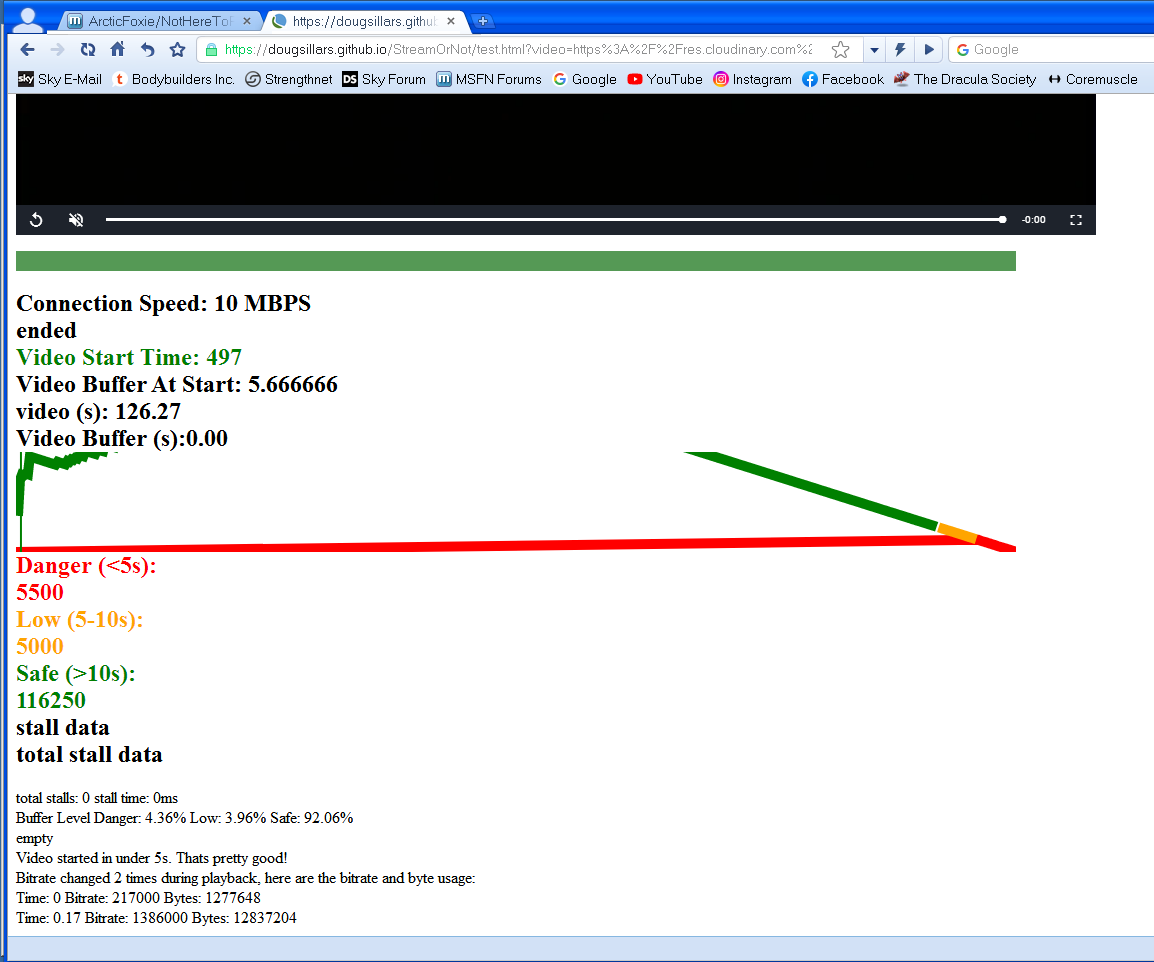
Does this look OK? Strange how the green line on the graph vanishes out of view when it goes high! Don't know if that's a display error or not.

-
I'm still using rebuild 1. Should I update to rebuild 2? Is rebuild 2 only available 'un-googled'?
-
Sorry, this was originally put into the 'announcements' section, where apparently it cannot be replied to. Please do add replies now. Thanks, Dave.
-
I hope it won't keep you that busy, it took me all of two minutes to do!
-
Sad news for everyone here at MSFN. One of our forum supervisors, Dencorso, passed away on October 24th, after a long and courageous battle with cancer. Apparently he was still upbeat and optimistic about the future a few weeks before he passed. My memories of Den go back quite a few years. He was incredibly helpful to me with technical problems, which is what this board is all about of course, initially mainly with Windows 98, and latterly with Windows XP. He was immensely supportive too when I first became a moderator here, something I will always be grateful for. He was definitely one of the good guys, and will be sorely missed here. Please add your memories here of working with Den. Thanks, Dave.