Leaderboard




Popular Content
Showing content with the highest reputation on 05/23/2024 in all areas
-
Good to know. I will also change that in my next release.3 points
-
Our 26100.1 ISO came from a trusted U.S. source. It is a digital license, but we don't like to cheat (too much anyway).2 points
-
In general, absolutely unnecessary. If Avast can't be removed from Windows inside, no matter whether in normal or safe mode, you can do this from outside. I did that in the past to remove locked registry entries which couldn't be deleted from Windows inside, not even by using Avast Clear in safe mode.2 points
-
A major progress -" involuntary connections to Google services, which will be pared back in response to users' complaints." https://github.com/win32ss/supermium/issues/6002 points
-
Fixed! "If using --ungoogled Chrome Store cannot be used" https://github.com/win32ss/supermium/issues/5932 points
-
In France one can get seriously beaten up for a talk like that.2 points
-
Starting point for the Part II is here. From Elira's post: Stale1 point
-
Start1 point
-
Exctrlst: https://techcommunity.microsoft.com/t5/ask-the-performance-team/two-minute-drill-disabled-performance-counters-and-exctrlst-exe/ba-p/374538 https://www.softpedia.com/get/System/System-Info/Extensible-Counter-List.shtml jaclaz1 point
-
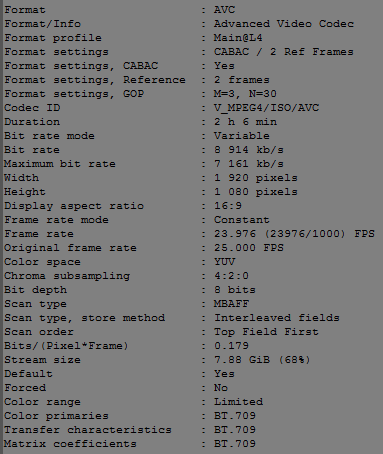
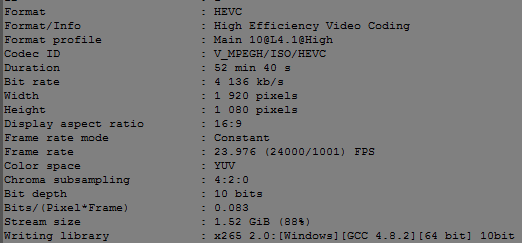
MPC-HC claims it's a "format", while V_MPEG4 (H264) is a proper codec name, take a closer look at the posted screenshot above.1 point
-
The irony is, the original idea behind Pale Moon, waaay back before XP even, at least as I understood it, was that it was supposed to just be Firefox optimized for Windows, so it was supposed to be (and seemed to be, on my ancient Win 98 PC) faster than vanilla Firefox. No new or different features, just better performance. This was like PM 3.6 or so, but it sure seems like they went astray somewhere along the line. And enabling AVX or whatever in 64-bit builds isn't going to make up for it. I tried disabling multiprocess mode on St 55 on Win 7 and had a similar experience. Couldn't even type a post on MSFN at 10-20 seconds per letter, with one CPU core maxed out! So, even with a single core, you might have had better luck with e10s forced on. It's my opinion that the OS version makes little difference in performance, assuming the application (browser or whatever) will run on both OSes. The app might be faster if optimized for a newer version, but in that case it's unlikely to run on the older version at all. It's mostly the hardware, rather than the OS, that provides good performance.1 point
-
@Anbima If you try Thorium as a solution to your secure connections problems with 360Chrome, and you have issues, please address those problems in the Thorium thread. Thorium should not need the use of any proxies, as it is based on a very recent Chromium version.1 point
-
Just a little reminder. This thread is about proxies. I believe there is no need to use Thorium together with ProxHTTPSProxy. @Dave-H Can you please move your conversation with @Anbima to the Thorium thread? A bit offtopic is normal and ok but I think this is the wrong place here. The Thorium thread is more suitable. Thanks!1 point
-
As I said, deepl is not important because no sensitive data is transmitted. DeepL was only an example. When using 360Chrome together with ProxHTTPSProxy, then either the settings in IE8 have to be changed or the Manual Proxy option has to be used by Proxy Switcher. All this can be clearly seen in ProxHTTPSProxy's logging window. BTW, the web interface of DeepL is broken in 360Chrome. It looks like a CSS issue.1 point
-
Burger Chrome & Google user here, AI overviews enabled. No ads thus far (desktop Chrome, have disabled UO & refreshed to check). AI results are pretty good -- exactly what i'm looking for ~95% of the time, hallucination-free thus far (not even once), info's no more outdated than all search results. OTOH, not searching for politics/current events, those might be right-think du jour. Don't miss out! ♫ I hope someday you'll join us/And the world will live as one♫1 point
-
AVC is H.264 or Mpeg4 part 10 : https://en.wikipedia.org/wiki/Advanced_Video_Coding1 point
-
When it comes to Deepl, you should use the Manual Proxy instead of the System Proxy option in Proxy Switcher. 360Chrome v13.5.1030 Redux in combination with Proxy Switcher seems to have problems when using the System Proxy option. Just tested with ProxHTTPSProxy. The Manual Proxy option works fine without any errors.1 point
-
I have to say as someone who's used Malwarebytes (Premium) for many years now, that I have never been aware of it producing false positives to justify its existence!1 point
-
Browsers don't get streams in containers, both audio and video streams are served separately.1 point
-
No, those are my screencaps from MPC-HC (streaming youtube, but then again, I get the same stats if I simply download them with a saving extension in Thorium.1 point
-
Bite1 point
-
Shouldn't they be identified by the codec in the browser? HEVC - V_MPEGH, H264 - V-MPEG4, respectively. I mean, AVC is format, not codec. Or no?
 1 point
 -
Which developer do you mean? Please, be a bit more precise! If you mean the extension developer, I assume he warns the user not to misconfigure the Proxy Switcher extension and not to use unsecure web proxies. Which proxy do you mean? If you mean ProxHTTPSProxy, this local proxy is as secure as Windows XP and direct connection is.1 point
-
I had to create for each domain a separate, new IF query otherwise it wouldn't have worked in my installation.1 point
-
@Anbima didn't say anything about that. If one doesn't make clear announcements, one can't expect to get exactly the information one needs. We are not clairvoyants. If the PAC script contains a different URL than the one you want to call up, you don't have to be surprised that it doesn't work.1 point
-
Duke1 point
-
Cure1 point
-
Dire1 point
-
Dice1 point
-
Pine1 point
-
sine1 point
-
Proxy Switcher and Manager 0.5.0 is the last compatible to 360Chrome due to the manifest change from 2 to 3 and works great. I tested Direct, Manual Proxy (set here the local proxy 127.0.0.1:8079) and PAC Script, and all worked as it should. So, a working PAC script (not a PAC file but a PAC script under the section Inline) can be inserted directly in 360Chrome. No need to do that in IE8 and no need to activate ProxHTTPSProxy in the system proxy settings of IE8 by inserting 127.0.0.1:8079 there. Simply call up ProxHTTPSProxy.EXE directly from the main directory of my package instead of StartProxy.exe! And that means by using this extension you can also use @cmalex's ProxyMII if you prefer a pure proxy without any comfort. BTW, all that was done in 360Chrome in a few minutes.1 point
-
Check the correct URL of the website which is supposed to use the local proxy! It should be example.com for testing and not *.example.com. But in the end, I don't understand the whole effort for just two websites. It would be easier to use a proxy extension to switch from the direct connection to the local proxy or vice versa whenever necessary.1 point
-
Same works for Back 4 Blood: Ultimate Edition Build 14216215 (Zombie game).1 point
-
Bone1 point
-
That's exactly why I support the idea of MSFN, and actually the reason for all my efforts here. In my case, let Windows XP live forever or at least as long as possible.1 point
-
pelt1 point
-
Belt1 point
-
walk1 point
-
I checked again all three extennsions. My favourite is Autoplay Whitelist. This one memorises all permitted websites in a whitelist.1 point
-
What makes you think I didn't read it? It was a personal thought of a random Reddit poster, while I got you a >Solved< page explanation. "Spotify is not working under VPN. I'm getting 403 error. I'm using my work VPN and it's always been OK." https://community.spotify.com/t5/Desktop-Windows/403-Error-when-using-VPN/m-p/5470802#M114786 How then you explain the same man not getting any errors with work VPN? I have a hunch it's related to the new fingerprinting techniques that are working differently with Thorium.1 point
-
You're wrong. First, I didn't use VPN, second, it says: the page "isn't not working", when someone is blocked, the error code is "403 FORBIDDEN". I get 429, not 403, please pay attention to what I write. 403 Error when using VPN, again my error was 429, not 403. https://community.spotify.com/t5/Desktop-Windows/403-Error-when-using-VPN/td-p/5470781 https://en.wikipedia.org/wiki/HTTP_403 https://support.google.com/chrome/thread/214178109/what-should-i-do-with-error-403-when-i-user-vpn?hl=en1 point
-
cake1 point
-
lace1 point
-
sole1 point
-
core1 point
-
Is there a way to run TEKKEN 8 on dx11?1 point
-
Here are 2 photos of my Shuttle Hot 433 board, with running full XP SP3 on it. I notice, that even from version 1...3 of this board, they have different IDE controllers, so you cant switch from one board to next with the same XP SP3 installation. This strange behavior I have never seen for any IDE controller before. Next step is to build an full Setup XP486.iso. I make a try, to overcome also there the crazy opcode cmpxchg8b and also the "Unknown Processor" hurdle. Any help is welcome, which files on the xp.iso have to be changed, for to kick out those checks. It is not so much difficult I think. My files without any cmpxchg8b are quite stable, anyway I will update them and I also make an english version Dietmar1 point
-
@roytam1 Yesssssaaa, I got it, XP SP3 on my Shuttle Hot 433 board and AMD 100MHZ 486 cpu Dietmar PS: Boot time to desktop is about 2 min. Via F8 you have to enable VGA modus. New ntoskrnl.exe with modd from @roytam1 https://ufile.io/peux59x61 point
-
My partner and I just built an Alder Lake system. I installed Windows Vista Ultimate x64 SP2 with the Extended Kernel and it works great! There is absolutely no drift-like behavior as seen on Haswell (4th gen) thru Tiger Lake (11th gen). Here's a screenshot: Just like Windows 7, the processor cores do not show up in Device Manager, however it is recognized in System Properties. Ethernet drivers are also currently unavailable, however since I am friends with win32 and speak to him on a regular basis, I asked him if he could possibly get the ethernet drivers working. He said he would have to add functions to NDIS & ntoskrnl, but he could do it at a later time. Right now, I use USB wifi which works fine but I could just install a Vista-compatible PCI ethernet card if I wanted to. Specs: Asrock Z690 PG Riptide Motherboard Intel Core i7 12700KF 32 GB RAM NVIDIA GeForce 980ti GPU w/modded 398.11 drivers by win32 Samsung 870 EVO 2TB SSD Windows Vista Ultimate SP2 x64 I may try UEFI at a later date with UEFIseven, but for the time being I am using Legacy boot with no problems. Windows Vista/7 also do not properly turbo the P & E Cores, however enabling High Performance in the BIOS simply makes the cores turbo up constantly so it runs great with no performance issues. I dualboot with Windows Server 2012, which does turbo the cores properly (and has drivers for everything, including ethernet).1 point