All Activity
- Past hour
-
Tested RaiseException=v4, and 0xFFFFFFEA exception seems to appear again in both XP SP3 and XP SP3 (Debug mode): WATSON07.WLG

- Today
-
Yes: RaiseException(406d1388) again. Use =v4 and hope for additional debugging text from DebugBreak or OutputDebugString in the logs before the code -1 exit.
-
roytam1 said: "runtime files are not changed and it works on XP SP2 with hotfix or SP3 using same runtime files, so the problem could be in w2k extended kernel." https://o.rthost.win/palemoon/palemoon-28.10.7a1.win32-git-20251225-d849524bd-uxp-fd19819276-xpmod.7z https://o.rthost.win/palemoon/palemoon-28.10.7a1.win32-git-20251225-d849524bd-uxp-fd19819276-xpmod-ia32.7z Please,can someone confirm if W2K with KernelEx works with the above latest versions of NM28 ?
-

My Browser Builds (Part 5)
nicolaasjan replied to roytam1's topic in Browsers working on Older NT-Family OSes
I have Windows 2000 with extended kernel here in a VM and the latest New Moon works fine. -
Has anyone tested the latest version with Signal?
-
I tried using debug mode with IsDebuggerPresent enabled, seems like it crashes on NSS3 instead of XUL (probably further than it should be?). Here I provided both DrWatson and ApiLog logs for Mypal68 (updated for WATSON05_NODBG.WLG, XP SP3 mode without debug) : Mypal.zip Dependency Walker (XP debug mode):
-

My Browser Builds (Part 5)
VistaLover replied to roytam1's topic in Browsers working on Older NT-Family OSes
https://en.wikipedia.org/wiki/International_Components_for_Unicode -

My Browser Builds (Part 5)
AstroSkipper replied to roytam1's topic in Browsers working on Older NT-Family OSes
Yep! It works. A working login form appears. But a login is only possible for school or business accounts. Private accounts are not supported. I tried to configure my old, private hotmail.com account but a message came up that private accounts are not supported. -

My Browser Builds (Part 5)
Mathwiz replied to roytam1's topic in Browsers working on Older NT-Family OSes
What is "ICU" anyway? -
My Browser Builds (Part 5)
Mathwiz replied to roytam1's topic in Browsers working on Older NT-Family OSes
Finally! It was so simple too. Just change the UA and it works! I could've used this years ago! Unfortunately it comes too late for me. My workplace has a new "security" admin who refuses to authorize any app other than M$ Outlook. (Well, he did relent and authorize GMail for phones.) MailNews looks like Mozilla Thunderbird. Thunderbird is perfectly fine from a security standpoint, but he's not going to unblock it because "why do I need to use another email client besides Outlook?" Still, it's nice to know that it's at least possible on XP again. - Yesterday
-

My Browser Builds (Part 5)
roytam1 replied to roytam1's topic in Browsers working on Older NT-Family OSes
runtime files are not changed and it works on XP SP2 with hotfix or SP3 using same runtime files, so the problem could be in w2k extended kernel. -
The log looks good until IP suddenly jumps to high system space. A crash dialog stack dump or Dr.Watson stack unwind would be helpful here to see where execution came from. What happened to the RaiseException error? That was the reason for trying in DW and Finesse. They don't all need to be redirected. Avoid API-MS-WIN dlls as much as possible, redirecting them to Kernel32.dll itself or other system dlls. See my API-MS-Win.reg file for details. Try using KernelEx XP-Debug mode for possibly more messages in AppLog. If already doing so, try changing IsDebuggerPresent to Kexbases.0 (0:False, 1:True) in Core.ini to possibly avoid the RaiseException errors when not profiling in DW.
-

KB2839299_2003 derived fltMgr upgrade that it is not...
Multibooter replied to modnar's topic in Windows XP
Besides speed, system stability could be another criteria for deciding between fltmgr.sys build 5107 and build 6912 under WinXP. eMule could be used for comparing system stability/uptime when running with fltmgr.sys build 2180 [WinXP SP2] vs build 5107 vs build 6912. eMule, installed under WinXP SP2 and running 24/7 on a dedicated old Inspiron laptop (500MHz, SSE-only, 512MB RAM), tends to crash with the original fltmgr.sys build 2180 after downloading for 7-14 days. Build 5107 has been installed to see whether it can increase eMule uptime, i.e. system stability. -
I'm not so sure about that. If you take a closer look at the scan results for the completely clean cmdow.exe file, you'll see that Kaspersky flags the file, but Panda Antivirus and Avast do not. Everyone can draw their own conclusions from this.
-
We finally agree on something!
-
This confirms my statement: And the moral of the story: don't trust scanners blindly.
-
https://www.virustotal.com/gui/file/767b877e735c425bf05c34683356abfde4070b092f17a4741ea5ac490611f3de https://www.virustotal.com/gui/file/9f805311953057a944567d9a2e45ee4d65ffb7804925115b3b05bf02d3ff7821
-
The archive is definitely virus-free. It was password-protected by me since MediaFire uses scanner which tend to produce many false alarms. Kaspersky is as bad as the virus scanner which MediaFire is using. These files are all clean and virus-free. The cacert_Updater.exe file has been fixed by me as the original version from @heinoganda stopped working. It is totally clean. And the cmdow.exe file is a DOS file from a trusted source and checked by me. Unfortunately, some scanners don't like it but it is totally clean, too. So, forget about Kaspersky and similar scanners. Set exclusions if you trust me. And if not, don't use it. In any case, I will not change anything in my packages because of faulty or overly cautious virus scanners. I have invested a lot of time in programming and am not going to start compensating for the inadequacies of certain virus scanners now. BTW, many virus scanners don't like exe files which have been generated by BatToExe converters due to their compression type. I use such converters and don't care about false positives of those scanners. Excluding such files from scanning is my way of dealing with this nonsense.
-
 nice one, but you said the exact oposite according to this they do not need a real name, real email, no smartphone number to gather this information -> witch means these services dont need to ask us these things to do so then dont ask us for our real name, our mail address or phone number -> just putting the logic right and a company should not do a such thing at all
 -
Thanks, AstroSkipper. But pw-protected "ProxHTTPSProxy_TLS_1_3_1_5_220717_PopMenu_3V3_CheckedByAstroSkipper.7z", containing your software package, has still the same issue (false positives by Kaspersky) which I posted on 14Jan2025, https://msfn.org/board/topic/183352-proxhttpsproxy-and-httpsproxy-in-windows-xp-for-future-use/page/61/ cacert_updater.exe and cmdow.exe inside your package still get flagged as Trojan and riskware by Kaspersky. mediafire: "This file was uploaded from Germany on January 14, 2025 at 9:50 AM" I surely want to believe that your package is clean. Maybe you can make these two files look clean or replace them, not just password-protect them? Many good little files have disappeared into oblivion because they were flagged.
-
well what you wrote now just goes to what i said in the past i dont join other projects like win2k or vista , nor i make a version war but it keeps ringing these questions - you followed that and you drained out i told sam and others a similiar thing - but yet he wants to go for win2k the todo list is far to big to jump around - in the end nothing is done while dibya for example started a vista version - what made me like angry because i know it leads to something like that
-
Yes. Install my package ProxHTTPSProxy's PopMenu TLS 1.3 3V3! Inside the archive, there is a short and a long, more detailed user manual. The user should read it carefully. All in all, installing my package is very easy, and the configuring of the PopMenu is done automatically. When done, start the proxy. Finally, you have to set the proxy in Panda's settings menu. The address is 127.0.0.1 with the port 8079. You need this proxy only once for the activation. When done, you can delete the proxy settings and close the proxy.
-

My Browser Builds (Part 5)
MilkChan replied to roytam1's topic in Browsers working on Older NT-Family OSes
KB936235 : info file newversion KB955988 Replace the Cimwin32.dll file. KB2676562 Leak Update Version for SP2 Replace all nt kernel & system files KB944340 : info file newversion KB2676562 Leak Update Version for SP2 Replace the kernel32.dll file. You can get all my Source Files Update Packs SP2 here. I would like everyone to archive them. Because they hotfix share is gone forever. https://drive.google.com/file/d/15B55MqPXmJlbSx3Uc4qNmXpsaUH63oBt/view?usp=sharing my link backup in archive.org https://archive.org/details/windows-2000-post-sp4-update-pack https://archive.org/details/windows-xp-post-sp1-update-pack https://archive.org/details/windows-xp-post-sp2-update-pack https://archive.org/details/windows-xp-post-sp3-update-pack https://archive.org/details/windows-xp-and-server-2003-x64-update-pack https://archive.org/details/windows-server-2003-x86-update-pack_202506 -
Owned 100% by a U.S. company with U.S. government contracts? On the other side of the globe: Eugene Kaspersky's background? Searching with the Yandex search engine for: Kaspersky Putin lists interesting articles, for example the 2012 article https://www.brookings.edu/articles/russias-top-cyber-sleuth-foils-us-spies-helps-kremlin-pals/
-
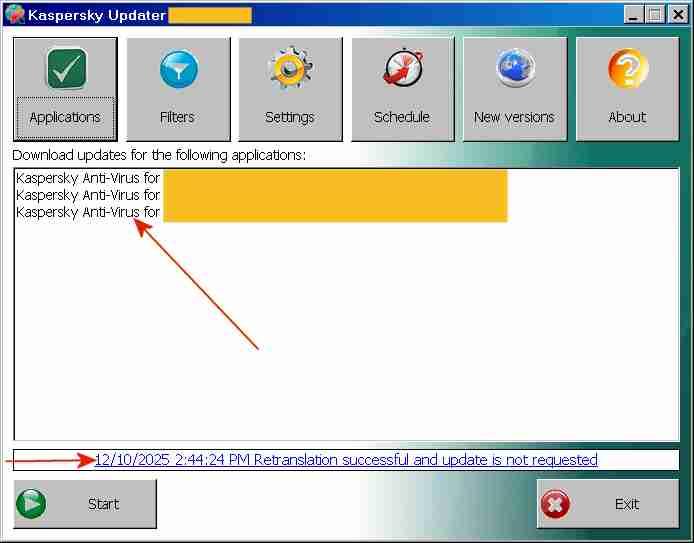
That looks too tricky to me, at least for testing Panda. Do you have simple instructions for installing the TLS stuff under WinXP? In contrast, updating the various versions and editions of My ancient version of Kaspersky in one swoop is quite simple. I just use a little corporate utility, Kaspersky Updater, to create/update a single update distribution folder from which 30+ Kaspersky programs can be updated off-line. Below is a screenshot of this little corporate utility, which I used for updating 3 different Kaspersky programs, the normal workstation edition, the specced-down workstation edition and the server edition. This screenshot shows the signature update of 10Dec2025 for my posting "My ancient version of Kaspersky under Windows 10" of 15Dec2025. https://msfn.org/board/topic/184730-antimalware-firewall-and-other-security-programs-for-windows-xp-working-in-2023-and-hopefully-beyond/page/82/#comments The message "... Retranslation successful" means that the update was successful and that the update distribution folder was filled OK. No idea what the part "and update is not requested" refers to. Kaspersky Updater here was run under Windows Server 2003 (blue window title) and updating under WinXP and Win10 from the update distribution folder worked OK. No need to register with an email address and to fiddle around with TLS stuff under WinXP.