Everything posted by TigTex
-
-
Sorry. eMMC storage is not supported at all. If you need windows 7, you will need to run it virtualized.
-
Usually on Acer laptops, you have to set up a BIOS password and disable secure boot. After that, the CSM / Legacy boot option should show up. But you might have a hard time finding drivers for a Geminy Lake cpu. There are also tools to boot windows 7 in pure UEFI mode. Check uefiseven
-
Some part of the RAM is shared with the onboard graphics. You probably have 3.00GB with 128MB shared memory
-
You can mix RAM modules. You can have a ddr2 400mhz CL6 with ddr2 333mhz CL5 module. Your system will always run at the highest speed that it's compatible with both DIMMs so you are free to do whatever you want with the RAM modules. But be aware, the i945PM might need a bios update to accept the full 4GB of RAM
-
You can use UEFI boot, but with CSM / Legacy mode only. If you want to make it UEFI Class 3 compatible, there's a project called uefiseven . It's not designed for Windows vista, but it might work
-
Sure. But it's unsupported. Expect all kind of problems (or not! your experience may be different). For every piece of equipment there's a specific OS. You wouldn't install windows XP on a pentium MMX (but it runs!) just like you should not install windows 11 on a 6th gen cpu (but it runs!). Keep on using windows 10 because it's supported out of the box, it's still supported by microsoft and should provide a better overall experience Remember, you don't use the OS, you use the applications. Chrome on windows 11 is still chrome.
-
-
Please don't do posts like this If you found the fix, post a link or post the fix so that you help other people at MSFN
-
The easiest and safest way would be for you to enable CSM / legacy boot support on the BIOS setup. Windows 7 doesn't work with pure UEFI systems without some modifications on the bootloader.
-
-
Also, make sure that you use 32bit windows because the memory usage is considerably lower if you can't afford more RAM
-
I hope "$763.45" shipping is a mistake... BIOS updates are cumulative, you only need to flash the latest version and that's all. There are some rare computers that require you to update to an intermediate bios version before upgrading to the last version but those are extremely rare and it's documented that you need that.
-
http://down.360safe.com/cse/360cse_13.0.2170.0.exe Version 13.0.2170 with Chromium 86.0.4240.198
-
Is there any localized version of any kind of "service pack" for 98se? I have a pentium mmx laptop that I brought back to life (old capacitors are crap, they leak everywhere...)
-
If foobar2000 can't play it, probably nothing can. Can't you mount the .bin file as a virtual drive and use any media player?
-
I've done that many times at my work when people install windows in CSM mode on a uefi system because they don't know better. Just install windows in CSM mode (or use the existing system if it was installed in CSM/BIOS mode) and then boot to windows instal media. Press shift+F10 and open diskpart, format the boot partition in fat32 and use bcdboot to reinstall the boot files with the /f UEFI switch. Reboot, disable CSM and done! Should be much easier than your method and the result will be a UEFI-MBR bootable disk with uefi class 3+ compliance.
-
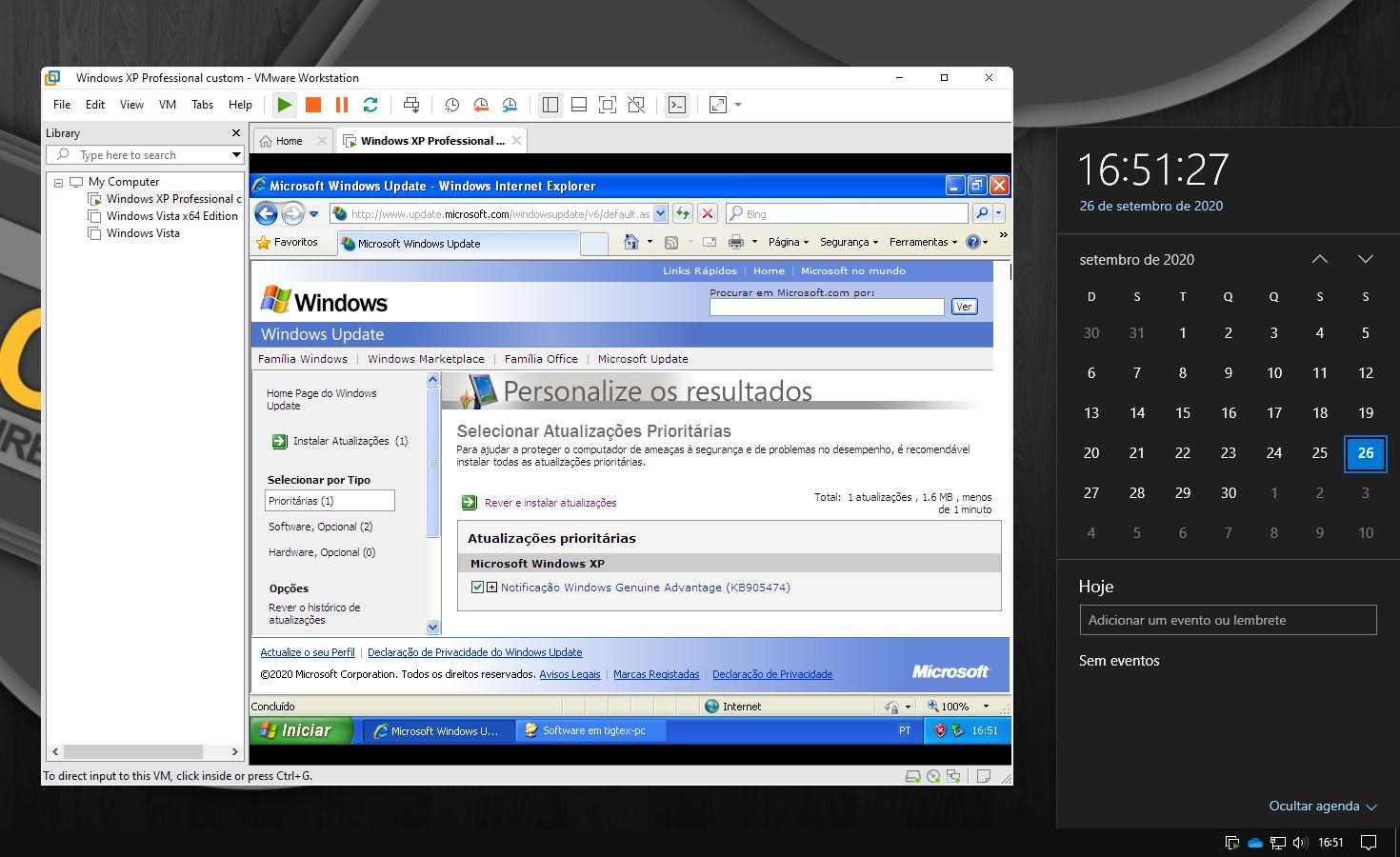
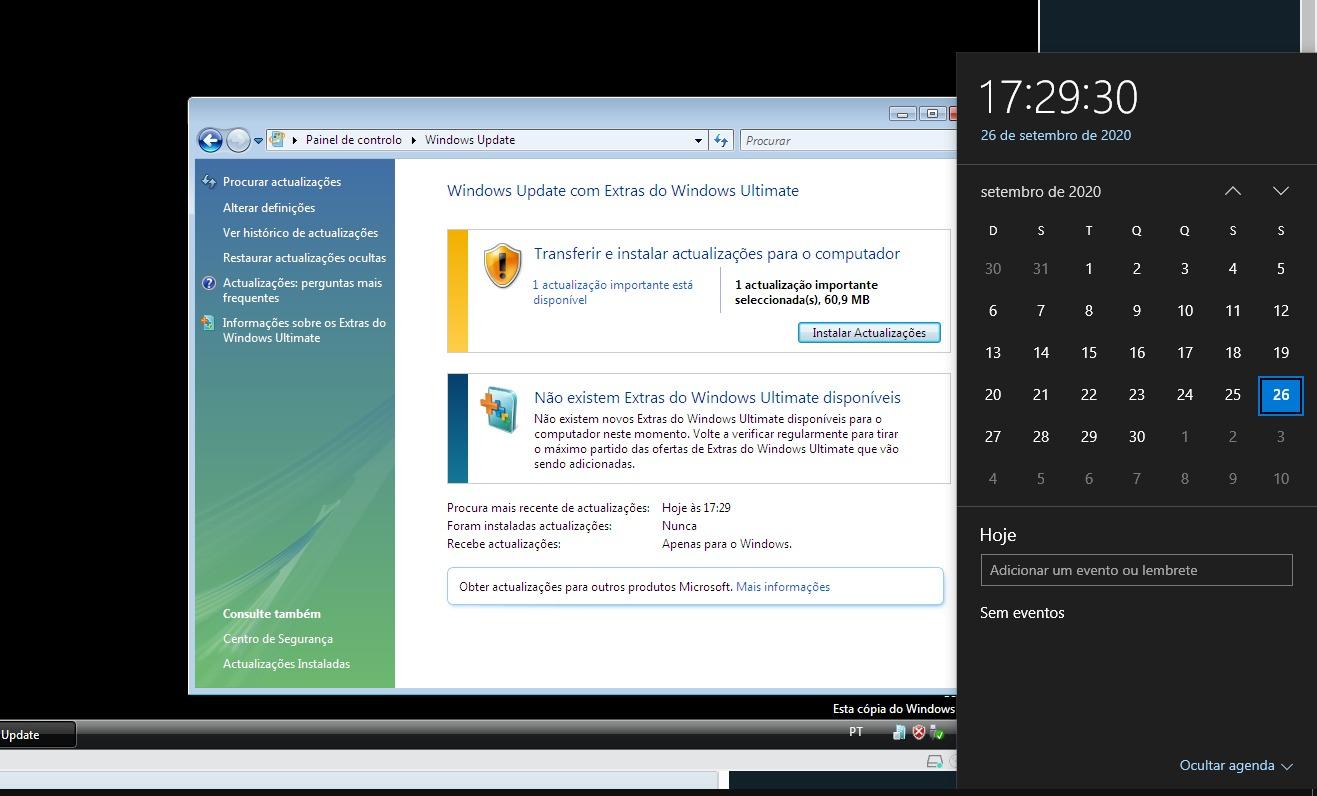
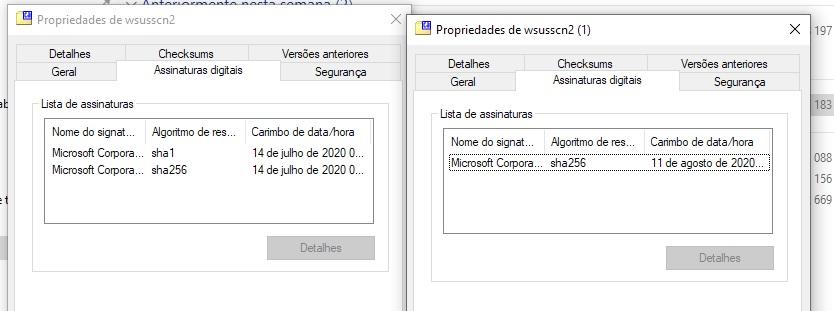
As of today (26 september 2020), the windows update for xp and vista (and maybe 2000?) is working. Grab them while you can Note: the wsusscn2.cab is still only sha2 signed
-
I use Macrium Reflect Free for all my backup / cloning purposes on my work and at home. It's free for both comercial and personal users. Give it a try.
-
Running a year 2000+ cpu without thermal paste is asking for trouble. That 2 or 3 dollars/euros that you save on a small cheap tube might cost you a new system. Even if the cpu doesn't thermal throttle, the huge spikes in temperature from idle to load might kill the chip. Also remember that older cpu's are NOT designed to run hot like today's cpus.
-
Intel HD is responsible for the graphics output. It is directly connected to the internal display and it can't be disabled. On modern operating systems, when a 3D application is detected, the driver enables the discrete GPU and renders only that specific window (or fullscreen) application. The intel HD is still rendering the rest of the screen. XP doesn't support switchable graphics so this will never work. You can only disable the intel HD graphics on a laptop after doing several hardware modifications or if you have a "gaming" laptop that has that feature. (some laptops have a "gaming mode" or "performance mode" that, when enabled, bypasses the intel HD graphics at hardware level).
-
Except IE9 on vista x64. It needs some extra procedures to install. On x86 there is no problem
-
I can confirm. The new wsusscn2.cab doesn't have a sha1 signature. Here's the last version with sha1 signature Filename: wsusscn2_sha1.cab Date: 14 July 2020 Link: http://www.mediafire.com/file/jxklkf1p8bjifff/wsusscn2_sha1.cab/file MD5: fe805bbf07898f2ab4ebc5e8a63983a8
-
I have that same problem if I enable windows XP automatic updates. Disable windows XP automatic updates (set to never check for updates), reboot the system and try again.
-
All I did was download wsusscn2.cab from here http://go.microsoft.com/fwlink/?linkid=74689 and toggle the offline mode in WUMT.