




Everything posted by gamehead200
-
PP97? Holy moly... Office 2002/XP/2007 should have been able to open that without a problem. Weird...
-
It would be useful to first know what software you are using to burn it. Secondly, did you download the ISO directly from Microsoft or through a third-party torrent (which may or may not have been real)?
-
Do you have the exact error? Do you know if the .PPS file opened in another app in another OS?
-
While I'm at it:
-
Let's move this to the Funny Farm as people will most likely be posting a lot. [ Moved. ]
-
Another few to add (plus some that are already known to work): Hamachi WinRAR 7zip Unlocker ScrubXP Office 2007 And that's all I've bothered to install and use so far... Oh, and it recognized my HP Deskjet F4135. All of this works under the latest build of Parallels 4 under Windows 7 Experimental mode.
-
...but I actually use the "Send Feedback" button! I've actually used it about five times now. Don't you want Microsoft to make this OS the best one after having released Vista?
-
[ Moved. ]
-
Should be as follows: 32-bit MD5: f9dce6ebd0a63930b44d8ae802b63825 SHA1: 6071184282b2156ff61cdc5260545c078cca31ee 64-bit MD5: 773fc9cc60338c612af716a2a14f177d SHA1: e09fdbc1cb3a92cf6cc872040fdaf65553ab62a5 Edit: It's also been confirmed on numerous blogs that the leaked copies are identical to the officially released ones.
-
I don't see why Opera wouldn't work (if it runs fine under Vista, should work fine under Windows 7). As for Office XP, not too sure. I was going to try Office 2003, but then opted to go with Office 2007 in the end.
-
The name members post with is the name they registered with. Your "screen name" is kmarkle. [ Moved. ]
-
Have you tried any basic stuff like using a different port on the router for both the NAS and your computer or switching network cables?
-
First off, which NAS do you have? Does it use IDE or SATA drives?
-
Yes. Most likely yes. It's up to you.Also, moved this to the appropriate Beta forum.
-
What can I say? It's been a while!
-
-
Happy holidays and happy new year to all! (And to all a good night... Hehehehe...)
-
Well, on behalf of those who haven't replied yet, I'd like to say that we're glad that you find the site so informative and helpful!
-
The company where I work uses CiscoWorks to manage its switches, that is, when it actually works and doesn't crap out. Otherwise we failover to regular command line which kind of sucks. :/
-
Don't care, check it every once and a while, same with browsers.
-
No.
-
pwned. LOL
-
Same here. Still using XP - haven't even touched or tried using Vista. I've played with Server 2008 too, which has taken some getting used to.
-
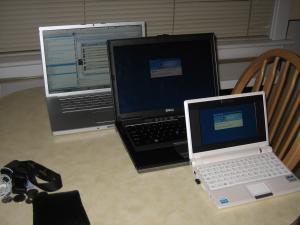
MacBook Pro (Personal Laptop) Mac OS X 10.5.4 2.4 GHz Intel Core 2 Duo 4 GB 667 MHz DDR2 RAM 160 GB HDD Dell Latitude D630 (Work Laptop) Windows XP Pro. w/ SP2 2.4 GHz Intel Core 2 Duo 2 GB 667 MHz DDR2 RAM 160 GB HDD Asus Eee PC 701SD (Personal Netbook) nLited Windows XP Pro. w/ SP3 900 MHz Intel Celeron M 353 2 GB 667 MHz DDR2 RAM 8 GB SSD HDD + 8 GB SD Card
-
I looked at the Dreamhost website. I don't like the unlimited disk space and unlimited bandwidth 'forever'. For less than $6/mo there must be a catch. Looks like they're overselling. I've been with them for a little less than a year. The only catch is that they don't allow personal backups on their space.
