Leaderboard




Popular Content
Showing content with the highest reputation on 07/31/2023 in all areas
-
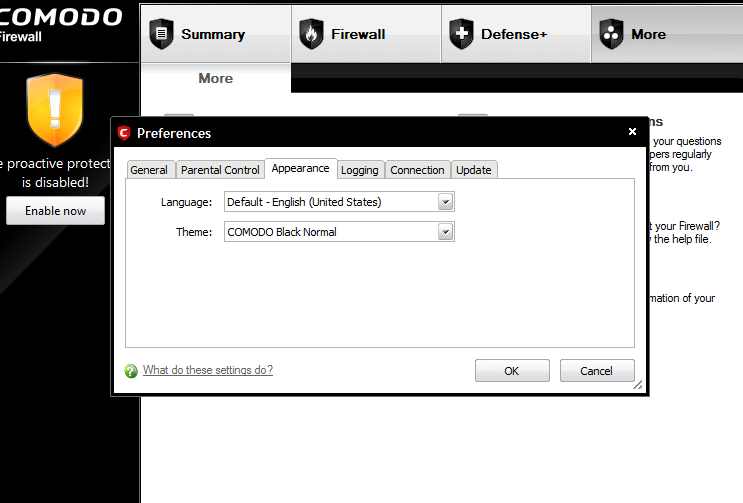
I stopped at early 5 and don't even know what they looked like later. I only use software that support dark themes (for vampires). By any chance, what was the last good looking one for XP, without Windows 10 UI, but with dark theme? I see 5.5 from @Saxon's screenshot is fully white, which won't do for me. Thank you!3 points
-
yeah, a major nuisance and one of the reasons my "old posts" will show DEAD images.2 points
-
Thanks, that's exactly what I wanted, I found that versions, already checked, unfortunately the dark theme is only partially dark, I'll try out the other ones. I consider Comodo Firewall to be good news, since it's not compatible with Kaspersky. What can I say, nice!
 2 points
 -
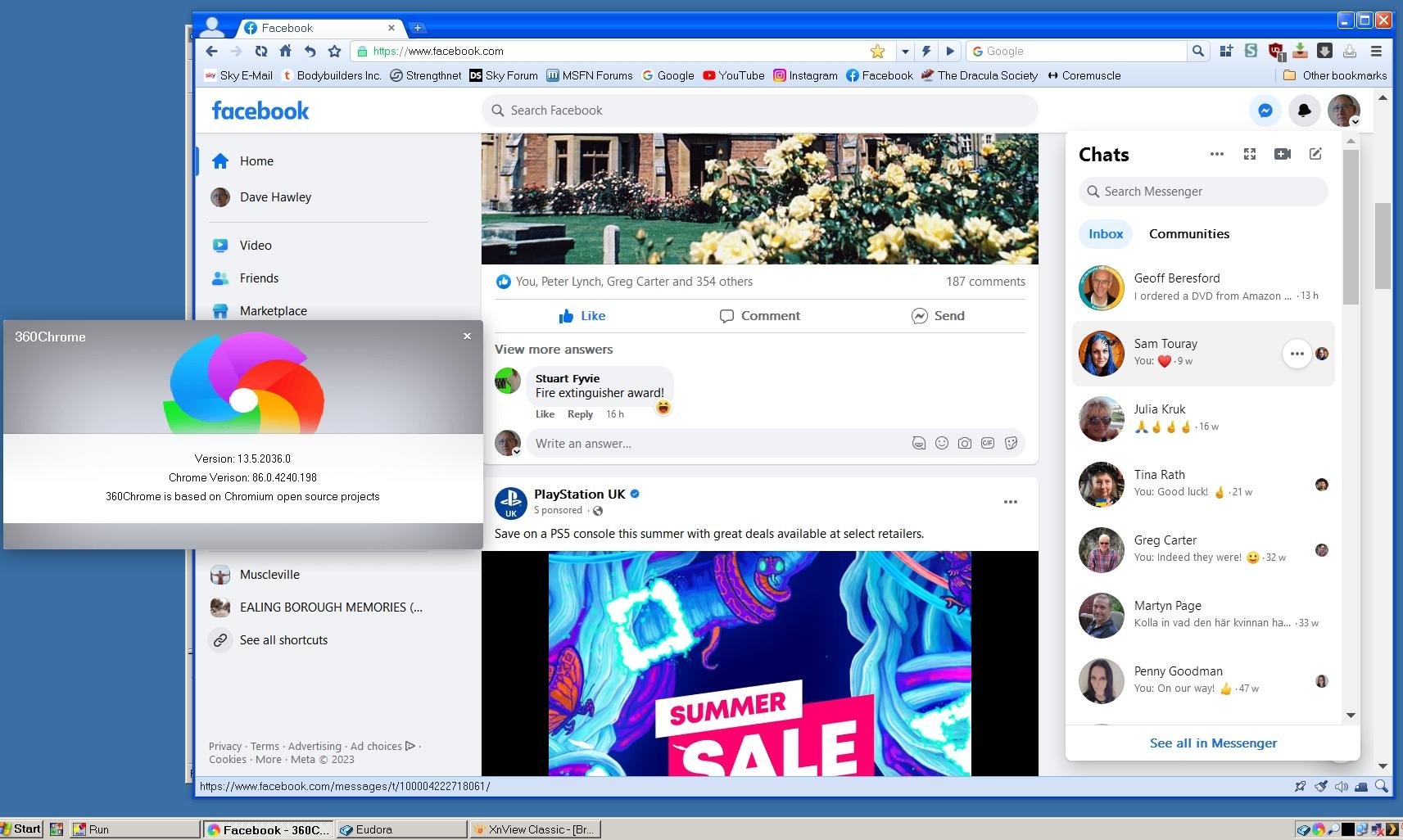
Looks like 360Chrome 13.5 doesn't display mediamarkt.de properly either. It displays in Edge 94 (the oldest "modern" browser at my disposal). They are not needed anymore after RegExp updates. Man, these people are nuts. A new (smart) TV was bought couple of weeks back and its web browser (Chromium 85) is obsolete straight out of the shop. Secondary function, but still, these lyrics come to mind: My new computer's got the clocks, it rocks But it was obsolete before I opened the box You say you've had your desktop for over a week Throw that junk away, man, it's an antique Your laptop is a month old, well that's great If you could use a nice, heavy paper weight https://www.youtube.com/watch?v=qpMvS1Q1sos Released in 1999 xD2 points
-
Hello @UCyborg! Thank you very much for sharing your "mediamarkt.de | saturn.de quick fix" userscript! I tried it in New Moon 28, Serpent 52 and 55. Although there are issues with images in the item lists as already reported by @VistaLover, it works and makes these websites readable again. In Palefill 1.27, martok also made fixes for mediamarkt's login area. Nevertheless, I hope there will be a solution of all these issues one day coded in NM and SP themselves. BTW, I am a customer of Media Markt's online shop and I am glad to be able to use this site in NM and SP again. Thanks again!2 points
-
There seems to be a Black Normal theme already in Comodo 5.9/5.10. Have a look here: https://help.comodo.com/topic-72-1-284-3042-.html I personally can't say anything more about it because it was too long ago and I never used black or dark modes. Cheers, AstroSkipper2 points
-
Thanks indeed. We do have some very helpful members here at MSFN that spend a great deal of time in assisting with enquiries. Unfortunately, we also have a growingly large number of members that will call those helpful posts long-winded or refer to them as A4. Guess we just have to take the good with the bad and learn to live and let live. Or something like that...2 points
-
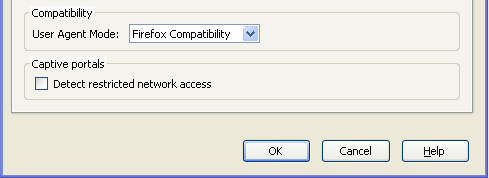
Hi @WSC4, welcome to the MSFN forums (the last "stronghold of XP-diehards" , as someone in another forum called it), best greetings to Oz ... In general, as posted already by another member, it's not a good idea to "try" financial services in "legacy" browser engines & OSes, because these institutions usually expect the "latest and greatest" in both departments (to generate a "sense" of security for their clients...); but we'll try to help, if we can; then, it's up to you to follow any offered workaround ... For starters, when I load the posted link in my FxESR 52 copy, I get a "warning" banner: Since you wrote already that FxESR 52 "works" for you, I'm inclined to disregard this "update" warning ; however, following the "Learn more" link it contains will land one on: https://www.westpac.com.au/personal-banking/online-banking/support-faqs/supported-browsers/ Reading that article immediately gives the impression it hasn't been updated (pun intended) for quite a while; Fx>=52 ? Chrome >=58? In the OS entries, no mention of Win8.1/10/11 (?); if it's minOS requirements, then it's obvious they don't support WinXP anymore (but you said FxESR 52 worked in your WinXP SP2 64-bit machine ) ... If we take that table "seriously", then UXP-based browsers (NM28, St52, etc.) have engines far superior to the one FxESR 52 has... Based on my small analysis above, and without having any failure details from you (Web/Browser/Error Consoles of NM28), first thing I'd suggest is a SSUAO (site-specific-user-agent-override) on NM28 targeting that bank, in the hope they're simply rejecting NM28 based on its default user-agent string (a practice known as UA-sniffing) ... If you had been lurking here "silently" for more than a year, perhaps you're already familiar with the procedure; if not, then: 1. In NM28, open a new tab and in the URLbar type about:config - press enter, and then press the "I promise to be careful! button"; you should now be inside the advanced preferences interface 2. Place your cursor inside the existing entries and right-click, invoking the context menu 3. from the CM entries, select New -> String 4. in the preference name field, enter general.useragent.override.westpac.com.au and click OK 5. in the string value field (in the second pop-up), enter Mozilla/5.0 (Windows NT 6.3; rv:52.0) Gecko/20100101 Firefox/52.0 and click OK Done! You should now have created a new entry that looks as below: Restart your NM28 browser (just for good measure ), then try your "bank" site anew; this time, the bank's software will think you're visiting with Fx52 on Win8.1 ... Tell us how it went! Cheers ...2 points
-
If I remember correctly, Comodo Firewall 6 was the last version too I had installed before I changed my firewall.2 points
-
I think he was only pointing out that your linked images do not show in his brower setup. I have witnessed that in the past also, I'd have to spend too much time to hunt it down and what MSFN Member's post it was. If I recall, the image hosting site had a double-extension, call it image.jpg.jpg, so MSFN showed it as a DEAD image. But you could still get access to the image via Dev Tools or also use Dev Tools to edit the HTML and correct the double-extension. edit: I was typing my reply while he was already replying.1 point
-
They show like that for me, if I go there directly, they say you got a view limit on them. "The HTTP 429 Too Many Requests response status code indicates the user has sent too many requests in a given amount of time ("rate limiting")."1 point
-
Chrome 117 for XP, it's not happening, forget it. My hunch, they started to serve you different content, try to change UA, possibly even to mobile. I still suggest to try VPN. https://www.useragentlist.net/chrome-android-13/1 point
-
Oh, sorry, of course you are right. I meant Win 7 and higher.1 point
-
In case no-one here noticed it already , "our" roytam1 is now formally mentioned inside the "official" UXP repo: https://repo.palemoon.org/MoonchildProductions/UXP/commit/7f8ea9ae2f92b71eefcd1dc286baaf529cc5686a Thanks to Brian Smith (aka dbsoft), the MacOS dev member of MCP ...1 point
-
No this problem is not because mypal 68 , this error appear to me even in windows 10 google chrome , and it not appear directly to me it show me the page 3 second and then it broken. Try this link in the 3 second i copy it to you : http://win2k.org/cgi-bin/dl.cgi?file=NETFX40JA2K.wlu but this language pack it is not required.1 point
-
Vista's media foundation and Direct2D are fully compatible with that purely DX11.0 game. Though, it's not the case with the latest patch, so I lowered down the version, patched a bit, DX11 loaded fine, so no troubles, except for the bloody text. I patched DWrite from the Platform Update and placed into the game directory, the error is gone, still no text, I even replaced the game fonts with a working ones from an older game, no result. WinSqmAddToStreamEx replaced with WinSqmAddToStream. These are undocumented: GetFontRealizationInfo GetFontFileData GetFontFileInfo https://github.com/MyTDT-Mysoft/DllCompat/issues/9 So I replaced with GetFontData. I even hooked it up with the new gdi32, then it just won't start at all, throwing out the generic 142 error. Before patching the log file was: [INFO]main() [INFO]Styles enabled [INFO]CApplication::CApplication() [INFO]Create options [INFO]Starting physics engine [INFO]Starting 3d engine [INFO]Selected adapter: NVIDIA GeForce GTX Titan dx11\DspMainDX11.cpp [190] : error: Assertment failed! Message: Failed to initialize DirectWrite. Now it's without the last line. But no ingame text, strange, as I see the Dwrite module is loaded into the memory just fine. Yes, I still use that 11 years old videocard.1 point
-
1 point
-
Hello VistaLover, I thank you for your diligent and hard work on posting this. And my sincere apologies for doubling up on the posts. I was working off line with my reply to NotHereToPlayGames and constructing images as you did and the wording of it. It was taking me a while and I had to search the Pale Moon forum for that post a year ago. I wish I had known you were working hard on this and about to post your message. I have studied your post twice and found it very interesting and helpful. Once again, thanks very much for your help1 point
-
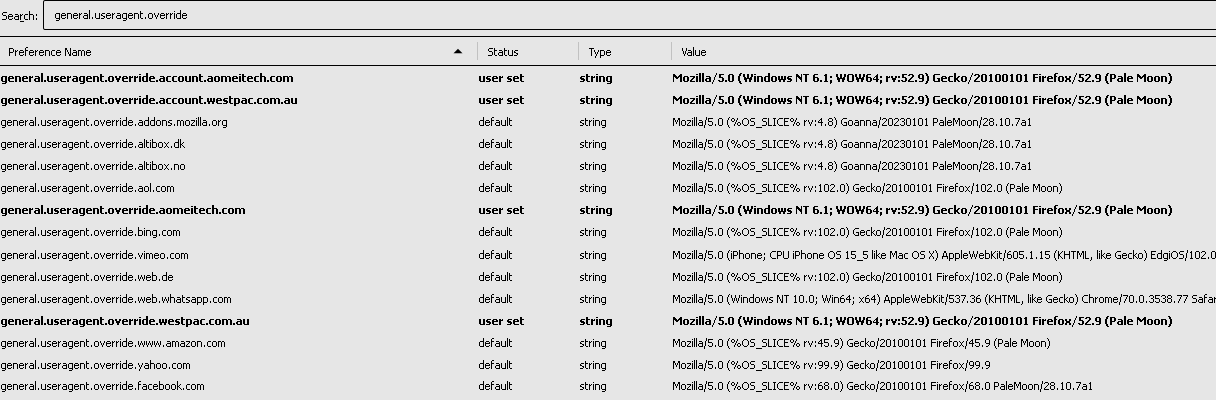
I managed to get this to work, and did have a similar problem over a year ago with another site called aomeitech.com. Back then, I found the answer on the Pale Moon forum. It was the User Agent Override string that fixed it in about:config general.useragent.override general.useragent.override.account I constructed a new string with westpac.com as the domain name. Before this, I did try Serpent 52 and 55 and they also did not work. I am using XP Pro 64-bit for Firefox ESR 52.9.0. However, this will not log into eBay and problems loading other sites. So far so good with New Moon 28
1 point
-
But if you read that, you will find this line -- to be short i tweaked it so I could use Paranoid mode without much hassle I would not rely on that "review" because he "tweaked it" and therefore BROKE IT. I'm all for "tweaking" software, I do it myself, but I don't turn around and blame the OEM when my "tweaked versions" isn't performing correctly.1 point
-
Indeed you're, but I already wrote: I agree with you. What else do you want me to say? Kafan is raw, they din't bother themselves to squeese out the full potential. But most importantly, only one version above.1 point
-
Is that a recent image? It also did for me, until recently. Now only Kafan does, but I don't use it, due to the bright theme, too bright.1 point
-
The /fw switch is shorthand for firmware, but what is not said anywhere is that they intend UEFI, and not BIOS (though it may work for UEFI in CMS mode ) it is very likely that it was introduced post Windows 7. You just run: shutdown /? to list the available switches to the command. Should be like this (no /fw switch present): https://www.computerperformance.co.uk/windows-7/shutdown-command/ jaclaz1 point
-
Yes, like I said before, that site is heavily "protected" by CF. Only direct non-Proxy connections work. Perhaps it's due to the age restrictions. Like in the case of "family" CF DNS, to filter out underaged children.1 point
-
Hello @Mark-XP! Sorry for the late reply! I totally overviewed this. I managed to get the "Alternating row highlighting" working in MailNews right away without any problems. So what is your problem in detail? For me, it works like a charm. Here is a small screenshot from my MailNews client: Greetings from Germany,1 point
-
Hello @Mark-XP! Sorry for the late reply! I totally overviewed this. I managed to get the "Alternating row highlighting" working in MailNews right away without any problems. So what is your problem in detail? For me, it works like a charm.1 point
-
Our days are numbered, too. But, joking aside! Speculating about the future is one thing. But we are (probably) not clairvoyants . The actual state is decisive. It's not only about your needs or mine. The fact is, MailNews and DreamMail Pro work with many email services, unfortunately with the exception of Microsoft 365. But in old operating systems, not every new gadget has to and can work. Then the user just has to use a more up-to-date operating system. There, the choice of email clients is much greater, and presumably, one of them will work with the latest stuff.1 point
-
A small update information! DreamMail Pro has been updated again and is now available in version 6.6.6.5. It is still XP compatible. Great to see ongoing development! Here is the download link: https://dl.cy-email.com/dm6/Download/dmpro_setup6.6.6.5.exe Cheers, AstroSkipper1 point
-
@Snowshoe! However, the address https://ms.kartkrew.org/ms/api/games/SRB2Kart/10/servers?v=2.2 exists and can be accessed by IE8 while running ProxHTTPSProxy: ProxHTTPSProxy's log is fine, no errors: Cheers, AstroSkipper1 point
-
Which version of ProxHTTPSProxy are you using?1 point
-
Hello @Snowshoe! I could successfully connect to https://ms.kartkrew.org/ using IE8 with ProxHTTPSProxy (part of my package ProxHTTPSProxy's PopMenu TLS 1.3 3V3) enabled: To connect successfully, you have to edit the config.ini of ProxHTTPSProxy under the section [SSL No-Verify]: Cheers, AstroSkipper1 point
-
Best regards. Back on topic! A few days ago, I had a similar problem with wget. Among other things, my self-created batch file should download a certain file from a server which leads to an error. I was able to fix the problem by adding an option to wget that disables the server certificate check against the available certificate authorities. With the option --no-check-certificate, wget was able to download the desired file again without any problems. Curl is a similar program which is able to download files from servers. It uses SSL/TLS protocols which can be controlled by different options as for example --sslv3, --tlsv1.2, --tlsv1.3, --tls-max and so on. Furthermore, curl has a lot of proxy options: --proxy [protocol://]host[:port] Use this proxy --proxy-anyauth Pick any proxy authentication method --proxy-basic Use Basic authentication on the proxy --proxy-cacert <file> CA certificate to verify peer against for proxy --proxy-capath <dir> CA directory to verify peer against for proxy --proxy-cert <cert[:passwd]> Set client certificate for proxy --proxy-cert-type <type> Client certificate type for HTTPS proxy --proxy-ciphers <list> SSL ciphers to use for proxy --proxy-crlfile <file> Set a CRL list for proxy --proxy-digest Use Digest authentication on the proxy --proxy-header <header/@file> Pass custom header(s) to proxy --proxy-insecure Do HTTPS proxy connections without verifying the proxy --proxy-key <key> Private key for HTTPS proxy --proxy-key-type <type> Private key file type for proxy --proxy-negotiate Use HTTP Negotiate (SPNEGO) authentication on the proxy --proxy-ntlm Use NTLM authentication on the proxy --proxy-pass <phrase> Pass phrase for the private key for HTTPS proxy --proxy-pinnedpubkey <hashes> FILE/HASHES public key to verify proxy with --proxy-service-name <name> SPNEGO proxy service name --proxy-ssl-allow-beast Allow security flaw for interop for HTTPS proxy --proxy-tls13-ciphers <ciphersuite list> TLS 1.3 proxy cipher suites --proxy-tlsauthtype <type> TLS authentication type for HTTPS proxy --proxy-tlspassword <string> TLS password for HTTPS proxy --proxy-tlsuser <name> TLS username for HTTPS proxy --proxy-tlsv1 Use TLSv1 for HTTPS proxy --proxy-user <user:password> Proxy user and password --proxy1.0 <host[:port]> Use HTTP/1.0 proxy on given port --proxytunnel Operate through an HTTP proxy tunnel (using CONNECT) Frankly, I don't really see the need to use curl with ProxHTTPSProxy. It should also do its job without this proxy in Windows XP. About programs with curl embedded, I can't say anything detailed. These programs would have to be specified more clearly. Maybe, @Snowshoe can explain more detailed what kind of programs he referred to, what he actually wants to achieve with these curl programs and why he needs a connection established by ProxHTTPSProxy, including the command line input or other execution commands which leads to the error. In any case, the curl option --ssl-no-revoke prevents the cert revocation check with the server to be connected. Are these the droids you're looking for? Probably not! Greetings from Germany, AstroSkipper1 point
-
@Snowshoe! I have checked your log file. Try following command line option with curl: --ssl-no-revoke. This disables cert revocation checks (Schannel) which most probably caused the error 0x80092012. You should do that only if you trust the server you want to connect. I had a similar problem with wget in the past, and disabling cert revocation was the way to solve it. Cheers, AstroSkipper1 point
-
Interesting news! ProxHTTPSProxy can only be used by programs which offer an option to use the IE proxy settings as for example browsers or use system components if the proxy has been set system-wide. From now on, we have the possibility to connect any program with a server or the internet via the local proxy ProxHTTPSProxy if necessary, of course including the latest protocol TLS 1.3. The solution is SocksCap64. I have already tested this tool, and it works perfectly with ProxHTTPSProxy. Link: https://www.sockscap64.com/homepage/ Cheers, AstroSkipper1 point
-
Absolutely ! Weird to see smth like this "25th" month. I think AstroSkipper wrote that Germany've been americanised against his will. Hence the result. Great Britain, to the rescue !1 point
-
By using these proxies nothing will be bricked. ProxyMII is fully portable, and my program package is almost portable. All is definitely reversible. It won't harm your OS.1 point
-
@tinspin! Did you read the first post of this thread? There, you'll find all technical information with regards to the TLS proxies and especially ProxHTTPSProxy. Link: Cheers, AstroSkipper1 point
-
Which installation? What pipes do you mean? Your questions are totally unclear. Maybe, you try the pure proxy ProxyMII first to see whether the proxy itself works under Windows 7.Here is the link to @cmalex's original ProxyMII: https://mega.nz/folder/68dj2YTY#As2w31IO4Smr7gy6p1ciSg And, to answer your question I do not have any plans to port my package to Windows 7 at the moment. Everything I do here targets basically the Windows XP operating system. All my further decisions and next steps will depend on the interest and feedback of the users, simply put....1 point
-
Hello @tinspin! I did not test my program package ProxHTTPSProxy's PopMenu TLS 1.3 3V3 on Windows 7. It was successfully tested on Windows XP 32 and 64 Bit, but I can't see any reasons why the proxy itself shouldn't also run under Windows 7. The commands to show or change the system's proxy status will not work, though. They are compatible with Windows XP and below. Read my documentation, check the stated system requirements, and try it out! And please, report back here! Here is the link: Cheers, AstroSkipper1 point
-
Hi @NotHereToPlayGames, I have sent you two PMs without reply! My fixed files are working great with and without spaces in program path. It seems to be a problem on your side. Read my PMs! Cheers, AstroSkipper1 point
-
Thank you for quick reply and feedback! I am happy to hear that you have no problems either. Your feedback is very important for me! Thanks so far! Cheers, AstroSkipper1 point
-
Thanks for your quick reply and your feedback! Glad to hear that you have no problems. Your feedback is very appreciated! Thanks so far! Cheers, AstroSkipper1 point
-
Hi beta testers, @Dave-H, @NotHereToPlayGames, @mina7601 and @xpandvistafan, what's the status of testing? Any further problems? Does it work for you? I need feedback. Cheets, AstroSkipper1 point
-
Ok, I think if spoofing of specific browser engines was possible, it would be great for Windows XP's life span.1 point
-
What didn't work on your x86 VM?1 point
-
Hi my beta testers, @Dave-H, @NotHereToPlayGames and @mina7601, Dave found problems with my configuration program Configure PopMenu.exe and the starter program ProxyPopMenu.exe. They can't process paths with with spaces in them. All my tested paths didn't have any blanks. Therefore I had to fix both programs. Furthermore the documentation in my package still had to be completed. I did that now. Therefore I'll send you a PM with a link of new update package. This archive contains only those files which have to be exchanged. Cheers, AstroSkipper1 point
-
@NotHereToPlayGames, did you ever use ProxHTTPSProxy before?1 point
-
Hi @NotHereToPlayGames and @mina7601, thanks for wanting to be beta testers too! There are more beta testers here than future users! I'll send you both a PM! Cheers, AstroSkipper1 point
-
Dixel is right . It's not >federal< law. What a hybrid times we are living in . Half-laws , somewhat-laws , para-laws , half-measures , hypocrisy all around. But most don't mind and will obey anything. Boycott them.1 point
-
Yes, you're right , indeed. Though Vista's device manager says only ksthunk.sys and nvhda64v.sys are being used for HD audio. In my previous posts I wrote about not being able to play any HD audiotracks using Vista SP2 (bypass thru HDMI) , it allows bypass for DTS / DD5.1 only. Weird , right ?1 point