All Activity
- Past hour
-
 VLC is also used to watch streams. And that means YouTube streams, too. Therefore, your request is totally on topic. Your observation in terms of the 3.0.8 version is interesting. I will try this version in my system the next days. One thing is clear. The latest versions aren’t always the best on older systems. They are no longer tested on older operating systems.
 -

TLS 1.2/1.3 In A Native Windows XP Application? (LibcURL/OpenSSL SDK)
user57 replied to Bottetoundra719's topic in Windows XP
the internet explorer 8 suppose to have tls 1.2 with some upgrades the standlone ie8 installer dont have tls 1.2 there KB4019276 is the upgrade for IE8 for tls 1.2 recently i wanted to test my installer, i looked on the windows update catalog and the biggest upgrade is ? the IE8 installer so i was thinking to try it on a bigger KB upgrade https://msfn.org/board/topic/187777-new-and-probably-a-lot-faster-installer/ look for kb4467770 + kb4019276 + kb4493435 + kb2598845 (english/us) or (GERMAN) there should be a downlink link there is a problem but - and im not certain where it actually come from if i use the orginal installer from IE8 almost no websites is opening (a few are opening) like theoldnet.com so i tryed both - the orginal one from microsoft and the one from me both have identical results (same goes if the side-upgrades are added) what i wanted to try is to test TLS 1.2 - but it dont do the test (either microsofts or mine) so hard to say where this is coming from - if you know i would be happy about that weird enough i have a .iso with sp3 with IE8 (without tls 1.1 and tls1.2) (like the normal IE8 installer (blank) has) there some websites are opening if you want to build in tls1.3 directly into IE8 you would need to figure out where the IE8 selects for example tls1.2 and at that progress you have to hand that over to your tls 1.3 -
I did the RTFM, it was hard to find so here is copy if you do not have it: https://www.trendnet.com/download_manager/default.asp?iFile=2831 it seems that that does offer ps/2 port too as option for input unless picture is generic, also have you enabled or disabled usb keyboard legacy support under bios? If it really got PS/2 option for cable rather use those and leave USB just for any USB perihepals that may use in both systems. I hate to admit it but I got little experience with USB keyboards with Windows 9x aside with Compaq presarios. I preferred use PS/2 since it works always out of the box. Also I mostly worked with ATEN USB kvm that let you set passtrough mode for port to emulate regular USB HUB. So the problem is that you cannot get keyboard or mouse to work at all?
-
I realise VLC specifically is NOT the topic of this thread, but could you be so kind as to actually pinpoint/link to that version? On https://artifacts.videolan.org/vlc-3.0/nightly-win32/ you can see that their server retention goes back to last December, ONLY, so I expect, in the future, that older "artifacts" will be forever purged ; perhaps this last, XP-compatible, build deserves to be archived for posterity ... All 3.0.23 versions are compatible with Windows XP. The last 3.0.23 version was releases on 12.05.2026. The last Windows XP compatible 3.0.24 version was from 29.05.2026.
-
first, thanks for your reply. It is the TrendNet TK210-K. It has the TI chip in it. It should be viewed by the OS as a composite device. The TI chip is considered a USB hub. and after that it presents itself as a composite device that has 2 more functions. The keyboard and mouse. I don't know if this will help but here are the registry entries I have tried already. This might give you an idea of what the OS is expecting.under the \enum key. REGEDIT4 ; ================================================================ ; 1. FORCE THE TWO TI HUB INSTANCES (INST_0 AND INST_1) ; ================================================================ [HKEY_LOCAL_MACHINE\Enum\USB\VID_0451&PID_2046] [HKEY_LOCAL_MACHINE\Enum\USB\VID_0451&PID_2046\INST_0] "Capabilities"=hex:b4,00,00,00 "HardwareID"="USB\\VID_0451&PID_2046&REV_0125,USB\\VID_0451&PID_2046" "CompatibleIDs"="USB\\CLASS_09&SUBCLASS_00&PROT_00,USB\\CLASS_09&SUBCLASS_00,USB\\CLASS_09" "DeviceDesc"="Generic USB Hub" "ClassGUID"="{36FC9E60-C465-11CF-8056-444553540000}" "Class"="USB" "Driver"="USB\\0011" "Mfg"="(Generic USB Hub)" "ConfigFlags"=hex:00,00,00,00 "Serial"=hex:14,00,00,00,00,00,00,00 "SymbolicName"="\\DosDevices\\0000000000000029#{f18a0e88-c30c-11d0-8815-00a0c906bed8}" [HKEY_LOCAL_MACHINE\Enum\USB\VID_0451&PID_2046\INST_1] "Capabilities"=hex:b4,00,00,00 "HardwareID"="USB\\VID_0451&PID_2046&REV_0125,USB\\VID_0451&PID_2046" "CompatibleIDs"="USB\\CLASS_09&SUBCLASS_00&PROT_00,USB\\CLASS_09&SUBCLASS_00,USB\\CLASS_09" "DeviceDesc"="Generic USB Hub" "ClassGUID"="{36FC9E60-C465-11CF-8056-444553540000}" "Class"="USB" "Driver"="USB\\0012" "Mfg"="(Generic USB Hub)" "ConfigFlags"=hex:00,00,00,00 "Serial"=hex:15,00,00,00,00,00,00,00 "SymbolicName"="\\DosDevices\\000000000000002a#{f18a0e88-c30c-11d0-8815-00a0c906bed8}" ; ================================================================= ; 2. BASE COMPOSITE DEVICE ROUTING (FORCING USB CORE CLASS) ; ================================================================= [HKEY_LOCAL_MACHINE\Enum\USB\VID_10D5&PID_0001] [HKEY_LOCAL_MACHINE\Enum\USB\VID_10D5&PID_0001\INST_0] "Capabilities"=hex:b4,00,00,00 "HardwareID"="USB\\VID_10D5&PID_0001&REV_0100,USB\\VID_10D5&PID_0001" "CompatibleIDs"="USB\\DEVCLASS_00&SUBCLASS_00&PROT_00,USB\\DEVCLASS_00&SUBCLASS_00,USB\\DEVCLASS_00,USB\\COMPOSITE" "DeviceDesc"="USB Composite Device" "ClassGUID"="{36FC9E60-C465-11CF-8056-444553540000}" "Class"="USB" "Driver"="USB\\0013" "Mfg"="(Standard USB Host Controller)" "ConfigFlags"=hex:00,00,00,00 "Serial"=hex:16,00,00,00,00,00,00,00 "SymbolicName"="\\DosDevices\\000000000000002b#{a5dcbf10-6530-11d2-901f-00c04fb951ed}" ; ================================================================= ; 3. SUB-INTERFACES (FORCING GENERIC CLEAN HIDClass PATHS) ; ================================================================= [HKEY_LOCAL_MACHINE\Enum\USB\VID_10D5&PID_0001&MI_00] [HKEY_LOCAL_MACHINE\Enum\USB\VID_10D5&PID_0001&MI_00\0USB&VID_10D5&PID_0001&INST_0] "Capabilities"=hex:80,00,00,00 "HardwareID"="USB\\VID_10D5&PID_0001&REV_0100&MI_00,USB\\VID_10D5&PID_0001&MI_00" "CompatibleIDs"="USB\\CLASS_03&SUBCLASS_01&PROT_01,USB\\CLASS_03&SUBCLASS_01,USB\\CLASS_03" "DeviceDesc"="USB Human Interface Device" "ClassGUID"="{745a17a0-74d3-11d0-b6fe-00a0c90f57da}" "Class"="HIDClass" "Driver"="HIDClass\\0000" "Mfg"="(Standard device)" "ConfigFlags"=hex:00,00,00,00 [HKEY_LOCAL_MACHINE\Enum\USB\VID_10D5&PID_0001&MI_01] [HKEY_LOCAL_MACHINE\Enum\USB\VID_10D5&PID_0001&MI_01\1USB&VID_10D5&PID_0001&INST_0] "Capabilities"=hex:80,00,00,00 "HardwareID"="USB\\VID_10D5&PID_0001&REV_0100&MI_01,USB\\VID_10D5&PID_0001&MI_01" "CompatibleIDs"="USB\\CLASS_03&SUBCLASS_01&PROT_02,USB\\CLASS_03&SUBCLASS_01,USB\\CLASS_03" "DeviceDesc"="USB Human Interface Device" "ClassGUID"="{745a17a0-74d3-11d0-b6fe-00a0c90f57da}" "Class"="HIDClass" "Driver"="HIDClass\\0001" "Mfg"="(Standard device)" "ConfigFlags"=hex:00,00,00,00 The VID_0451&PID_2046 key is the TI chip. The VID_10D5&PID_0001 key is the composite device. And the VID_10D5&PID_0001&MI_00 & _01 keys are the Keyboard and mouse ports. Since I also have 98se on this computer I looked at how 98se did it. It's somewhat helpful in understanding how it is setup but 98se uses a completely different way of setting up USB than ME. The problem, according to Googles AI, is that ME was born in that transition era between the older, 95 & 98, way and the just being introduced WDM way that ME uses. And what this KVM does is take your PS2 inputs for the keyboard and mouse and translates them into USB packets sent out thru the supplied USB cable that you plug into the back of the computer. So it is not a simple pass-thru. It is pass-thru for the monitor and audio. I hope that's enough for you to understand and if it's not just reply and let me know what else you need. Thanks.
- Today
-

YouTube under Windows XP - Downloaders, players and browser support
VistaLover replied to AstroSkipper's topic in Windows XP
I realise VLC specifically is NOT the topic of this thread, but could you be so kind as to actually pinpoint/link to that version? On https://artifacts.videolan.org/vlc-3.0/nightly-win32/ you can see that their server retention goes back to last December, ONLY, so I expect, in the future, that older "artifacts" will be forever purged ; perhaps this last, XP-compatible, build deserves to be archived for posterity ... These recent VLC builds exhibit a very high CPU consumption on my old Core2 Duo processor when listening to radio (audio) streams using either the HLS/mpeg-dash streaming protocol, e.g. to BBC Radio 2 Live stream: http://as-hls-ww-live.akamaized.net/pool_74208725/live/ww/bbc_radio_two/bbc_radio_two.isml/bbc_radio_two-audio=96000.m3u8 I have identified the issue to be with recent versions of the "libadaptive_plugin.dll" module: .\plugins\demux\libadaptive_plugin.dll Swapping the 3.0.24 version with the 3.0.8 old one (from 2019!) reduces the CPU usage to just 25% of what the current version uses... Apologies again for the somewhat OT parts of this comment ... Best regards. -

Last Version of Programs for Windows NT 4.0
ruthan replied to Leokids123's topic in Windows 2000/2003/NT4
Yeah, i already good it above, 3dfx cards would be probably the best, Matrox have some software driver and lots of ATI have OpenGL drivers only for Profesional line of cards. On physical machine you can get OpenGL 2.0 with Geforce 6x00 cards and there is even Direct3D to OpenGL wrapper (only OpenGL 2.0) -
 @user57 I should've perhaps specified I wouldn't mind using TLS 1.2. However, the issue is that I don't want my current test app to require an external proxy for HTTPS and modern TLS, as I'd want it to be standalone with no dependencies. But to not have any external dependencies, I'd need the SDKs, for which I need the download links, so if you have any of those, please let me know! (And if there aren't any, then I might just have to compile the source code myself, which I don't really know how to do )
 -

Dual Booting XP and 7 on an NVME (non Samsung 950 Pro)?
AaronS replied to AaronS's topic in Windows XP
I literally said CSM is on in the post. -
Thanks, now I understand on how you are using the phrase "polling". BTW my boards Front Panel is not connected, I always use the green connection at the back.
-

Win10 LTSC IoT lag issues. How to resolve?
NotHereToPlayGames replied to DeathAdderSF's topic in Windows 10
I'm leaving it at that for now. If the OP doesn't reply, then I shall view this as me wasting my time and will move on. No skin off my back either way. -
Win10 LTSC IoT lag issues. How to resolve?
NotHereToPlayGames replied to DeathAdderSF's topic in Windows 10
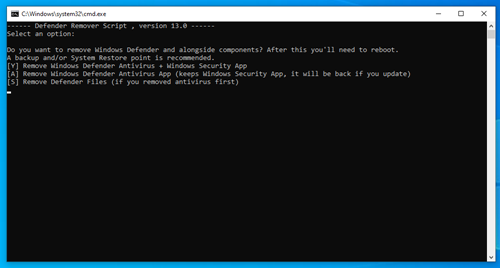
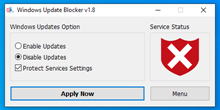
Guide for Half Baked Phase 1: Only TWO executibles are required. The first executible is found here: https://www.softpedia.com/get/Antivirus/Removal-Tools/Defender-Remover.shtml Windows Defender has had a ton of Zero Day vulnerabilities exploited (BlueHammer, RedSun, UnDefend). It really is a FALSE SENSE OF SECURITY and a MAJOR source of resource WASTE. If you "want" to run some form of anti-virus, that's your call, it is YOUR computer (personally, I am *against* them, ALL OF THEM, but I do take other preventative measures). If you can't bring yourself to AXE IT, then, and no offense, but you aren't being SERIOUS about wanting to debloat (even half-baked). Right-click it and Run as administrator and select the "Y" option (your computer will reboot): The second executible is found here: https://www.majorgeeks.com/files/details/windows_update_blocker.html Download, extract/unzip, and EDIT the Wub.ini file !!! The original Wub.ini section that we are editing will look like this: [Service_List] ; 2=Auto ; 3=Manual ; 4=Disabled wuauserv=2,4 dosvc=2,4 WaaSMedicSvc=3,4 UsoSvc=2,3 BITS=3,3 EDIT/ADD to that section so that it looks like this: [Service_List] ; 2=Auto ; 3=Manual ; 4=Disabled wuauserv=2,4 dosvc=2,4 WaaSMedicSvc=3,4 UsoSvc=2,4 BITS=3,3 mpssvc=2,4 BFE=2,4 WinDefend=2,4 WdNisSvc=3,4 TimeBrokerSvc=3,4 Save the edited Wub.ini then Run as administrator the Wub.exe for 32bit OS or Wub_x64.exe for 64bit OS. Select Disable Updates, check Protect Services Settings, and click Apply Now.
-
Yep, you're right. I thought he meant av1. Anyway, my youtube.luac is requesting the h264 codec. And my tests were done using yt-dlp from 2026.06.10, so not the recent one.
-
Win10 LTSC IoT lag issues. How to resolve?
NotHereToPlayGames replied to DeathAdderSF's topic in Windows 10
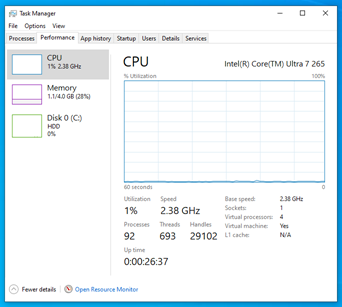
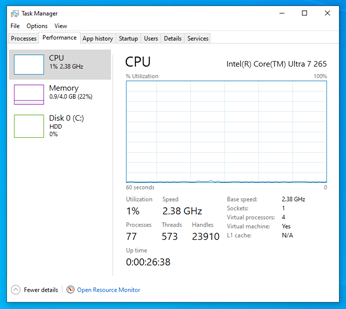
With no replies whatsoever, the OP has left us all with no other choice but to speculate: he's decided this endeavor is too large to undertake, so he's just going to accept Win10 as a bloated mess and "live with it" or downgrade and miss out on "millions better" in capabilities. I don't want him to "give up" and nobody should ever "live with" the BLOATED MESS that we all know Win10 to be. So here, let's try this a different way. Instead of a full deboat, let's just axe the TOP FIFTEEN "usual suspects" that can bottleneck a Win10 config. Call it "baby steps", a FULL DEBLOAT is HIGHLY recommended, but sure, let's take "baby steps". These "fifteen" alone got my default as-is Win10 VM from OVER ONE HUNDRED processes (did settle to 92 eventually [took 26 minutes!]) per Task Manager down to (in-process). In the past, I've always called my configs that have not been FULLY debloated as Half Baked. 1) Windows Updates 2) Windows Updates 3) Windows Updates 4) Windows Security 5) Windows Security 6) Windows Security 7) Windows Defender 8) Windows Defender 9) Windows Action Center 10) Windows Action Center 11) Windows Firewall 12) Windows Search Indexer 13) Microsoft Edge 14) (in-process) 15) (in-process) Default As-Is (ie, original install, no steps taken yet to debloat): This is only after TWO "baby steps" (ie, two executibles to remove/disable Defender + Updates + Firewall). Low 80s process count after startup, waited same 26 minutes as above, settled down to 77. Technically, the process count was at 77 within a few minutes of startup, but seemed fair to wait the same amount of time for comparison. I'll call this Half Baked Phase 1:
-
for baytrail and limited systems that don't need a full install.
-
Make PE 3- creates Win7 PE make_pe3.7z
-
By KVM I assume you mean Keyboard Video Mouse meant for using multiple computers, not Kernel Virtual machine. First which model of KVM do you use? Second, is it USB or PS/2 KVM? Third what is the problem you are having? Device not detected or cannot find HID driver? If it is USB one have you tried enabling USB pass-trough and connect keyboard and mouse then? By default atleast ATEN USB KVM I used in past emulates keyboard and mouse so there is no device reinsertion event every time you change input. There is key command for setting one of the ports (usually mouse) for USB pass-trough where it acts like USB hub. I have used both ATEN USB KVM (passtrough mode) and ATEN PS/2 KVM succesfully with Windows Millenium. Although I prefer use PS/2 one as USB ones cannot be used with my 486DX2.
-

YouTube under Windows XP - Downloaders, players and browser support
nicolaasjan replied to AstroSkipper's topic in Windows XP
Do you mean AV1? https://en.wikipedia.org/wiki/AV1 AVC1: https://en.wikipedia.org/wiki/Advanced_Video_Coding BTW, my latest version of yt-dlp is 2026.06.14 -

Dual Booting XP and 7 on an NVME (non Samsung 950 Pro)?
Damnation replied to AaronS's topic in Windows XP
Turn on CSM in your BIOS and then try to boot. -
Anybody ever install a KVM in Millennium. Unsuccessful so far even with AI help with registry entries. Cannot do it the normal PnP way. Millennium's PnP is broken when it comes to this kind of device. Have 2 computers that I would like to share without swapping cables all the time. this one computer has 98se Millennium and xp pro on it. both 98se and xp pro have installed it without a problem but millennium refuses. Any help appreciated.
-
At present it's only polling the first output pin which is listed as a Headphone Out in the BIOS pin configuration verbs. If you look at the log it shows that Node 1Ch is a Line Out pin complex and so the jack detection is not used. In your log Node 1Dh is the headphone out, this probably goes to the front panel audio header which may or may not be connected anywhere. If jack detection were working the log would show *WDMHDA: SwitchOutput -> SPEAKERS or *WDMHDA: SwitchOutput -> HEADPHONES. when the jack was disconnected/connected. For a desktop PC this seems to be the correct expected behavior but if there is more than one headphone out on a codec all of them should be polled, not just the first one. (There is a legacy assumption in the code that each codec can only have one headphone or speaker output.) Also need to add overrides to cover cases where the BIOS pin config verbs don't match the system's actual configuration.
- Yesterday
-
Congratulations, your WDMHDA v21.a is working now on my N68-board with codec VT1705. Also Master Volume is working. I made two set's of log's, one without Jack inserted (Fallback Playback-path is okay) and one with Jack inserted. I can not find a meaningfull difference in the log's in this respect. Is this logged somewhere? WDMHDA.21a.N68_VT1705.WIN982.zip BTW I added a log from a tool Isolar is working on currently, so you can see the Jack is really inserted in PIN-widget 1Ch.
-

My Browser Builds (Part 5)
soggi replied to roytam1's topic in Browsers working on Older NT-Family OSes
The tab issue has been solved, thanks @roytam1! The latest New Moon 28 is still slower than the 0516 release, but I found out that the problem is a lot smaller with less tabs. So I uploaded the latest builds to the mirror! :) Do you have a plan to update the other builds like f.e. Retrozilla/RZ browser to version 2.3? ------------------------------------------- The mirror of latest ArcticFox 44, BNavigator 0.9, Firefox 28/45ESR, IceApe 52, IceDove 52, K-Meleon 1.5.x/74/76, MailNews 52, New Moon 26.5/27/28, RetroZilla, RZ browser and Serpent 52/55 builds by @roytam1 has been updated -> soggi.org - tools. changelog (since last such post in 2023): - added latest ArcticFox 44 20240330 build - added latest BNavigator 0.9 20260613 build - added latest Firefox 45ESR 20241221 builds - added latest IceApe 52 20260613 build - added latest IceDove 52 20260613 build - added latest K-Meleon 1.5.4 20240601 build - added latest K-Meleon 74 20241221 build - added latest K-Meleon 76 20241221 build - added latest MailNews 52 20260613 build - added latest New Moon 26.5 20241221 build - added latest New Moon 27 20241221 builds - added latest New Moon 28 20260613 builds - added latest RetroZilla 20241221 build - added latest RZ browser 20241221 build - added latest Serpent 52 20260613 builds - added latest Serpent 55 20260613 builds To don't lose track of things I want to update too someday... todo: - add various flash player versions - add FlashFix for WinXP - add VLC 2.2.8 (WinXP non-SSE2) done! - add polyfill addons Kind regards soggi -
 RU-B joined the community
 -
 @reboot12 Now I disabled ME, but this does not help. Now, after opening the Hidden Entries in Bios V92 of the Evga Dark z390 board, I can change such a lot of entries for the 9560 Wlan card. But nothing helps, the symptoms are to 100% the same as before. So now I think, that for sure the scan is not ok. I think about to build a brandnew driver for the 9560 on gemini chipset with j4105 and Cannon Lake on the really nice Dark board. But in first place I make a try to keep everything from the Windows site, for example the scan, from the working m135 driver. Just change Firmware 77 ==> 46 and some more. But I doubt, that this will work. Only brandnew driver gives a real new chance Dietmar
 -
Well that tells me that your HDA controller is like Vmware in that even with a longer timeout it will never set the bit to acknowledge CORB reset so always falls back to PIO. I have improved the PIO path to stop probing blindly if there were any codecs detected at reset, and have also added working jack detection polling in the latest version here (with some debugging help from LLMs unfortunately). I haven't tested this fully yet but it does work on at least 2 old laptops. WDMHDA-main-21a.zip