All Activity
- Yesterday
-
 Although the LUA script yt-dlp4vlc,, originally created by FalloNero on GitHub, is still working, I modified it once again but already months ago. I didn't like his solution from April 2025 to have to add the video quality to the link every time it was transferred to VLC. It is easier to only enter the raw YouTube link as was the case in the past. In the LUA script, I therefore added code to be able to read and use the video quality which the user has preset in the video settings of VLC. Furthermore, I added a new variable containing a limit to use no better codec than h264 (an important switch for older hardware). I also changed the content of the format_string variable. Both can of course be changed by the users according to their needs. Finally, I reduced the hidecon command to start yt-dlp hidden. Here is my new mod of the LUA script yt-dlp4vlc: -- YouTube Link Resolver for VLC with Separate Video and Audio URLs -- Place this script in VLC's lua/playlist directory local yt_dlp_path = 'yt-dlp.exe'; local yt_dlp_silent_path = 'yt-dlp-silent.exe'; function sleep(s) local ntime = os.time() + s repeat until os.time() > ntime end function probe() -- Check if the input is a YouTube link return vlc.access == "http" or vlc.access == "https" and (string.match(vlc.path, "youtube%.com") or string.match(vlc.path, "youtu%.be")) end function parse() -- Construct the full YouTube URL local youtube_url = vlc.access .. "://" .. vlc.path -- Extract "quality" query parameter if present local quality = youtube_url:match("[&?]quality=(%d+)[pP]?") youtube_url = youtube_url:gsub("[&?]quality=%d+[pP]?", ""):gsub("[&?]$", "") -- Remove trailing ? or & -- Get the preferred resolution preset by the user in VLC local prefres = vlc.var.inherit(nil, "preferred-resolution") if prefres < 0 then prefres = 2160 -- Best quality set to 2160p to overwrite VLC's native value of -1 end local allowed_qualities = { ["240"] = true, ["360"] = true, ["480"] = true, ["720"] = true, ["1080"] = true, ["2160"] = true } -- Default quality limited to the preferred resolution taken from VLC's settings local format_string = string.format("bestvideo[height<=%i]+bestaudio", prefres) if quality and allowed_qualities[quality] then format_string = string.format("bestvideo[height<=%i]+bestaudio", quality) vlc.msg.info("Using requested quality: " .. quality .. "p") else vlc.msg.info("No valid quality specified. Defaulting to best available.") end local cmd_hidden = yt_dlp_silent_path -- No better codec than h264 (an important switch for older hardware). This can of course be changed by the users according to their needs. local codec_limit = '-S "codec:h264"' local video_url = '' local audio_url = '' local yt_dlp_silent_exists = io.open(yt_dlp_silent_path, "r") ~= nil if not yt_dlp_silent_exists then vlc.msg.info(yt_dlp_silent_path .. " not found. Falling back to " .. yt_dlp_path) cmd_hidden = 'hidecon &' -- Start cmd hidden and ... local cmd = string.format( '%s "%s" %s -f \"%s\" -g "%s"', cmd_hidden, yt_dlp_path, codec_limit, format_string, youtube_url ) local handle = io.popen(cmd) video_url = handle:read("*l") audio_url = handle:read("*l") handle:close() else vlc.msg.info(yt_dlp_silent_path .. " found. Running program") local cmd = string.format( '%s -s "%s" %s -f \"%s\" -g "%s"', cmd_hidden, yt_dlp_path, codec_limit, format_string, youtube_url ) local process = io.popen("start /B " .. cmd) process:close() local output_file = "yt-dlp-output.txt" local file_exists = false local timeout = 0 local timeout_limit = 10 while not file_exists do local file_test = os.rename(output_file, output_file) if file_test then file_exists = true else vlc.msg.info("Waiting for output file...") sleep(1) timeout = timeout + 1 if timeout > timeout_limit then vlc.msg.warn("Timeout reached. The output file was not created.") break end end end vlc.msg.info("File found") local file = io.open(output_file, "r") video_url = file:read("*l") audio_url = file:read("*l") file:close() os.remove(output_file) end video_url = video_url and video_url:gsub("^%s+", ""):gsub("%s+$", "") or "" audio_url = audio_url and audio_url:gsub("^%s+", ""):gsub("%s+$", "") or "" vlc.msg.info("[YouTube Resolver] Original URL: " .. youtube_url) vlc.msg.info("[YouTube Resolver] Video URL: " .. video_url) if audio_url and audio_url ~= "" then return { { path = video_url, name = vlc.path .. " (Video)", options = { ":input-slave=" .. audio_url } } } else return { { path = video_url, name = vlc.path .. " (Video + Audio)" } } end end Don't forget to download hidecon (see the quoted post) and copy it to the main progranmme folder of VLC! From now on, the user's default settings for video quality will be respected again. Simply enter any YouTube link in VLC and the preset quality will be played. Cheers, AstroSkipper
 -
Sorry, I can't see your image for some reason ('content not available in your region'). I'm sure you're right, but I have split the home page away from the new tab page, which may be the issue. It probably isn't an issue with a standard installation.
-
... Wasn't/isn't there a native way to do that, without any such extension? Below, a screengrab from a Sm-132 copy:
-
Off-topic of course, but if there are ads on the dial pages they are probably being blocked by uBlock Origin in my case! It does have 'sponsored dials' but they can be deleted. There is also a 'sponsored' page, which is the only one which can't be deleted, but I just ignore it. The sponsored dials don't seem to invade your own customised speed dial pages, I'm glad to say! I like it because I think it's very well-designed and extremely customisable.
-
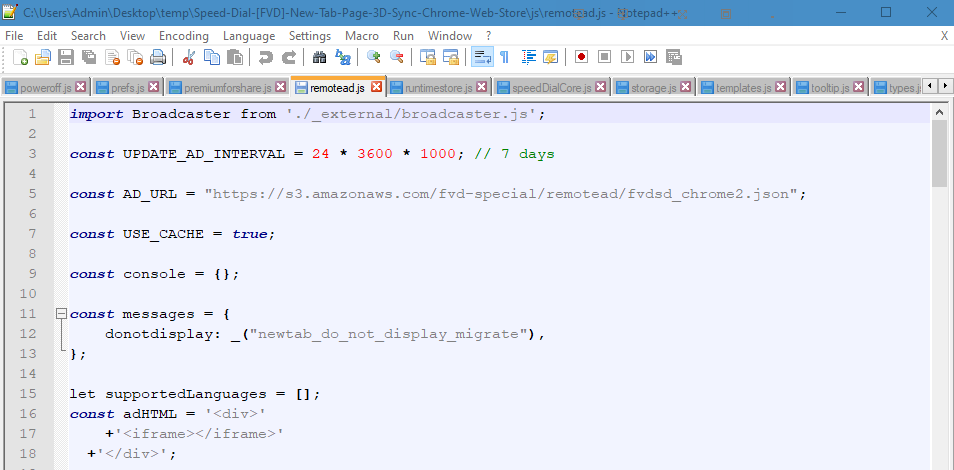
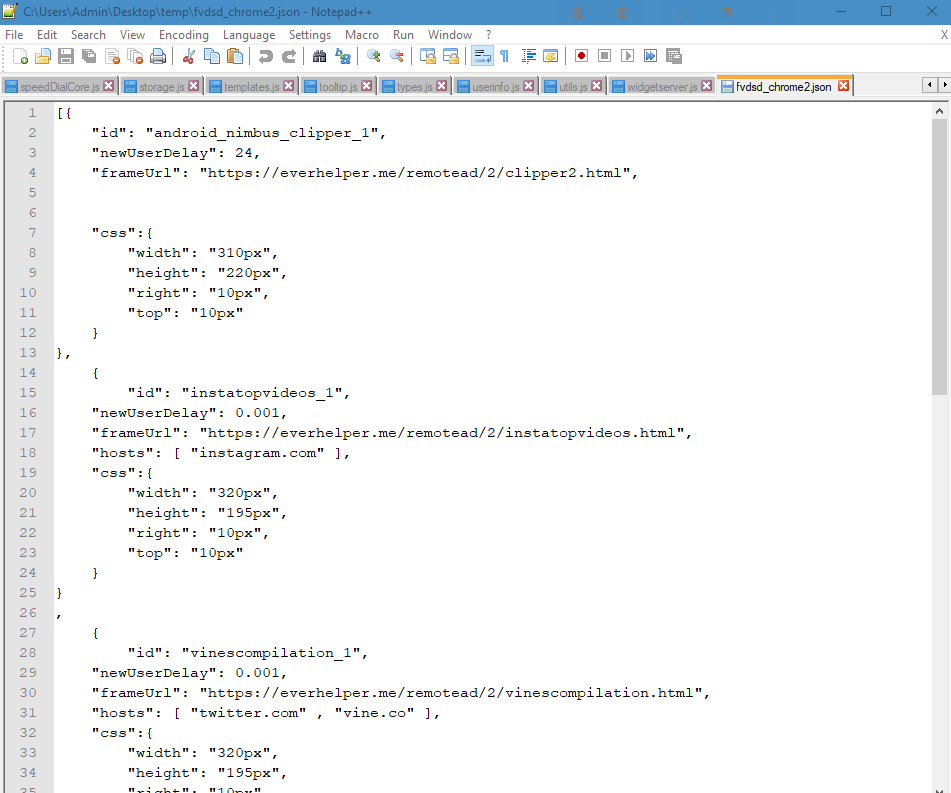
<OT> I've not used that one. Downloaded just now but not installed. The source code seems to suggest that it throws advertisements. The .json then loads ads into frames. Appears all of the ads come from "everhelper.me". But most ad-blockers would block it anyway.

-
Yes, I use one of those 'speed dial' extensions too! The one I use is called 'Speed Dial [FVD]' and it's great. I actually have Supermium set up so that I get the speed dial page when I hit the 'home' button, but I keep the normal new tab page for start up and when I open a new tab.
-
I always prefer the new tab extensions that "convert" your bookmarks into "thumbnails" displayed as a grid for your "new tab page". I've used one called "Speed Dial" in the past (forget which one, there are a TON that go by that name at the Chrome Web Store). I currently use "Visual Bookmarks" - https://chromewebstore.google.com/detail/visual-bookmarks/jdbgjlehkajddoapdgpdjmlpdalfnenf
-
Same as with any extension. Find it in the Chrome Web Store, install it, and set it up. With New Tab Redirect (and there are others I'm sure, that's just the one I use) you can set any URL as the new tab page.
-
how do i do that edit ok i did it
-
That is the default new tab page on Supermium. You can customise it with an extension, such as New Tab Redirect, which works well for me.
-

YouTube under Windows XP - Downloaders, players and browser support
user57 replied to AstroSkipper's topic in Windows XP
// h265 --enable-libvpx --enable-libx265 --enable-libaom // new image formats --enable-libwebp --enable-libjxl do ffmpeg handle these well in xp ? what with the LAV filters - guys, we would need people what make a list what works with this one BUT lav is a classical "programming engine" windows 10/ect. users are using in their programs to play h265 but its a engine written for windows10/ect. later on it get to DX11/CUDA ect. - where cuda at best has a few support but to really handle this controlment what comes afterwards we would need the handling for the cuda in ring0 it wont work with a limited function set that is provived in XP so either libde265 or maybe a reverted x265 would make the right decoding progress, cpu power wise you dont need that hardware acceleration (grafic card wise) for a decoder - a decoder useally can be just considered a player also h265 useally has parts written in MMX/SSE/AVX - those are a lot faster - it would be enough of speed if these things still need a discussion, people should come out with a discussion -
can someone help when i used to click on the plus tab it would goto the google page now it goes to the supermium page how do i go back to it
-

How can a thread have 18 "Replies" and NO "Views"??
Tripredacus replied to videobruce's topic in Site & Forum Issues
Forums are social media. Topic for this already exists: -
Happy new year! $OEM$ folder is automatically selected, if it's in the same folder as install.wim. Else you can choose it on the "Ready?" window.
-

How can a thread have 18 "Replies" and NO "Views"??
NotHereToPlayGames replied to videobruce's topic in Site & Forum Issues
ps - this is *NOT* a "social media platform". the userbase herein really should *NOT* be so focused on all of these "counts". myself included (ie, our *played* rep-point bean-counts). if you want a real laugh, you can find the one person here that "likes" content from DECADES ago and then even brags and boasts that his "friend" has more "views" in 4 years than one of our moderators has in 20 years. when it was he/her that was solely responsible for 99% of those "likes". has to be some kind of high school project. or college class sociological study. there are days, increasing in number, where i feel forums like this would be MUCH GREATER if *NONE* of these "counts" were present. i mean, i know what posts are "helpful" and which are "far from" and i didn't have to look at the "count" to know which was which. but anywhoo... edit: this seems appropriate -- -
How can a thread have 18 "Replies" and NO "Views"??
NotHereToPlayGames replied to videobruce's topic in Site & Forum Issues
Already discussed in a different thread. Moderators are aware. Not sure how "accurate" those read-counts really are. I don't read SEVERAL topics here but I do click the "Mark site read" button quite often. That doesn't mean that I actually *READ* those topics. -

How can a thread have 18 "Replies" and NO "Views"??
videobruce posted a topic in Site & Forum Issues
At least, a "reply" is a "view" since one has to read the posts in the thread to reply to them,. Correct" I belong to over a dozen forums and have never saw anything like this in a forum. The example is here; https://msfn.org/board/topic/187714-when-i-assign-specific-file-extensions-to-default-program-it-doesnt-hold/ -
 daniel_fs0 joined the community
 - Last week
-

My Browser Builds (Part 5)
modnar replied to roytam1's topic in Browsers working on Older NT-Family OSes
I have msvcr100.dll v. 10.0.40219.473 in XP. I use abbodi1406's CPPredist AIO x86 v35 (XP_last). -
exactly, for a fully customized install. talking about this, I was gonna ask jfx a further question, for a change: does winntsetup limit itself to processing whatever .reg file it finds in the user-specified folder in the systweak slot or can it also process any other filetype there is in the said folder? Moreover, on the wake of all this, in my continuously and continually desperate attempt to customize my installs as quickly as possible, I was wondering whether we could "ask" winntsetup to install the required iso with the same config and settings as the online os it operates from or, for that matter, any other offline os. So far, I have been able to do it all with several .bat and .ps1 scripts on a post-install basis only. It would be just wonderful if one could have the resulting os with all the desired settings at first attempt, or nearly so. whatever automisation I have tried so far that works perfectly concerns regfiles only. on the same wavelength, I was wondering whether the .ini slot as in the case of sample.ini can actively process any other ini file that gets added, as happens with reg flles in the systweak slot or it accepts only one ini file to process.
-
@JFX Thank you for the update. This program is so essential, I can't image install without it. Thank you for making it. One question, I used the $OEM$ folder with SetupComplete.cmd inside but it never ran, Like the drivers/unattend dedicated tabs, can we also have dedicated tabs for SetupComplete, Firstlogon.cmd etc where we could specify the locations of the files and program make them available to Windows setup ? Thank you for your great work. Highly appreciated.
-

My Browser Builds (Part 5)
anton12 replied to roytam1's topic in Browsers working on Older NT-Family OSes
Hello nicolaasjan and roytam1, nicolaasjan said: "I have : msvcr100.dll 10.0.40219.473 (Windows 2000) msvcr100.dll 10.0.40219.325 (Windows XP SP3) Those belong to Microsoft Visual C++ 2010 (direct link; no idea if it will work for your system)." I tried Windows2000-VC2019u2-INTL.wlu for W2K by blackwingcat which installs the latest M$ Visual C++ 2019, together with W2K-Kex v31l, and it didn't help (runtime error). Next I returned to my old v30fM and NM28 25-12-24 and St52 25-12-24 work ok. roytam1 said: "hmm, confirmed v30i and v31 also works. and it seems to be broken in v31a and later." W2K-Kex from v31 to v31h had problems that were finally fixed with W2K-Kex v31l. The strange thing is that this fixed version v31l that worked quite well for over a year - incl. NM28 and St52 - now has problems with the latest version of NM28 and St52. -
The old download link I used in my ytBATCH releases was https://github.com/nicolaasjan/yt-dlp/releases/latest/download/yt-dlp_x86_Windows-XP.zip which is no longer working. As you can see, at some point you changed the file name of the ZIP archive. For me. no problem. I have already rewritten the yt-dlp update module for the upcoming release of ytBATCH.
-
thank u ever so much jfx - works like a charm!
-
 There is a program called "DVD Audio Extractor" that can rip only sound from video DVDs in a user-friendly way. Of course a number of DVD video rippers exist too, and you can demux the output to get only audio if you want. It is possible that the disk drive was worn and stops reading weaker disks first, or that the DVD part of it had failed specifically.
 -
JFX Thank you. Happy New Year to you and all the best!