All Activity
- Past hour
-

My Browser Builds (Part 5)
adata replied to roytam1's topic in Browsers working on Older NT-Family OSes
Map is not loading https://odjazdowykrakow.pl/mapa - Today
-
 ^ Understood, I appreciated all the help, but I'm not a 'typist' and never really good at spelling and it aint getting any better. But, the following worked; Default Programs Editor https://defaultprogramseditor.com/
 -
Ref: https://msfn.org/board/forum/35-windows-20002003nt4/ There can be found (currently) multiple topics with replies but 0 views.
-
 See here for more - https://help.pdf-xchange.com/pdfxe6/index.html?command-line-options_ed.html I'm afraid that if you find command lines "too confusing" then I'm not going to be able to assist any further. I've provided what the DEVELOPER HIMSELF/HERSELF cites for setting file associations.
 -
Whatever is easiest for you, OPEN AN ADMIN COMMAND PROMPT and direct it to the FOLDER CONTAINING your "PDFXEdit v6.exe". Then perform BOTH of the following (unsure if which is performed first is important or not, this was the order the DEVELOPER indicated): "PDFXEdit v6.exe" /fileassoc:user=no "PDFXEdit v6.exe" /fileassoc:user=yes This really really REALLY should solve your problem - IT IS DIRECT FROM THE DEVELOPER OF PDF-XCHANGE (but the VIEWER instead of the EDITOR, this method is supposed to work for both).
-
You typed "cd", then (c d SPACE) which seems to be 2 separate commands. It failed both ways with error messages. Sorry, I don't like command lines, too many ways to make a mistake or not understand the exact command.
-
I tried W10 3 years ago and decided to stay with W7. Things change usually for the worse so I decided to try W10 again. I have a number of images of that O/S I made that I tweaked (instead of spending days tweaking) I will try again. Anyway, I did try that Portable using one of those images and things worked fine. The funny thing is it's shown in the Registry as enabled, but the 'dumb' O/S doesn't see that which apparently why I can't add it since it's already there, but just doesn't show within a 'right click' dialog box.
-
I managed getting Microsoft Office 2007 to work on Windows XP RTM unofficially! Instructions: 1) See Windows XP RTM in 2026: Unofficial Guide 2) Run regedit.exe via run dialog box, and navigate to HKEY_LOCAL_MACHINE\SYSTEM\CurrentControlSet\Control\Windows, and create a new dword key and name it "CSDVersion" and set the value to 200, restart your computer. 3) Like Windows 2000 with Extended Kernel, during setup, you must click customize and uncheck Microsoft Office Groove and Microsoft Office Visio Viewer or the explorer.exe will break. After installation, set the CSDVersion key value to 0, and you might want to replace the sxs.dll from Windows XP SP3 again. 4. Install Windows Installer 3.1, if you want updates for Microsoft Office 2007. 5. Enjoy!

-
 The two programs I use for this area of trouble, usually to un-associate a program I've accidentally used forgetting to uncheck the, annoyingly, Windows checked by default 'make default' tick box rather than what is described here as being the problem are:- https://defaultprogramseditor.com/ and https://www.softpedia.com/get/System/OS-Enhancements/Unassoc.shtml I was thinking that you could try to un-associate everything already associated with opening a .pdf then with that clean slate trying to associate the program wanted. I find it a bit unusual that a 'proper' PDF viewer like Adobe Reader, Sumatra or Foxit are not amongst the options as usually, arrogantly, Adobe will assign itself by default to open any .pdf file type. So even if you use something else you'd expect to see it in the list. Whether these programs will help in this case I do not know but they're useful tools to have particularly as they both work with XP and Win7.
 -
You're a legend for this friend, been dealing with this bug for weeks and I kinda suspected some vivetool changes I made around that time were causing it but had zero clue which one or what the ID with be. This seems to have fixed it completely and haven't had a single issue with Quick Actions/Win+P breaking in 2 days whereas it would break at random but consistently random. Very much appreciated
- Yesterday
-

When I assign specific file extensions to default program it doesn't hold
TSNH replied to videobruce's topic in Windows 7
Try modifying the entries with this program https://www.nirsoft.net/utils/file_types_manager.html it's more advanced than the default open with gui. Maybe try this pdfxedit on another computer/VM look up how it's getting automatically set there and if it works replicate that config -

Flash 9 not working on NT 4.0? (consolidated thread)
reboot12 replied to ironman14's topic in Windows 2000/2003/NT4
RetroZilla 2.3 - same problem :-( -

Flash 9 not working on NT 4.0? (consolidated thread)
Leokids123 replied to ironman14's topic in Windows 2000/2003/NT4
I use Retrozilla 2.3 and i don't know about HAL...but i use the default one,Standard PC... -
 Almost all the quoted browser requirements are ancient! 🤔
 -
Try this. 1) Open FILE EXPLORER (even if you have alternative file manager, please open FILE EXPLORER) and navigate to your "PDF-Xchange Editor v6 Portable" folder. 2) Click ONCE inside the address bar so that the entire folder PATH is highlighted. 3) Do CTRL-C on keyboard to copy that hightlighted PATH. 4) Now open a COMMAND PROMPT WINDOW *AS ADMIN*. 5) Type "cd " (c d SPACE) without the quotes then CTRL-V then hit ENTER. ie, an ADMIN COMMAND PROMPT from the directory CONTAINING your "PDFXEdit v6.exe" file. 6a) Now do *BOTH* of the following (no!, the second one does not 'replace' the first one, the first one MUST be executed to establish LOCAL MACHINE registry configuration). 6b) In that ADMIN COMMAND PROMPT, enter and execute the following INCLUDING the quotes around the .exe file name: "PDFXEdit v6.exe" /fileassoc:user=no 6c) AFTER doing the above, do the BELOW in that ADMIN COMMAND PROMPT (this sets CURRENT USER registry configuration that is USELESS without the LOCAL MACHINE registry configuration also in place): "PDFXEdit v6.exe" /fileassoc:user=yes 7) REBOOT YOUR COMPUTER - *required* for additions to LOCAL MACHINE and CURRENT USER registry hive changes to *take effect* 8) double-click on a .pdf file and (fingers crossed), it SHOULD launch PDF-Xchange Editor *and* open the file you double-clicked
-
 When you click on "Minimum" system requirements, it lists "Internet Explorer® version 11 and newer (Windows XP IE8)", so that's confusing.
 -
No Registry cleaner used, I haven't use on of them for years now. It's almost impossible to "test" all possibilities in a O/S image file. Apparently, there was the problem that I obviously wasn't aware of. It's not as there weren't portable programs on the list. You did mention something I've never heard of discussed. 'Spaces' in the names of program exe's. I've noticed numerous times, but not all, that some companies/writers/programmers will add punctuation marks between words in the exe. Never had a known issue with spaces. You are suggesting to 'add' the name of the exe as it appears in the program file to that Registry entry?
-
Here's where I would go next "if it were me". The pop-up box contains a list of programs that are PROPERLY embedded within the OS Registry. Scan that list for something that should be "rare" within the OS Registry, search for THAT PROGRAM in the OS Registry. You should be able to find WHAT populates that pop-up list. Now you know WHERE to ADD your preferred pdf file "handler". edit - I kind of have to assume that you have a PATH issue, you are associating pdf files with an EXE (with spaces in the name!) but nowhere is the PATH (also containing spaces!) to that EXE being defined. SPACES have a way of "breaking" things if not properly accomodated for. Why "all of this" is just now hitting your setup is definitly a mystery. My assumption is a "registry cleaner" was used, but that is just an assumption.
-
There *MUST* be something different between the two OS Registries (not to state the obvious, as I'm sure you already know this). Many associations are much more complicated than "OpenWithList". I guess all I can suggest at this point is to search for any-and-all pdf ocurrences in that 2nd W7 Pro's registry and compare to the computer where you are having the issues. There's (obviously) something different between the two and it basically "has to be" at the registry-level. ps - I can't help but "laugh" when BACKUPS contain issues that the backup was resorted to in order to FIX the non-backup. not laughing "at you", laughing because this happens at work *ALL THE TIME*, "backups" are never TESTED and when they go to get USED, the department finds them to be *USELESS*.
-
I realize Portable programs won't and CAN'T automatically have associaton w/o manually setting them. I've done that for a decade or more, no big deal. What I did just tried, I have a 2nd W7 Pro O/S as a backup (I've run a 2ndbackup drive for some time now, just in case). I went to that drive (I'm using it now) and tried the same test. At the time nothing was assigned in that drive for .pdf files, I went thru the process and presto, it worked as it should. No errors or non reaction. And this is using the exact same program, portable in the exact same backup partition that my main drive (O/S uses, the ONLY difference it's another W7 Pro x64 install. I find it hard to believe I never opened a .pdf file in my main O/S in 3 months, so it may look like the problem was actually from 3 months ago based on the fact the backup image has the same problem. I've never had a problem as this as long as I can remember other than fighting M$ with their forced on you defective Browsers. But, there is a workaround for that too.
-
As its stated minimum system requirement is Windows 8, I would be very surprised if it works on XP. I'll be delighted if I'm proved wrong though!
-
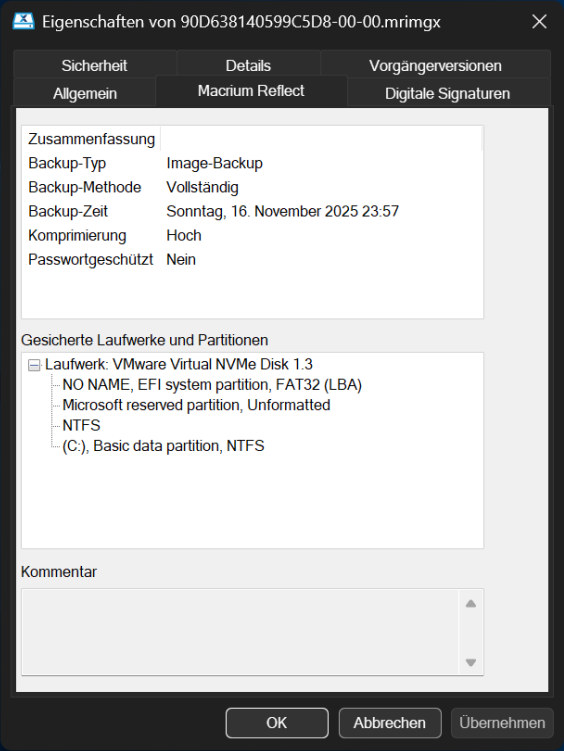
I recently noticed that the Properties tab for Macrium Reflect X is not affected by dark magic.
-
 I'm using his Firefox ESR builds. They suit me fine. For now, that is
 -
Ah, yes. I know how to use NTLite. I also remember using it's older cousin, nlite, to slim down XP and 2000 installs (one time I think I got an XP install down to, I think, 200 MB or less, and a 2000 install under 100 MB). Is it possible to somehow pre-activate Windows 10 after I've slimmed it down? I vaguely recall being able to do that with XP. Yeah, you're probably right. I will likely go with whatever the last version is, though, because it's easier. Of course, I have the problem of finding a license key that will work. I could've sworn I had one I got free as a perk from a CS class I took at the local Community College, but I can't seem to find it anywhere. I do have it in a VM, which I painstakingly upgraded – one release at a time – from 1809 to whatever the current is (22H2?). I also was able to update (a copy) of that VM further to the current release of 11, which actually isn't as awful as I thought – once I got rid of that ridiculously useless thing they call a "task bar." It feels more or less like a version of 10, to be honest. Why did they bother upping the version number? Microsoft's logic has escaped me in recent years (the naming scheme they used from the earliest Windows NT releases up to 7 made perfect sense to me). Ha! That's a bit extreme, yes? And if your range was much more than 50 feet, you most certainly would be violating lots of rules with your "jammer." I'm going by the rules and broadcasting on one frequency – 1610 AM. Interesting. Another instance of stock Windows 10 being dishonest and deceptive. An all to common theme in the industry nowadays. c
-
 I heard it works https://www.webroot.com/us/en/home/products/trials