NotHereToPlayGames
Content Type
Profiles
Forums
Events
Everything posted by NotHereToPlayGames
-
Well, two things here. 1) There really is zero reason for r3d to fix what HE DID NOT BREAK. 2) We-the-consumer can just slip back to a previous version - IT AIN'T GONNA HURT YOU ONE D@MN BIT TO USE A PREVIOUS VERSION. This is where the Browser Universe is just a bunch of whining babies, it really is the biggest STUPIDITY on the planet that browsers are updated so d@mn fast and no matter how fast it is, there are always folks that want it FASTER. FASTER is WHY we have issues like this. Because the ecosystem is all about pushing updates out fast, fast, fast. INSTEAD OF TRULY TESTING THOSE UPDATES BEFORE SENDING THEM OUT INTO THE UNIVERSE. And we end up with an ecosystem that is "happy" because they get FAST updates instead of GOOD updates. Send out VULNERABILITIES all day long, nobody really cares, "because they fix them fast". No, what we have is that they CREATED those vulnerabilities and sent them out to a population DEMANDING faster update cycles. PUBLIC GOT WHAT THEY WANTED.
-
I disagree. For one, the user agent is ANCIENT TECHNOLOGY that is DYING, DYING, DYING. And for two, we should never lump Firefox forks (r3dfox, this thread) and Chromium forks (Supermium) into that sort of direct comparison. No offense, but web sites that still do use the ANCIENT TECHNOLOGY of the DYING user agent isn't exactly (pro and con) up to par with the latest "googleims" and therefore stuck with Site A relying on a faked OLD user agent, Site B relying on a faked RECENT user agent, Site C relying on something totally in the middle, and therefore those OLD SCHOOL web sites can never use a ONE-FOR-ALL user agent, you will always have to rely on the "user agent override" settings in about:config.
-
I'm seriously wondering what the significance is, ie, the "viral" aspect is, of that number THREE. e3k-blah... r3dfox... probably just overthinking it, but that 3 just feels like some "viral meme" that I'm just not "hip enough" to know.
-
Yeah, I kind of assumed upstream as "e3k-blah" is also affected.
-
Q.E.D. However, whether this is an rd3fox issue or an upstream issue is "not my problem", no clue if it upstream, no clue if it only r3dfox, don't care, neither is my default browser. edit: those are in Win10. so if this isn't doing this in Win7 or Vista, I cite again as "not my problem", but then we are faced with NO LONGER calling this "Vista+" but saying "don't use on 10 [or 11?]".
-
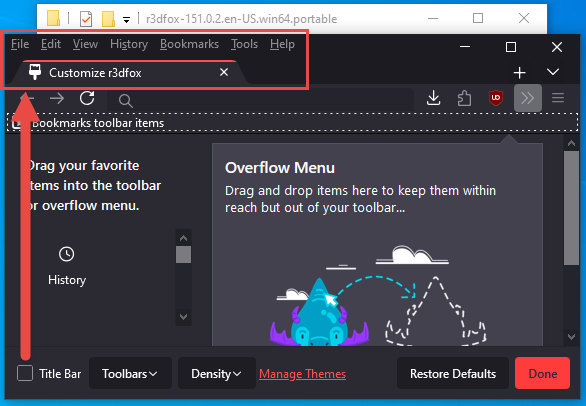
v151 not working like it has always worked in the past:

-
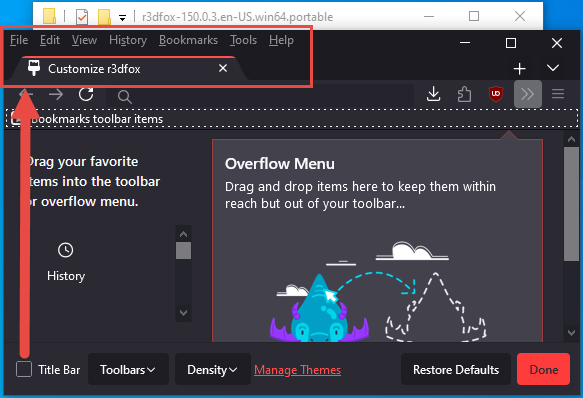
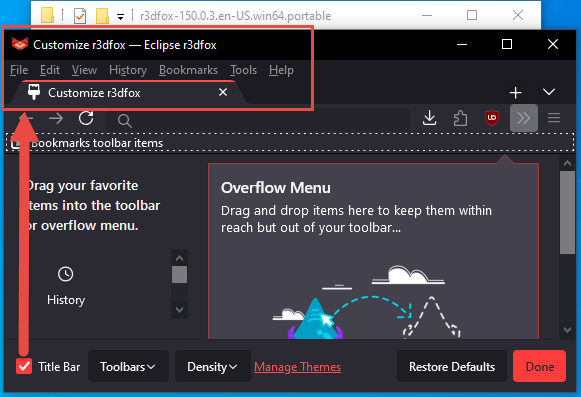
v150 working like it has always worked in the past:
-
You're not looking at it correctly. I will post PICTURES to demonstrate. Will be back . . .
-
Okay, but that kind of misses my question. IF this only affects v149, then IT DOES *NOT* EFFECT Supermium. ie, "the sky isn't falling" edit: ie, the "stupidly aggressive" update schedule (that both Chrome and Firefox do!) **CAUSED** the "exploit" so *ONLY* people that "update every d@mn day" (exaggerating for effect) were even effected
-
What does "exists in the wild" *REALLY* mean? ie, does it really affect v144? Or does it just affect those that "thought" they were safe by always running the most recent?
-
Last Version of Programs for Windows NT 4.0
NotHereToPlayGames replied to Leokids123's topic in Windows 2000/2003/NT4
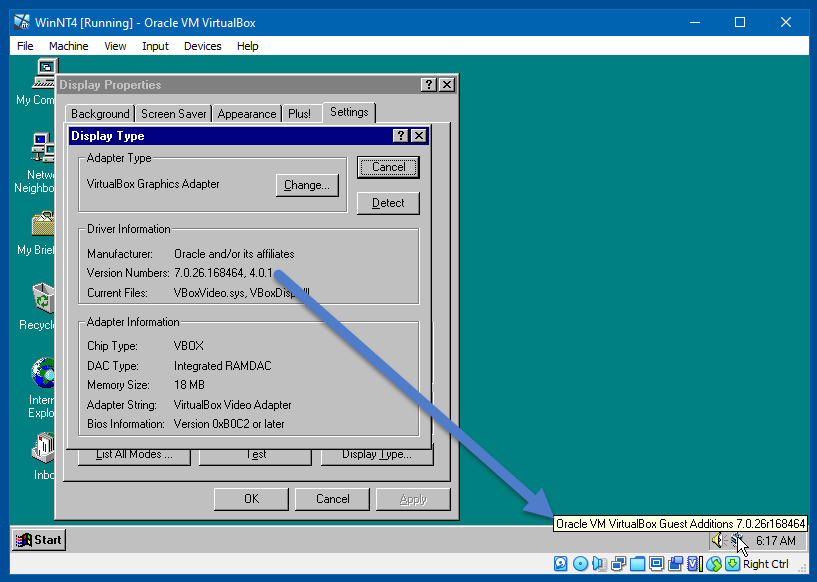
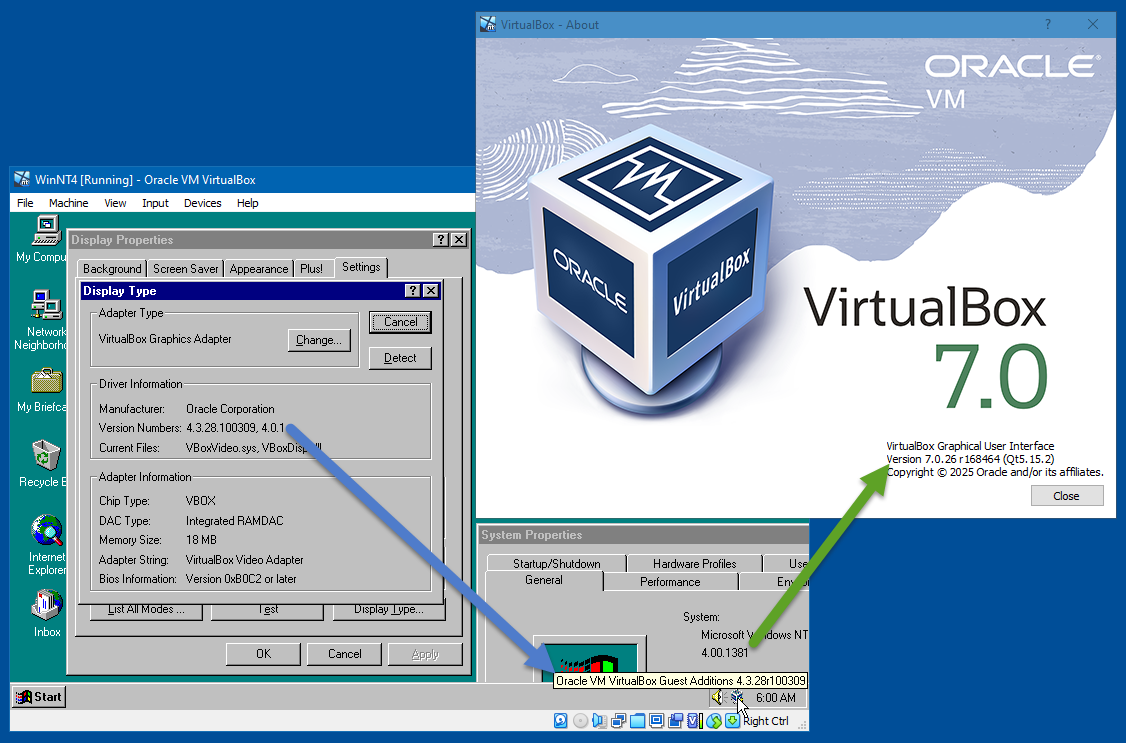
Everything still working fine after upgrading Guest Additions to 7.0.26.
-
Last Version of Programs for Windows NT 4.0
NotHereToPlayGames replied to Leokids123's topic in Windows 2000/2003/NT4
I am using 7.0.26 but upgrading would violate my "workflow process". But what works in 7.0.26 should also work in 7.2.6. My NT4 was installed under 4.3.28, as seen below. Everything (audio and graphics) is working great for me. I will update the Guest Additions to 7.0.26 and that should be the same as if it was installed under 7.0.26 (I'll screencap that shortly).
-
Last Version of Programs for Windows NT 4.0
NotHereToPlayGames replied to Leokids123's topic in Windows 2000/2003/NT4
Guest Additions is a VirtualBox item. Do we know if the OP is even trying in VirtualBox? Or is the OP using something else? I myself have an NT4 VirtualBox VM and zero issues. I would have to pull it from my archives but my guess is that it is VirtualBox v4.x.y. But... that doesn't necessarily say anything at all about NT4 being able to be installed in v5.a.b or v6.c.d or v7.e.f. So yeah, the OP should tell us what virtual machine software he is using, and also what version of that software. -
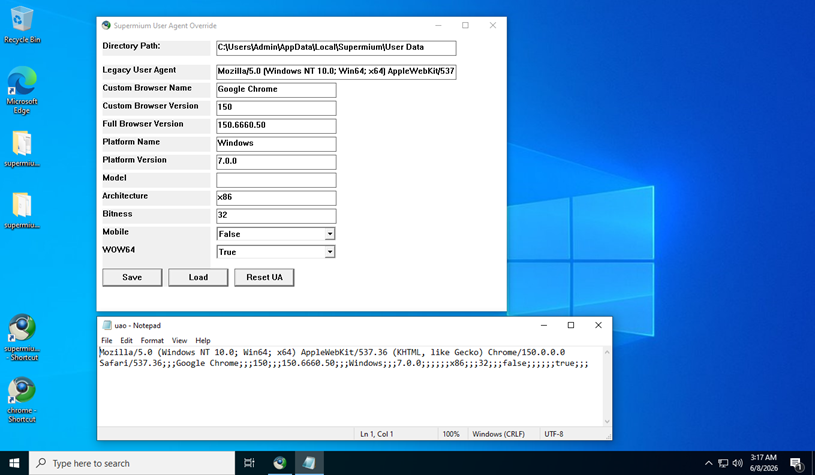
You don't "need" that tool. All it does is create ONE FILE in your profile directory and Supermium looks for that file. It is called "uao" without any dot-extension. Basically follows this format:
-
yep, thanks
-
I didn't look into it that far (will need to wait for another day). But I suspect that for those of us with access to newer-than-XP, we can run it in that, and just copy a file over to XP. That would be my guess, but I didn't look into it. It is writing that info to "something", .ini, .dat, .bin, .txt, config file without extension, "something". Safe assumption because it DOES ASK if you want to OVERWRITE when you make changes and click the save.
-
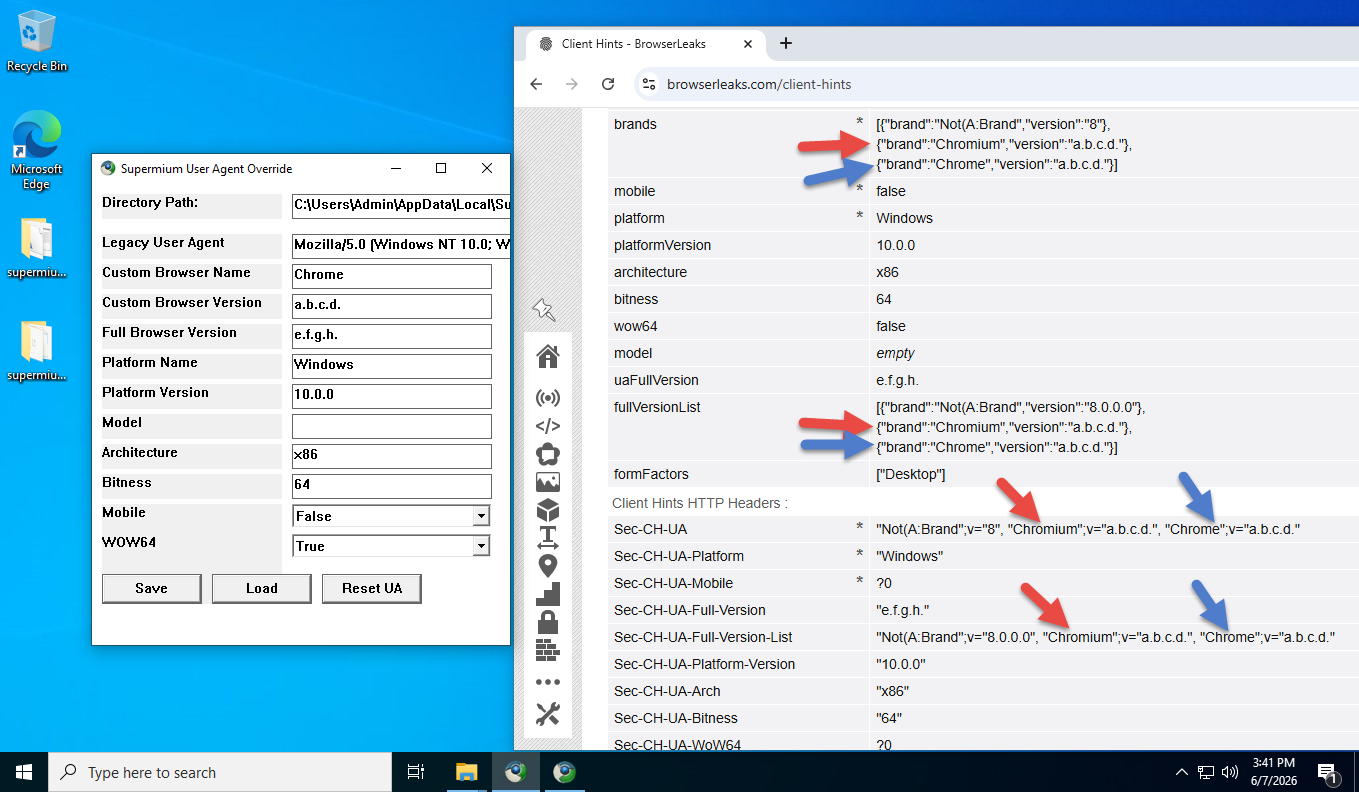
It needs improved. It doesn't really replace the original CH, it "appends" to them. The red arrow is the "original" (the tool DOES change the version, but not the brand). The blue arrow is the tool's "custom" entries. This THREE ENTRY brand isn't "normal", I *think* (but not sure) that most javascript that "reads" this line will only see the ORIGINAL, it will never see that THIRD "appended" entry that follows.
-
Good question! All Chrome-based browsers use WINDOWS'S "cert store". But I also *never* "update" Windows. But I've also *never* encountered "expired" certificates. And I'm also "deadset against" any (including those found at MSFN) "certificate updaters" (cause more harm than good). So yeah, good question, it would seem that my usage (and it sounds like yours too) would &/or should bump into "expired" certs - but again, I never have. In the past, for me at least, that was because I *created my own* certificate for PROXOMITRON and the browser only relied on that certificate. But I dropped Proxomitron in favor of all userscripts and userstyles about a year and a half ago (too many Cloudflare issues that requires Proxomitron [Reborn] to be bypassed). My gut reaction answer was that maybe certs are good for too long into the future so I've never hit an expiration. But MSFN's cert shows only THREE MONTHS between release date and expiration date. This Win10 install is WAY older than that! With no Windows Updates allowed! But no cert error here at MSFN. Sorry, none of that is really an "answer", per se, but adds intrigue to your question. Hmm...
-
MyPal 68
NotHereToPlayGames replied to Jody Thornton's topic in Browsers working on Older NT-Family OSes
If you are talking about feodor2, he has visited within the past ONE WEEK. A little over two weeks for Ascii2. Some members disable this (and one has to wonder "why"), but you can always HOVER OVER a member's name to see if they have visited recently. Sure, some (overly paranoid) types have this disabled. But most members do not. -
Win10 LTSC IoT lag issues. How to resolve?
NotHereToPlayGames replied to DeathAdderSF's topic in Windows 10
Agreed! And I'd need more info (questions already asked) to offer more suggestions. Things like "timestamp telemetry" can lag network folders, but you haven't told us if this is network only. Any and all services with the purpose of "diagnostics" that run in the background 24/7 is just "crap". Sure, if you "like them" or THINK they actually do any good at "diagnosing" issues, then use them ONLY when you have "issues". But in my experience, they never do any d@mn bit of "diagnostics" and should be trashed and disabled! Rely on "good" forums to assist with real debugging and diagnosing (MSFN may not qualify, too many of the GOOD members have been "silenced" by the BAD that run amuck/amok with "fake likes"). et cetera... -
Bummer. AI isn't always that great at writing userscripts. They almost never work as AI provides it but they generally can be edited into a working script. But I do not have "F Book" in order to perform that editing.
-
Win10 LTSC IoT lag issues. How to resolve?
NotHereToPlayGames replied to DeathAdderSF's topic in Windows 10
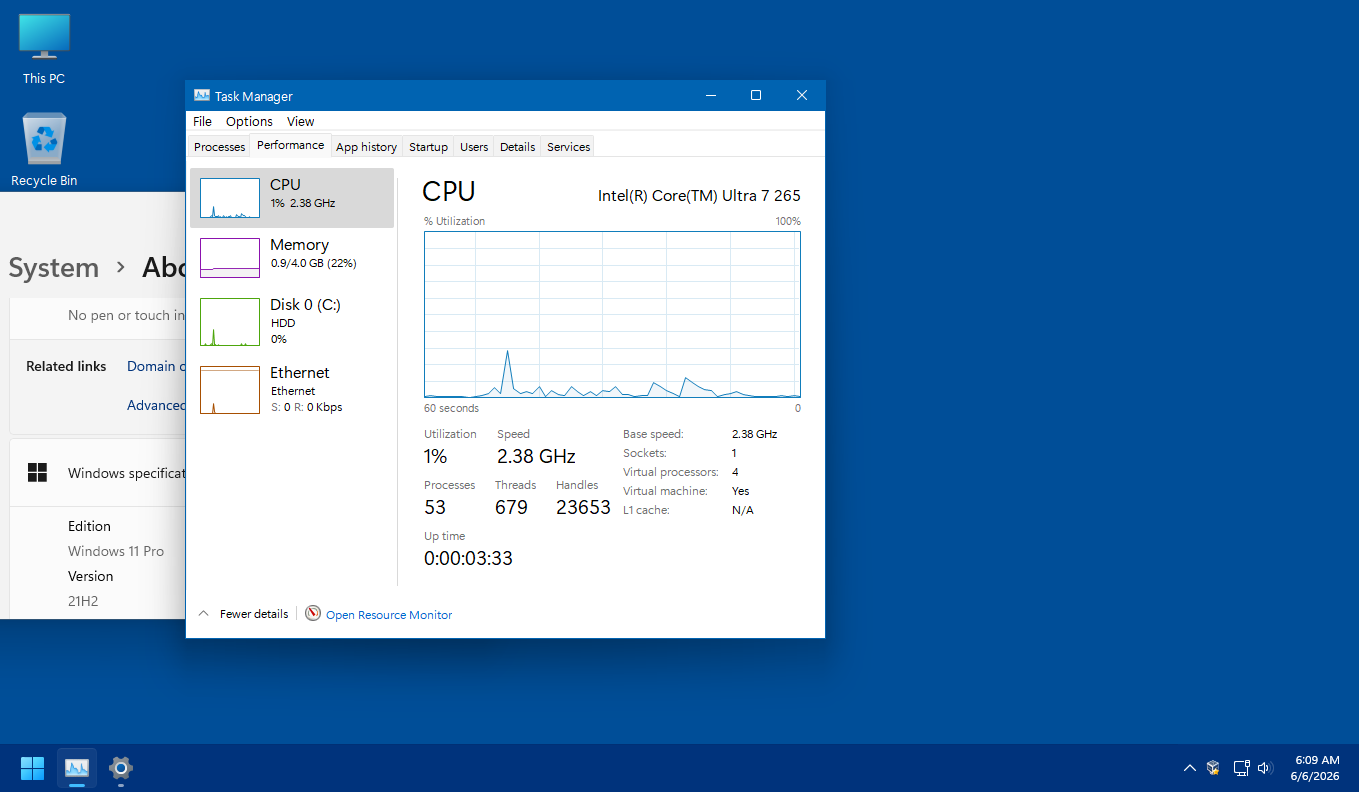
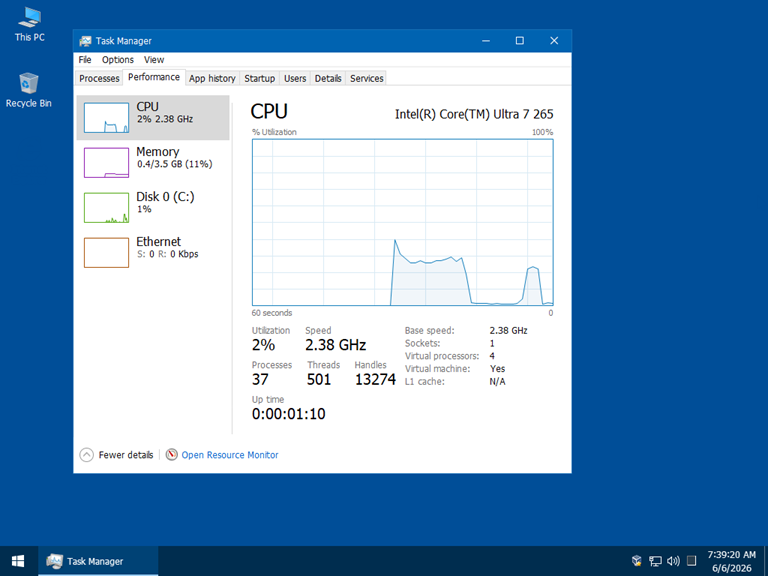
Point being, just from the sake of running a tweaked and debloated Win *TEN*, your process count should be between 37 and 53. Anything higher than that is just a bunch of "crap" wasting resources and bogging down your system. -
Win10 LTSC IoT lag issues. How to resolve?
NotHereToPlayGames replied to DeathAdderSF's topic in Windows 10
And this is Win *ELEVEN* 21H2. Tweaked and debloated. Again, purely as comparative reference.
-
Win10 LTSC IoT lag issues. How to resolve?
NotHereToPlayGames replied to DeathAdderSF's topic in Windows 10
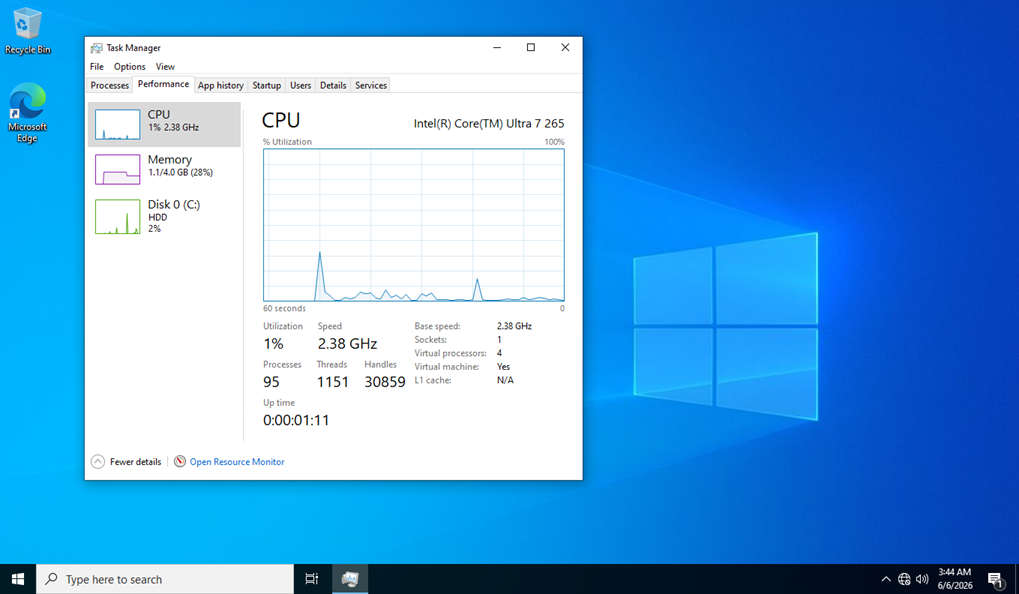
Just for comparative reference, the above is LTSC 2021 *as is* (not tweaked or debloated, default install, no updates). The below is LTSC 2019 *tweaked and debloated*, no updates.
-
Win10 LTSC IoT lag issues. How to resolve?
NotHereToPlayGames replied to DeathAdderSF's topic in Windows 10
I guess we should start with whether we are looking at a "full debloat" or just a "single process trackdown" to fix your lag issues. I've never experienced the type of lag you are talking about - but, I have also *never* used any version of Windows "as is". edit1: below screencap IS an "as is" install of Win10 LTSC 2021 -- en-us_windows_10_iot_enterprise_ltsc_2021_x64_dvd_257ad90f.iso edit2: below screencap is a NEVER-UPDATED install of Win10 LTSC 2021 edit3: below screencap has NEVER accessed the internet for ANY "bs" types of Windows Updates -- I *fully and wholly* **DISABLE** any-and-all "updates" on my OS's 1) Can you share a screencap of your Task Manager's Performance tab for the computer's first full minute of full startup (not return from sleep or hibernate)? 2) Is your lag only when accessing a NETWORK resource? 3) Is your lag only when accessing an EXTERNAL drive? 4) Is your lag purely a WINDOWS issue or does it only occur when you have NON-WINDOWS programs running?