cc333
Content Type
Profiles
Forums
Events
Everything posted by cc333
-
Not really. I tried all the suggestions to no avail. Plus, it happens with a fresh installation. Surely things couldn't get corrupt that fast? c
-
This is driving me insane! After years as a holdout, I've finally decided to upgrade to Windows 10, because there was some software I wanted to use which wasn't compatible with 7 (I subsequently discovered a workaround, but I wanted to forge ahead with 10 anyway). However, no matter what I do, 10 will eventually begin crashing with the stop code "PFN LIST CORRUPT" almost constantly, to the point where it's no longer usable (this morning, it happened when I moved the mouse!) I've tried fresh installations. I've tried not installing any programs. I've tried installing to an NVMe SSD. I've tried installing to a spare SATA SSD. I've tried spare, known-good RAM, and I've tested it (it passed). I even tried rebuilding my whole d*** computer (Dell OptiPlex 7050 SFF) with all new hardware. As it happens, the motherboard died shortly after this stop code began appearing, so I thought it might've been a precursor to that, but no. The exact same thing happens with the new motherboard. What the h*** is going on? I've never had this kind of problem with Windows 7! c
-

Microsoft removed outdated Windows 10 cumulative updates from MUC
cc333 replied to halohalo's topic in Windows 10
Now that you put it that way, you are probably right. c -
Microsoft removed outdated Windows 10 cumulative updates from MUC
cc333 replied to halohalo's topic in Windows 10
It seems absurd to m that they would want to save money by not hosting older updates and drivers. They have hundreds of billions of dollars, but they can't spare a few million to host some outdated updates that could actually be useful to someone? c -
I thought all versions of 10 supported Firewire, provided the correct drivers were installed? c
-
I think they mean to say that Cleartype (?) hurts their eyes. It doesn't bother me tons (my eyesight, while not awful enough to mandate correction, isn't a perfect 20/20), but I can still tell when it's on, and I tend to prefer how sharp and crisp text is when it's off. Why add extra blur when I don't have to? Recent MacOS versions have it too, but it's more subtle and less annoying (I can still tell the difference when it's off, though). XP had it, too, and for some reason, it wasn't so bad (maybe due to the fact that it was fully optional and off by default). I don't recall Windows 2000 having it natively, but maybe it (or something like it) was backported, perhaps by way of an XP update? c
-
Ah, yes. I know how to use NTLite. I also remember using it's older cousin, nlite, to slim down XP and 2000 installs (one time I think I got an XP install down to, I think, 200 MB or less, and a 2000 install under 100 MB). Is it possible to somehow pre-activate Windows 10 after I've slimmed it down? I vaguely recall being able to do that with XP. Yeah, you're probably right. I will likely go with whatever the last version is, though, because it's easier. Of course, I have the problem of finding a license key that will work. I could've sworn I had one I got free as a perk from a CS class I took at the local Community College, but I can't seem to find it anywhere. I do have it in a VM, which I painstakingly upgraded – one release at a time – from 1809 to whatever the current is (22H2?). I also was able to update (a copy) of that VM further to the current release of 11, which actually isn't as awful as I thought – once I got rid of that ridiculously useless thing they call a "task bar." It feels more or less like a version of 10, to be honest. Why did they bother upping the version number? Microsoft's logic has escaped me in recent years (the naming scheme they used from the earliest Windows NT releases up to 7 made perfect sense to me). Ha! That's a bit extreme, yes? And if your range was much more than 50 feet, you most certainly would be violating lots of rules with your "jammer." I'm going by the rules and broadcasting on one frequency – 1610 AM. Interesting. Another instance of stock Windows 10 being dishonest and deceptive. An all to common theme in the industry nowadays. c
-
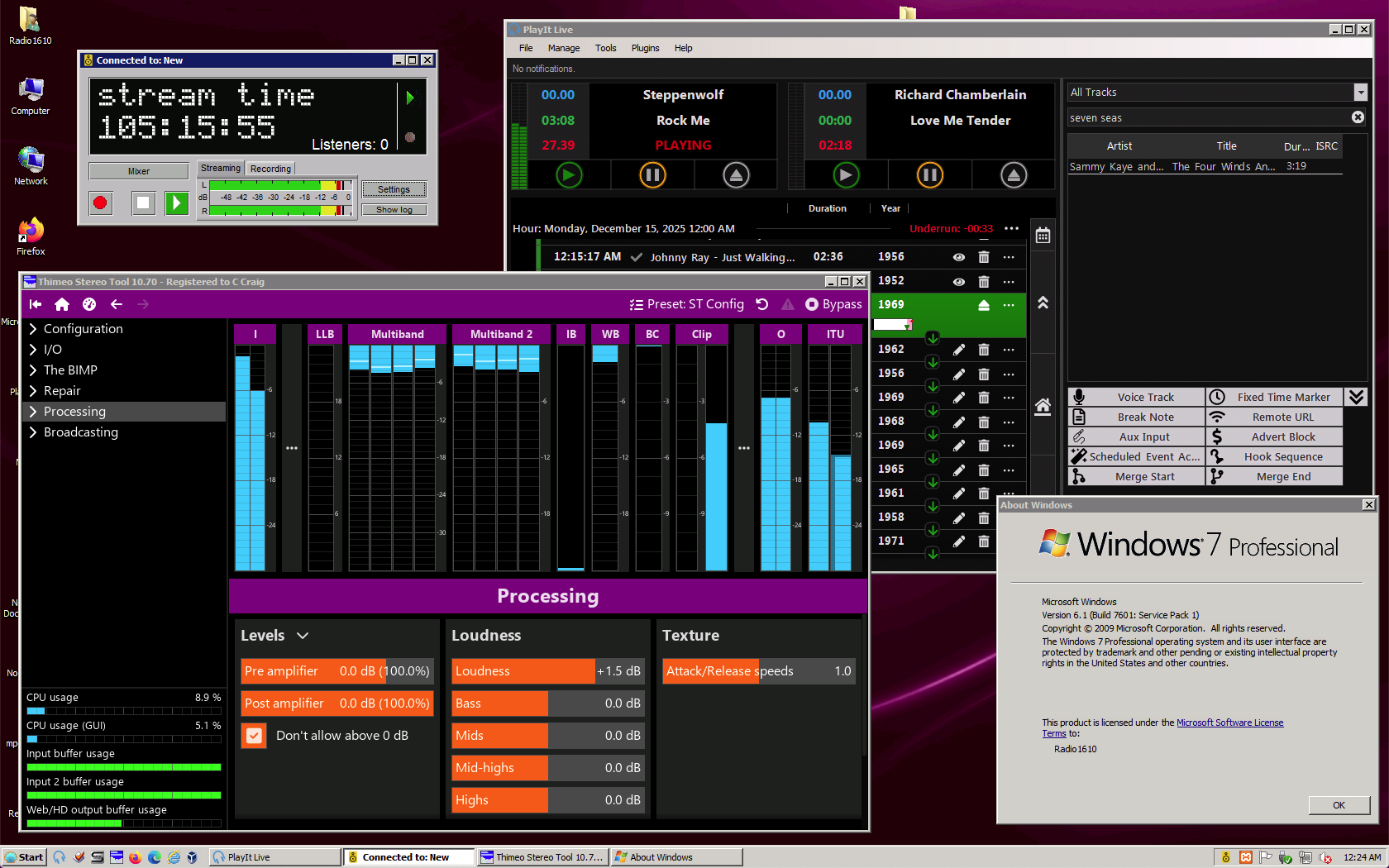
Hi! It's been awhile since I posted here! I'm mainly using Mac OS nowadays, but I still maintain a Windows 7 VM, and I have a Dell OptiPlex 7050 running Windows 7 Professional that I use for playlist automation (I run a small, unlicensed AM radio station; the neat part is that it's not illegal: look up Title 47, CFR Part 15, Subsection C, § 15.219 of the FCC rules). So, despite it being over 16 years old now and EOS since 2020, it's still perfectly usable and secure enough to at least get done what I'm trying to do, as you can see here: I had an earlier version of this running on XP, but unfortunately, it got too old to run the versions of the above apps I wanted (clockwise from top left: Butt, PlayIt! Live, Stereo Tool). 7 is still in that sweet spot where current versions of these things are still supported, so I'm going to use it while I still can (that said, I'm planning for an eventual upgrade to (ugh!) Windows 10 because, unfortunately, the fun doesn't last forever, and there's no Mac or Linux version of PlayIt! Live). Here's to keeping Windows 7 alive, one PC at a time! c

-
At least the acronym (BSoD) will still be valid, since both black and blue begin with the letter 'b' c
-
Hmm, how fascinating. It must be something about your specific hardware that only works best on Vista, and malfunctions (and sounds bad) on any other version. My hearing is fairly good, and I still can't really tell the difference between 44.1 and 96 or 192, so I just go with 44.1 to save on disk space. MP3 at the highest possible bitrate (320) is tolerable, I find, but once it starts dropping below 192, it becomes increasingly awful. My preference, of course, is uncompressed WAV or AIFF (I guess FLAC is supposed to be good, but I tend not to use it much because support for it isn't as universal as it is for MP3 and WAV). c
-
That's strange. I've never had any trouble with sound on XP. All cards I've tried function as they should, and I could set 44.1kHz (or any other supported sample rate) easily. Of course, I've often used USB or Firewire (IEEE1394) audio interfaces with ASIO support for top sound quality, and they usually include decent drivers; in my experience, I've found that virtually all of the so-called "HD" sound systems built into most XP-era motherboards have stupidly bloated and half-broken drivers and often are hideously noisy and cheap sounding regardless of driver or Windows version (if anything, newer Windows versions with newer drivers sound worse as the already mediocre support the bad drivers have deteriorates further). Perhaps your drivers weren't fully compatible or something was wrong with your sound card? c
-
I like how XP can be "tamed" and with a few simple settings, the whole "fisher-price" theme can be disabled, after which it looks and feels basically like an upgraded version of Windows 2000, especially before SP2. c
-
True, but I mainly used the Extended Kernel to gain access to a more modern web browser; Then-recent versions of Java and Notepad++ ran fine without it. c
-
Speaking of irrational hatred of old operating systems.... I just remembered an anecdote of mine from a programming class several years ago (I think it was 2017 or so). The instructor was very much one of those "newer is better" people, and actively shunned anything that wasn't "now" and encouraged all his students to do the same. So what did I do? I brought in and used my Dell Latitude D630 (then about 11 years old) running Windows 2000 (then at least 16 years old, and 7 years out of date), and, via blackwingcat's Extended Kernel, I was able to run the then-current versions of Java and Notepad++ and complete my assignments just as well as my classmates with their fancy Windows 10-based stuff. I didn't have to do this (I had a nice, then-current Apple MacBook Pro I could've used instead), so why did I? Well, mainly to prove that I could. Plus it was fun to spite the instructor and prove to him that old computers can still be useful (he was rather arrogant and I didn't like him very much). c
-
Over the past summer, I set up a 6th gen-based Dell Optiplex with Windows 7, and that thing absolutely flies with a nice 1 TB SSD and 16 GB of RAM. I've been thinking of *gasp* upgrading it to 10, but, honestly, I don't really see any point to it other than curiosity. 7 is doing everything I want with no problems, and there's no reason to change it unless/until I encounter something I want to use that it can't run. If I had a spare SSD that I could swap in, maybe I would try 10, so that if I didn't like it (and I probably wouldn't), I could simply swap my undisturbed Windows 7 SSD back in and pick up where I left off. c
-
Neither do I! My favorite Windows is 95, followed by (in order from most to least): 98 SE, 2000, XP, and 7. I don't care much for 8.x, but I've found that with some effort, it can be rendered mostly sane. 10 is harder, and it has a tendency to self destruct, so I try to avoid it. Since I use Apple MacOS primarily, I don't need to bother with the latest Windows. 2018, I believe, was about when Google (I think) told everyone to mandate https and TLS1.2, among other things, and naturally most sites complied. This, of course, broke virtually all older browsers, which lack support for modern security protocols. A couple years later (2020) for similar reasons, MS began breaking Windows Update for older Windows, like 2000 and XP (via extraordinary measures, some degree of WU functionality remains, but stock WU is completely broken now). There's not much that cn be done about WU, but as for ancient browsers, if you set up a proxy that handles the security, things get better, but then they get choked up on the rampant javascript. If you strip that out too, you can still get a weirdly rendered, but somewhat usable page which is usually good enough for basic text. This can be fixed somewhat by web proxies that can reformat a page into something more usable that old browsers can render more or less correctly, but ultimately a current browser is needed for full functionality. c
-
Such a thing actually does exist. It's called Windows NT 4.0. However, Windows 2000, AKA NT 5.0, seems somewhat better because it still has a similar look and feel (although the "webbified" variant from 98), but includes many of the conveniences that are often taken for granted, such as Device Manager, Plug & Play, full support for USB HIDs (and at least partial support for USB mass storage), etc. NT 4 and earlier never had any of that. Of course, it follows that XP (NT 5.1-5.3) was the best Windows overall (and in my opinion still is, at least as far as the UI is concerned; there's a good reason why it outlasted every other version, having been continuously supported and updated in some form for almost 20 years!) because it took many of 2000's firsts and refined them with new features and even better reliability. 10 and 11 may have full support for modern hardware, but all that spyware junk is just unnecessary (I've read about how people were worried about all the spyware MS was including in Windows all the way back to Windows 98. If only they had known what was to come 15 years later, maybe they wouldn't have complained so much....) c
-
Wow! I've been out of the vintage Windows scene for awhile, and last I knew, the best, most "modern" browser was the Chinese Extreme360 that was hacked to display in English and remove all/most if the CCP (Chinese Communist Party) spyware and other similar junk. This Supermium, in principle, seems much better however, in the sense that it's a maintainable and reproducible port of Chromium, so the source code is available, unlike Extreme360, which is closed source. Last I knew, this was thought to be either impossible or prohibitively difficult, so I'm glad there was finally a breakthrough, as a native Chromium port seemed to be the most viable path forward, given that even the latest ports of the various Firefox-derived browsers have fallen increasingly out of date and/or are not working super reliably anymore as bugs and half-broken features begin to pile up. While in general I loathe to use Google Chrome and reluctantly use the open-sourced Chromium only when absolutely necessary, I will definitely consider giving Supermium a try, at least on my Windows XP, Vista and 7 machines. c
-
@66catsAll very good points. I'm not opposed to "reasonable" cuts to old hardware support, if doing so would guarantee that the OS will run reliably and have reasonable performance, even when running on the minimum supported configuration (95 on a 486, which I ran exactly once, is painfully slow even by late 90s-early 2000s standards, but usable once fully booted; I wouldn't want to try 98 or XP on a 486, though (XP can now be forced to run on 486, apparently, but it's almost useless for anything other than a proof of concept), especially with all the IE integration). It's the lack of support for otherwise perfectly fine hardware on account of a relatively minor technicality that comes across as kind of irksome. I didn't realize that Coffee Lake (8th gen) was from 2017 for some reason, so that helps somewhat. But what about 6th and 7th gen? They're not much older (2015 and 2016, respectively), are very similar architecturally to Coffee Lake, and 11 runs perfectly fine on them, yet both are officially unsupported and Windows refuses to install without workarounds. c
-
Yes, but consider the late 90s and 2000s, where new CPUs showed up regularly with all kinds of fancy new instructions. MS took advantage of many of these new instructions, and, yet, they were simultaneously able to retain compatibility with older CPUs that lacked the new instructions. What is so different between then and now? The fundamentals of how the x86 architecture works haven't changed that much, have they? I think that dumping compatibility with 2-4 year old hardware "for security reasons" is just an excuse to be lazy. They can absolutely make use of the new stuff and still retain compatibility with most of the old. They did that for years and it worked well enough. Yes, it would be unrealistic to maintain full compatibility with, say, the i386, or anything else that can't run at least 1 GHz and 4 GB of RAM, but they could certainly keep, at a minimum, higher-end Core2 Duos and all 1st gen Core i stuff (Nehalem and Westmere, etc). c
-
XP and its derivatives seem to be the cockroaches of the PC world, don't they? They won't die! c
-
My Windows 11 impressions so far are that most peoples' impressions of it aren't that great (I haven't used it myself, and probably won't any time soon). I waited 7 years for Windows 10 to get better — and it never really did, so I'm not waiting around for 11, because I doubt it'll ever get meaningfully better either. Microsoft simply doesn't seem to care anymore, so why should I? c
-
And Happy New Year! c
-
After some rigamarole (installing the official Update Rollup 1) and discovering that one must be using the newest release of the Legacy Update client (1.3 as of now; when I first tried it a week or two ago, 1.1 was current, so development is moving quite fast), I managed to update a fresh install of Windows 2000 SP4. I suspect this is the first time in quite awhile that it actually worked with such ease. Even when v6 was still fully online with SHA-1, updating a fresh install of 2000 was very hard because WU didn't work out of the box; I had to almost update everything just to make it work, but then what's the point? c
-
I tried Legacy Update, and I liked it. It worked more or less equivalently to the normal WUv6, but the sidebar and header were different, and overall the sidebar's UI feels a little unpolished compared to the old WU one, and the header is a bit large compared to the original. Because this is an open source project, perhaps it's possible to modify the header and sidebar to make them look and feel more true to the original. For now, however, I'm quite satisfied with its performance as is; it's functional and gets the job done. I know this isn't strictly relevant here, but I wonder if the same techniques used could enable a version based on WUv4 for use with Windows 9x and ME (and also unupdated 2000 pre-SP3 and XP RTM)? I suspect that it would be fairly trivial to get the front end working since v4 and v6 are fairly similar, but getting the back end going would be harder; any WUv4 workalike would need to be redirected to some sort of 9x update archive, since the original servers were purged of them years ago, and likely aren't even online anymore. c