Leaderboard




Popular Content
Showing content with the highest reputation on 03/04/2024 in all areas
-
And yeah, if win32 wishes to know what I fixed, please get in touch via PM. The information is not be shared with 3rd parties. The result is good, but I still want to improve it more, As of now, it still feels heavy on a low end PC with 4GB of RAM. 8GB and more - very good.3 points
-
Some two weeks ago, I fixed the awful memory leak in Rabinovitcsh's Opera "cr+ck". I was willing to hesitate posting about it due to the fact it needed to be tested properly, and I only use Opera on occasion.3 points
-
I'm sorry, I only used XP for no more than a month in 2006, but the below solution should actually work for older OS, even 32bit ones. This is what I sometimes use for my own custom drivers' signing. The procedure is described in details, Seeing you, Dave, have an Win 10 installation, it shouldn't be a problem to do it there, and then use the signed driver on your XP. https://github.com/MicrosoftDocs/windows-driver-docs/blob/staging/windows-driver-docs-pr/devtest/tools-for-signing-drivers.md3 points
-
To force the installer of DreamMail Pro 6.6.5.9 to use English instead of Chinese as the installer language, I created a small loader that does this when it calls up the setup program. It must be executed in the same directory in which the setup file is located with its original file name dmpro_setup6.6.5.9.exe. Here is the download link of my loader: https://www.mediafire.com/file/4bh4pybunlmr5hq/ForceEnInstall.7z/file Although some virus scanners detect this file as malicious, it is just a false-positive as always. Use my loader to force an English install, only if you trust me, of course! Cheers, AstroSkipper3 points
-
As I already said, fully functioning email clients under Windows XP are rare and not easy to find. Nevertheless, I have found another candidate whose latest version is supposed to be XP-compatible according to the homepage and many other sites. This is the email client DreamMail Pro. It is available in the latest version 6.6.5.9 from 05.01.2023. The program comes from a Chinese manufacturer and is of course available in English and some other languages. It is free of charge and actually being further developed. In China, Windows XP is still appreciated, as we know. I did a short test. It installs successfully under Windows XP and runs there properly as far as I can see in a few seconds of testing. Rather unpleasant is the installer, which strangely can only be opened in Chinese. Here is the link to DreamMail's homepage: https://www.cy-email.com/ and its installer: https://dl.cy-email.com/dm6/Download/dmpro_setup6.6.5.9.exe Greetings from Germany, AstroSkipper3 points
-
The installer of Pegasus Mail 4.81 beta doesn't work properly under Windows XP, indeed and unfortunately. I reported it to the technical support of Pegasus via email. I'm curious to see if anyone gets back to me and if it's of any use.3 points
-
I think you are overthinking. There really is NO REASON to make an x64 version. I'm more OCD then the next guy, but to have it x64 just because everything else you use is x64 is not really a justifiable reason.2 points
-
I'm seeing it as a pattern, 85 was very light and fast, 86 a bit heavier, then a long row of heavy versions followed, starting from 108 it got better again. As of now, I only see some improvement in 122. But it's too new for valve.2 points
-
Looks more like the real reason to choose 109 is simply because it's lighter on system resources, not that they actually care about Win8, just my opinion.2 points
-
The current version, Pegasus Mail 4.80, is XP-compatible. I could successfully install it on my real Windows XP computer, and it runs as expected. At next, I will try the beta version 4.81.2 points
-
It won't be.1 point
-
Thank you! Very interesting facts from a fellow MSFNer! It's no wonder that spyware replaces those original Windows files. wzcsvc.dll (Wireless Zero Configuration Service) - convenient to send additional hidden data via side channels (a well known way of stealing data). shimgvw.dll (Windows Picture and Fax Viewer) convenient to view and make screengrabs of what you do on your PC. There are multiple official governmental warnings against using that software.1 point
-
I tried Kaspersky Embedded Systems Security 3.1.0.461 and Kaspersky Embedded Systems Security 3.3.0.87 on Windows XP Professional with Service Pack 3. Both versions (version series) would replace or modify the following system files: wzcsvc.dll (Wireless Zero Configuration Service) shimgvw.dll (Windows Picture and Fax Viewer) Kaspersky Embedded Systems Security 3.1.0.461 also modifies: mfc42u.dll (MFCDLL Shared Library - Retail Version) Kaspersky Embedded Systems Security 3.3.0.87 also modifies: pdh.dll (Windows Performance Data Helper DLL) userenv.dll (Userenv) netapi32.dll (Net Win32 API DLL) secur32.dll (Security Support Provider Interface) user32.dll (Windows XP USER API Client DLL) mfc42.dll (MFCDLL Shared Library - Retail Version) usp10.dll (Uniscribe Unicode script processor) shlwapi.dll (Shell Light-weight Utility Library) ws2_32.dll (Windows Socket 2.0 32-Bit DLL) msasn1.dll (ASN.1 Runtime APIs) wintrust.dll (Microsoft Trust Verification APIs) mscms.dll (Microsoft Color Matching System DLL) olepro32.dll () fastprox.dll (WMI) odbc32.dll (Microsoft Data Access - ODBC Driver Manager) winmm.dll (MCI API DLL) atl.dll (ATL Module for Windows XP (Unicode)) wldap32.dll (Win32 LDAP API DLL) wmiprvse.exe (WMI) It is not clear why the products do so. After restoring the original files, the original files were again replaced with Kaspersky modified ones after a few reboots.1 point
-
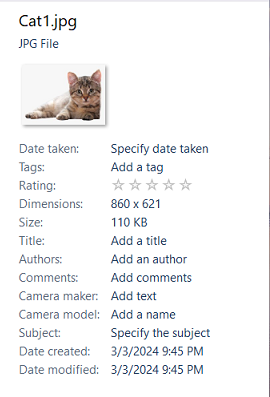
Please enable the classic Details pane with the "Win 10 Ribbon UI" option. When the Windows 10 Explorer (Win 10 Ribbon UI) is enabled, the Details pane is still the new version. I can get to the classic Details pane by opening Explorer via the Control Panel, so the code is still part of Windows: Is there any chance you could bring back the classic Details pane with the "Win 10 Ribbon UI" option? Yes, I know I can get the classic Details at the bottom of the window, but I would also like the option to have the classic Details in the side panel.
 1 point
 -
@anton12, your hostility mystifies me! (We are talking about Web browsers here. Unlike the canaries of the past, nobody dies. It's just a metaphor.) Posting on this thread does not obligate anyone to be a beta tester for @roytam1's browser builds. Some have taken on this task, but voluntarily. I appreciate their efforts, but I see no reason why I should be expected to join them. I have my own interests, which I will pursue as I see fit. As Billy Joel sang many years ago, "this is my life; go ahead with your own life, and leave me alone!" (Or - less politely - MYOFB.) Now - on to a (hopefully) more interesting topic. On another thread, this was brought up: 7 years ago seems pretty old to me! So I started wondering if newer versions would work. I found that pdf.js is contained in file omni.ja, so it's not super easy to replace the code, but it is possible. So as a test, I downloaded and extracted version 1.8.188, and replaced path chrome/pdfjs/content in omni.ja with that "newer" (by 1 month) code. It seems to work, although I saw no obvious differences between 1.7.348 and 1.8.188. Still, the fact that it didn't just blow up in my face is encouraging. I plan to try progressively newer versions to see how far we can push pdf.js before being stopped by some JS feature not yet implemented in UXP. Stay tuned....1 point
-
@roytam1, I report some BNavigator bugs (my currently used build is 20240223 of version 0.9.8714a1 (32-bit)): Bug 1: The "Open Web Location..." menu item is not shown in Bnavigator at all, but Open Web Location functionality still is accessible other than via menu item (use Ctrl+Shift+L keyboard shortcut to bring up dialog box). It is notable that the "Open Web Location..." menu item is present and can be accessed via in SeaMonkey and Iceape-UXP. In those browsers, the menu item is located in the first section of the "File" menu. The "Open Web Location..." functionality can no longer be accessed without the use of a keyboard (such as by mouse). Perhaps the menu item was removed (accidentally?) when removing menu items relating to the SeaMonkey suite that are not used by the Browser component (such as the items that relate to email client, Composer, Address Book, etc.). I tried using userChrome.css to make the "Open Web Location..." menu item visible, but it failed. Perhaps the menu item is missing completely. EDIT UPDATE: It appears that the The "Open Web Location..." functionality is intact and available except that the insertion of the File menu item for "Open Web Location..." has been unfortunately commented out by Developer Tobin. In the source page of chrome://navigator/content/navigatorOverlay.xul (chrome\navigator\content\navigator\navigatorOverlay.xul in the omni.ja file), the relevant code is commented out and appears as: [Forum errors when trying to post the information, so it has not been posted. Please instead search the file for (contents between the quotes) "<!-- XXXTobin: Get rid of this".] After un-commenting the removing the code, the UI elements are restored and usable, but only on new profiles. Existing profiles remain on the old behavior. Bug 2: The "Go" toolbar button, which is used to run the URL bar contents, is not shown at all, but the URL bar contents may still be run via keyboard shortcut (Only while having the URL bar already selected, the Enter keyboard shortcut may perform the run action). The "Go" navigation button functionality can no longer be accessed without the use of a keyboard (such as by mouse). This is also true of the dedicated "Search" navigation button (which operates against the Location Bar/Urlbar contents); however, it is less severe because of the existence of the optional dedicated search bar item that incorporates its own search button. The "Go" button does not display at all. I tried using userChrome.css to make the Go button visible, but it failed. Perhaps the Go button is missing completely. EDIT UPDATE: It appears that the Go button and Search Button functionalities are intact and available except that the default inclusion of those intractable items have been commented out by Developer Tobin. In the source page of chrome://navigator/content/navigator.xul (chrome\navigator\content\navigator\navigator.xul in the omni.ja file), the relevant code is commented out and appears as: [Forum errors when trying to post the information, so it has not been posted. Please instead search the file for (contents between the quotes) "<!-- XXXTobin: These need to be exterminated".] Given the "These need to be exterminated" comment, it would appear that the developer had great prejudice against these accessible navigation buttons. (I would speculate that the developer disliked the late 1980's or early 1990's style/appearance that the buttons have.) After un-commenting the removing the code, the UI elements are restored and usable, but only on new profiles. Existing profiles remain on the old behavior. Bug 3: Set default browser does not work correctly or fully. When setting default browser (using the "--setDefaultBrowser" command line argument), a Desktop shortcut is created, but the browser is not configured to be the system default. Many of roytam1's browsers do not set default browser correctly and can make other changes (which I think happened when I last tested roytam1's K-Meleon browser). It would be good to have the default browser/application options working correctly for all major roytam1 releases. ---------------------------------------------------------------- Seem like Bugs but Not sure if Bugs; should bring to roytam1 attention: Seems Like Bug 1: The throbber icon is invisible. The icon still exists and can still be interacted with. I think that it would good to for the throbber icon to actually have something to visibly see. It would make accidentally clicking it more difficult, particularly, if one does not remember where it is placed.1 point
-
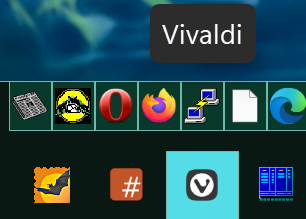
I'm not sure if this started with 3.7.5, but I noticed that tooltips are now white-on-grey instead of following my (high contrast) theme: (the pinned icon tooltips also appear above the taskbar, even if there's a quicklaunch toolbar in between)
1 point
-
By the way - today (sunday) I just saw this piece of news....don't people have anything to do these days?1 point
-
Hello Mathwiz, your motto: is "truly heroic" !? Since using the latest browsers by RoyTam1 is not a question of "life and death", woudn't it be a little more productive if you muster your courage and lend a helping hand with this project ? Where are the DEAD CANARIES ?? The World Belongs to the Brave - so let's go on !1 point
-
I technically don't agree with this 100%. Not saying it's not true, just saying the entire picture cannot be painted with this one brush and this one brush stroke. I'm not referring to .pdf's but "web browsers" in general. The constant push for "new and improved" isn't being led by the "web designer", it's being led by the hype and propaganda behind "security". "Use our browser! It's more secure then theirs. Just look at our upgrade rate relative to theirs, we find and fix vulnerabilities faster then they do. Use our browser!" Paraphrasing, of course. In regards to .pdf's, totally and completely agree! It makes NO SENSE for a web site to host a "viewer" when Mozilla-based started embedding a built-in .pdf viewer in 2011 and Chrome-based started in 2010. One uses HTML5 and .js. The other uses C++. This would have been Firefox 5 and Chrome 7. Where are we at now? I've lost track because they both update 7 times a day (exaggerating, of course).1 point
-
Vista and Server 2008, they both support SHA-2 officially. https://support.microsoft.com/en-us/topic/2019-sha-2-code-signing-support-requirement-for-windows-and-wsus-64d1c82d-31ee-c273-3930-69a4cde8e64f1 point
-
This is not the reference edition I was talking about. Reference is slim, but long. https://www.tweaktown.com/reviews/7170/nvidia-geforce-gtx-980-ti-reference-video-card-review/index.html1 point
-
Probably a reference edition will fit in that case, I'd also recommend to look at Titan X, 980Ti. Both will work with XP by adding an inf string, both are not huge (reference, slim design).1 point
-
I thought using hacked(modded) XP ISO versions was banned here, and even discussing it, especially posting screenshots.1 point
-
"Unknown organisation" must have its own ways1 point
-
It doesn't even properly work on Vista, not to mention windows XP. Confirmed by the developer. https://github.com/weolar/xpchrome/issues/19#issuecomment-18262802591 point
-
People say it doesn't. "chromium 115 for xp 20231121 does not work" https://github.com/weolar/xpchrome/issues/261 point
-
@roytam1! In your first post of this thread, you referenced to your support thread on the eclipse forum. The provided link https://forum.eclipse.cx/viewforum.php?f=33 doesn't work, as this internet address doesn't exist anymore. After a bit research, I found your support thread under the new address https://board.eclipse.cx/viewforum.php?f=33. If I am right, this link needs an update.1 point
-
Just a reminder! There is already a thread about legacy extensions with the title "Extensions and custom buttons for UXP browsers - Corrections, modifications, adjustments, and special recommendations": Cheers, AstroSkipper1 point
-
Here is the download link of Pegasus Mail 4.51: https://download-us.pmail.com/w32-451.exe Cheers, AstroSkipper PS: Didn't see that the link was already posted. BTW, many old files are on their server which are not listed anymore on their download site. Trial and error is the way!1 point
-
I didn't try the recent version of Pegasus Mail but it is listed as XP-compatible on their homepage. If it really can't be installed, then they haven't updated the system requirements on their homepage. Anyway! Here is the quotation of their system requirements:1 point
-
Hi , I didn't have any notifications , the next time you need to tag a member if you want help. I'd definitely helped you. I'm glad you sorted this out. 344.75 is bullet proof for XP , that's right. I usually suggest it to every XP user.1 point
-
Try driver 347.09 . I've got better performance with it using XP64 vs 344.75 . https://drivers.softpedia.com/get/GRAPHICS-BOARD/NVIDIA/NVIDIA-GeForce-Graphics-Driver-34709-for-XP.shtml1 point
-
Yes , Nvidia iCafe are absolutely official and WHQL . https://www.nvidia.com/en-ph/geforce/icafe-certified-program/ Also , there are rumours saying they are based on Quadro. Do you know where to find v368.91 for XP 64-bit or any other iCafe starting from 347.xx for 64-bit XP , I'd like to try them.1 point
-
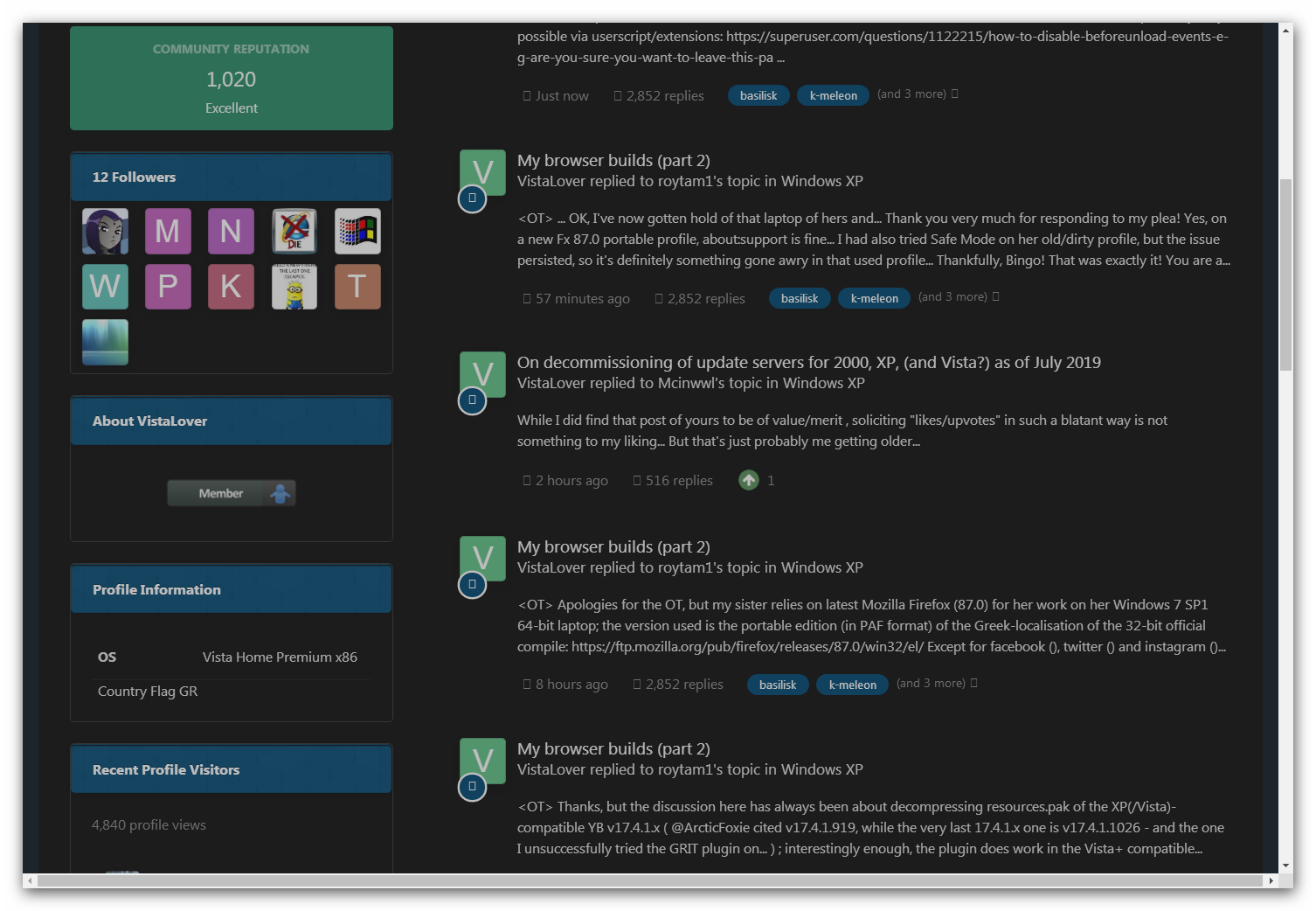
Oh really !? Where is any valuable info in your reply and why do you think it is needed ? It's not the first time you've misinterpreted my posts . Do note , I didn't write "like" , and "upvote" is meant to move the post in the charts for people who need to find a quick solution. Now this is really funny how your absolutely worthless and hostile post is getting upvotes. Such "posts" do pollute this wonderful website , our beloved MSFN. Let me ask , do you have a special permission to write off-topic posts ? The rules do not apply to you ? I've noticed you have plenty of them with many being marked as <OT>. Are you a wise ancient ("old", like you said it yourself) Guru of some sorts ? Well, sorry if I missed that part. I would like to ask the moderators and the public to forgive me for going off-topic , I didn't start this and I'm sorry, but this time it's just too much. Please delete this post (and his too for being absolutely off-topic and obviously personal). EDIT : I've decided to attach this screenshot of the main page of "VistaLover" 's profile where 70% of his posts are marked as <OT> (off-topic) by the user himself . Maybe it is something for the moderators to consider.
1 point
-
Great ! But why haven't you made an upvote for my post then ? BTW , our dear moderators may want to pin this post as a quick and proven fix for Vista users who got lost among all those numerous updates . @Dave-H , we have something for your consideration here , in my previous post.1 point
-
Well , it's strange . Like I said earlier , I have an absolutely clean x64 SP2 . This update installs without any problems . Then - boom - the kernel from December works ! Did you see , win32 said , as of now "only two level of updates April 2017 and March 2019" , right ? So this one has all of the needed files for it to work . Again , I'm not using it simply because I don't need it , not because it doesn't work or smth. Ex-kernel is a great achievement , I already said it many times.1 point