Leaderboard
The search index is currently processing. Leaderboard results may not be complete.




Popular Content
Showing content with the highest reputation on 02/04/2024 in all areas
-
@nicolaasjan I have listed your post with the Dutch language pack in the second post of this thread so that it can be found more easily later. I hope it was in your interest. Greetings, AstroSkipper2 points
-
My German language pack for New Moon 28 - Fixed - Part 3 My last German language pack 28.10.0rc4 from this post had to be fixed again. I found another issue under Einstellungen -> Datenschutz some weeks ago. Here is a screenshot to demonstrate this issue: I have fixed this issue and assigned the number 28.10.0rc5 to the new, corrected version. Here are two screenshots taken from the fixed version in the most recent version of New Moon 28 (2024-01-31): And here is the download link of the updated, German language package in version 28.10.0rc5 for the more recent versions of New Moon 28 (issue observed starting with the version palemoon-28.10.7a1.win32-git-20240120-d849524bd-uxp-a62d808d09-xpmod): https://www.mediafire.com/file/xty66noengy0ktg/de-28.10.0_RC5.xpi/file Greetings from Germany, AstroSkipper2 points
-
2 points
-
<OT> NOT MY PROBLEM. I've been told that it is a form of Aspergers Communication Skills - which I make NO APOLOGY FOR. All MSFN members are "opinionated", myself included. My opinion never trumps yours. Your opinion never trumps mine. Or any other member that anyone here decides "today I'm going to publicly argue with so-and-so, because I'm bored and need something to do and it only walks right up to the line of violating Forum Rules without actually crossing that line." <OT> Agreed!2 points
-
Just FYI: not sure off-hand if this works with the Supermium installer (I won't be trying this browser until/unless I can have it fully "ungoogled"/spyware-free), but if it's like the normal [ungoogled-]Chromium installer, running it with the --system-level command-line option will install the browser under Program Files.2 points
-
Jody, can I trouble you to compare the brightness? Sorry for the delicate question, how's your eyesight? To me, Supermium is approx. 25 percent brighter than any other browser, let's say the ordinary Ungoogled, thus leading to the extreme eye fatigue. No matter what flags I use.2 points
-
Friend, add a dedicated GPU to your PC, it will greatly extend the overall Supermium speed. Could be found for cheap, or even for free. 2-5 bucks card examples would include 8600 GT, GT1030 (15 Bucks), ATI 6510 (2 bucks), 10 bucks would be smth like GT730, 3 bucks for GT610 and so on, all are low power consumption.2 points
-
@win32, I have a serious issue to report. I can't pass my full list of flags. The browser only accepts a much shorter, reduced variant. I can 100% confirm, it's not some exact flags it doesn't want, it's their overall length in cmd. OS - Vista x64 6003 without Kernel. Browser also x64.2 points
-
The ugly lumpen icon is usually removed with this startup flag. --hide-avatar-button I don't know whether it's still valid here, in this chromium fork.2 points
-
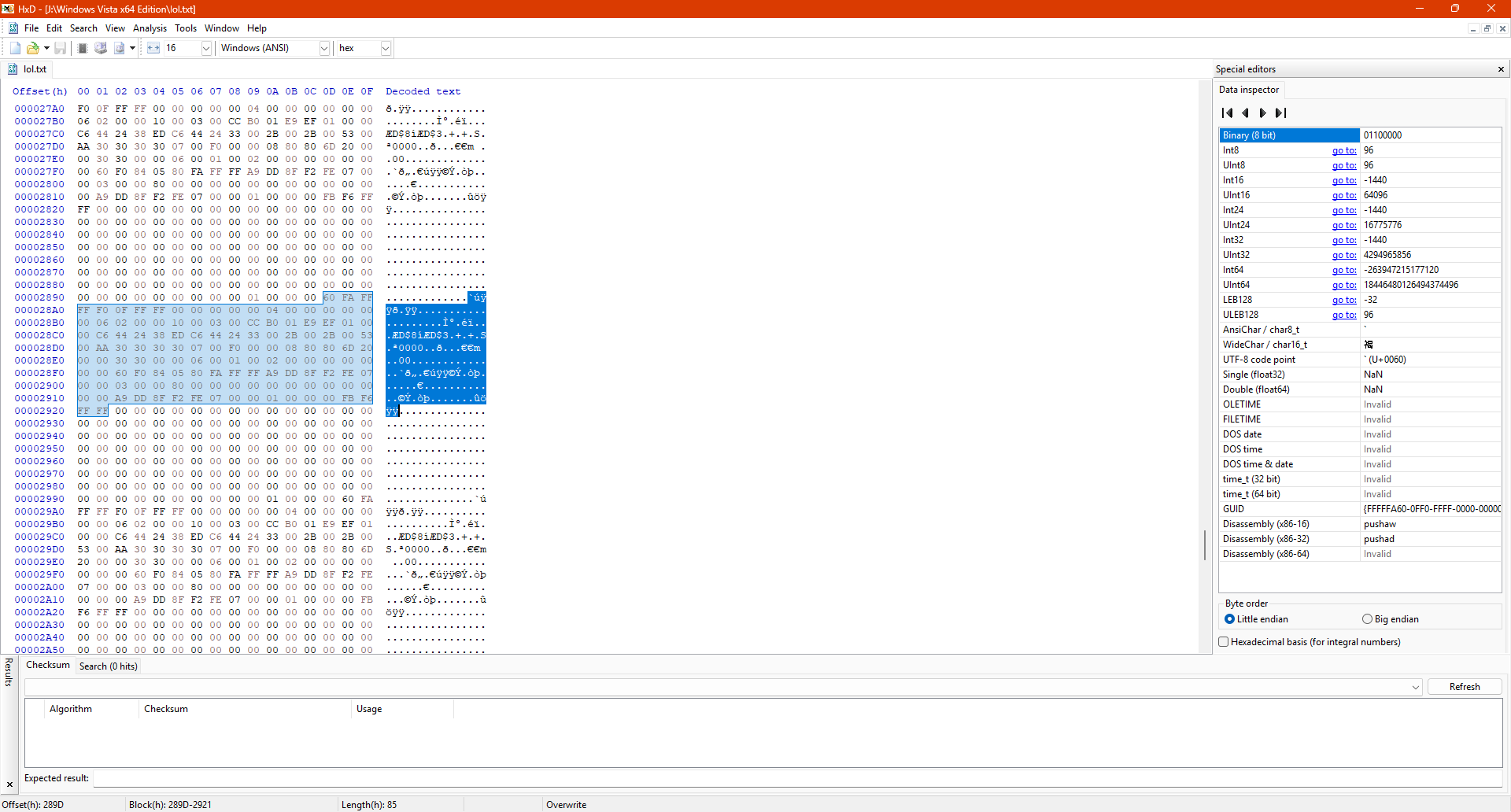
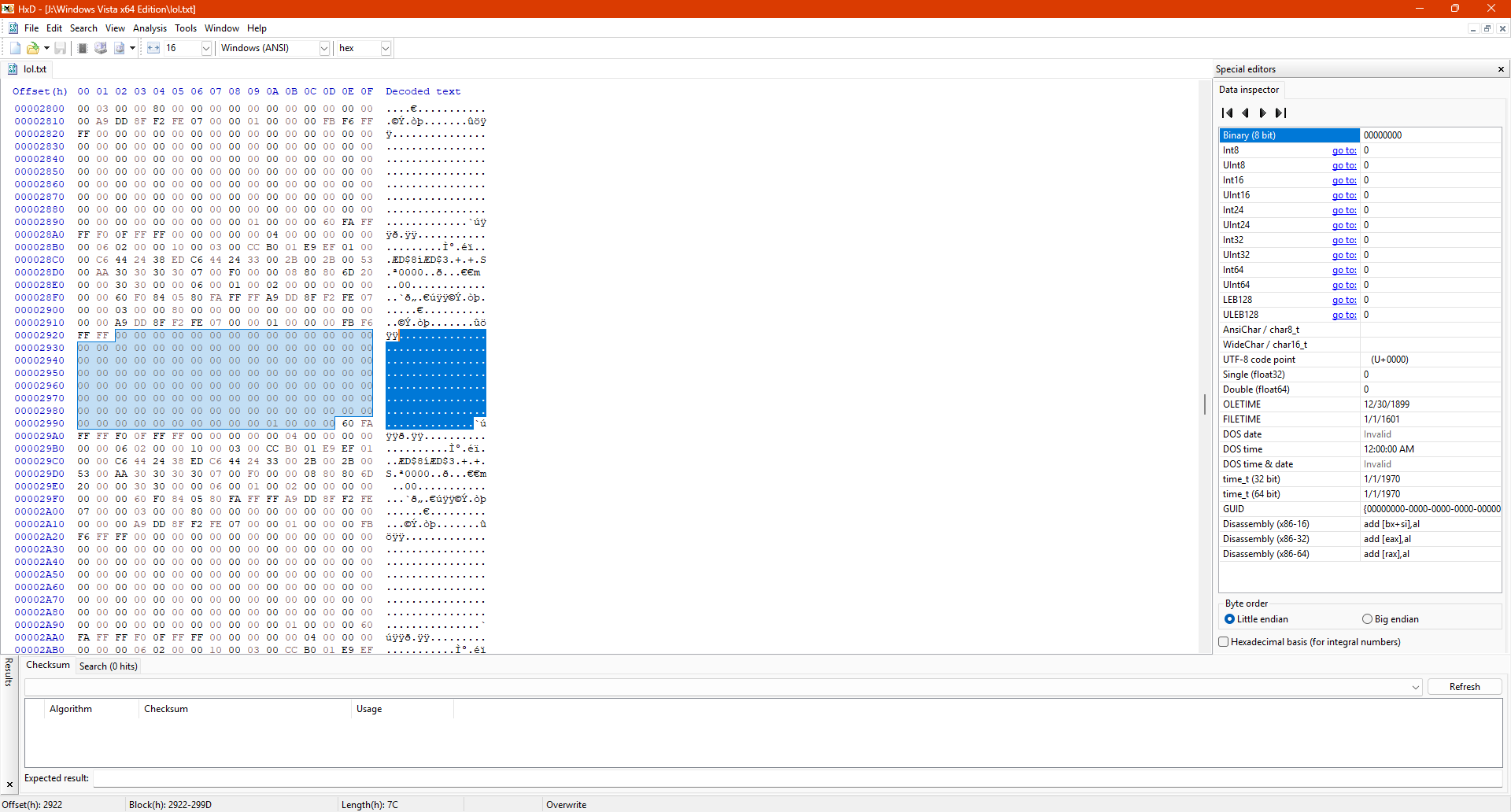
I experimented with various options to boot Windows Vista from Windows 10's Windows Boot Manager in UEFI mode and I done it today . - On VMware, I created 2 separate partitions (one for 10 and one for Vista) and installed Windows 10 in UEFI mode. - Then, I set Boot policy to Legacy from Standard to show Windows Boot Manager in text mode. - Then I installed Windows Vista on the 2nd partition and it gives 0x0000001E error (obviously .). - When I press F10 while Vista's boot entry is highlighted, I added /DEBUG /DEBUGPORT=COM1 and /BAUDRATE=115200 to boot arguments (or select Debugging Mode from F8 menu,). - When I did the above things and then pressed ENTER to boot system, somehow, Windows Vista BOOTS with Windows 10's Windows Boot Manager in UEFI mode! It finished SysPrep phase and I'm able to reach desktop. - When I remove DEBUGPORT and BAUDRATE, it gives 0x0000001E bugcheck error. - Also removing BAUDRATE and then L changing DEBUGPORT to USB or, L changing DEBUGPORT to 1394 and setting CHANNEL to 1 also causes 0x0000001E bugcheck error. - Without DEBUG option, adding /DEBUGPORT=COM1 /BAUDRATE=115200 also boots system. - Also, without DEBUG and BAUDRATE option, system boots. - So, I think, DEBUGPORT=COM1 to COM4 does all this thing, I guess . - Then, I tried that thing on a real machine (on my spare laptop, Casper CGA-P847, has text-based Phoenix UEFI BIOS.) and also boots with it! I will write updates to inform you about all things about that. UPDATE 1: I don't know if it is caused from debugging parameters or Windows Boot Manager itself, Windows Media Sharing just won't work. It freezes the system instantaneously. UPDATE 1.1: It looks like debugging parameters causing freeze on system while Windows Media Sharing is open . UPDATE 1.2: Yup, debugging options definitely cause issues with this. I even tried with Windows Vista's original Windows Boot Manager in UEFI mode on VMware. When I disable Windows Media Player Network Sharing Service, the system will boot even when a device is shared. But when I reboot the system, re-enable Windows Media Player Network Sharing Service and when I click start Windows Media Player Network Sharing Service, the system will instantly freeze. UPDATE 2: When I debug output in VMware using serial port, I saw repeating output like this: This pattern repeats over and over again and it's 85 hexadecimal long. And these repeated dots are 7C hexadecimal long.
 2 points
 -
I performed the test on two different computers (AMD quads) and yet it flows better under 360chrome when scrolling, draging the Rover's camera I didn't try it on Haswell CPU though....2 points
-
Extensions, UC.JS/UC.XUL Scripts, CSS Stylesheets and Custom Buttons for UXP browsers – Corrections, modifications, adjustments, and recommendations I am a fan of extensions, UC.JS/UC.XUL scripts, CSS stylesheets and custom buttons. That is one of the reasons I already created the thread “Mypal 68 in Windows XP – Custom Buttons, Extensions, UC.JS scripts and CSS stylesheets”. This thread here is a place where I will post about our beloved, legacy extensions and custom buttons for the UXP browsers such as New Moon 28, Serpent 52 and so on, and more recently also about UC.JS/UC.XUL scripts and CSS stylesheets. The purpose of this thread is to easily find corrected, modified, adjusted, or highly recommended extensions and furthermore, custom buttons, too. I couldn't find any thread here on MSFN dedicated to extensions and custom buttons for UXP browsers. The threads “My Browser Builds (Part 1 + 2 + 3 + 4 + 5)” are too extensive and confusing to find information about this stuff, although there are also posts about them. Moreover, these threads are dedicated to the browsers themselves and not to their extensions, and certainly not to custom buttons. Everyone is invited to post their own corrected, modified, adapted, or highly recommended extensions or custom buttons here. The main idea is to enhance the functionality of our beloved, legacy browsers and ensure that this remains the case in the future. In the second post of this thread, the reader will find an alphabetical list of all posted extensions. In the third post, the reader will find an alphabetical list of all posted custom buttons and additionally right behind, an alphabetical list of all posted tips, special scripts and plugins. All entries of the provided lists are linked to their contributions here in this thread. Last not least, some additional sources where legacy extensions and custom buttons can be found: Pale Moon Add-ons - Extensions – Link: https://addons.palemoon.org/extensions/ Basilisk Add-ons - Extensions – Link: https://addons.basilisk-browser.org/extensions/ Classic Add-ons Archive – This catalogue contains 93,598 versions of 19,450 Firefox add-ons created by 14,274 developers over the past 15 years using XUL/XPCOM technology. To access this archive, you have to install the extension ca-archive. Link: https://github.com/JustOff/ca-archive/releases/tag/2.0.3 Extensions for Pale Moon, Firefox & SeaMonkey made by JustOff – Link: https://justoff.github.io/ LegacyCollector - Link: http://web.archive.org/web/20191110173006/https://legacycollector.org/firefox-addons/index.html RealityRipple Software – Pale Moon Extensions – Link: https://realityripple.com/Software/XUL/ Custom buttons Forum (this forum has been closed in the meanwhile) – Link: http://custombuttons.sourceforge.net/forum/index.php AMO archived – Link: https://web.archive.org/web/20171004160834/https://addons.mozilla.org/en-US/firefox/extensions/ Thunderbird.net – Link: https://addons.thunderbird.net/en-us/firefox/ TarekJor - Firefox 52 ESR legacy addons - A curated list and XPI files of Mozilla Firefox browser extensions, addons, themes from addons.mozilla.org, before XUL-based purge blackout – Link: https://github.com/TarekJor/Firefox-52-ESR-legacy-addon/tree/master/xpi I would be very pleased about every contribution and support, no matter if it is comments, opinions, recommendations, own modifications, further links with download sources, or reactions in the form of upvoting or liking. Welcome and greetings from Germany! AstroSkipper1 point
-
Yep, the problem still exists. The forum will not let you have "b oot.ini" (without the space) in your post.1 point
-
The purpose of this topic is laid out by jaclaz in the topic's title.1 point
-
Thank you very much, Jody, I'll test with another PC. I wonder, could this be GPU related? I have nvidia on all of my computers.1 point
-
one of the several reasons why I don't like W7 at all.... https://answers.microsoft.com/en-us/windows/forum/all/how-to-manually-arrange-folders-in-windows-7/91d630f0-c18d-4eaa-889b-e0ecaffa5a94 is there a good file manager out there similar or with the simplicity of the XP built-in one ???1 point
-
Did you also check if ProxHTTPSProxy is working on other websites, for example, accessing the website https://www.howsmyssl.com/ in the Internet Explorer, as it should? Please, post one screenshot of this website including the programme window of ProxHTTPSProxy!1 point
-
I couldn't find any visual theme for Supermium 121 akin to this one. https://msfn.org/board/topic/184266-arcticfoxienotheretoplaygames-360chrome-v1351030-rebuild-7/?do=findComment&comment=1239611 all of the ''classic'' style themes available in the chrome web store look awful to my eyes.1 point
-
That certainly could be true, but I compared these browsers (Supermium and MyPal 68) just now with Explorer++, Softmaker Office and Serpent 52, and I'm not noticing a difference. All I can say is that out of all the options on this rather ill-equipped Vista notebook, Supermium really does run well. Very snappy considering I only have 2 GB or memory.1 point
-
If my tip An experimental solution for the error code 0x80072F78 while accessing the WU/MU website doesn't work for you, here some further ideas: Check the Windows Update log. Check the date and time of your computer and Windows XP. Check if Windows XP is activated. Try a more recent ProxHTTPSProxy version. Check if the proxy is installed correctly and is working properly. Update all certificates.1 point
-
It happened to me recently, reason was because I tried to insert Link (replace URL with text) into my post, I had to post without the Link and edit my post and add the Link afterwards.1 point
-
Naah, you didn't overstep at all, just having a bit of fun at the way you phrased it, don't worry. coot.ini jaclaz1 point
-
Thanks for your worries! As far as I know, forum supervisor is well aware of this issue with certain members having troubles posting, Again, thank you, we understand you mean well.1 point
-
How any of this related to Supermium!??!??!? Folks, let's not inflate this important topic, thanks in advance.1 point
-
For me, it's basically come down to a true TITLE BAR and UNIFORMALITY. I really really do HATE one program on my computer not "looking the same" as all my other programs. My current Win10 at home runs 360Chrome 13.5.1030 90% of the time (the other 10% is technically just "comparison" to Official Ungoogled v114 [which is the only browser I use at work]). I've not bothered to upload my "current" 13.5.1030 but the one I use now doesn't have any "shadow borders" on context menus, adheres more closely to my Win10 context menu colors relative to other programs, adds title bars to dialog boxes that didn't have them, etc.1 point
-
My take - about time! As most of you may already know, I no longer run XP. Although I still do find myself PREFERRING v86-based Chromium Forks over the slow-a$$ "modern" 'stuff' - NO ONE BROWSER WILL EVER PLEASE EVERYONE.1 point
-
Under one's butt to sit and enjoy the jaw breaking opportunity to test this browser for free, while the free is lasting.1 point
-
Glad you guys are having good luck with Vista, but sadly I can't say this is the case with XP and I'm sort of stuck with XP until this machine (DELL Optiplex Pentium D with 3GB RAM) finally craps out which could be any day now and expected. I can't complain my computers have been through the mill. As far as chrome goes, NHTPG 360 is about all my computer can (barely) handle. I'll try with those new files tomorrow and see if Supermium is usable - I'll keep an open mind. EDIT: fixed typos1 point
-
1 point
-
1 point
-
The reason why I investigated the restart behaviour of these browsers is that I have created various restart custom buttons (JavaScript) for Firefox-based browsers in the past and currently have made one that performed a normal restart when left-clicked and additionally deletes the startup cache when middle-clicked. I also extracted the restart code, which is used by New Moon 28, from its source code and had a look at it. But somehow I get the feeling that manually deleting the startup cache is not really necessary any longer, as the browser seems to do this on its own in most cases when restarting it.1 point
-
I've hardly been able to post anything in this thread for hours. Is it just me, or are there fellow sufferers? I always get the message:1 point
-
just about 500 MB (zero extensions). I removed the user data folder and started from scratch just in case.1 point
-
I tried this myself on both Supermium 121 1st release and the hot-fix release. I restared the computer just in case but the memory usage is still the same1 point
-
that trick does nothing for me in fact win32 fixed the rebased dll from this link https://github.com/win32ss/supermium/files/14129613/rebased_dlls.zip anyway the map issues have nothing to do with RAM usage...1 point
-
Xean processors don't fully support hardware acceleration1 point
-
Hello modnar. I don't use cable 'cause it's a long distance, I live in a cold area and the inclement weather would make it complicated, plus we are many neighbours taking the same signal, so the landlord would not allow it. Anyway, thanks for your recommendations and good vibes!1 point
-
this map loads fast enough on 360chrome however it's almost unusable with Supermium 121... can you confirm this ? https://www.360cities.net/image/mars-panorama-perseverance-rover-martian-solar-day-0965 I don't expect it to run as smooth as it does with Win7 of course1 point
-
Thanks for the links! I totally forgot about looking there for possible command line options.1 point
-
Well done! Your Dutch colleagues will be delighted with such a service. BTW, I already mentioned this issue here two weeks ago: https://msfn.org/board/topic/185966-my-browser-builds-part-5/?do=findComment&comment=1258614 I have fixed my German language pack the day I posted this issue. This corrected language pack has been in testing mode since then. I will post it when testing mode is over, and all is definitely working. So far, no further issues.1 point
-
New build of Serpent/UXP for XP! Test binary: Win32 https://o.rthost.win/basilisk/basilisk52-g4.8.win32-git-20240203-3219d2d-uxp-0db181d2b7-xpmod.7z Win64 https://o.rthost.win/basilisk/basilisk52-g4.8.win64-git-20240203-3219d2d-uxp-0db181d2b7-xpmod.7z source code that is comparable to my current working tree is available here: https://github.com/roytam1/UXP/commits/custom IA32 Win32 https://o.rthost.win/basilisk/basilisk52-g4.8.win32-git-20240203-3219d2d-uxp-0db181d2b7-xpmod-ia32.7z source code that is comparable to my current working tree is available here: https://github.com/roytam1/UXP/commits/ia32 NM28XP build: Win32 https://o.rthost.win/palemoon/palemoon-28.10.7a1.win32-git-20240203-d849524bd-uxp-0db181d2b7-xpmod.7z Win32 IA32 https://o.rthost.win/palemoon/palemoon-28.10.7a1.win32-git-20240203-d849524bd-uxp-0db181d2b7-xpmod-ia32.7z Win32 SSE https://o.rthost.win/palemoon/palemoon-28.10.7a1.win32-git-20240203-d849524bd-uxp-0db181d2b7-xpmod-sse.7z Win64 https://o.rthost.win/palemoon/palemoon-28.10.7a1.win64-git-20240203-d849524bd-uxp-0db181d2b7-xpmod.7z Official UXP changes picked since my last build: - No issue - Remove leftover reference to focus handler for dev edition doorhanger (1116e8e137) - Issue #618 - Follow-up: Fix missed constant refactor preventing ExportEntries from working. (9e3d38b642) - Issue #2158 - Part 1: Add the 'as' attribute to the HTML Parser (8e1b3db048) - Issue #2158 - Part 2: Handle and expose preload link destination to DOM (24189770aa) - Issue #2158 - Part 3: Parse preload links as part of the HTML5 parser's speculative load queue (b0d2af4e01) - Issue #2158 - Part 4: Dispatch load/error events upon parsing preload links (95490b25eb) - Issue #2158 - Part 5: Guard preload links support with a preference (6c53117699) - Issue #2158 - Follow-up: Add missing include (b84a61605a) No official Pale-Moon changes picked since my last build. No official Basilisk changes picked since my last build. Update Notice: - You may delete file named icudt*.dat inside program folder when updating from old releases. * Notice: From now on, UXP rev will point to `custom` branch of my UXP repo instead of MCP UXP repo, while "official UXP changes" shows only `tracking` branch changes.1 point
-
Add startup flags to disable acceleration, or simply go to chrome://flags/ and search for acceleration, then disable all occurrences, relaunch.1 point
-
No, as far I know, I remember I had that disappearing font issue evn with 360EE, the only way to get rid of it is to have a fully/properly functional sandbox or that flag.1 point
-
He is "joking". It's his "jokes". Just try to ignore. The more you react, the more off-topic nonsense from him we'll see here. Thanks for understanding,1 point
-
and by then the version 122 will likely break other things. https://msfn.org/board/topic/185045-supermium/page/22/#comment-12592511 point
-
I missed out this rebuild 91 point
-
Thanks! Good to know.1 point
-
Thank you! So far all is good. All my four IDE hard disk in my Windows XP computer are in an excellent condition. And I have two Dawicontrol SATA PCI cards on reserve. But I hope I do not have to use them. I think I would even rather change the motherboard.1 point
-
I direct you to Forum Rule 2.a. 2.a Use some common sense. Do not create identical topics or make identical posts in more than one forum. Think before posting and choose the right topic for your question or answer. Do not "bump" newly created topics until at least 24 hours have passed. If a topic has been "bumped" three times without any new replies, please consider reviewing and editing your original post and adding any information which you think may help other members in answering your question(s) or concern(s). When posting, have something to say, not just "My First post!" or "Cool site!!!" We sort of have the idea by now. :-)1 point