Leaderboard




Popular Content
Showing content with the highest reputation on 07/25/2023 in all areas
-
Thanks yes, that indeed fixes it. I wouldn't use it in that mode normally of course as it slows everything down considerably.3 points
-
Hello @Dave-H! If you have problems to access a particular website via IE proxy through ProxHTTPSProxy although the website works correctly through direct connection, then the SSL certificate verify should be done by the browser. When you don't want to change the proxy mode to direct connection, you have to add the entry onlyfans.com* to the section [SSL Pass-Thru] of ProxHTTPSProxy's configuration file config.ini as shown below: ### Bypass Proxomitron and the Rear Server, Proxy setting still effective ### SSL certificate verify will be done by the browser [SSL Pass-Thru] pypi.org files.pythonhosted.org pypi.python.org www.gstatic.com watson.telemetry.microsoft.com *.sync.services.mozilla.com onlyfans.com* I tried it in 360ChromePortable 13.5.1030 rebuild 7, and it works for me. Cheers, AstroSkipper3 points
-
OK, problem solved! I feel like an absolute fool now. A few days ago I was having a problem with something, and as part of the troubleshooting, I switched the 360Chrome proxy option from 'Do not use proxy' to 'Use IE proxy'. Of course, I then forgot to switch it back! I thought things had been running a bit slow, but hadn't twigged what the problem was. 'Use IE proxy' on my system runs https through ProxHTTPSProxy. Now I've gone back to no proxy, everything is fine. Why OnlyFans had a problem in the IE Proxy mode I have no idea, all the other sites I've been using have been fine. Sorry to have troubled you all!3 points
-
One of my computers has two Windows XP partitions. Until now, I had installed Malwarebytes Premium 3.5.1.2522 on both. I have now changed that. I have installed Malwarebytes Anti-Malware Pro 1.75.0.1300 on one of them for a week. On older, less powerful computers, you notice a considerable difference. Malwarebytes Anti-Malware Pro 1.75.0.1300 is much more resource-efficient and lightweight. I loved to use it in the past, and now, I am able to enjoy it again. I am very happy. On more powerful computers, I would of course prefer Malwarebytes Premium 3.5.1.2522.2 points
-
Yes, like I said before, that site is heavily "protected" by CF. Only direct non-Proxy connections work. Perhaps it's due to the age restrictions. Like in the case of "family" CF DNS, to filter out underaged children.2 points
-
Not uncommon. Cloudflare fingerprinting cannot run through Proxomitron either.2 points
-
@exogenesis Yes, there a little things regarding sse to fix in the code, but it is worth to do? How much ram do you have? Also did you try @roytam1 sse versions?2 points
-
I'm sorry, I forgot what is it exactly that you develop here, at MSFN ? I mean, apart from the texts with oversimplifications and funny stories from your work at the factory. And you don't miss any opportunity to bark at me, even when there's zero reason for you to do that, oh wait, I forgot the "rep" farming, say something against Draker - get upvotes from the well-known couple. You don't use Vista, why are you here ? You didn't even bother to write a couple of words on-topic. Maybe I need to report you, or you just leave me be ? Now to another part - could you calm down yourself voluntarily, without the help of adults ?2 points
-
https://community.chocolatey.org/packages/sqlite-studio.portable/3.1.11 point
-
I'm referring to performance of XP, XP SP1, XP SP2, and XP SP3. it's been well over a decade since I ran tests, but I do distinctly recall that SP3 was faster than SP2. I will attempt to get some proof over the next couple of weekends - not exactly high priority for me. But for people to say, over and over again, that SP2 is faster, but have NO DATA to back it up, that is "gut feeling" and none of us should listen to anybody's gut growling, all that tells anybody is that the gut is hungry and wants food.1 point
-
Resource leak detected. See a bunch of "D3D9Window" windows? I guess new one is created every time a D3D9 Device must be recovered. Two ways I can reproduce this: Minimize the browser, launch any proper 3D game (that uses Direct3D or OpenGL for rendering). Disable or enable one of the monitors. Restore the browser window afterwards. That's on latest and greatest Serpent 52.1 point
-
I promised to add. 192.229.220.0-192.229.222.2551 point
-
I agree with you. Don't forget, they also introduced memory limit in SP2.1 point
-
I'm inclined to "toot a horn" also, but "why bother".1 point
-
UPDATE: I found the problem, it's in the shell32.dll, not comdlg32. The bug is there when using both methods, local and normal install. I will later write what I did to solve it for me.1 point
-
GCC 11.1.0 - > https://github.com/fsb4000/gcc-for-Windows98/releases/tag/gcc11.1.01 point
-
they're in my tree now, vc2015 rebase-branch is also updated.1 point
-
In theory, it doesn't need a hack to launch on win8. Try. For win7, I'm afraid this won't be enough just to patch it out.1 point
-
No, it's win 8+ https://learn.microsoft.com/en-us/windows/win32/api/winnt/nf-winnt-rtladdgrowablefunctiontable1 point
-
Just in case, some details/explanation of IFEO: https://www.dedoimedo.com/computers/windows-ifeo-debugger-gwx-more.html jaclaz1 point
-
He wrote their gov. had plans to cut off their internet from the rest of the civilized world. Maybe this is the case.1 point
-
and btw, what version that you using? i think you need to update to 68.13.2b1 point
-
That's because that is the INACTIVE WINDOW title bar and icons. When ACTIVE, Mypal's title bar and icons are EXACTLY IDENTICAL to the title bar and icons of my 360Chrome skin !!! My INACTIVE WINDOW 360Chrome skin is also IDENTICAL to Mypal's INACTIVE window. And the Mypaly title bar being TALLER than a STANDARD title bar in XP is one more reason I will not be using it! The min/max/restore/exit icons are TOO TALL and DO NOT MATCH the other 99.9% of applications on my computer. XP icons and title bar should look like everything else on my XP. One program should not look different than another! THAT is the purpose of my XP skin. Nothing more, nothing less. Will not be discussing futher.1 point
-
As stated before, your error console is not displaying any error that points to the polyfill in question. The browser window showing that error and the LG web site showing that error before the polyfill in question does not make the polyfill in question the common denominator.1 point
-
What is your current version of DWrite.dll ? I mean the one in Vista (not the alien one from win10).1 point
-
Check your inbox. It's in the last message.1 point
-
Thanks cap., we know ! I'm glad you were able to follow my methods though ! Yes. I still consider Opera 97.047040 is not fully finished and didn't place it here. But maybe that variant works well on his system too, who knows ?1 point
-
I need a publicly written approval from the moderators !1 point
-
Ask the moderators in this topic, if they allow, I can send you a PM and tell exactly what to mod via PM to avoid a possible scandal with the evil Opera devs.1 point
-
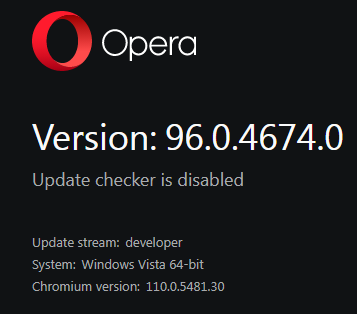
I successfully ported newly released Opera Version: 96.0.4674.0 System:Windows Vista 64-bit Chromium version:110.0.5481.30
 1 point
 -
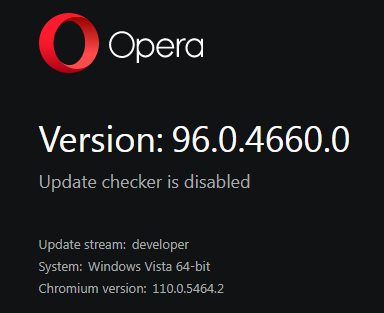
I successfully ported freshly released Opera Version: 96.0.4660.0 System:Windows Vista 64-bit Chromium version:110.0.5464.2
1 point
-
Enjoy. Thank you and welcome to you !1 point
-
Regarding this he may change his opinion like several times per day. He followed/unfollowed me like 3 times per day and I always get notified ! So yeah, you're right, "they" do seem to think it's twitter or smth. For now he won't able to see your question, even though he's online, because looks like you're still blocked (and all of your content too, obvously) .1 point
-
Please stop tagging me for empy cases like this one and don't bombard my inbox. Looks very spammy, honesty. Thank you. EDIT: And why you blocked jaclaz, I don't understand. Anyways, it's not my concern, and I would like to stick to the topic, thanks. Considering multiple re-edits of almost every post of yours, it's very hard to follow what you want or wanted to say.1 point
-
Yes, you're absolutely right , they are mean for no reason , just out the blue. Thank you for your support ! It's good it's only a few of them, like you said. And they don't even use Vista ! Just in case you didn't notice - I ported Opera 96 on Chrome 110 to Vista, it means you also have a chance to use it on your un-supported 8.1 OS in the future. https://msfn.org/board/topic/184249-chrome-110-based-opera-i-ported-it-to-vista/1 point
-
First off , thank you ! Second, I already wrote many times, you can just put the kernel in the folder (the precise instructions are given in the topic). And you need only 1 update. That's it ! So no "instability".1 point
-
In that case, we'd be delighted to know your opinion of North Korean browsers, Iranian firewalls, Cuban operating systems and antiviruses made in Karl-Marx-Stadt.1 point
-
Sent instructions to @win32, but you all need to wait , and not demand anything !!! He has his own personal life and not owe you anything.1 point
-
Update notification! My favourite registry editor Registry Workshop has been updated and its current version is now 5.1.0. Link: http://www.torchsoft.com/en/rw_information.html It is still supported in Windows XP, but it's commercial. This program is definitely worth its money. You can try it 30 days for free. Here are the download links of the English and German version 5.1.0 (other language versions are also available): English version: http://www.torchsoft.com/download/RegistryWorkshop.exe German version: http://www.torchsoft.com/download/RegistryWorkshop_deu.exe Cheers, AstroSkipper1 point
-
Hi @ADMM! Download all portable versions and check the compatibility by decreasing version number! Unfortunately, Rizonesoft doesn't provide a changelog and a download archive. Therefore, trial and error is the game. But it is an easy game because there are portables, too. Nothing to install. It works or not! Just that simple! I'll have a look in my system and report which version exactly is installed. Anyway, it is great to reduce RAM consumption of browsers like 360Chrome or Mypal. Cheers, AstroSkipper1 point
-
If your hard drive is defective or has bad sectors, you should back it up completely and then test it for errors using the manufacturer's checking or formatting software. Sometimes, there are just pending sectors and can be fixed by hard drive electronics, triggered by executing the manufacturer's checking or formatting software. I did that successfully several times in the past. Check your hard drive first by using Hard Disk Sentinel or CrystalDiskInfo to know exactly what's wrong with your hard drive! Both programs are available as portables, too. Cheers, AstroSkipper1 point
-
Hi @ADMM! I use Firemin 6 with different browsers. It is an useful tool if you are low on RAM resources and works with nearly all browsers, AFAIK. The purpose of this tool is to reduce the RAM usage of the browser controlled by Firemin. The most recent version Firemin 8 seems not to be compatible anymore, either. If you can't find a download link of Firemin 6, I can upload this version for you. It's open source. Maybe, it can help with poor sound quality if it is caused by the lack of free RAM. You have to test it, of course. Cheers, AstroSkipper1 point
-
Does Firemin work with XP and 360 Chrome? Which Firemin version would be best?Will it fix the poor sound quality issue?1 point
-
Just an additional observation! I have two different Windows XP Professional SP3 partitions on my old computer. On the one all POSReady updates are installed, on the other none. After several tests of ProxHTTPSProxy's PopMenu TLS 1.3 3V3 on both partitions, I can confirm that no POSReady updates are necessary to run the proxy. it does not seem to matter to have installed any POSReady updates to access websites in IE via TLS 1.3. It simply works.1 point
-
I use an older verrsiion, Firemin 6, without any paypal popups. I can provide a download link if needed.1 point
-
Hi @XPerceniol! Yep! That's what I meant. You need to use it only on systems with low hardware resources.1 point
-
I can remember very well!1 point
-
The well-known file archiver 7-Zip has been updated. The latest version 22.00 from 15-06-2022 still supports Windows XP. Download link of 32 Bit version: https://7-zip.org/a/7z2200.exe Download link of 64 Bit version: https://7-zip.org/a/7z2200-x64.exe Cheers, AstroSkipper1 point
-
And a further tool associated with this AVG version is the AVG Clear 18.8.4084.0 to get rid of all installed components if necessary. Download link: https://install.avcdn.net/avg/iavs9x-xp/avgclear.exe Cheers, AstroSkipper1 point