Leaderboard



Popular Content
Showing content with the highest reputation on 03/10/2021 in Posts
-
I recently started a separate site with more details on the extended kernel. You can find it by searching "eclipse" and the TLD for Christmas Island. But yes, I am trying more invasive methods of version spoofing, which have worked for the .NET Core 5.0 installer, but make Steam think it's offline, while Office has yet to be tested.2 points
-
WinNTSetup - a simple but powerful universal Windows Installer Features: Install (unattend) Windows 2k/XP/20??/Vista/7/8.x/10/11 x86/x64/arm64 Practically runs even on the most minimalistic WinPE selectable drive letter for the new Windows installation Fully automated with save/load setting in ini file and various command line options Install Windows also if nlite/vlite has remove winnt32.exe/setup.exe Integrate Drivers: normal PNP and Textmode Drivers Patch uxtheme to allow unsigned Themes Some common registry tweaks and *.reg file import DISM APPX removal, feature enable/disable Simple VHD creation and Installation Support "Windows to Go" for Windows 7 and later installs Supports WimBoot and CompactOS option for Windows 7 and later Supports all current WIM files: WIM/SWM/ESD and ISO files WinCapture - capture a Windows installation to WIM or ESD file MinWin - simple trimming WIM in memory before apply WinCopy - copy an existing Windows installation to another partition Offline Hotfix uninstall Offline password reset Not Supported: - No Windows embedded version (this includes WinFLP) - No upgrades of existing installations About driver installation: Every driver added in NT6.x windows will be added to the driver store. So it's not recommended to add countless driver, but rather more really required ones. NT5.x massstorage driver integration is possible thanks to Mr dUSHA powerful MSSTMake.exe tool To the Unattend option: It's possible to use an unattend.xml to run the Setup unattended. But as the actual WinPE Setup Phase isn't effective in that way of install, all Winpe related settings inside the unattend.xml won't be applied. Ini config file It's possible to save all GUI-settings to a ini file: push Ctrl + S to save all settings to an ini. push Ctrl + L to load all settings from an ini. A WinNTSetup.ini file in the same dir as the app itself will be loaded automatically at startup. It also can be selected via command line: WinNTSetup.exe /cfg:"C:\mysettings.ini" If you want to modify ini settings yourself, click-click has made a nice PDF for it. For advanced users there are also hidden settings described in the included WinNTSetup.ini.txt Command line: - Press F1 to get list of all options To install Windows in a VHD file: - requires Windows 7 as OS and Windows 7 Ultimate, Enterprise or Server 2008 R2 as Source - create a partitioned VHD and assign a drive letter (push Ctrl + Shift + V to use build in diskpart wrapper for this) - select the VHD drive as installation drive (make sure you boot drive ist a active primary partition on a physical disk) If you get an Antivirus warning from your AV software, please report it to them as a false positive and let them check it. Current Version: 5.4.2 Download: Mega - MediaFire1 point
-
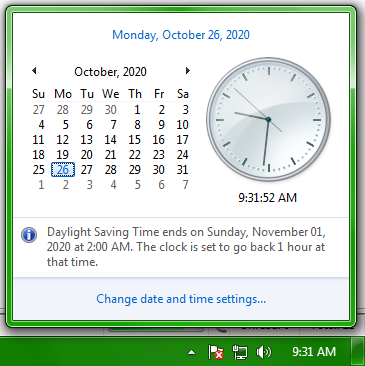
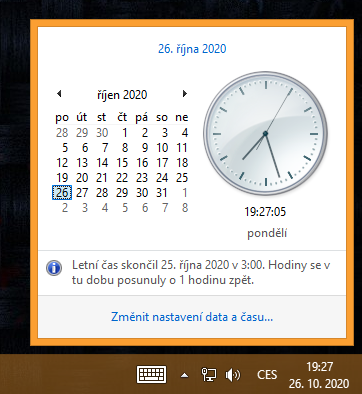
There are many reasons Windows 7 is an objectively superior OS to Windows 10 and why I will use it until I die. This is one of them: Naturally, Windows 10 users won't get this notification. That would, you know, actually improve the UX, so that would be anti-Windows 10. Guess you'll have to wait for the Sunday paper to tell you what you missed.
 1 point
 -
So I know that this forum existed from around when XP was the latest. It still exists obviously. But for those who have used it for a while (6+ years) what was it like when each version was released? How were the reactions on this forum? Did people have any hate towards the latest (example, 7) back then same as the 10 hate? I haven't been around long enough to know, plus my memory goes back as far as 2014. Any farther and its just a blur. What was it like anyways when XP, Vista, 7, 8, or 10 was the latest?1 point
-
Yes -- and thankfully it appears that the YouTube space bug has now been fixed.1 point
-
Off topic, but are you the real vwestlife?1 point
-
Here's a really weird bug: As of today, you can no longer type a space in YouTube on any legacy-Firefox-derived browser, in either the search box or when typing a comment -- it's reserving the space bar exclusively for pausing/unpausing the video. Typing Alt-032 to generate ASCII 32 or pasting in a space character from the clipboard works, but pressing the space bar doesn't. I've tried Serpent/Basilisk 52.9.0, New Moon 27.10.0, and Mypal 28.14.2 on XP, and Firefox ESR 52.9.1 on my Mac, and they all do the same thing. The space bar works normally in Chromium-based browsers. Edit: I just updated Mypal to 29.1.0 from their Github page and now the space bar works in YouTube. So it appears that Pale Moon 29.x-based browsers should not have this problem.1 point
-
Daft Punk is great.1 point
-
LOL, I was going to correct the error in the thread title (I hate spelling mistakes in thread titles!) but I won't now as it will spoil the joke!1 point
-
It's hard to choose between Windows and Linux. Both have their perks and downsides, and Linux in particular is great for reviving old systems. I used to frequent Linux a few years ago, but now most of my systems have only Windows installed. I am planning to start using Linux pretty soon though, not as a main, but as a side OS.1 point
-
Give each OS a sword and see which one is the last standing. "I shot the Vista, but I did not shoot the XP"1 point
-
Raydio - Is This a Love Thing (US 1978) Rose Royce - You're A Winner! (US 1980) Rose Royce - Do Your Dance (US 1977)1 point
-
Have you enabled wireless network support on server manager? Open up server manager go to add roles and features. Skip roles part on feature tab select wireless network support. By default windows server got wireless network support disabled. Also after enabling it make sure wireless adapter is enabled on bios and windows device manager1 point
-
Windows 8.1 does this as well. I really hate Windows 10 UI in general. I like aero, but I also like colorful borders that Windows 8.1 has. Windows 10 is just ugly.
1 point