All Activity
- Past hour
-
This should have the fix and it will be included in the next release as well. https://files.videohelp.com/u/69760/ffmpeg-8.2-2155-1836ef9684-win32-static-xpmod-P4.7z
- Today
-

Root Certificates and Revoked Certificates for Windows XP
egrabrych replied to heinoganda's topic in Windows XP
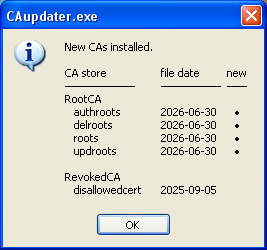
The contents of the updroots.sst file have been changed; the contents of the other * .sst files are unchanged.
-
 Just for the record - today, 2nd July 2026 Panda AV (though not the latest - v22.03.01) has started behaving suspiciously on my system, that is PSANHost crashing quite a few times since 13:00 hours update. It then restarts or now at 16:42 it's become unresponsive (the whole thing). Is this the end, my friend? UPDATE: It's not the end - the problem is there are new system certificates. But it took me to uninstall (unresponsive) and reset and then unistall with Panda Generic Uninstaller and a few more restarts (chkdsk) to realise root certificates may be the issue and they are, but now I have 22.03.05 (XP-last) version installed. We'll see. If I don't like it, I can still install 22.03.01 again. Crazy.
 -

The MSFN Forum Editor – Endless errors
AstroSkipper replied to AstroSkipper's topic in Site & Forum Issues
It's no longer even possible to enter simple, harmless DOS code in the forum editor. Not in the text area, not as a code block, and not as a quote. No longer a forum for coders who want to post their code, or must. -

Don't understand WUD's GUI
steven4554 replied to conceptualclarity's topic in Windows Updates Downloader
I know this reply is extremely late as the last post was in 2017, but I think it's important to know what those three buttons do. So I will explain below:- The first left button with the Plus icon This is to direct the user to the WUD website to download the latest update lists (.ulz). Since the website is no longer available, you will receive a error message. This will be fixed in the next release next week. The second middle button This is to refresh the Update Lists And finally, the third right button This will display a grid menu with all Update List(s) currently installed. With option to remove any of the Update Lists. -
@autodidact When testing, please use this command: I think it is a problem showing the embedded subtitle in version 8.2 as the standard command without subtitle works: Maybe you can bring yourself to build your releases the way you always have in the past. BTW, the MSFN editor is such a piece of junk. To inject this code into my post, is an absolute nightmare. I had to simplify my command. MSFN seems to consider completely harmless DOS commands to be dangerous.
-
Unfortunately, the problem persists. I downloaded the video with same yt-dlp options once again. Same behaviour. Your ffplay.exe opens and immediately closes. Here is my suggestion. I'll send you a PM with a link to the video file, and you can test it in-depth on your system. Ok? If you need the yt-dlp log generated while downloading the video, do not hesitate to ask for it here.
-
Looks like they've fixed Vista problems with that patch and not Win7 (2009 was too late for that as it seems). Is it NTFS metadata handling or what? You can trust Microslop to break good things. If you are going to reinstall, make a 2GB (max.) FAT16 partition and try that. Install should look the same - It shall ask you if you want to convert FAT16 to NTFS. About handling boot loader stuff I wouldn't know.
-
I have finally managed to fix this audio issue in Firefox 15 (and later versions) browsers on Windows 98 FE. As previously mentioned, you need to switch to an audio card that uses WDM drivers (VxD is not compatible with any compatible OS) in the Multimedia settings before launching the browser. In addition, I also had to update the "KMIXER.SYS" file located in the "C:\WINDOWS\SYSTEM32\DRIVERS" folder to version "4.10.2222" (I haven't tested other versions yet). After updating this file and then rebooting, the sound works fine in all browsers (I tested it using an online video on YouTube.com). In addition, I also tested a simple USB audio card for just five euros, and surprisingly, Windows 98 FE found it and automatically installed all the necessary WDM drivers (it requested the Windows 98 FE installation CD during the process), and now, after replacing "KMIXER.SYS" with the above version, the sound works in all browsers with this USB audio card as well. So if you prefer VxD drivers and Windows 98\98SE\ME, you can also purchase a USB audio card specifically for browsers as an additional option. You can also try the new WDM driver for integrated audio solutions: https://msfn.org/board/topic/187713-native-wdm-hd-audio-driver-for-windows-98seme/
-
Theoretically, you should select device in VLC media player. Have you tried it?
-
Thanks for all your efforts! I'll test that when I'm back at my Windows XP computer.
-
My Browser Builds (Part 6)
AstroSkipper replied to roytam1's topic in Browsers working on Older NT-Family OSes
That's why I thought you were using a static IP. But if you can get a new IP via power-cycling, then your IP is of course assigned dynamically, and, however, you are then also able to reconnect by different options, a reconnect tool, a self-created script or whatever. BTW, my reconnect batch file uses curl.exe, and my router can even be reconnected by an Android app. If you wonder why a reconnect is such important, the answer is easy. Once your current external IP is blacklisted by a website or service, you need to reconnect your router or establish a VPN connection and delete your cookies and cache logically first. This is, of course, age-old knowledge, and I’ve been doing it this way for decades. BTW, I never had any problems conntecting to https://o.rthost.win. -
I can't reproduce the problem. I downloaded the same video source and assets as yours and it played with my ffplay version 8.2-1568-b355200263-win32-shared. Here is a new basic static build for you to test to see if the problem persists. With the next release both static and shared builds will match, so ffplay will be in both. https://files.videohelp.com/u/69760/ffmpeg-8.2-2129-0dac41d2e5-win32-static-xpmod-P4.7z
-
 No. S4OS is supported by Millenium only (and in OEM versions only AFAIK). 98 supports S4BIOS, but enabling this is not the OS task.
 -

My Browser Builds (Part 6)
Mathwiz replied to roytam1's topic in Browsers working on Older NT-Family OSes
@roytam1: Weird that it works for you and @Skorpios but not me. Serpent 55 always brings up the captcha for me, left-click or right-click, and then doesn't pass the challenge. Maybe it is the user agent that Cloudflare is balking at, as @AstroSkipper suggested earlier. R3dfox also brought up the captcha, but I just pasted the URL, so there wouldn't have been a referer. That's probably why. (I know "referer" isn't the correct spelling, but it's how Mozilla spells it.) Bringing up MSFN in R3dfox, signing in, browsing to this thread, and then clicking one of the links might have worked, but I just wanted to get the file. R3dfox passed the challenge of course. Since my wget batch file is working again, it doesn't really matter to me now. -

My Browser Builds (Part 6)
roytam1 replied to roytam1's topic in Browsers working on Older NT-Family OSes
the default config of referer policy (i.e. network.http.sendRefererHeader in about:config) should send referer, and from my testing on clicking on link from the post is fine here. -
My Browser Builds (Part 6)
Mathwiz replied to roytam1's topic in Browsers working on Older NT-Family OSes
@VistaLover's suggestion worked My .bat file has been repaired! @AstroSkipper, I didn't say I had a static IP address. I said "I don't really have an option to change my IP address though." Well, that wasn't entirely correct. I do have such an option: power-cycle the router, so it negotiates a new IP address with my ISP. This, of course, would disconnect all devices in the home, so it's not really practical unless I do it in the middle of the night. The IP address Cloudflare sees is, of course, my home network's external IP address, negotiated between the router and ISP. Changing the internal address my PC is using with the router would make no difference to Cloudflare whatsoever. Luckily it's now clear that such a thing isn't necessary anyhow. -
My Browser Builds (Part 6)
AstroSkipper replied to roytam1's topic in Browsers working on Older NT-Family OSes
I would never sign up for a contract with my internet service provider that includes a static IP address. My IP address is, of course, dynamic. And I’ve created a batch script that, when double-clicked, immediately reconnects and displays both the old and new external IP addresses. -
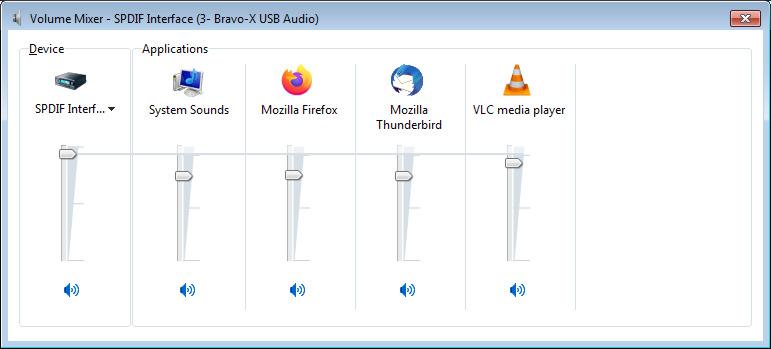
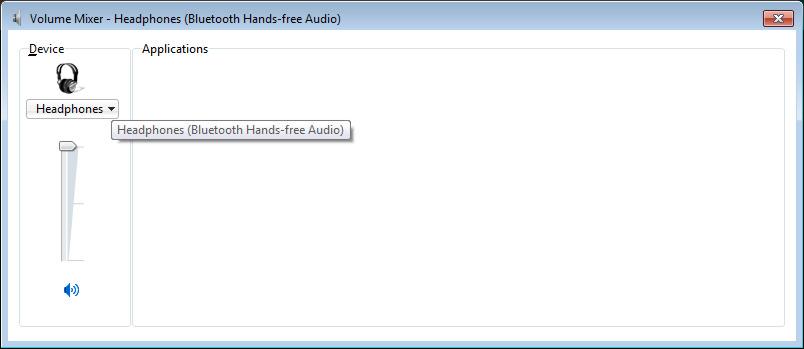
On this particular win-7 laptop I have 4 audio-out devices according to the tray sound mixer application. In the mixer, I see a window with a drop-down where I select the device, and in the right-pane are the applications currently running (browsers, maybe VLC if it's running, etc). But I only see these apps for one of the audio devices. I've just paired a bluetooth amp - but how can I select a particular app (say, VLC) to output to it?
-
My Browser Builds (Part 6)
AstroSkipper replied to roytam1's topic in Browsers working on Older NT-Family OSes
https://msfn.org/board/topic/187837-the-msfn-forum-editor-–-endless-errors/ -
This was triggered by yt-dlp's option --embed-thumbnail. But as I said your previous version 8.1 has no problems playing this video.
-

My Browser Builds (Part 6)
VistaLover replied to roytam1's topic in Browsers working on Older NT-Family OSes
That suggestion works fine here with WGET (the forum's faulty software wouldn't let me put below content inside "code" tags ): - Yesterday
-
My Browser Builds (Part 6)
Mathwiz replied to roytam1's topic in Browsers working on Older NT-Family OSes
@Skorpios, no; I didn't think that a right-click followed by "Save Link As" would lead to different results than a left-click, which invokes the captcha. I guess XP users have a way to download the latest version after all. Edit: Just tried it. Right-click and "Save Link As" didn't work for me. I got a 6 kB file. Maybe it's that "referer" Roytam mentioned, but.... @roytam1, all my "referer" prefs in Serpent 55 are at their defaults. A standard left-click on the link brought up the captcha. I haven't yet tried the right-click and "Save Link As." @AstroSkipper, perhaps telling wget to use a Firefox UA along with Roytam's "referer" suggestion might do the trick. I don't really have an option to change my IP address though. I just couldn't imagine Cloudflare leaving such a gaping security hole! @VistaLover, check this out: https://blog.includesecurity.com/2026/06/the-smart-tv-in-your-livingroom-is-a-node-in-the-aiscraping-economy/ Sneaky devils! I don't (and as long as I can get away with it, won't) own a "smart" TV, but I do own a Roku streaming box. I wonder if any of its "apps" are letting folks use my Internet bandwidth without my knowledge. -
My Browser Builds (Part 6)
VistaLover replied to roytam1's topic in Browsers working on Older NT-Family OSes
This URL is no longer valid ; try the one below: https://board.eclipse.cx/viewforum.php?f=33 -
Unfortunately I have just installed both of the relevant updates (ntfs.sys and the 872 one) (by install I mean copy the files over for ntfs.sys and run the EXE for the other) and unfortunately the issue persists. Once again, it is just 7. Vista is acting fine now. Seems like I may have to install to fat 16, which I am clueless on doing.