All Activity
- Past hour
-
 ==================================================== Intel i219 (DEV_15B8) Windows XP SP3 driver from scratch (NDIS 5.1) ==================================================== Hi, I’m working on a Windows XP SP3 LAN driver for my Intel i219, written from scratch as an NDIS 5.1 miniport (i219.sys). I am very happy for any hints about the remaining missing pieces (especially i219 “PCH SPT” specifics). Here is what I already reach, the confirmed hardware facts, register notes, and the current Supported-OID list. ---------------------------------------------------- 1) My used lan adapter on Asrock z370 k6 board ---------------------------------------------------- - NIC: Intel i219 (i219-V2) - PCI Vendor/Device: 8086:15B8 - MMIO: BAR0 mapped at 0xDF400000, length 0x20000 (128 KB) - IRQ: legacy line 5, vector 97 (XP HAL/IOAPIC mapping) - MAC (observed / read from RAL/RAH): 70-85-C2-7E-28-B7 - Current driver build (“v45”) installs and STARTS cleanly in Device Manager and answers basic NDIS OID queries without crashing. ---------------------------------------------------- 2) Why i219 is tricky vs i218 ---------------------------------------------------- - i218 belongs to the older PCH-LPT / LPTLP (Lynx Point, 8-Series) family. - i219 belongs to the newer PCH-SPT (Sunrise Point) and later PCH families. Therefore: “patch only DeviceID” (i218 → i219) is not enough. A working i219 driver must use the correct i219-family MAC/PHY/NVM init logic (different from i218-family). ---------------------------------------------------- 3) Hardware inputs I treat as runtime data (must be read) ---------------------------------------------------- From PCI config space: - Vendor/Device ID (8086 / 15B8) - Command register (Bus Master + Memory Space enable) - BAR0 base + decoded size (here: 0x20000) - Interrupt pin/line (legacy) and optionally MSI capability - Power management capability (D0/D3) - Revision ID, subsystem vendor/device ID (for possible quirks) From MMIO: - Classic Intel GbE register model (“E1000-ish”) ---------------------------------------------------- 4) Minimal register map I’m using (layered bring-up) ---------------------------------------------------- (Full 128 KB MMIO window is huge; I focus on the layers needed for a real driver.) 4.1 Core control / status / PHY/NVM - CTRL 0x00000 (reset / link control) - STATUS 0x00008 (link-up bit etc.) - EECD 0x00010 (EEPROM/flash control) - EERD 0x00014 (EEPROM read) - CTRL_EXT 0x00018 (extended control) - MDIC 0x00020 (MDIO/PHY access) - FEXTNVM 0x00028 (PCH-family helper register) i218 vs i219 note: The register “existence” looks similar, but the correct init sequence and interpretation is family-path dependent (i218=pch_lpt vs i219=pch_spt). 4.2 Interrupts (currently I use polled mode) - ICR 0x000C0 (cause read/ack) - IMS 0x000D0 (mask set) - IMC 0x000D8 (mask clear) - (ITR is optional) 4.3 RX/TX engine registers Receive: - RCTL 0x00100 (RX enable + filters) - RDBAL 0x02800 / RDBAH 0x02804 - RDLEN 0x02808 - RDH 0x02810 / RDT 0x02818 Transmit: - TCTL 0x00400 (TX enable) - TIPG 0x00410 - TDBAL 0x03800 / TDBAH 0x03804 - TDLEN 0x03808 - TDH 0x03810 / TDT 0x03818 4.4 Address filtering tables (important for DHCP/ARP/multicast) - RAL0/RAH0 0x05400 / 0x05404 (RAR0) - MTA 0x05200 (multicast hash table) - VFTA 0x05600 (optional VLAN filter) Important: When Windows sets OID_802_3_MULTICAST_LIST, the driver must program MTA accordingly (or choose a safe fallback strategy). ---------------------------------------------------- 5) Supported OIDs in v45 (current list) ---------------------------------------------------- static const NDIS_OID g_SupportedOids[] = { OID_GEN_SUPPORTED_LIST, OID_GEN_HARDWARE_STATUS, OID_GEN_MEDIA_SUPPORTED, OID_GEN_MEDIA_IN_USE, OID_GEN_MEDIA_CONNECT_STATUS, OID_GEN_MAXIMUM_FRAME_SIZE, OID_GEN_MAXIMUM_TOTAL_SIZE, OID_GEN_LINK_SPEED, OID_GEN_XMIT_OK, OID_GEN_RCV_OK, OID_GEN_XMIT_ERROR, OID_GEN_RCV_ERROR, OID_GEN_RCV_NO_BUFFER, OID_GEN_TRANSMIT_BUFFER_SPACE, OID_GEN_RECEIVE_BUFFER_SPACE, OID_GEN_TRANSMIT_BLOCK_SIZE, OID_GEN_RECEIVE_BLOCK_SIZE, OID_GEN_VENDOR_ID, OID_GEN_VENDOR_DESCRIPTION, OID_GEN_DRIVER_VERSION, OID_GEN_VENDOR_DRIVER_VERSION, OID_GEN_CURRENT_PACKET_FILTER, OID_GEN_CURRENT_LOOKAHEAD, OID_GEN_PROTOCOL_OPTIONS, OID_GEN_MAC_OPTIONS, OID_GEN_MAXIMUM_SEND_PACKETS, OID_GEN_MAXIMUM_LOOKAHEAD, OID_802_3_PERMANENT_ADDRESS, OID_802_3_CURRENT_ADDRESS, OID_802_3_MAXIMUM_LIST_SIZE, OID_802_3_MULTICAST_LIST }; Numeric OID values (standard ntddndis.h definitions): - OID_GEN_SUPPORTED_LIST = 0x00010101 - OID_GEN_HARDWARE_STATUS = 0x00010102 - OID_GEN_MEDIA_SUPPORTED = 0x00010103 - OID_GEN_MEDIA_IN_USE = 0x00010104 - OID_GEN_MAXIMUM_LOOKAHEAD = 0x00010105 - OID_GEN_MAXIMUM_FRAME_SIZE = 0x00010106 - OID_GEN_LINK_SPEED = 0x00010107 - OID_GEN_TRANSMIT_BUFFER_SPACE = 0x00010108 - OID_GEN_RECEIVE_BUFFER_SPACE = 0x00010109 - OID_GEN_TRANSMIT_BLOCK_SIZE = 0x0001010A - OID_GEN_RECEIVE_BLOCK_SIZE = 0x0001010B - OID_GEN_VENDOR_ID = 0x0001010C - OID_GEN_VENDOR_DESCRIPTION = 0x0001010D - OID_GEN_CURRENT_PACKET_FILTER = 0x0001010E - OID_GEN_CURRENT_LOOKAHEAD = 0x0001010F - OID_GEN_DRIVER_VERSION = 0x00010110 - OID_GEN_MAXIMUM_TOTAL_SIZE = 0x00010111 - OID_GEN_PROTOCOL_OPTIONS = 0x00010112 - OID_GEN_MAC_OPTIONS = 0x00010113 - OID_GEN_MEDIA_CONNECT_STATUS = 0x00010114 - OID_GEN_MAXIMUM_SEND_PACKETS = 0x00010115 - OID_GEN_VENDOR_DRIVER_VERSION = 0x00010116 - OID_GEN_XMIT_OK = 0x00020101 - OID_GEN_RCV_OK = 0x00020102 - OID_GEN_XMIT_ERROR = 0x00020103 - OID_GEN_RCV_ERROR = 0x00020104 - OID_GEN_RCV_NO_BUFFER = 0x00020105 - OID_802_3_PERMANENT_ADDRESS = 0x01010101 - OID_802_3_CURRENT_ADDRESS = 0x01010102 - OID_802_3_MULTICAST_LIST = 0x01010103 - OID_802_3_MAXIMUM_LIST_SIZE = 0x01010104 ---------------------------------------------------- 6) Current OID behavior in v45 ---------------------------------------------------- QueryInformation highlights: - OID_GEN_SUPPORTED_LIST: -> returns g_SupportedOids[] - OID_GEN_HARDWARE_STATUS: -> NdisHardwareStatusReady - OID_GEN_MEDIA_SUPPORTED / OID_GEN_MEDIA_IN_USE: -> NdisMedium802_3 - OID_GEN_MEDIA_CONNECT_STATUS: -> cached LinkState (Connected/Disconnected) - OID_GEN_MAXIMUM_FRAME_SIZE: -> 1500 - OID_GEN_MAXIMUM_TOTAL_SIZE: -> 1514 - OID_GEN_LINK_SPEED: -> 10000000 (1 Gbps in 100 bps units) - OID_GEN_VENDOR_ID: -> derived from MAC OUI (first 3 bytes) - OID_GEN_VENDOR_DESCRIPTION: -> "Dietmar i219 XP skeleton v45" - OID_GEN_DRIVER_VERSION: -> 0x0100 - OID_GEN_VENDOR_DRIVER_VERSION: -> 0x00010000 (1.0 encoded as major/minor) - OID_GEN_MAC_OPTIONS: -> COPY_LOOKAHEAD_DATA | TRANSFERS_NOT_PEND (observed as 0x5) - OID_GEN_MAXIMUM_SEND_PACKETS: -> 1 - OID_GEN_MAXIMUM_LOOKAHEAD: -> 1500 - OID_GEN_CURRENT_LOOKAHEAD / OID_GEN_CURRENT_PACKET_FILTER: -> returns cached values (Lookahead / PacketFilter) - Basic stats OIDs: -> currently 0 (no counters yet) - OID_802_3_PERMANENT_ADDRESS / CURRENT_ADDRESS: -> returns 6 bytes MAC - OID_802_3_MAXIMUM_LIST_SIZE: -> 32 SetInformation highlights: - OID_GEN_CURRENT_PACKET_FILTER: -> currently stores PacketFilter only (hardware filter mapping still in progress) - OID_GEN_CURRENT_LOOKAHEAD: -> stores Lookahead (clamped to 1500) - OID_802_3_MULTICAST_LIST: -> stores up to 32 multicast MACs (but MTA programming is still in progress) ---------------------------------------------------- 7) Problems already solved ---------------------------------------------------- - Driver loads/starts (v45): -> Clean start in Device Manager, Initialize runs, MMIO mapping is real. - Reliable MMIO/resource discovery: -> Stable BAR0 mapping confirmed (0xDF400000 / len 0x20000). - Root cause of earlier NDIS crash identified: -> When I previously “faked” some OIDs via WinDbg, I triggered a crash in NDIS OID validation (bad/NULL/incorrect Supported-OID list handling). -> Fix direction implemented: - real SupportedOids[] array - real Query/Set OID engine with correct BUFFER_TOO_SHORT / BytesNeeded / BytesWritten. - XP NDIS signature differences handled: -> Adjusted NdisMMapIoSpace / NdisMUnmapIoSpace usage for XP/NDIS5 compatibility. ---------------------------------------------------- 8) What I still miss ---------------------------------------------------- Even though the driver starts and answers OIDs, I still do NOT have real network traffic working end-to-end: - No DHCP lease / no real RX/TX I can see. What I believe is still needed: 1) Correct i219-family (PCH SPT) PHY + NVM init sequence (this is where i219 differs most from i218). 2) Correct mapping of OID_GEN_CURRENT_PACKET_FILTER into real hardware filtering (RCTL + tables). 3) Correct implementation of OID_802_3_MULTICAST_LIST into MTA programming (or safe fallback). 4) Possibly: switch from polled mode to proper interrupt mode once the basics work. If anyone has experience with i219 on older OSes (XP/2003): - The minimal “must-do” i219 (PCH SPT) PHY/NVM init steps to get stable link + RX/TX. - Any known i219-specific register quirks that differ from i218-family. - Confirmation whether my minimal TX/RX + RCTL strategy is sufficient, or which missing bits are typically required. Dietmar PS: ==================================================== Intel i219 (DEV_15B8) Windows XP SP3 driver from scratch (NDIS 5.1) – Status report + technical notes ==================================================== Hello MSFN community, I’m working on a native Windows XP SP3 LAN driver for my Intel i219, written from scratch as an NDIS 5.1 miniport (i219.sys). I’d be very grateful for any hints about the remaining missing pieces (especially i219 “PCH SPT” specifics). Below is what I already reached, plus the confirmed hardware facts, register notes, and the current Supported-OID list / behavior. ---------------------------------------------------- 1) My exact adapter (confirmed on my machine) ---------------------------------------------------- - NIC: Intel i219 (i219-V2) - PCI Vendor/Device: 8086:15B8 - MMIO: BAR0 mapped at 0xDF400000, length 0x20000 (128 KB) - IRQ: legacy line 5, vector 97 (XP HAL/IOAPIC mapping) - MAC (observed / read from RAL/RAH): 70-85-C2-7E-28-B7 - Current driver build (“v44”) installs and STARTS cleanly in Device Manager and answers basic NDIS OID queries without crashing. Note: additional properties (Subsystem IDs, Revision ID, PCI bus:dev:func, MSI capability, etc.) are runtime inputs from PCI config space and are not hard-coded. ---------------------------------------------------- 2) Why i219 is tricky vs i218 (the important difference) ---------------------------------------------------- This seems to be the #1 trap: - i218 belongs to the older PCH-LPT / LPTLP (Lynx Point, 8-Series) family. - i219 belongs to the newer PCH-SPT (Sunrise Point) and later PCH families. Therefore: “patch only DeviceID” (i218 → 15B8) is not enough. A working i219 driver must use the correct i219-family MAC/PHY/NVM init logic (different from i218-family). ---------------------------------------------------- 3) Hardware inputs I treat as runtime data (must be read) ---------------------------------------------------- From PCI config space: - Vendor/Device ID (8086 / 15B8) - Command register (Bus Master + Memory Space enable) - BAR0 base + decoded size (here: 0x20000) - Interrupt pin/line (legacy) and optionally MSI capability - Power management capability (D0/D3) - Revision ID, subsystem vendor/device ID (for possible quirks) From MMIO: - Classic Intel GbE register model (“E1000-ish”) ---------------------------------------------------- 4) Minimal register map I’m using (layered bring-up) ---------------------------------------------------- (Full 128 KB MMIO window is huge; I focus on the layers needed for a real driver.) 4.1 Core control / status / PHY/NVM - CTRL 0x00000 (reset / link control) - STATUS 0x00008 (link-up bit etc.) - EECD 0x00010 (EEPROM/flash control) - EERD 0x00014 (EEPROM read) - CTRL_EXT 0x00018 (extended control) - MDIC 0x00020 (MDIO/PHY access) - FEXTNVM 0x00028 (PCH-family helper register) i218 vs i219 note: The register “existence” looks similar, but the correct init sequence and interpretation is family-path dependent (i218=pch_lpt vs i219=pch_spt). 4.2 Interrupts (currently I use polled mode) - ICR 0x000C0 (cause read/ack) - IMS 0x000D0 (mask set) - IMC 0x000D8 (mask clear) - (ITR is optional) 4.3 RX/TX engine registers Receive: - RCTL 0x00100 (RX enable + filters) - RDBAL 0x02800 / RDBAH 0x02804 - RDLEN 0x02808 - RDH 0x02810 / RDT 0x02818 Transmit: - TCTL 0x00400 (TX enable) - TIPG 0x00410 - TDBAL 0x03800 / TDBAH 0x03804 - TDLEN 0x03808 - TDH 0x03810 / TDT 0x03818 4.4 Address filtering tables (important for DHCP/ARP/multicast) - RAL0/RAH0 0x05400 / 0x05404 (RAR0) - MTA 0x05200 (multicast hash table) - VFTA 0x05600 (optional VLAN filter) Important: When Windows sets OID_802_3_MULTICAST_LIST, the driver must program MTA accordingly (or choose a safe fallback strategy). ---------------------------------------------------- 5) Supported OIDs in v44 (current list) ---------------------------------------------------- static const NDIS_OID g_SupportedOids[] = { OID_GEN_SUPPORTED_LIST, OID_GEN_HARDWARE_STATUS, OID_GEN_MEDIA_SUPPORTED, OID_GEN_MEDIA_IN_USE, OID_GEN_MEDIA_CONNECT_STATUS, OID_GEN_MAXIMUM_FRAME_SIZE, OID_GEN_MAXIMUM_TOTAL_SIZE, OID_GEN_LINK_SPEED, OID_GEN_XMIT_OK, OID_GEN_RCV_OK, OID_GEN_XMIT_ERROR, OID_GEN_RCV_ERROR, OID_GEN_RCV_NO_BUFFER, OID_GEN_TRANSMIT_BUFFER_SPACE, OID_GEN_RECEIVE_BUFFER_SPACE, OID_GEN_TRANSMIT_BLOCK_SIZE, OID_GEN_RECEIVE_BLOCK_SIZE, OID_GEN_VENDOR_ID, OID_GEN_VENDOR_DESCRIPTION, OID_GEN_DRIVER_VERSION, OID_GEN_VENDOR_DRIVER_VERSION, OID_GEN_CURRENT_PACKET_FILTER, OID_GEN_CURRENT_LOOKAHEAD, OID_GEN_PROTOCOL_OPTIONS, OID_GEN_MAC_OPTIONS, OID_GEN_MAXIMUM_SEND_PACKETS, OID_GEN_MAXIMUM_LOOKAHEAD, OID_802_3_PERMANENT_ADDRESS, OID_802_3_CURRENT_ADDRESS, OID_802_3_MAXIMUM_LIST_SIZE, OID_802_3_MULTICAST_LIST }; Numeric OID values (standard ntddndis.h definitions): - OID_GEN_SUPPORTED_LIST = 0x00010101 - OID_GEN_HARDWARE_STATUS = 0x00010102 - OID_GEN_MEDIA_SUPPORTED = 0x00010103 - OID_GEN_MEDIA_IN_USE = 0x00010104 - OID_GEN_MAXIMUM_LOOKAHEAD = 0x00010105 - OID_GEN_MAXIMUM_FRAME_SIZE = 0x00010106 - OID_GEN_LINK_SPEED = 0x00010107 - OID_GEN_TRANSMIT_BUFFER_SPACE = 0x00010108 - OID_GEN_RECEIVE_BUFFER_SPACE = 0x00010109 - OID_GEN_TRANSMIT_BLOCK_SIZE = 0x0001010A - OID_GEN_RECEIVE_BLOCK_SIZE = 0x0001010B - OID_GEN_VENDOR_ID = 0x0001010C - OID_GEN_VENDOR_DESCRIPTION = 0x0001010D - OID_GEN_CURRENT_PACKET_FILTER = 0x0001010E - OID_GEN_CURRENT_LOOKAHEAD = 0x0001010F - OID_GEN_DRIVER_VERSION = 0x00010110 - OID_GEN_MAXIMUM_TOTAL_SIZE = 0x00010111 - OID_GEN_PROTOCOL_OPTIONS = 0x00010112 - OID_GEN_MAC_OPTIONS = 0x00010113 - OID_GEN_MEDIA_CONNECT_STATUS = 0x00010114 - OID_GEN_MAXIMUM_SEND_PACKETS = 0x00010115 - OID_GEN_VENDOR_DRIVER_VERSION = 0x00010116 - OID_GEN_XMIT_OK = 0x00020101 - OID_GEN_RCV_OK = 0x00020102 - OID_GEN_XMIT_ERROR = 0x00020103 - OID_GEN_RCV_ERROR = 0x00020104 - OID_GEN_RCV_NO_BUFFER = 0x00020105 - OID_802_3_PERMANENT_ADDRESS = 0x01010101 - OID_802_3_CURRENT_ADDRESS = 0x01010102 - OID_802_3_MULTICAST_LIST = 0x01010103 - OID_802_3_MAXIMUM_LIST_SIZE = 0x01010104 ---------------------------------------------------- 6) Current OID behavior in v44 (summary) ---------------------------------------------------- QueryInformation highlights: - OID_GEN_SUPPORTED_LIST: -> returns g_SupportedOids[] - OID_GEN_HARDWARE_STATUS: -> NdisHardwareStatusReady - OID_GEN_MEDIA_SUPPORTED / OID_GEN_MEDIA_IN_USE: -> NdisMedium802_3 - OID_GEN_MEDIA_CONNECT_STATUS: -> cached LinkState (Connected/Disconnected) - OID_GEN_MAXIMUM_FRAME_SIZE: -> 1500 - OID_GEN_MAXIMUM_TOTAL_SIZE: -> 1514 - OID_GEN_LINK_SPEED: -> 10000000 (1 Gbps in 100 bps units) - OID_GEN_VENDOR_ID: -> derived from MAC OUI (first 3 bytes) - OID_GEN_VENDOR_DESCRIPTION: -> "Dietmar i219 XP skeleton v44" - OID_GEN_DRIVER_VERSION: -> 0x0100 - OID_GEN_VENDOR_DRIVER_VERSION: -> 0x00010000 (1.0 encoded as major/minor) - OID_GEN_MAC_OPTIONS: -> COPY_LOOKAHEAD_DATA | TRANSFERS_NOT_PEND (observed as 0x5) - OID_GEN_MAXIMUM_SEND_PACKETS: -> 1 - OID_GEN_MAXIMUM_LOOKAHEAD: -> 1500 - OID_GEN_CURRENT_LOOKAHEAD / OID_GEN_CURRENT_PACKET_FILTER: -> returns cached values (Lookahead / PacketFilter) - Basic stats OIDs: -> currently 0 (no counters yet) - OID_802_3_PERMANENT_ADDRESS / CURRENT_ADDRESS: -> returns 6 bytes MAC - OID_802_3_MAXIMUM_LIST_SIZE: -> 32 SetInformation highlights: - OID_GEN_CURRENT_PACKET_FILTER: -> currently stores PacketFilter only (hardware filter mapping still in progress) - OID_GEN_CURRENT_LOOKAHEAD: -> stores Lookahead (clamped to 1500) - OID_802_3_MULTICAST_LIST: -> stores up to 32 multicast MACs (but MTA programming is still in progress) ---------------------------------------------------- 7) Problems already solved (wins so far) ---------------------------------------------------- - Driver loads/starts (v44): -> Clean start in Device Manager, Initialize runs, MMIO mapping is real. - Reliable MMIO/resource discovery: -> Stable BAR0 mapping confirmed (0xDF400000 / len 0x20000). - Root cause of earlier NDIS crash identified: -> When I previously “faked” some OIDs via WinDbg, I triggered a crash in NDIS OID validation (bad/NULL/incorrect Supported-OID list handling). -> Fix direction implemented: - real SupportedOids[] array - real Query/Set OID engine with correct BUFFER_TOO_SHORT / BytesNeeded / BytesWritten. - XP NDIS signature differences handled: -> Adjusted NdisMMapIoSpace / NdisMUnmapIoSpace usage for XP/NDIS5 compatibility. ---------------------------------------------------- 8) Current blocker / what is still missing ---------------------------------------------------- Even though the driver starts and answers OIDs, I still do NOT have real network traffic working end-to-end: - No DHCP lease / no real RX/TX observed in practice (current symptom). What I believe is still needed (minimum): 1) Correct i219-family (PCH SPT) PHY + NVM init sequence (this is where i219 differs most from i218). 2) Correct mapping of OID_GEN_CURRENT_PACKET_FILTER into real hardware filtering (RCTL + tables). 3) Correct implementation of OID_802_3_MULTICAST_LIST into MTA programming (or safe fallback). 4) Possibly: switch from polled mode to proper interrupt mode once the basics work. ---------------------------------------------------- 9) Help I need ---------------------------------------------------- If anyone has experience with i219 on older OSes (XP/2003), I’d be grateful for: - The minimal “must-do” i219 (PCH SPT) PHY/NVM init steps to get stable link + RX/TX. - Any known i219-specific register quirks that differ from i218-family. - Confirmation whether my minimal TX/RX + RCTL strategy is sufficient, or which missing bits are typically required. PS: The technical details in my i219 XP driver thread come from, and how I verify everything with crazy WinDbg use. ---------------------------------------------------- A) Direct observations from MY system (WinDbg + runtime logging) ---------------------------------------------------- These facts are taken from my own XP test machine and WinDbg sessions: - PCI ID: 8086:15B8 (Intel i219-V2) - BAR0 MMIO mapping: base 0xDF400000, size 0x20000 - IRQ resources (legacy line/vector) - MAC address read/used by the driver (70-85-C2-7E-28-B7) - Which OIDs are queried by NDIS / TCPIP and what my driver returned (seen via breakpoints + stack inspection) - Whether frames are actually TX/RX (currently: driver starts, but traffic still missing) ---------------------------------------------------- B) Extracted from my own driver source code (current v45 skeleton) ---------------------------------------------------- These items are not “guessed”; they come straight from my current i219.c / i219.h: - The exact SupportedOids[] array (the list I return for OID_GEN_SUPPORTED_LIST) - My current OID Query/Set behavior (what I return/store) - Ring sizes / buffer sizes / the delayed bring-up strategy (late TX/RX init after 40s) - Which register offsets I currently touch (RCTL/TCTL/TIPG/RDBAL… etc.) and which bits I set ---------------------------------------------------- C) Public reference sources (open headers/docs) ---------------------------------------------------- I used publicly available sources for “static” definitions, i.e. register offsets, bit masks, and OID semantics: 1) Intel e1000 / e1000e style register offsets + bit definitions - Linux kernel: drivers/net/ethernet/intel/e1000e/ (hw.h, defines.h, etc.) - QEMU’s e1000_hw.h (also includes the classic register layout) 2) NDIS OID numbers (hex values) and structures - ReactOS ntddndis.h (matches Windows OID values and is easy to reference) 3) OID semantics (what Windows expects) - Microsoft documentation for OID_GEN_SUPPORTED_LIST, OID_GEN_CURRENT_PACKET_FILTER, OID_802_3_MULTICAST_LIST, OID_GEN_LINK_SPEED, etc. ---------------------------------------------------- D) Heavy WinDbg use, the extremely hard part ;)) ---------------------------------------------------- My main technique is breakpoint-driven “bisection” (binary search in control flow): - Set a breakpoint at the function I expect to run. - If it is NOT hit, move the breakpoint earlier (caller / dispatcher) until I find the last hit location. - The bug must be between the last-hit BP and the first-not-hit BP. - Only after I have narrowed it down do I inspect registers/stack/buffers. Typical breakpoints I use: 1) OID path: bp i219!I219MiniportQueryInformation bp i219!I219MiniportSetInformation bp NDIS!ndisMDispatchRequest Inside Query/SetInformation on x86 NDIS5, the OID value is the 2nd argument: - OID is at [esp+8] ? poi(@esp+8) I often dump the full stack to see all arguments: dd esp L20 Then continue: g 2) Driver bring-up / resources: bp i219!I219Initialize bp i219!I219LateBringUp bp i219!I219ProgramRxTx bp i219!I219WriteMacToRar0 3) RX/TX progress: bp i219!I219SendPackets bp i219!I219PollRxTx (then watch MMIO reads/writes and descriptor ring head/tail changes) If an OID is queried and packets still don’t flow, I focus on: - OID_GEN_CURRENT_PACKET_FILTER SET → must translate into RCTL + filtering (broadcast/multicast) - OID_802_3_MULTICAST_LIST SET → must program MTA (or enable a safe fallback) - Link state / PHY init (i219 “PCH SPT” path differs from i218 “LPT” path) ---------------------------------------------------- Reference links (for convenience) ---------------------------------------------------- Linux e1000e: - https://github.com/torvalds/linux/tree/master/drivers/net/ethernet/intel/e1000e QEMU e1000 register layout (e1000_hw.h): - https://git.zx2c4.com/qemu/tree/hw/e1000_hw.h ReactOS ntddndis.h (OID hex values): - https://doxygen.reactos.org/dc/d38/ntddndis_8h.html Microsoft OID docs: - https://learn.microsoft.com/en-us/windows-hardware/drivers/network/oid-gen-supported-list - https://learn.microsoft.com/en-us/windows-hardware/drivers/network/oid-gen-current-packet-filter - https://learn.microsoft.com/en-us/windows-hardware/drivers/network/oid-802-3-multicast-list
 -
I've chosen Gs Richcopy 360 for our Box to OneDrive migration, and it was fantastic, preserving permissions, metadata, and external sharing links perfectly, even with our complex nested structures. Handled 15TB smoothly with great support. Highly recommend it!
- Today
-
OK, too bad. I can't remember any useful information about testing with hardware from around 2000. Unfortunately, I haven't had such a 378/slot1 motherboard or something similar to test for a long time. Since there is probably no one here who knows KernelEx better than you jumper, the hardware could probably play a role. Maybe it's more the graphics card and its drivers, which in my experience can be a factor. My oldest boards have chipsets Via P4M800, PT880Ultra or Intel 915 - Graphic cards are NV 5900XT / 6600GT AGP for the VIA boards with drivers 82.16 or 82.69 . RT's browsers work here using these boards, but the browsers are extremely slow with this hardware. The speed becomes useful by suppressing advertising or deactivating Javascript. SSE2 Processors were required since Firefox 49. So I'm assuming that this isn't important here.
-

My Browser Builds (Part 5)
NotHereToPlayGames replied to roytam1's topic in Browsers working on Older NT-Family OSes
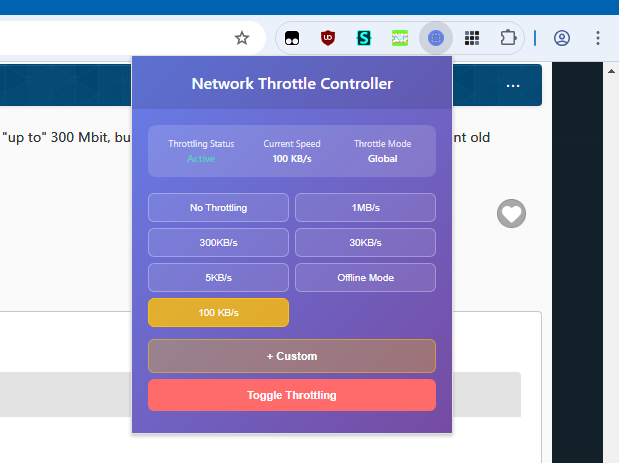
We're veering off-topic, so I'll make this my closing remark. 10 is plenty for "browsing", per se. And having "fast internet" can sometimes cause more harm than good. I *intentionally* "throttle" my connection when streaming from my "tv provider" (I don't have a "tv", everything is streamed via computer or laptop). I "throttle" all the way down to 100 KB/s [so literally 1/100th of 10 MB/s] (I get buffer-lag at 75 KB/s but ZERO buffering issues at 100). This *forces* my "tv provider" to *STOP* sending me 4k resolution video streams! I have no use for 4k because it pegs my very old laptop's CPU at 100%. Why would I watch an hour or so here and there or an entire Sunday with the CPU pegged at 100% for the entire time? Would KILL this laptop in a matter of days. 100 KB/s seems to be perfect for 720p streaming "on the side" (more than fine for laptop display as "background" to real computer adjacently performing real tasks). That drops CPU to below 28%. 300 KB/s seems to be perfect if I want to "allow" my tv provider to send 1080p. At the expense of bumping the CPU up to around 35% and that's enough for the fan kicking up to a higher RPM occasionally.
-
Next step, cool Dietmar
-

My Browser Builds (Part 5)
j7n replied to roytam1's topic in Browsers working on Older NT-Family OSes
10 MB/s is what I have and I am perfectly content with it, I could buy a replacemnt router with a gigabit port and get "up to" 300 Mbit, but I can't afford a decent mikrotik router. Only efficient old software can reach high speeds, not a web browser in typical use. -

My Browser Builds (Part 5)
roytam1 replied to roytam1's topic in Browsers working on Older NT-Family OSes
longstanding misskey.io issue will be somewhat fixed in next build. -
My Browser Builds (Part 5)
NotHereToPlayGames replied to roytam1's topic in Browsers working on Older NT-Family OSes
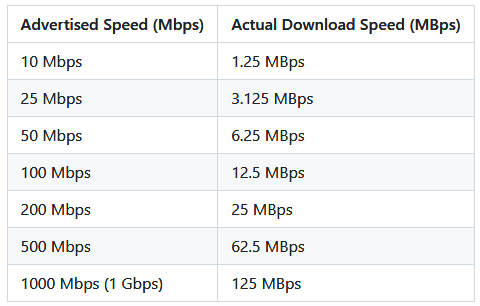
10-40 MB/s sounds slow to me. But I had to learn something new... From here: https://www.techcalc.org/blog/mbps-vs-mbps-download-speed-explained My wireless fluctuates between 46 and 66 MB/s. So yeah, 10 on a wired is a definite sad face.
-
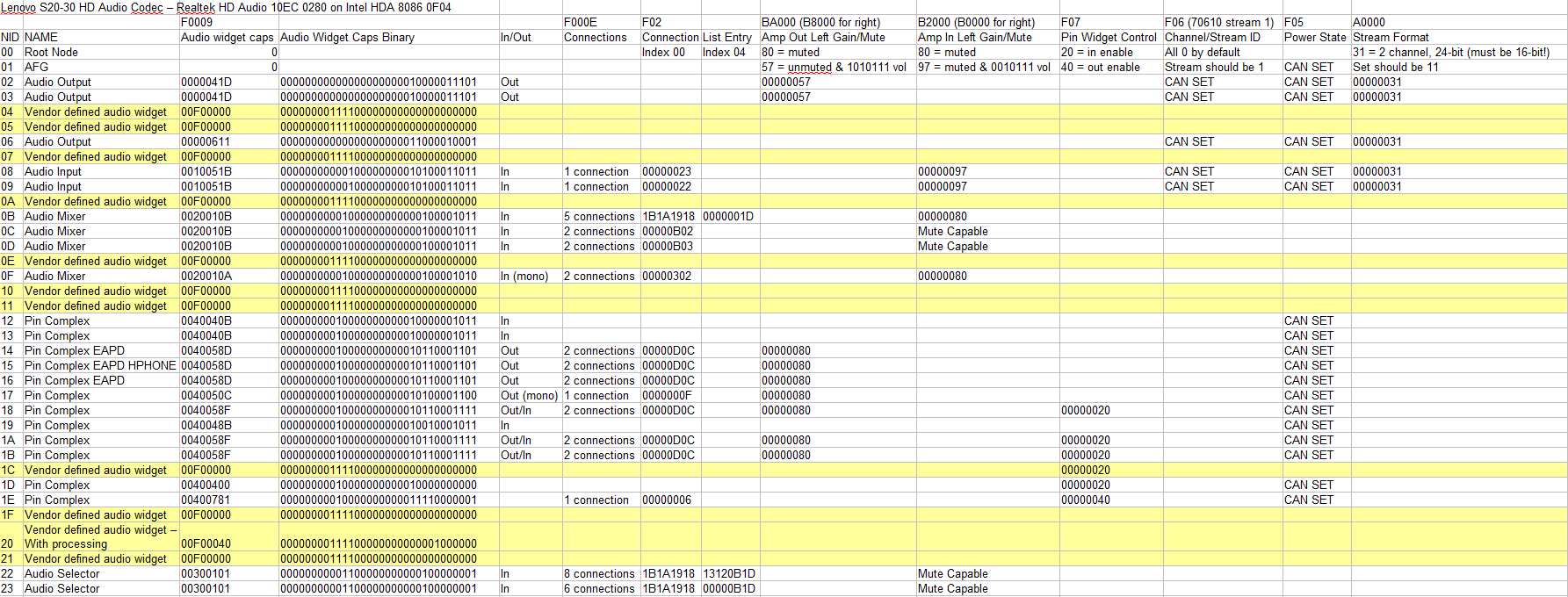
 @deomsh thank you for all of this info! Notes below with @Drew Hoffman HDA.SYS renamed HDA.BAK for testing purely Watler's. 1) Noted! I will leave the PCI registers alone for now. 2) The AFG reports some GPI/O - please see codec response log file attached below for full verb parameter responses. Response on AFG is $40000005 (reports 5 GPI/O's). 3) Until now I only unmuted outputs, but tested also with combined output and input payloads as you mentioned using $00C3F03F (F:Set out+In_L+R, 0: Index 0, 3F: Unmute and volume to 3F). Also $0143F03F. No change with these. Sleeping Widget) I tried $02. No change with this. Volume) According to DAC1 at reset AmpOut is set to $57 which when checking steps settings is 0dB and unmuted. I maybe read somewhere that amp gain is added together if you also set it on mixer and pin widget (but maybe I am imagining this and instead it adds L+R channels?). I thought if I set $57 also on Mixer and Pin Widget the amp gain becomes $57 + $57 + $57 at LineOut.. I think I am wrong here maybe..? Power Verbs) At the beginning of testing I set $00170500 and also $0C and $14 to 70500 to power on the nodes to D0 state, however checking F05 readings in HDAICIN without 705 set at reset: all nodes showing $00000000 (D0 power state) so I assume not needed to be set. Maybe I am wrong here and reading $00000000 could also mean no reading at all, therefore the 705 verbs are required? So I tested with that but no difference in result. Further) That is great you have a quasi-universal HDAICOUT.HDA that works on multiple codecs! Hopefully I can help confirm some more codecs for this. Please see image here with quick lookup reference I made from GET verbs and the responses that helped me map this codec. I am lost at what the vendor defined audio widgets could be. Any idea for these? CODEC RESPONSES.TXT
-

My Browser Builds (Part 5)
nicolaasjan replied to roytam1's topic in Browsers working on Older NT-Family OSes
That's because I should be getting ~40MB/s. I'm connected here in a rather weird way via cable from the providers modem in the neighbouring house to my router and then via cable to my PC. -
@Damnation I think, it can be done for any Nic, as long as you have Linux, where you can spy. But it is soso crazy hard work. I notice for example, that I always get Bsod D1, which I cannot catch with Windbg, only when you make an offline check of it. It happens, when the lan cable is connected at boottime, but parts of the driver have not loaded to full, so happens this Bsod even everything is "ok". Now I understand, why on many compis there is always a big time delay, before you get connected via lan Dietmar
-
 @Dietmar Do you think you'd be able to make a similar driver for realtek 2.5gb NICs at some point in the future? I don't have any hardware with intel i219 NICs.
 -
I created a separate VM for plain KernelEx 2022 (.18 and later updates + Kex22) with no modifications to Kstub and Firefox 29 works there with XP mode. Unsure if it's your non-SSE2 hardware, more likely related to how you setup KernelEX. Also you might need to take a look at sqlite 3.50.1 issue thats happening on Roytam1 browsers post-2025.05.31, those break "Restore Previous Session, Recently Closed Tabs and Recently Closed Windows" and history (if transferred from XP) on 98/ME.
-
I was unable to get any browser later than FF28 to load (and even that crashed at exit), so I wrote a small test app to raise various exceptions. I've added to Finesse basic support for several new continuable exception types, but still need to add detail reporting and make it all more robust.
-
My Browser Builds (Part 5)
j7n replied to roytam1's topic in Browsers working on Older NT-Family OSes
I had selected to not use New Reddit in preferences. Apparently, now adding "old" to the address makes it faster again. Previously there was no difference, and I could get to the old reddit by following someone elses link without old. I see in the network log that it repeatedly loads the same things. And the scripts get processed again and again, causing the whole loading take about 1 minute. https://i.imgur.com/WUe9nev.png Scrolled down a bit, the same: https://i.imgur.com/cyP79MP.png I have talked to a couple websites in the outcome was just them saying to use modern stuff, so it is not really productive. 10 MB/s is the speed of fast ethernet, why the sad face, lol. The limitation as always is the load on the CPU from processing every piece, -
Hi, I take all data from Linux for i219 for the registers etc. Crazy work, 16 hours a day. Now the driver i219.sys for XP SP3 is nearly ready Dietmar
-
My Browser Builds (Part 5)
nicolaasjan replied to roytam1's topic in Browsers working on Older NT-Family OSes
That's not `old.reddit.com` in the address bar. 🤔 I have the user script Reddit Old Redirect and the pages load quite fast here (but somehow I have not so many requests): (max download speed here ~10MB/s 🙁) -
.thumb.jpg.e861836bb05fe824ad8ec1930061ee43.jpg)
MyPal 68
genieautravail replied to Jody Thornton's topic in Browsers working on Older NT-Family OSes
Probably a stupid question but if someone can answer. Does the 64-bit version of Mypal work normally or are there specific bugs compared to the 32-bit version ? Regards -
jj
- Yesterday
-
Last Version of Software for Windows 8.1
NotHereToPlayGames replied to xedakide's topic in Windows 8
Wow! That was even more OT, random, and out-of-nowhere than even a lot of my posts! -
 @isolar I looked into it, up to a certain extent for now. About 1: My initial idea was you can make print-screens to compare register 8086:0F04 without and with HDA.SYS from @Drew Hoffman but today I searched for the appropriate PCI-registers and couldn't find them. It seems your system has a SoC (System on Chip), not a 'classic' design. In some 4274 pages long Intel Datasheet I found things are different, seems have to do with separate PCI Configuration Registers (probably XT_SNP). So I expect no results. I had some conversations with Copilot during traffic, and it seems it is even possible to damage your hardware in this case. 'While less common, repeatedly writing unsupported values to hardware registers could stress the hardware or violate electrical timing constraints, leading to permanent damage in extreme circumstances.' Normally I use a disclaimer like 'writing to PCI registers is at your own risk, if any' but for now I strongly suggest NOT to write to your PCI registers and NOT try to use pcipatchB (unless you are knowing what you are doing). About 2: I Googled ALC280, so far GPIO not found mentioned in Linux sources! About 3: '$00C3B000 - Unmute Audio Mixer': this is a verb ment for OUTPUT's (3B000). For inputs use: Begin ;;node 0xC:Analog_Mixer $00CB0000;AC_VERB_GET_AMP_GAIN_MUTE;Channel0_R $00CB2000;AC_VERB_GET_AMP_GAIN_MUTE;Channel0_L $00C37000;AC_VERB_SET_AMP_GAIN_MUTE;Channel0_R+L;Unmute ;$00C37080;AC_VERB_SET_AMP_GAIN_MUTE;Channel0_R+L;Mute $00CB0000;AC_VERB_GET_AMP_GAIN_MUTE;Channel0_R $00CB2000;AC_VERB_GET_AMP_GAIN_MUTE;Channel0_L $00CB0001;AC_VERB_GET_AMP_GAIN_MUTE;Channel1_R $00CB2001;AC_VERB_GET_AMP_GAIN_MUTE;Channel1_L $00C37100;AC_VERB_SET_AMP_GAIN_MUTE;Channel1_R+L;Unmute ;$00C37180;AC_VERB_SET_AMP_GAIN_MUTE;Channel1_R+L;Mute $00CB0001;AC_VERB_GET_AMP_GAIN_MUTE;Channel1_R $00CB2001;AC_VERB_GET_AMP_GAIN_MUTE;Channel1_L End Mixer: '$00C70100 - Audio Mixer connected to DAC': as such okay, but I don't expect Selector Widgets before a Mixer. If wanted, better test with GET verbs too: $00CF0100;AC_VERB_GET_CONNECT_SEL;Channel0 $00C70100;AC_VERB_SET_CONNECT_SEL;Channel0 $00CF0100;AC_VERB_GET_CONNECT_SEL;Channel0 $00CF0101;AC_VERB_GET_CONNECT_SEL;Channel1 $00C70101;AC_VERB_SET_CONNECT_SEL;Channel1 $00CF0101;AC_VERB_GET_CONNECT_SEL;Channel1 Note for interested readers: a GET-VERB returns a meaningful payload, can be read-out in HDAICIN.TXT. SleepingWidget: I would set 'SleepingWidget=$02' in HDACFG.INI. Volume: If Volume is set to '00' I am afraid it's minimal volume. Please correct me if I am wrong! Better try a moderate value like '3F'. Next example Verbs are without Node/ Widget address: B8000;AC_VERB_GET_AMP_GAIN_MUTE;status_ch0_R BA000;AC_VERB_GET_AMP_GAIN_MUTE;status_ch0_L 3B000;AC_VERB_SET_AMP_GAIN_MUTE;unmute_ch0_L+R B8000;AC_VERB_GET_AMP_GAIN_MUTE;status_ch0_R BA000;AC_VERB_GET_AMP_GAIN_MUTE;status_ch0_L 3B03F;AC_VERB_SET_AMP_GAIN_MUTE;set_volume_ch0_L+R B8000;AC_VERB_GET_AMP_GAIN_MUTE;status_ch0_R BA000;AC_VERB_GET_AMP_GAIN_MUTE;status_ch0_L Power Verbs: I do not understand what you said about your Power States, please explain in (much) more detail. Further: Looks all good to me. Do not forget I have at home only about four different (desktop) High Definition Audio Controllers/ Codecs, all working with my quasi-universal HDAICOUT.HDA and only one HDA controller needed pcipatchB (or set already by Watler's HDA2.DLL, like on my SB710 chipset). I have one laptop from work, but I can not even open a command-line. Booting from USB is out of the question. So I can not run any tests on machines like yours....
 -
What you mean with penguins!!!!? Tux from the Linux operating system?
-
My Browser Builds (Part 5)
j7n replied to roytam1's topic in Browsers working on Older NT-Family OSes
Something happened to Reddit literally just now. Loading has become slow on an old PC, it fetches about 800 requests and 30 MB to display 100 subscriptions. This is not a problem specifically with New Moon, as Opera 12 is also affected, but I have no other place to discuss old PC and old browser behavior. Seems like they have modernized "Old" reddit. https://i.imgur.com/9xL6uJh.png -
I know, that's why I bought it. But... It did not come with the motherboard on this cheap budget-market eMachine. It was just the *BEST* replacement CPU that I could throw at it to get some life out of it when a piece-of-junk freebie was given to me. I got several years out of it, only for the cost of a CPU that would have been at least a decade old and was pennies to the dollar of what it cost in 2007.
-
On second thought, and not interested in digging up reviews and whatnot, but I should probably put Acer as "more junky" then eMachine. Both are "budget markets" and both were so JUNKY that the owners that bought them HATED them so much that they GAVE THEM AWAY FOR FREE. One of the Acer's I did buy (WORST MISTAKE I'VE EVER MADE), the other was given to me, this eMachine was also given to me.