Leaderboard




Popular Content
Showing content with the highest reputation on 06/17/2026 in all areas
-
Well, the page loads here with Vorapis (slowly...), but the video doesn't. Bugs regarding the Vorapis project can only be discussed on Discord. Playing the video using the Open With extension and MPC-HC 2.2.1 from Maroc works very well though. Maroc is no longer active on the My Digital Life Forums and his link to Windows XP compatible MPC-HC has expired. I have preserved it in my Dropbox. Link (portable). Be sure that FFmpeg, yt-dlp and QuickJS are in your path.2 points
-
After all the drama surrounding MSFN, Google has gone and made things even worse. YouTube no longer runs at all within browsers on older, low-performance hardware like my P4. The Vorapis script can no longer play videos on my hardware in New Moon 28 and Serpent 52 on Windows XP. For some reason, the h264 codec can no longer be used in the same way as before. So I’ve removed all scripts and extensions from these browsers. They’ve become useless to me. I now only use VLC with my youtube.lua script. I search on YouTube using the 3D YouTube Downloader, which can of course also download videos and audio files. And naturally, I’m using the latest version of my ‘ytBATCH for Windows XP’ (version 1.7).2 points
-
Most of the services you recommended disabling, I already had disabled. 👍🏻 But I implemented most of your other suggestions, inc. removing the unnecessary system software. Most of this, I had done with the 10586 I had locked down years ago, but that was back when I had a lot more free time to do the research. I hadn't expected to do any of it w/Win10 LTSC IoT, but it obviously became a necessity w/all this ridiculous lag. (I still can't believe it; I've never had such problems with Win10 before!) Anyway! After doing all of that stuff, I've been farting around w/my computer again and it does seem to now be running quite smoother. Not sure which of your suggestions eased it, but I hope it's now going to be a lot easier to get some work done on this machine. I'll report back if it creeps in again, but at least for now it doesn't seem to be a "placebo effect" - the lag was so frequent, I'd have noticed it dozens of times by now. So, super-duper thanks for taking the time to share all of those tips!1 point
-
I used to use Directory Opus for syncing files between internal HDD and external archive HDD. But note that it isn't free but does offer a free trial to see if if works for you. Mine is a very old version and I've not bothered to see if it migrates to Win10 with my current (old) license.1 point
-
Many times these modified versions come with tweaks and third-party apps. I'm used to it so the first thing I do is disable and delete anything I don't need... to free up space! Indeed, my friend.1 point
-
To be perfectly honest, one of the primary reasons that I tweak and optimize myself is because one of Conan's releases that I was testing PUNCHED ME IN THE FACE with an uncalled for SOLICITATION to purchase a LICENSE for StartIsBack/StartAllBack. A never-asked-for and nowhere referenced on his website that his builds INCLUDED a *third-party* BUNDLE that I do not want, did not ask for, will NEVER use BECAUSE of that UNSOLICITED punch in the face! "To each their own."1 point
-
Agreed! I've stopped fighting with XP also, almost two years or so now. It's been a GIANT godsend !!! I run Win10 LTSC and everything just runs a HELLAVUALOT better !!! With VASTLY better memory management !!! An outright GODSEND.1 point
-
Make_WinPE - Boot and Make PE WIM File from 10/11 x64 Windows ISO Download Manual VHD_Compact PDF and Make_WinPE and PE_Tools with Portable Apps for WinPE Credits and Thanks to: - ChrisR - for making Win10XPE and slore for making WimBuilder 2 GitHub Releases - homes32 aka Jonathan Holmgren for making PhoenixPE - JFX for making WinNTSetup Program for Install of Windows from ISO File1 point
-
For a longer time, New Noon 28 and Serpent 52 don't work correctly on MediaFire. When logging in and opening a folder with more files the screen can show there is no scroll bar to get the next ones in the list. Here are screenshots from the NM and Sp browser consoles: And here is a screenshot of a MediaFire's folder taken from my account where you can see the missing vertical scroll bar:1 point
-
Update: USB_FORMAT-70 and VHD_Compact PDF - ReFormat of GPT partitioned USB Disk as UEFI/MBR partitioned USB Disk is supported by using convert MBR in DISKPART - Error Handling and Messages in USB_FORMAT 7.0 are improved1 point
-
Thank you for the Link and I think it is certainly an interesting application that can be quite useful. The wumt_x64.exe size is 14.3 MB and makes it less suitable to integrate it in PE_Tools, but we can use it as a standalone app.1 point
-
Very good conclusion! I totally agree!1 point
-
Hello again to all browser experts! Although I am informed about roytam1 browsers' developments and read this thread regularly, I am not really clear whether one has to live with the following problem or whether there might be a solution via polyfill or otherwise. I wanted to book cinema tickets online at the following site: www.uci-kinowelt.de. My main browser is New Moon 28 (2022-09-10). The website itself can be opened, but a login is not possible due to an endless Cloudflare security check that never comes to an end. I have read such problems here before. The spoofing of most recent user agents of Firefox or Chrome didn't help, either. Is there any hope that such modern security checks will also be successful in New Moon 28, Serpent 52, and so on one day? The only browser that successfully completes the security check is 360Crome v13, but what it opens doesn't look good, either. In the end, I successfully booked my tickets on my Android tablet in the most recent version of Opera. Greetings from Germany, AstroSkipper1 point
-
Hello @Mathwiz! Thanks for the next alternative! You're right, the more, the better! Frankly, I never really used pinned tabs, but it sounds like a method that has a higher probability of accessing the about:about pages quickly in the event of a case. Speaking only for myself, I prefer the about:about button provided by the extension Toolbar Buttons, whose position I know exactly for accessing it without any delay.. But, I'll just try your solution to get to know the feature of a pinned tab, too.1 point
-
@roytam1! Thanks for your assessment! Changes in the flex layout could really be a reason for the issue that the original values of the position properties don't work anymore in uBlock Origin's dashboard.css. Kindest regards, AstroSkipper1 point
-
... There's a slightly updated "beta" version (not by JustOff), v1.16.4.31b2, tucked away inside PR#330 : https://github.com/gorhill/uBlock-for-firefox-legacy/pull/330#issue-1206437114 that I have been using for the last few months, without any noticeable problems so far... @roytam1, any clue on your side? Thanks for the retracing! Although there is definitely a theoretical and legitimate interest for this issue, my fix of the CSS code has actually solved the issue. Some days ago, any help would have been appreciated by me. But, there was nothing except an idea from @NotHereToPlayGames, which I also already had, but with a different approach that I didn't pursue. And that was also good. In any case, I was on the right track. Now, with my modification of the dashboard.css file, the dashboard can be opened as before, and all elements are finally fully visible again. As a mathematician, I am problem and solution oriented. I have solved the problem, and thus the matter is closed for me. And you know, I do things my own way! But anyway, thanks for your interest! Here is again the link to my fixed version of uBlock Origin Legacy 1.16.4.30: https://msfn.org/board/topic/183923-extensions-and-custom-buttons-for-uxp-browsers-corrections-modifications-adjustments-and-special-recommendations/?do=findComment&comment=1226247 Kindest regards, AstroSkipper1 point
-
VLC, Videolan and FFmpeg communities worked on and created a reference optimized decoder for AV1, it is dav1d. Mozilla has enabled the new decoder in Firefox 67 on Windows. Firefox. and therefore Mypal 68, too, now uses dav1d for decoding AV1 videos. This decoder can be enabled by setting the preference media.av1.use-dav1d to true. If you watch such videos in Mypal 68, it should presumably be set to the boolean value of true. Try it! It's always trial and error. And the other setting, I would leave at true.1 point
-
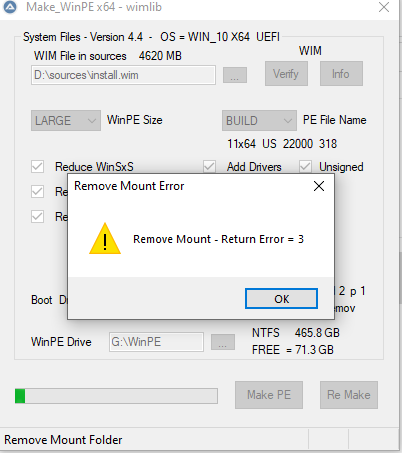
I ran your winpe tool, but when I hit create it gives me the same error. Can you help me out? Thank you so much....
 1 point
 -
Good job ! Even though I do not use any of these , I took the options out of your 12th version to use with v.13 and the browser loads even faster ! Thank you ! You're are absolutely right about russians , they are incompetent , to say the least , and they broke that functionality. It was a very wise decision to make your own version from the original ! EDIT : You may do the same and save time when modding v.13 . Also , the skin files are swappable.1 point
-
In my expereience Windows 7 (x64 or x86) just do not go well with any audio equipment . You're absolutely right , one of the reasons is DRM. I have several pro-grade sound cards and they sound awful with win7 , despite being officially supported . As soon as I put them in Vista PC , the sound is amazing .1 point
-
Windows 7 is super-duper slow and it's a huge blob of spyware/bloatware (what they call "telemetry" now). Of course they had to boost hype to sell this absolutely unneeded OS. "Microsoft denied rumours that it built a backdoor (NSA backdoor) into Windows 7". We trust Mivrosoft , of course ! lol "... a senior National Security Agency (NSA) official told Congress it had worked with Redmond on the operating system..." "Richard Schaeffer, the NSA's information assurance director, told a Senate homeland security sub-committee on Tuesday that the agency had worked with developers on Windows 7's operating system" source : https://www.theregister.com/2009/11/20/win7_backdoor_denial/ Or search Wiki for Federated_identity , for example. https://en.wikipedia.org/wiki/Windows_7 https://en.wikipedia.org/wiki/Federated_identity#Identity_federation1 point
-
ANY official version your desire , starting from 48 and up to the latest , including x64 and x86 of Chrome is available at this archived version's page : https://www.slimjet.com/chrome/google-chrome-old-version.php Linux and Mac are there too . Yeah , I know - it's a nice find , enjoy .1 point