Skip to content
View in the app

A better way to browse. Learn more.

MSFN

A full-screen app on your home screen with push notifications, badges and more.

To install this app on iOS and iPadOS
  1. Tap the Share icon in Safari
  2. Scroll the menu and tap Add to Home Screen.
  3. Tap Add in the top-right corner.
To install this app on Android
  1. Tap the 3-dot menu (⋮) in the top-right corner of the browser.
  2. Tap Add to Home screen or Install app.
  3. Confirm by tapping Install.

PK29RXT

Member
  • Joined

  • Last visited

  • Country

    Vietnam
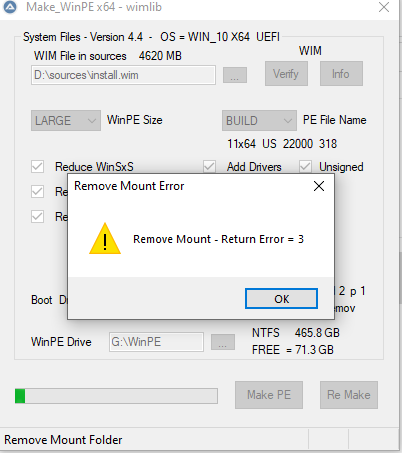
  1. I ran your winpe tool, but when I hit create it gives me the same error. Can you help me out? Thank you so much....
  2. Thank you, I am looking forward to your solution. Wishing you a happy and productive working day...
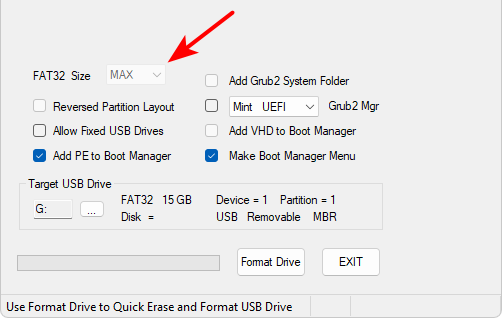
  3. Thank you so much, But I'm using Windows 11 x64 and when I run the file "USB_FORMAT_x64.au3" still doesn't show FAT--32 option
  4. Hello, I have a reference to your .au3 code, but after running this file, the FAT32 USB format selection list for USB is hidden. Made me unable to select on it. Can you tell me how to fix it in your "USB_FORMAT_x64.au3" file? Thank you so much, I admire you so much!

Account

Navigation

Configure browser push notifications

Chrome (Android)
  1. Tap the lock icon next to the address bar.
  2. Tap Permissions → Notifications.
  3. Adjust your preference.
Chrome (Desktop)
  1. Click the padlock icon in the address bar.
  2. Select Site settings.
  3. Find Notifications and adjust your preference.