Leaderboard




Popular Content
Showing content with the highest reputation on 11/29/2023 in Posts
-
It's at value of 4. With Nvidia panel the setting value is also 5 or 4. My monitor was very bright at its default values of brightness 50 and contrast 50, too. I have a 24 inch Fujitsu Siemens from 2006. (It a has a Philips panel inside). All German assembly. The current refresh rate I use is 60HZ. Soon to be two decades old, runs like a clock, I may recap it later (change capacitors). It's hard to buy German made caps nowadays.2 points
-
Dave, you're absolutely right! 60Hz is definitely the right frequency for such flat screens of that era, even if they can do 75, it usually leads to reduced quality.2 points
-
ClearType is easily switched off in Vista, so you will see identical fonts as if you were on XP, this is not the case with Windows 7, the fonts will still be blurry no matter what you do. Windows 7 renders everything blurry and bluish, mp4 videos, any film you watch on windows 7 looks awful. I don't know about Win10, I guess your driver there is different?2 points
-
The aboutbuttuon is a special custom button coded quite unusually. It is generated in JavaScript by the var variable and is a menu button. When hovering on all buttons, you will notice that this button renders differenly from all the others. I think the code imported by the stylesheet buttons_on_navbar_button_roundness.css can't target this kind of custom button. It is simply not recognised as a standard toolbar button by the stylesheet. To change the appearance of this button in a toolbar (e.g. nav-bar) itself, you have to change the code inside the aboutbutton.uc.js file directly. Cheers, AstroSkipper2 points
-
@dmiranda The solution to let the custom button aboutbutton recognise by the CSS stylesheet buttons_on_navbar_button_roundness.css is a bit more complicated than I thought. You have indeed to change the code of the script aboutbutton.uc.js. It seems to be a class issue. This is the first part of the original script code from line 1 to 26: (function() { if (location != 'chrome://browser/content/browser.xul') return; try { CustomizableUI.createWidget({ id: 'about-toolbarbutton', type: 'custom', defaultArea: CustomizableUI.AREA_NAVBAR, onBuild: function(aDocument) { var toolbaritem = aDocument.createElementNS('http://www.mozilla.org/keymaster/gatekeeper/there.is.only.xul', 'toolbarbutton'); var attrs = { id: 'about-toolbarbutton', class: 'chromeclass-toolbar-additional', type: 'menu', removable: true, label: 'about Seiten öffnen', tooltiptext: 'about Seiten öffnen' }; for (var a in attrs) toolbaritem.setAttribute(a, attrs[a]); return toolbaritem; } }); } catch(e) { }; I changed the class of this button in line 15 from 'chromeclass-toolbar-additional' to 'toolbarbutton-1 chromeclass-toolbar-additional': (function() { if (location != 'chrome://browser/content/browser.xul') return; try { CustomizableUI.createWidget({ id: 'about-toolbarbutton', type: 'custom', defaultArea: CustomizableUI.AREA_NAVBAR, onBuild: function(aDocument) { var toolbaritem = aDocument.createElementNS('http://www.mozilla.org/keymaster/gatekeeper/there.is.only.xul', 'toolbarbutton'); var attrs = { id: 'about-toolbarbutton', class: 'toolbarbutton-1 chromeclass-toolbar-additional', type: 'menu', removable: true, label: 'about Seiten öffnen', tooltiptext: 'about Seiten öffnen' }; for (var a in attrs) toolbaritem.setAttribute(a, attrs[a]); return toolbaritem; } }); } catch(e) { }; This change seems to be enough to let the CSS stylesheet buttons_on_navbar_button_roundness.css recognise the custom button aboutbuttuon as a standard toolbar button. Thus, the button can be rounded by this CSS stylesheet. Here is a screenshot to show the result of my change (I added borders around the buttons via CSS code for better visibility ): The positive side effect of this modification is that the custom button aboutbuttuon behaves as a normal toolbar button from now on, even if it is not rounded off by such a CSS stylesheet. Cheers, AstroSkipper1 point
-
sc qc wscsvc If you run Command Prompt as administrator, type in and run the above command, what does it say? The command queries the service's configuration.1 point
-
My monitor brightness is at 4, yes, at 4, contrast at 18. Nvidia panel is at 5 brightness and 2 contrast.1 point
-
Really. really bad fonts, I'm very sorry you have this problem. Are you sure it runs at 1280x1024 Pixel, 32-bit colour? Because those usually run at 1280x1024 Pixel and 60hz, not at 75hz. At 75hz it would be like 1024x768.1 point
-
What is the resolution of your monitor?1 point
-
Firefox and MyPal catch d3d9.dll file but there is a conflict with hardware acceleration if it is enabled1 point
-
I told you many times about 1030 being superior. What can I say, we all learn something, I guess, I spent several years before I found the right driver for me, But hey, no one stops you from those topics getting deleted.1 point
-
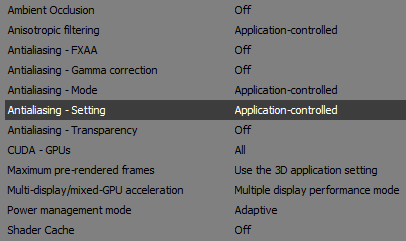
I use 13.5.1030, and the fonts look very good, maybe 13.5.2044 isn't for your system after all. The fonts look like here. The settings I use is in the image I already sent (here). Sorry, can't send BMP - the limit is up.1 point
-
anti-aliasing gamma korrektur = aus1 point
-
Never heard of those, AstroSkipper thank you for letting us know!1 point
-
Yes, I know about browser not being 3D, still nVidia driver seems to apply these settings and render it as if it was a 3D app. It even suggests to choose those options for each of my browsers individually.1 point
-
You're not the only one who is not satisfied with chromium/windows7 fonts, look here. ""So the year is 2023 and MS Edge still seems to be the only Chromium-based browser that follows Windows settings for font-rendering..."" https://msfn.org/board/topic/185877-changing-sk_gamma_contrast-without-recompiling-chromium/1 point
-
That confirms what I've been saying about different levels of brightness/contrast in different versions.1 point
-
Go to Manage 3D settings, it's there for me.
 1 point
 -
NCH Debut Sceen/Webcam Cature works okay too.1 point
-
That's why I wrote that you don't need any VGA files from Win7.1 point
-
Yes, It's new for me too. I have downloaded it and installed on offline Windows XP x64 machine. I have not found silent install switch. Installation was fast and in English. UI doesn't looks bad. I will post some screenshots later. Good is it run on XP, hopefully they not spying a lot.. Someone needs to check if there are any hidden connections.1 point
-
Thanks for the information! I personally have never heard of it before. I found a review on MalwareTips Forums which is from 2022 and unfortunately not positive. The author does not recommend this security programme. Here is a link: https://malwaretips.com/threads/huorong-internet-security-2022.119308/ But one review is of course not the world.1 point
-
Screenshots won't do it real justice due the compression, about win7, yes, no way to tweak it to display normal fonts, Vista can be tweaked though.1 point
-
What about iOS?1 point
-
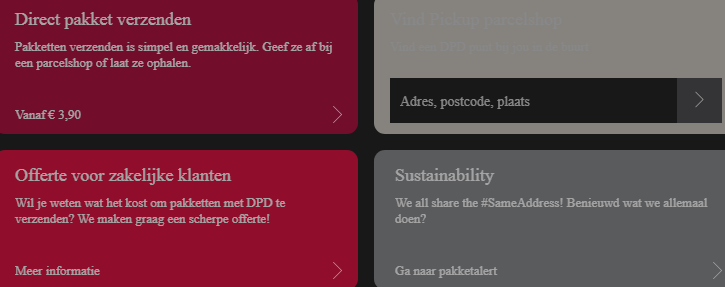
This is how the fonts look like on my old Siemens XP laptop with a very low screen resolution 1366x768 (it can't go more). Driver nVidia 346.26. Take a note, the website automatically switches me to the Dutch website https://www.dpd.com/nl/nl/ because I am from Holland.
1 point
-
For XP and this browser I use suggested by @D.DrakernVidia icafe 347.26. The fonts look marvellous!1 point
-
Every video driver renders fonts differently. I'd start with searching the right one for you. It's a long path of trial and error.1 point
-
No such flag in M115.1 point
-
I remember minibrowser crashing when inserting USB drives (it is not the same thing but it relates to external media stuff), user @realisty found out that by turning off the "Enable new USB backend" flag in "chrome://flags/" made the browser not to crash anymore. I don't know if that can help (I also don't know if that flag still exists on 115).1 point
-
You're very welcome! It would an interesting topic since my experience with Windows 7 was nothing but annoyances and grievances.1 point
-
After a long while, I successfully "installed" CustomCSSforFx (https://github.com/Aris-t2/CustomCSSforFx). This was covered in passing by @AstroSkipper, but I was lost implementing it (as many reading this thread, I reckon). Below a short how-to summary. First, download and follow the instructions in the first post (https://www.mediafire.com/file/m84enyyuz7up01y/Mypal_68_CB_requirements.7z/file). This will set up the basics. MAKE SURE TO RENAME userChrome.css to my_userChrome.css. Second, download and paste the latest version of CustomCSSforFx into the Chrome folder in yout Mypal profile. All of it: you can later on delete the css files and images you don't need, once you played with the different settings, as described below. Third, open userChrome.css and userContent.css in your preferred text editor. In those files, play around commenting and uncommenting the @import "./css/WHATEVERYOUWANTTOTRY, by adding or deleting /* at the beginning of each @import. You'll have to run mypal after every change(s) you make. For instance, in userContent.css I uncomment @import "./css/aboutaddons/recentupdates_category_always_visible.css"; /**/ and @import "./css/aboutaddons/availableupdates_category_always_visible.css"; /**/ (to comment out add /* before each @import you don't want to use; to uncomment, delete said /*). Idem in userChrome.css. For instance, I uncomment @import "./css/tabs/tabs_below_main_content.css"; /**/ and comment out all the others I don't want to use, yet. In userContent.css, change and uncomment the last line @import "./my_userContent.css"; /**/ to @import "./my_userChrome.css"; /**/ (see first step). This will load @AstroSkipper's custom buttons, such as the one below. That's it.1 point
-
The stylesheets are not intended to be installed completely. You choose what you want to change and what you like. I only use a very few of them. Custom CSS stylesheets must be permanently adapted to new Firefox versions. Stylesheets that worked in a previous version do not necessarily have to work in the subsequent version. Mypal 68 is based on Firefox 68.12.0esr from August 2020. The regular Firefox 68 version (not esr) was released in July 2019. Thus, you have to look mainly for custom CSS stylesheets published from July 2019 to August 2020. Search for tabs_below_navigation_toolbar_fx68.css which depends on tabs_below_navigation_toolbar_fx65.css which in turn depends on tabs_below_navigation_toolbar.css! That means you have to copy all three files into your profile subfolder chrome\CSS and import the tabs_below_navigation_toolbar_fx68.css file only in your userChrome.css file via the following command: @import "./css/tabs_below_navigation_toolbar_fx68.css"; The good is that once you found working stylesheets they will work in Mypal 68 probably forever. Is mostly finished. It is not for public as I have not changed the name from Firefox to Mypal. Replace the string Firefox by the string Mypal in all files using the "replace all"-function of an editor as, for example, Notepad++! This is very easy and can be done in minutes. In any case, your compatriots would surely appreciate a working German language pack for Mypal 68.13.x. Cheers, AstroSkipper1 point
-
Here are two screenshots to show where and by what means modifications have been done to the user interface of Mypal 68.13.5b: The colours of the areas mean how the modification was made. Red stands for CSS only, blue for JavaScript only, and green for both, JavaScript + CSS. Cheers, AstroSkipper1 point
-
I have tested Malware Hunter in version 1.173.0.791 on my system, and it is still compatible with Windows XP. Accordingly, I updated my article. Cheers, AstroSkipper1 point
-
On my Windows XP Professional SP3 32-bit partitions, I have installed all .NET Framework versions from 1.1 to 4.0 with all hotfixes and updates.1 point
-
@tekkaman This thread is exclusively about security programmes for Windows XP . Therefore, your observation or problem is unfortunately off-topic. You should post it in the Windows 7 forum. BTW, I had no problem to install Panda Antivirus Free in the version 22.00.01 under Windows XP. And the installer didn't want me to install .NET Framework 4 either, presumably because my Windows XP was and is fully updated. Cheers, AstroSkipper1 point
-
Here is a review of Panda Free Antivirus from November 2022, so still quite up-to-date, but in any case better than any experiences from 2015: https://www.lifewire.com/panda-free-antivirus-review-1356582 Cheers, AstroSkipper1 point
-
I totally forgot to mention I already wrote an article about Panda Free Antivirus. Here is my article: Cheers, AstroSkipper1 point
-
Subject: Panda Free Antivirus Some months ago, I had carried out my own tests with the result that Panda Free Antivirus detected and deleted my test malware. In a real Windows system, not in a VM. So, I can confirm that Panda Free Antivirus is fully working. It is one of the rare antimalware ptogrammes which are still up-to-date and still receive programme updates under Windows XP. However, we all know the real security problem is very often in front of the computer. In such cases, a good programme like Panda Free Antivirus can't help anymore, either. Cheers, AstroSkipper1 point
-
Welcome to MSFN and my thread! Thank you very much for your nice compliment! I will continue when I have more time available. Researching, checking, and writing is very time-consuming, unfortunately. Greetings from Germany to Belgium, AstroSkipper1 point