All Activity
- Today
-
It's not that bad, IF you tweak the CRAP out of it! I strongly (strongly!) suggest learning how / teaching yourself how to create installation media that removes the CRAP *BEFORE* the install! Do not (do not!) install FIRST then remove the crap LATER. You GOTTA remove the crap FIRST. There are some very good "scripts" (PowerShell) that make "decent" attempts at removing AFTER-THE-FACT (install first, remove later), but you really are BETTER-SERVED in not allowing the bloat to be installed in the first place. Install first then remove later method always (always!) leaves a "tangled mess" of a Windows Registry behind. For your radio station needs, I suspect that Win10 *1511* is really all that you need. I currently stick with *1607* and *21H2* the best I can (hardware-dependent). Good Luck! Don't "fear" Win10. Fear the BLOAT of "standard user, default installs", but don't fear The De-Bloated Advanced-User. Oh, last but not least, do not (do not!) save yourself legwork by using anything called "tiny" or "lite" or the names creatively change more than the underlying "debloatifying". Just trust me, you will NOT be satisfied unless YOU do the legwork. But do be warned, there *IS* a "learning curve". But I have no doubt whatsoever that you are smart enough to take on the task.
-
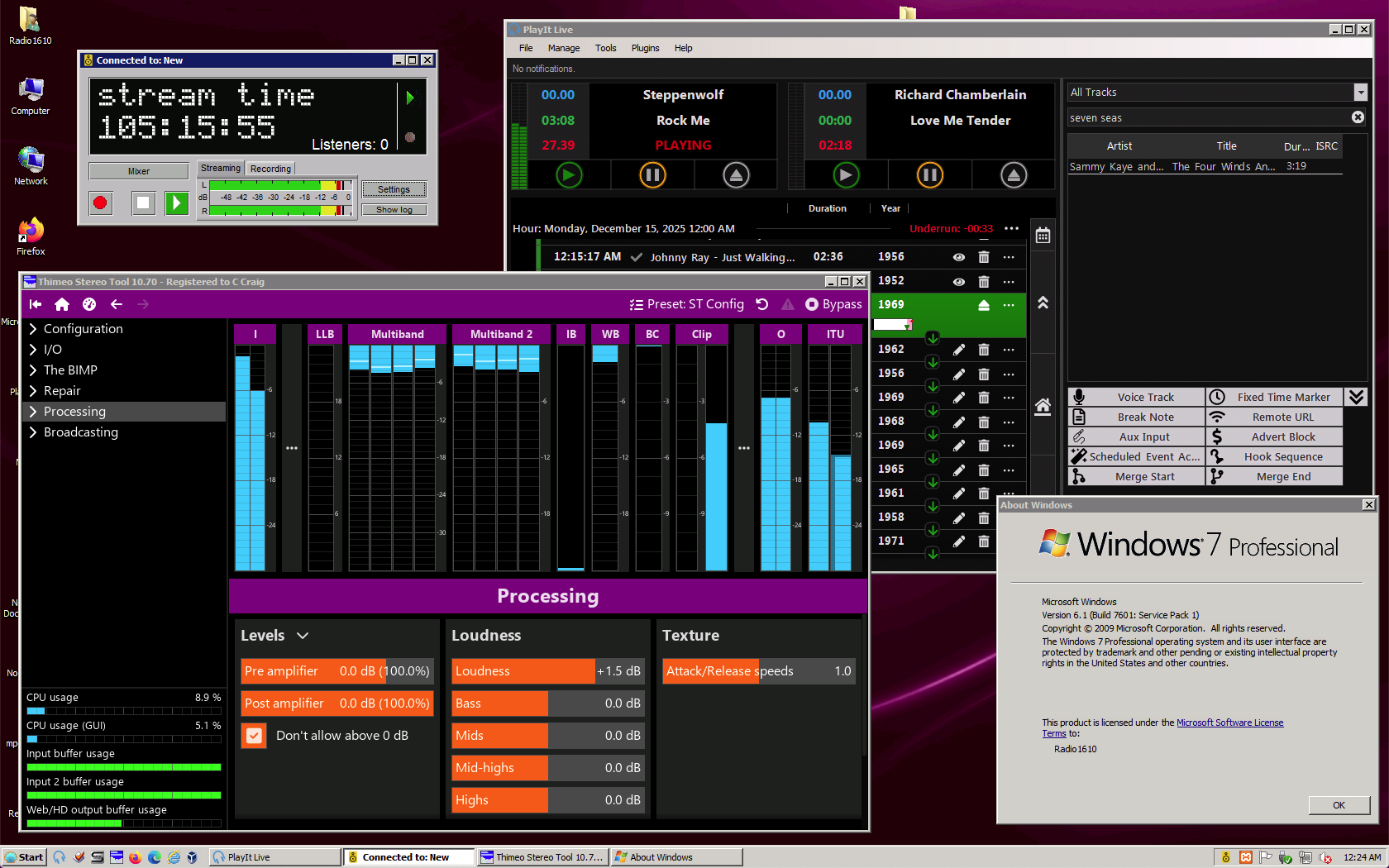
Hi! It's been awhile since I posted here! I'm mainly using Mac OS nowadays, but I still maintain a Windows 7 VM, and I have a Dell OptiPlex 7050 running Windows 7 Professional that I use for playlist automation (I run a small, unlicensed AM radio station; the neat part is that it's not illegal: look up Title 47, CFR Part 15, Subsection C, § 15.219 of the FCC rules). So, despite it being over 16 years old now and EOS since 2020, it's still perfectly usable and secure enough to at least get done what I'm trying to do, as you can see here: I had an earlier version of this running on XP, but unfortunately, it got too old to run the versions of the above apps I wanted (clockwise from top left: Butt, PlayIt! Live, Stereo Tool). 7 is still in that sweet spot where current versions of these things are still supported, so I'm going to use it while I still can (that said, I'm planning for an eventual upgrade to (ugh!) Windows 10 because, unfortunately, the fun doesn't last forever, and there's no Mac or Linux version of PlayIt! Live). Here's to keeping Windows 7 alive, one PC at a time! c

-

released: bug fix for win32k.sys/fsg_RunPreProgram
NotHereToPlayGames replied to Start Me Up's topic in Windows 2000/2003/NT4
I would certainly recommend that over any "AI-generated" list! We are YEARS away from "AI" being a trusted and reputable source! In my not-so-humble opinion. AI, for now, is nothing but "Junk in, junk out". I get some reasonably good STARTING POINT javascript code from AI, but it is NEVER perfect or good-to-go without HUMAN intervention. -
 https://github.com/e3kskoy7wqk/Chromium-for-windows-7-REWORK/issues/7
 -

released: bug fix for win32k.sys/fsg_RunPreProgram
Start Me Up replied to Start Me Up's topic in Windows 2000/2003/NT4
If noone has cataloged them, then I probably have to go through them one by one. -

Native (WDM) HD Audio driver for Windows 98se/Me
SweetLow replied to Drew Hoffman's topic in Windows 9x/ME
It's excuse for alpha version but not for beta or release. As the [WDMPNPB003_Device.FactDef] section and other sections in HDA.inf too. Two controls (low and high "something", I don't remember exact names) are definitely visible and, yes, do nothing. P.S. Realtek ALC887 @ Intel Comet Point-V PCH (Intel Core gen 10 Desktop Motherboard) CSM does exactly the same job as at my notebook - all PCI devices on IRQ11. Version 11 of drivers set up without problems. Situation is exactly the same as MERCURY127 have - digital part of driver definitely works as expected but no analog sound. >low and high "something" Low and High Frequencies, I suppose (I have localized Windows). -
released: bug fix for win32k.sys/fsg_RunPreProgram
Start Me Up replied to Start Me Up's topic in Windows 2000/2003/NT4
Well, yes. I am also aware of the collections you uploaded to archive.org. But I was hoping that someone has cataloged the updates to know what's inside. It's still a long way from the state of having links to updates to the state of knowing which updates contain versions of win32k.sys. However, knowing the links is the first step. I have cataloged more than 400 Windows 2000 updates, but nearly no Windows XP updates. -

released: bug fix for win32k.sys/fsg_RunPreProgram
MilkChan replied to Start Me Up's topic in Windows 2000/2003/NT4
You should go to this link. There will be a txt file containing: Links to all Microsoft files uploaded directly to the MS Catalog. In all languages. So you can find all the files you need. https://msfn.org/board/topic/182599-nt-5x-windows-update-urls-dump-inc-custom-support-updates/ -
Hello, as you are probably aware, Windows has problems with long paths (total length > 260 characters). --- In old Windows versions there is the "\\?\"-trick, which helps in a few situations: --- Starting with Windows 10, it is possible to allow specific applications to use longer paths. According to the documentation, Microsoft modified specific functions of the API to allow using longer paths for specific applications in Windows 10. So the list of functions is rather interesting. And here it is: CopyFileW CopyFile2 CopyFileExW CreateDirectoryW CreateDirectoryExW CreateFileW CreateFile2 CreateHardLinkW CreateSymbolicLinkW DeleteFileW FindFirstFileNameW FindFirstFileW FindFirstFileExW FindFirstStreamW FindNextFileNameW FindNextFileW FindNextStreamW GetCompressedFileSizeW GetCurrentDirectoryW GetFileAttributesW GetFileAttributesExW GetFinalPathNameByHandleW SetFileAttributesW GetFullPathNameW GetLongPathNameW MoveFileW MoveFileExW MoveFileWithProgressW RemoveDirectoryW ReplaceFileW SearchPathW SetCurrentDirectoryW --- Is anyone aware of any pioneer work that has been done to improve the situation with Windows versions older than Windows 10?
-
I've been having this for a while too with the entire Action Center/Quick Actions menu, it'll work on boot and then at some point it'll just stop showing up and no hotkeys like Win+P work until I kill explorer.exe 1-2 times. This is on latest 25H2 update with 3.9.20 of SAB as well.
-
 I still have LTSC 2019 setup, and heavily customized, but I'm putting off using it. I really enjoy Windows 8.
 - Yesterday
-

Native (WDM) HD Audio driver for Windows 98se/Me
Drew Hoffman replied to Drew Hoffman's topic in Windows 9x/ME
WDM Sound Blaster digital and MIDI emulation should work but occasionally the sound will drop out for a while if there are a few seconds when nothing is playing. I think there is a race condition bug with quickly stopping and starting the stream. The WaveCyclic port driver aggressively sets the state to Stop whenever there is nothing playing but it can be held open by having Winamp or similar open in the background and paused. The Mute check box is disabled because it was disabled in the original SB16 sample driver and I haven't changed the topology miniport much. (I also need to remove the EQ settings it has since they don't do anything but I don't think those are exposed in the volume control panel, there was originally an example cpl addon for that. ) -
Actually I restored it to IE6 (what it came with pre-installed in XP Pro SP2). Had to do this from scratch I had originally installed IE7 and then IE8 and deleted the IE7 and IE8 uninstall folders in Windows because at that time, why would I want to go back to IE6. right? IE6 doesn't support HTTPS or HTML5 which is what the internet switched to. At this point IE is dead anyway and all I need is an installed Internet Explorer for the files that other Windows apps use and share with it. However over the past 2 months I was discovering several issues with some Windows apps. Help and Support Center would not let me type text into the search box (not even a blinking cursor), I wouldn't get the Index when clicking on the Index button, and clicking on any of the Related Topics links would get me the "There is an error in this dialog" message. Also, when opening Computer Management from the Control Panel and selecting Services I would get the same message. Also, with the Indexing Service, Query the Catalog, the box that you type your search query into had no blinking cursor and the Sort By and Order By drop down boxes had only question marks in them. Also, User Accounts in the Control Panel failed to display the little question mark icons "?" And after getting IE6 back up I was getting that same error message when I would click on "About Internet Explorer" from the Help tab. It wouldn't display the information (ie. version number, cypher strength, product ID and updates). So after several weeks of trying to figure it out, and Google searches, I realized it had something to do with Internet Explorer. So I re-registered all the dll's that have to do with displaying HTML etc and voila, everything is now back to how it should be. The unusual folder behaviour was the last thing to fix. So before I used your suggestion I thought what if I just rename the Local Service folder and see what happens. So I did, from the parallel installation, and re-booted back into the system that had that problem. I was expecting Windows to either complain about it missing or even hang up but it didn't. The boot was as smooth as always. So I opened Explorer and chose Folder view and opened the Documents and Setting folder and there was a fresh new copy of the Local Service folder with everything in it. So it must be built into Windows to repair that. There was only one difference between it and the original Local Settings folder. The NTUser.dat file was 740Kb whereas the original one was 240Kb. So it would seem that it was corrupted somehow and caused that strange behaviour because it didn't create those extra folders in the wrong place after doing this. So everything is working correctly now and thanks to everyone who replied with suggestions.
-
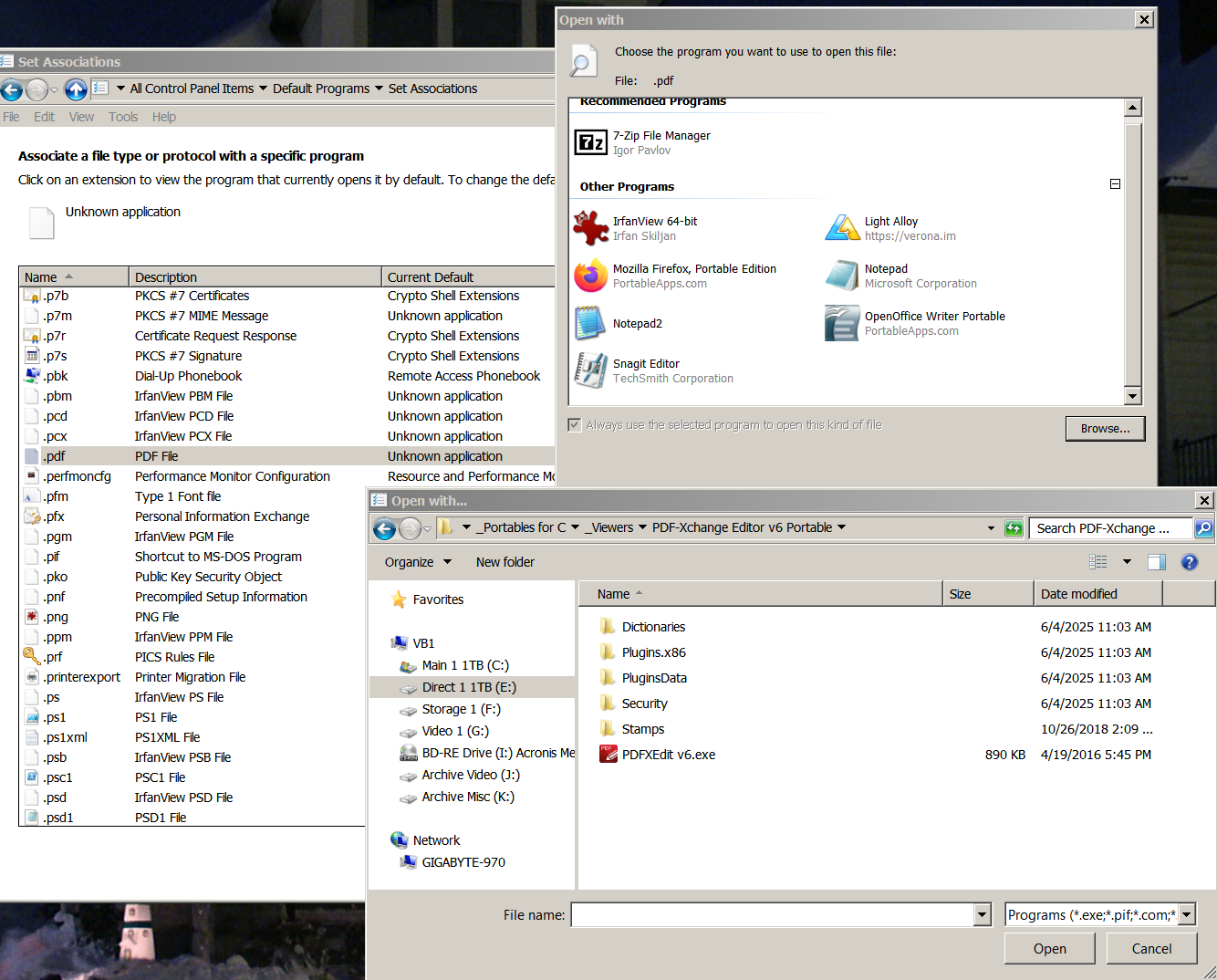
I'm not familiar with "PDF-Xchange", but your screencap cites it as PORTABLE. So what happens if you copy the folder (archive it somewhere), then DELETE the portable apps "profile" then launch it? Just speculating as all of my portable apps have their own "bin" (profile) where files and registry is saved within itself (as opposed to Win Registry / Program Files Folder / User Data Directory / etc). ie, force PDF-Xchange to start BRAND NEW / FIRST-RUN.
-
 This will help; after I click on the .exe, nothing happens, no error messages etc.
-
Yes, I know how to do it (all 3 methods) but when I point to the programs .exe it doesn't 'stick' in the dialog box. I've done it multiple times, same thing. It's like I never pointed W7's O/S to anything. This just stared a few days ago. No real idea what caused it. Specifically it is .pdf files, but document files were affected also, but for some reason I was able to re-assign that file type. To make matters worse, I even went to the hassle to restore a image of the O/S I made almost 3 months ago and the same same thing!! In fact, it was more than one type of file, but .pdf is the major issue. When I choose the program, the pop-up box with all the other 'assigned' programs shows, but the one I tried to add doesn't get added to the list. It's PDF Exchange (that I have used for years) is the specific program, but again, it's ALWAYS worked with NO issue. This image and what was the former current active version. Again, any way I do this it fails. Then and now. One more detail, I also lost the default programs for .txt (I use Notrebook2) and .odt (Open Office documents & Spreadsheets), but I was able to restore those. All of this happened apparently one time again, in both W7 installations.
-
Native (WDM) HD Audio driver for Windows 98se/Me
SweetLow replied to Drew Hoffman's topic in Windows 9x/ME
Yes, this probably is result of hang on when installation of bad driver was executed. One file from WDM sound system was absent (and did not restore on subsequent driver installations), that gave such undesirable effect. Ok, I tested more. WDM SB emulation is working (Quake1 as test software). DirectX diagnostic tests of (non hardware accelerated) Sound and Midi passed. One small problem exists - there is no Volume Mute enabled control, only Level. Individual components like Wave or Midi have both Level and Mute. -
The interface in the taskbar that enables Wi-Fi sound and battery stops working after a while. It works again when I restart Explorer, then it stops responding again. Only these two things are not working. I have Windows 11 26200.7462 and SAB 3.9.20 installed. bandicam 2025-12-15 01-41-55-410.mp4
-
 Jody, Vista is the same 6.x as Win8, as soon as he retires Vista, Win8 will follow the same road. Win10 is another story though.
 -

Beware of Office 2010 Updates!
assenort replied to Dave-H's topic in Pinned Topics regarding Windows XP
Thank you, @MilkChan, but it seems kind of overkill to a noob like me. @jumper patched and made available a single file (for the 32-bit version of MSO 2010), hope he can do this for the 64-bit version too and save the hassle :-) -
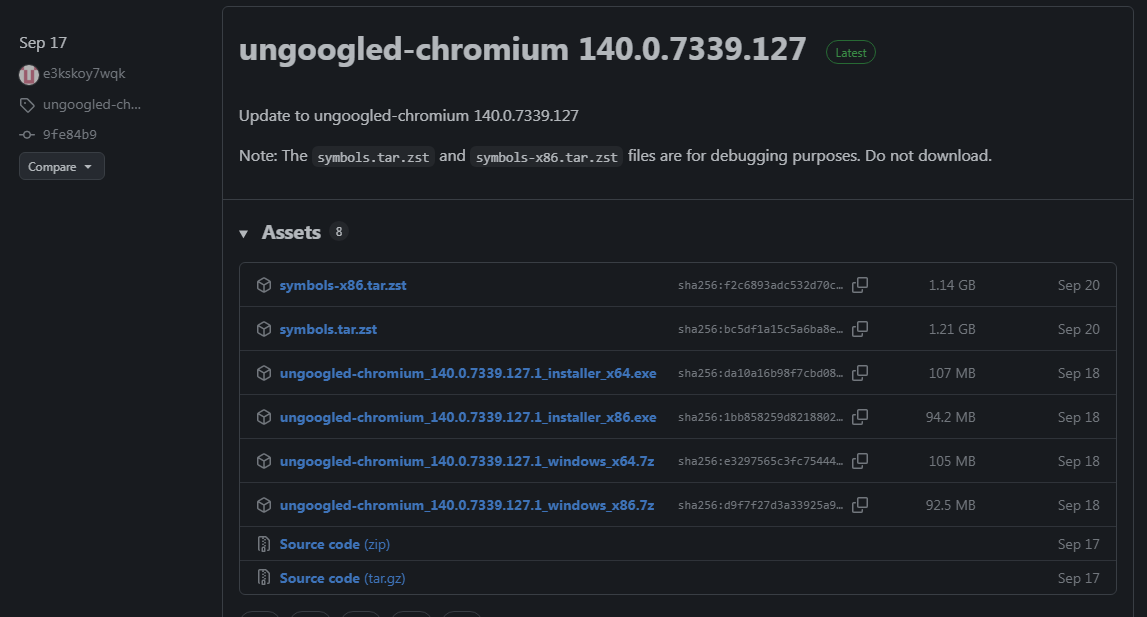
I am on-topic. The topic name is "Firefox and Chromium running on Windows 7 by e3kskoy7wqk" It references the generic Chromium. Ungoogled is also Chromium, and more to the point, the author e3kskoy7wqk releases it. Let me help you find it. https://github.com/e3kskoy7wqk/Chromium-for-windows-7/releases/tag/ungoogled-chromium_140.0.7339.127 So please stay on-topic.
-
Beware of Office 2010 Updates!
MilkChan replied to Dave-H's topic in Pinned Topics regarding Windows XP
It seems like abbodi1406 has already done that in # Office 2010 MSI Upsourcer You should try it. Link : https://mega.nz/file/LgZyCZxa#ew7SgnszJXa8lX0miZAIQk6qGQJljiRxSunc-ynaSow -

Native (WDM) HD Audio driver for Windows 98se/Me
MERCURY127 replied to Drew Hoffman's topic in Windows 9x/ME
1) downloaded latest version. 2) checked all five jacks on rear side. no sounds... for compare, i try mpxplay for DOS with default jack to play logon.wav — there was loud noises, slightly remember logon.wav... i think it will good option use some registry key for manual iteration of pins and volume control. i also have nvidia videocard with hda, connected to monitor with speakers. so i check playing this way soon... -
Native (WDM) HD Audio driver for Windows 98se/Me
Drew Hoffman replied to Drew Hoffman's topic in Windows 9x/ME
Nvidia and ULI chipsets would be the highest priority to test as I don't have any of those myself and they need some PCI Configuration Space fixes that I blindly copied from VSBHDA. Tests on as many combinations of controller and codec as possible would be appreciated. I already know there's no sound on on IDT / Sigmatel codecs yet and will continue to debug that. The driver should function without DirectX 8, at least it does in Virtualbox, with maybe the only issue being choppier MIDI playback. I'm ignoring the requested interrupt interval from ks.sys (which is always 10ms) because Virtualbox seems to require a power of 2 audio buffer size not just a multiple of 128 bytes. Haven't tested on 98FE or 95 with the USB support added yet. DirectX 8.1 updates these audio related files: Ks.sys, Stream.sys, mskssrv.sys There's also a Microsoft WDM Audio Update hotfix KB242937 which updates kmixer.sys, portcls.sys, usbaudio.sys, wdmaud.sys I do have a QIYIDA X99 motherboard I can try to test on myself, if I can figure out Omores's trick for running 98 from a USB key in legacy emulation mode. -
 Ungoogled would be a fork, not a port. Please stay on-topic.