



Skip to content
View in the app

A better way to browse. Learn more.

MSFN

A full-screen app on your home screen with push notifications, badges and more.

To install this app on iOS and iPadOS
  1. Tap the Share icon in Safari
  2. Scroll the menu and tap Add to Home Screen.
  3. Tap Add in the top-right corner.
To install this app on Android
  1. Tap the 3-dot menu (⋮) in the top-right corner of the browser.
  2. Tap Add to Home screen or Install app.
  3. Confirm by tapping Install.

harock

Member
  • Joined

  • Last visited

  • Country

    Turkey
  1. You can check if it's active with `vivetool /query /id:41356296`, and similarly, you can disable it with `vivetool /disable /id:41356296`. My problem seems to be fixed; I need a little more time to confirm.
  2. The interface in the taskbar that enables Wi-Fi sound and battery stops working after a while. It works again when I restart Explorer, then it stops responding again. Only these two things are not working. I have Windows 11 26200.7462 and SAB 3.9.20 installed. bandicam 2025-12-15 01-41-55-410.mp4
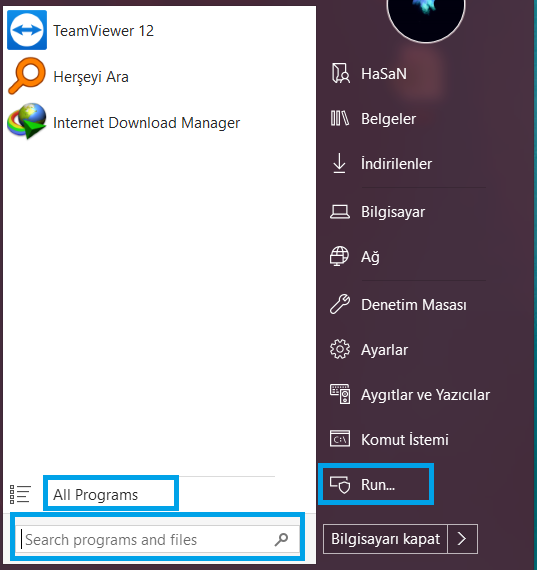
  3. Hi i ve Startisback ++ 2.5.2 m using Windows 10 Pro x64 1703 Turkish some section English like search run and all program section any one help me whats the problem ? My friend ve same os verison but he doesnt ve this problems u can see picture in blue box thank you
Account

Navigation

Configure browser push notifications

Chrome (Android)
  1. Tap the lock icon next to the address bar.
  2. Tap Permissions → Notifications.
  3. Adjust your preference.
Chrome (Desktop)
  1. Click the padlock icon in the address bar.
  2. Select Site settings.
  3. Find Notifications and adjust your preference.