All Activity
- Past hour
-

KB2839299_2003 derived fltMgr upgrade that it is not...
MilkChan replied to modnar's topic in Windows XP
ESU also has this file that has been updated. I'll probably try KB4493563 from Server 2003 because it's equivalent to WinXP POSReady 2009 Updates. I might have to try it to see what the benefits are. Because the latest file from ESU is at KB4512787. - Today
-
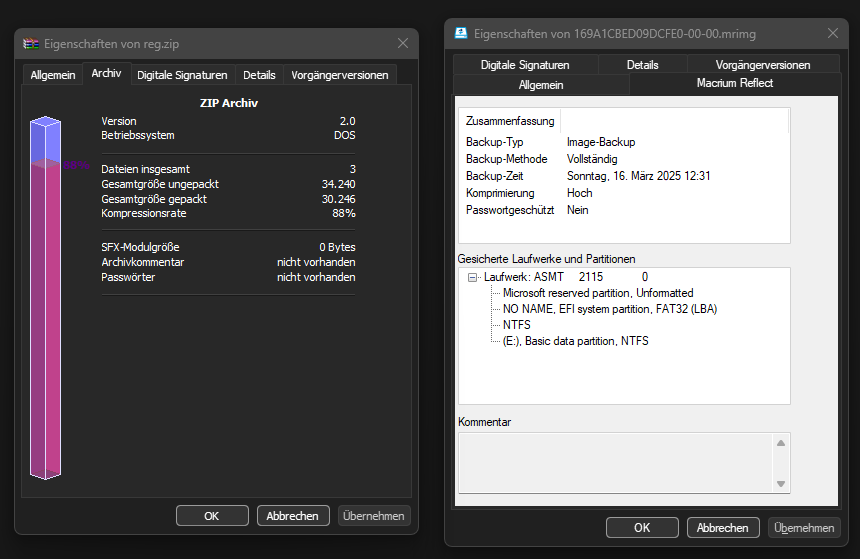
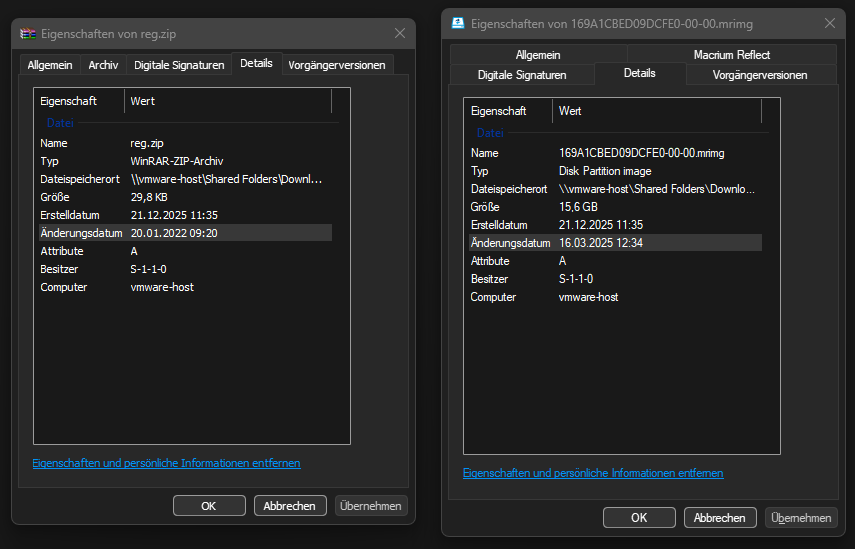
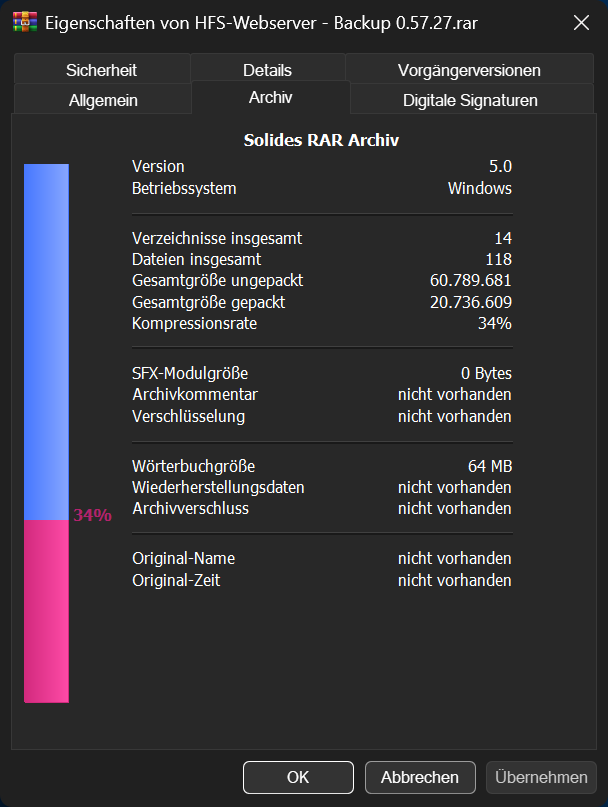
Details is in dark mode, it is a native tab from Explorer. "Archiv" is a custom tab from WinRAR and Macrium Reflect is a custom tab from well Macrium Reflect. Here it is compared to the very old WinRAR 5.31, to show that it is properly colored with dark magic. And here is the “Details” tab for reference. It functions as expected. Unfortunately, I'm not aware of many programs that have a custom tab to test this further.

-

exceeding max_path (path length > 260 characters)
user57 replied to Start Me Up's topic in Windows 2000/2003/NT4
USHORT is a short syntax for unsigned short signed short (or just short) goes from −32767 to +32767 unsigned short goes from 0-65535 https://en.wikipedia.org/wiki/C_data_types in newer compilers i saw that is sometimes a problem if you put a unsigned char vs a BYTE - it starts to complain and fail in VC6 it dont do that - because BYTE is a macro name for unsigned char you have to understand it that way: 16 bits (that is what short represent) (Length) 16 bits (MaximumLength) buffer (32 bits/4 bytes) (PWSTR Buffer) then here useally is that string -
 VL ... Thanks for that information. I did not know that.
 -
Both are, indeed, but one seems a custom object. The other tabs on the Macrium file are not with dark mode ? Like "details" for example.
-
But both are, or am I mistaken? Also I am not using the WinRAR Update with dark mode yet.
-
i find interesting when i talked to sam and dibya and i came up with the idea ffplay would be the option (also on page 13 here), you just came up with that one you more or less can forget about LAV - LAV is a software engine that use up like dx11, cuda and other things the thing what is handling that internal is something they call CUDA (in kernel mode - not the usermode functions) (look what he writes on his github: NEW: D3D11 support for HEVC 4:2:2 and 4:4:4 hardware decoding v0.80.0) LAV is not something that provides such en or decoding for h265 and such - its a engine what use a next engine (like dx11, cuda ect.) (its like a script or prescript - what meet its demise later on) support matrix (NVENC, NVDEC) https://developer.nvidia.com/video-encode-decode-support-matrix you actually dont have h266 there - and thats forever (all cards up to 21.12.2025) for that grafic cards because its a print <-- what you could do for us is making a last like nvidia did - what LAV and what modes can be done with it, like the one from nvidia grafic card "encoding" wise there is a big problem , hardware units doing so are a print - so there are many modes grafic from grafic card that is not supported and printed is printed - while software can be upgraded the other option like having a programmable core is close to the same thing as if having just 1 cpu core more with software instructions cpu decoding dont need that much power even with normal instructions (the XMM registers are a lot faster) you dont need a grafic card to encode a video or image here i wrote exactly this (no video card, no weird dll´s, no weird os functions, no directx, no cuda, no lav): https://msfn.org/board/topic/185879-winxp-hevcheifheic-image-encoderdecoder/ it use normal instructions if (hardware acceleration is turned off) - if on it checks what XMM registers are available (these are like 2-150 times faster) also from consideration would be the vLC player - it suppose to work with video´s from H265 - how many modes are not known to me to CUDA and XP to say is that the CUDA versions that are available on XP are like old, the functions are probaly very limited the only real option would be to either have the source code of the nvidia driver (how it controls its cuda) or how to give that cuda kernel code its controlment (like control/input/output) so after all of that - yep you right ffplay was my idea too but ffmpeg in the past was very self-contained - today they already use also engines, dx11 and such things - so it might also have its limitations if you really want a h265 support on mpc-hc you have to write a connection from mpc-hc to libde265 (that one can decode h265) https://github.com/strukturag/libde265
-
 If you encounter problems installing Panda Antivirus Free and uninstalling it fails or is incomplete, you should use the Panda Dome Generic Uninstaller, which is available here: https://techsearch.pandasecurity.com/PandaKBView?id=kA1Vr00000064QjKAI
 - Yesterday
-
I just found one randomly in other thread when I searched something about MPC-HC, posted 1 year ago - Telegram 4.14.6 by Maroc, https://pixeldrain.com/u/mFXmsANf
-
Because that is a file explorer properties window. Also, WinRAR has integrated dark theme, if that makes any difference.
-
Might be, but WinRAR, for example, works as expected.
-
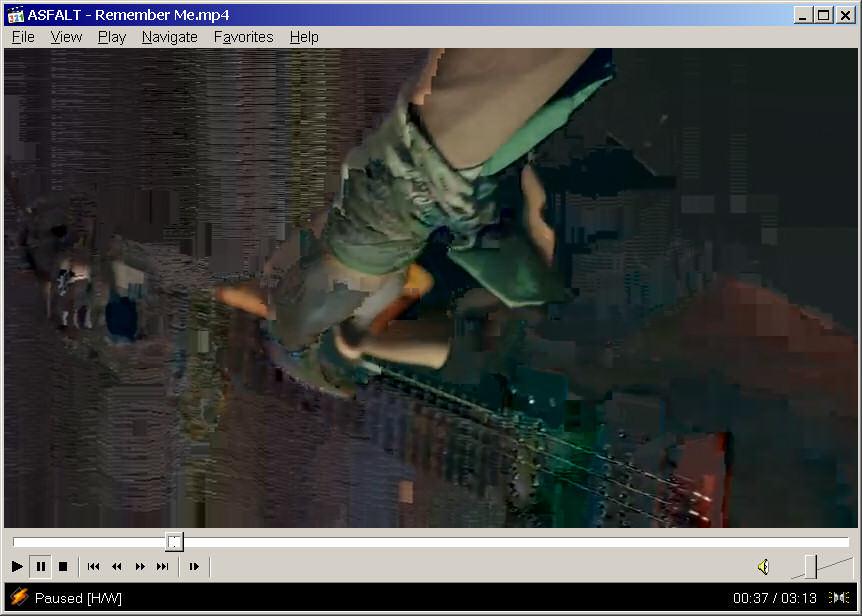
Hi, I just tried the latest LAVFilters 0.79.2 build for XP and I also have problem with correct decoding h264 when CUVID is enabled - image is messed up like this below (verison of MPC-HC doesn't matter it's problem of LAVfilters)... I have to disable CUVID to decode it correctly (other acceleration is not effectively available under XP). If I go back to LAVFilters 0.74.1.9 it's fine. So it's evident that some bug was introduced in newer versions and still presents. On the other hand, I have enough power to decode h264 by software and LAVFilters 0.79.2 brings support for new h266 codec. There's not much XP players that can play this format, just FFplay from FFmpeg. Of course all do only software decoding which compute power demand extremely increased. I can play only 1280x720 at full speed near 80% CPU load and 1920x1080 turns to slideshow :\ Some hybrid accelerated decoder offloading on GPU would help. For h265 I use such one - Lentoid works well on GTX970 and decrease CPU load to 30-40% of pure software decoding. You can try it: http://www.strongene.com/en/hevc/hevcProduct.jsp
-

Flash 9 not working on NT 4.0? (consolidated thread)
Leokids123 replied to ironman14's topic in Windows 2000/2003/NT4
At this point you should reinstall Windows NT 4.0 just to get it working... -
 FWIW, .NET FW 4.0 isn't a replacement for older .NET frameworks; 2.0/3.5/4.0 can co-exist on the same machine, and each one caters to applications targeting that specific version of .NET FW; i.e., if an app was built against 2.0, it needs 2.0 installed to run; likewise for newer apps built against 4.0... On Vista and later Windows versions, a newer 4.*.* version will overwrite a previously installed 4.*.* version of .NET FW, however this is NOT applicable to XP SP3, where only 4.0.x was made available; loyal XP users here can chime in to assist you, but from memory I recall than some feature/security updates for .NET FW 4.0 were made available at the time for XP SP3; unless the (recent) installer you linked to has those bundled ...
 -
Generally, Panda Antivirus Free is working under Windows XP, even in the most recent version. However, there are two issues. The first issue which I noticed is the unability to connect to a Panda Dome account. Every time you open the programme interface, you are annoyed by a pop-up window asking you to log in to a Panda Dome account. However, this does not work under Windows XP and ends with an error message. There is no official solution for this error. But I have a solution. It appears to be a TLS problem. A secure connection is required, which Windows XP cannot establish natively. The solution is ProxHTTPSProxy, HTTPSProxy or ProxyMII which you can get in my thread Simply set the proxy in the Panda Antivirus settings and set up your Panda Dome account. Once this is done, Panda will no longer bother you, and the proxy settings can be deleted again. The second issue consists of a delay of several minutes during system start-up. Panda Antivirus needs round about 5 minutes to be completely loaded on my machine. I tried different versions and possible solutions, but nothing helped. Therefore, this issue has been reported by me to Panda's support. We will see what happens. Greetings from Germany, AstroSkipper
-
I guess it's because it's a custom object, not a native one. For this you'd need a theme, that enforces dark colors (like Rectify11 dark theme).
-
Microsoft .NET Framework 4 is needed and should be installed to ensure that Panda Dome runs correctly.
-

KB2839299_2003 derived fltMgr upgrade that it is not...
modnar replied to modnar's topic in Windows XP
In Win2003 only some security enhancements were added from b3959 to b5107; it was somehow possible to bypass it but with local access, not over internet from what I remember. I have unpacked it using Universal Extractor. While it is faster than XP's fltmgr, it seems like even with XP settings the 2003 one is again hitching... The only way to make XP one better is to place it on Tag=4 as it was in XPSP2, but that setting is not secure - means that any false driver could render it useless when it gets installed in boot order in front of it (Tag=1)... Update: Windows really never ceases to surprise with strangeness. Apart from inserting empty place in GroupOrderList between 2 Tagged services (for the tag-less in the same group), I also reinstalled XPSP3 fltMgr right from Windows/ServicePackFiles/i386 (I use harkaz's USP4), so there are all 4 fltmgr files under there. I just right-clicked fltmgr.inf -> Install and restarted. System is much snappier now... Good; I'll take it. -
PhoenixPE is a WinPE Rescue/Recovery Environment based on Win10/Win11. It can be booted via USB, CD/DVD, PXE/Network, or hard disk. PhoenixPE uses the "next-generation" PEBakery engine resulting in faster build times and advanced features compared to legacy Winbuilder projects. Build from Win10/Win11 sources using either boot.wim or WinRE.wim as a base. Designed from the ground up to be developer/contributor friendly and use clean, well documented code. Easy to understand options and uncluttered user interface. Flexible and fully customizable. Features Drive Backup/Clone/Imaging Malware Removal Password Recovery File Recovery Forensics Tools Drive Partitioning/Install Prep. Hardware Diagnostics Offline OS Troubleshooting/Repair/Recovery And more... PhoenixPE includes a variety of carefully selected applications to get you started and PEBakery's user friendly scripting language makes it easy for you create your own scripts and customize PhoenixePE with your favorite apps and settings. Homepage: GitHub Latest Release: Download
-

exceeding max_path (path length > 260 characters)
Start Me Up replied to Start Me Up's topic in Windows 2000/2003/NT4
According to the documentation the "Length"-field and the "MaximumLength"-field are values in bytes. This explains why the maximum path length with the "\\?\"-trick is a little bit over 32,000 characters (which is about 64 KB). -
KB2839299_2003 derived fltMgr upgrade that it is not...
Start Me Up replied to modnar's topic in Windows XP
They can also be extracted without third party tools: open a command prompt (cmd.exe) drag and drop the kb...exe into the command prompt window add " -x" or " -c" (c with old updates, x with new updates) to add the command line parameter hit [enter] -
I want to use Windows XP in 486 as WinPE bootable rescue shell. Here is command line from WinPE constructor ( xpsp3_opk_en original, cannot post it here, paths can be different ): Z:\OPK\mkimg.cmd Z:\DIST Z:\OUT winpe486.iso /NOWF Created image cycled reboots. Even on Pentium and later CPU. Please help.
-

exceeding max_path (path length > 260 characters)
NotHereToPlayGames replied to Start Me Up's topic in Windows 2000/2003/NT4
That's one thing I never liked about XP's default setup. Something like "C:\Documents and Settings\YourName\My Documents" might not seem like much at first, but those 47 characters is using up 18% of your allotted 256. The thing that always annoyed me is that Windows would run everything just fine, even if you exceed 256, *UNTIL* you go to copy/archive the files and only then does Windows throws up a name-too-long error. Even though it's been using those names as-is without any issues. -
Microsoft Visual C++ v14 Redistributable removed support for Visual Studio 2015. Besides, it seems that v14 Redistributable also dropped support for Windows 7.
-
exceeding max_path (path length > 260 characters)
user57 replied to Start Me Up's topic in Windows 2000/2003/NT4
programming-wise normal strings get translated to the unicode string (windows do so internal with its deeper function) https://learn.microsoft.com/en-us/windows/win32/api/ntdef/ns-ntdef-_unicode_string theoretical these can have a bigger value of 260 - max_path has not 256 for a reason of terminating 0´s an example would be CreateFileA/W this one gets translated to ZwCreateFile(NtCreateFile) to create this unicode string there is : RtlInitUnicodeString( &fileNameUnicodeString, L"\\Device\\Harddisk0"); and then: InitializeObjectAttributes( &objectAttributes, &fileNameUnicodeString, OBJ_CASE_INSENSITIVE, NULL, NULL ); then it looks something like: ZwCreateFile( &hFileHandle, SYNCHRONIZE|FILE_ANY_ACCESS, &objectAttributes, &IoStatus, NULL, 0, FILE_SHARE_READ|FILE_SHARE_WRITE, FILE_OPEN, FILE_NON_DIRECTORY_FILE, NULL, 0); explaining that unicode-string: typedef struct _UNICODE_STRING { USHORT Length; USHORT MaximumLength; PWSTR Buffer; } UNICODE_STRING, *PUNICODE_STRING; this one got a buffer and a Length and MaximumLength - ushort is 65535 in size but that are theorecial numbers it raise questions to make so many folders so they extend the length of 256 signs