




-
Yup, the level of expertise and the intellect I was expecting.
-
It does not raise any alarm that the issue only happens to you and nobody else ?
-
That is because it does not happen to normal people who use such software, it happens to those who cannot understand how to uncheck a simple box or how to set user account control to never show confirmations for everything, like for autists.
-
Both are, indeed, but one seems a custom object. The other tabs on the Macrium file are not with dark mode ? Like "details" for example.
-
Because that is a file explorer properties window. Also, WinRAR has integrated dark theme, if that makes any difference.
-
Thank you. Sadly, I think the blue is uglier than the green, but .... it is what it is.
-
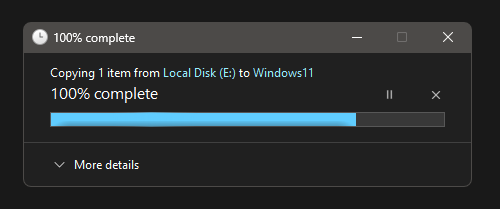
Sorry to have to ask, but can anyone tell me why this strange color of the progress bar and folder names ? The blue is NOT the accent color, in case anyone is wondering. Happened after the latest two updates, one of Windows (26200.7309), second of SAB (3.9.19). LE : I tried with SAB disabled, still same crappy blue. So not caused by SAB, I think, but I would still love to get rid of the blue accent and progress bar, if anyone has any idea, I would be grateful.
-
Thank you, that worked.
-
Updated to 3.9.12 today, which has in the changelog "Removed Click-to-do app where not applicable", my PC has no AI features, yet the Click to do is still there in the start menu.
-
Yup, MS changed the taskbar again.
-
Yeah,. so it's named badly and the fact that Windows 10 taskbar is default now for Windows 11 mode in SAB is another weird choice.
-
I'd happilly donate for some features as well, but it does not seem likely it would happen.
-
So very true :))
-
Nothing wrong with it, but I do not see the point in my use case, it simply increases the space used by the taskbar for ... no practical use.
-
Yeap, this is yuk, without even an option to change it. Definitely not like default W11 taskbar progress bar. Stranger thing is the other options with plumpness are also all different than default W11 progress bar.