The search index is currently processing. Activity stream results may not be complete.
All Activity
- Today
-

My Browser Builds (Part 5)
jumper replied to roytam1's topic in Browsers working on Older NT-Family OSes
I would try lowering the browser.cache.memory settings or disabling it altogether. Extensions CacheToggle and CacheSwitch can flush the memory cache out to disk. - Yesterday
-
 If it makes any difference, the "missing-titlebar-bug", https://github.com/Eclipse-Community/r3dfox/issues/177 https://github.com/e3kskoy7wqk/Firefox-for-windows-7/issues/147 , is caused by a change between v151.0a1-v4 (last GOOD build of the 151 branch) and v151.0.2 (first BAD build of the 151 branch); so, not that big of a "regression window" to dissect ...
 -
 I disagree. For one, the user agent is ANCIENT TECHNOLOGY that is DYING, DYING, DYING. And for two, we should never lump Firefox forks (r3dfox, this thread) and Chromium forks (Supermium) into that sort of direct comparison. No offense, but web sites that still do use the ANCIENT TECHNOLOGY of the DYING user agent isn't exactly (pro and con) up to par with the latest "googleims" and therefore stuck with Site A relying on a faked OLD user agent, Site B relying on a faked RECENT user agent, Site C relying on something totally in the middle, and therefore those OLD SCHOOL web sites can never use a ONE-FOR-ALL user agent, you will always have to rely on the "user agent override" settings in about:config.
 -
I'm seriously wondering what the significance is, ie, the "viral" aspect is, of that number THREE. e3k-blah... r3dfox... probably just overthinking it, but that 3 just feels like some "viral meme" that I'm just not "hip enough" to know.
-
 hmm when you either stuck, dont want to make more of releases, coming to an end, versions dont go high quickly then it might be time for the same thing as in the supermium then it would be time for a user agent changer, build in
 -
.thumb.jpg.b251015fc522288a9691c6db583793fd.jpg) So I just shouldn't work on r3dfox is what you're saying? I like adhd hop between projects and r3dfox is taking a backseat currently, I don't even know if I want to release a v152 yet. I don't feel like diagnosing this when I didn't touch the code myself, I would have to trace and debug and it's a lot of work and effort for something I myself don't use. I do wish the feature worked, but I just don't feel like diving into it. This also does not affect ESR 140.
So I just shouldn't work on r3dfox is what you're saying? I like adhd hop between projects and r3dfox is taking a backseat currently, I don't even know if I want to release a v152 yet. I don't feel like diagnosing this when I didn't touch the code myself, I would have to trace and debug and it's a lot of work and effort for something I myself don't use. I do wish the feature worked, but I just don't feel like diving into it. This also does not affect ESR 140. -
 I know these forks are free, and it's their time, but if you're going to commit, then commit. Don't deliver because, "I don't feel like it". The browser artist known as e3k-blah (I friggin love that), is not going to further compile any ESR 140x builds. I appreciate these builds, but either deliver consistently, or don't.
 -
 AaronS joined the community
 -
 Yes, when I check what and how, I will add the eMMC driver to my guide on MDL
 -
 The new version is very difficult to use. It wastes space, adds unnecessary features, and doesn't allow you to turn them off. old version new version
-
Yeah, I kind of assumed upstream as "e3k-blah" is also affected.
-
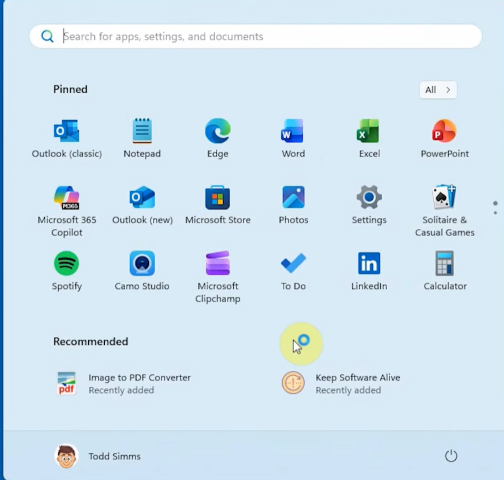
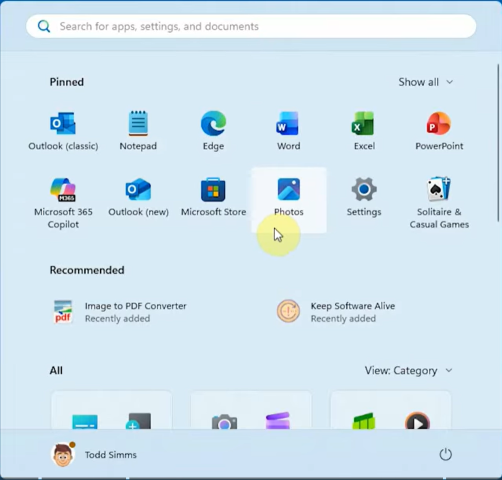
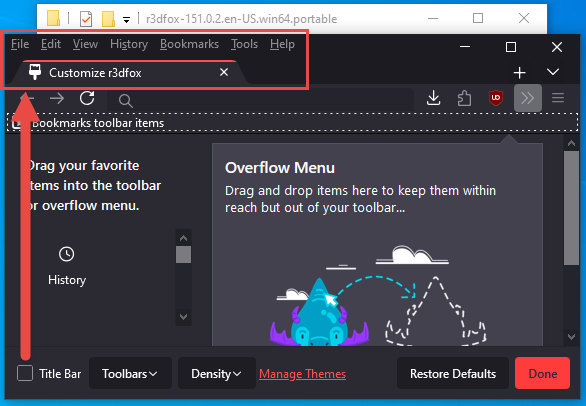
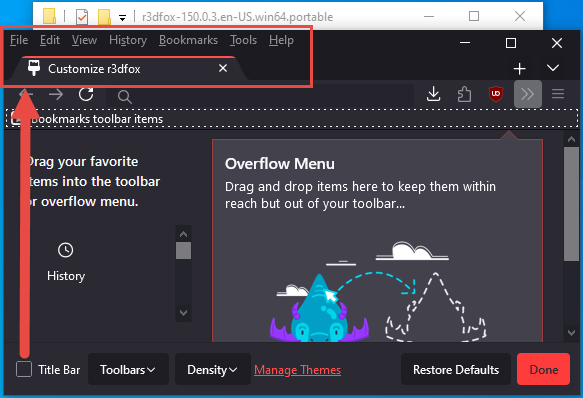
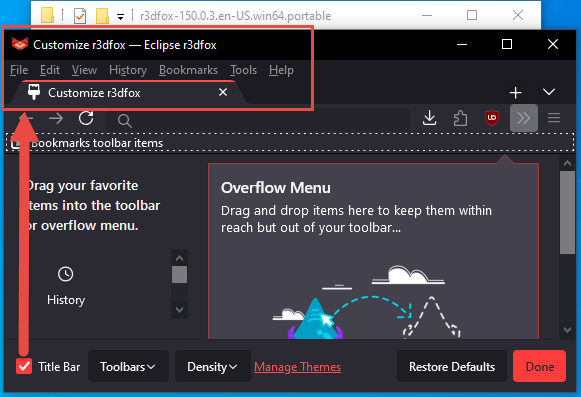
ty notheretoplaygames (picture 1) in the first 2 pictures i can see 2 different things at the first upper picture the "file edit view history bookmarks tools help" looks like a menu having that at the spot of the "window title" (picture 2) then "file edit view history bookmarks tools help" has gone downwards its no longer at the part of the "window title" instead at the window title now it has "Customize r3dfox -- eclipse r3dfox" and below it shows "file edit view history bookmarks tools help" it very much look to a menu (picture 3) in your second post you are showing v151 where the windows title is not showing "Customize r3dfox -- eclipse r3dfox" instead it shows what it shows in (picture 1) the menu "file edit view history bookmarks tools help" is at the window title in the second post (picture 4) does not show a differens so we can discard this one that also refers to a common problem devlopers often have (also supermium) often something is coming in like "this dont work - then like nothing else - no pictures - not where it happens - not how it happens - not even what the problem is - and often the most important: how it is to reconstruct to happening" - but rather you need to reconstruct the error - so you can see what the problem is
-
 zip joined the community
 -
Oh it's that problem. I didn't understand the wording. It's an upstream issue for all Windows versions and I don't feel like diagnosing it.
-
 Clover on legacy through CSMWrap (on UEFI Class 3, ASUS x509FA). I will try this when I have time.
 -
Q.E.D. However, whether this is an rd3fox issue or an upstream issue is "not my problem", no clue if it upstream, no clue if it only r3dfox, don't care, neither is my default browser. edit: those are in Win10. so if this isn't doing this in Win7 or Vista, I cite again as "not my problem", but then we are faced with NO LONGER calling this "Vista+" but saying "don't use on 10 [or 11?]".
-
v151 not working like it has always worked in the past:
-

My Browser Builds (Part 5)
AstroSkipper replied to roytam1's topic in Browsers working on Older NT-Family OSes
Yesterday, I uploaded files to MediaFire, and the used RAM increased to over 600 MB. After closing the tab, only a very, very small amount of used RAM was freed up. @roytam1, any chance to natively improve that behaviour in New Moon 28? -
v150 working like it has always worked in the past:
-
the title bar is there with correct names and reacting correct ? dont sound to bad for me it somewhat looks like the window title bar - i dont know if NotHereToPlayGames means that if it is that problem there are solutions that draw a "tab like title bar" - sumatra pdf use one for example, if that is the problem it certainly is solveable maybe someone put up the right pictures - like version before - like chrome 151 normal on win10 (representing a visable working picture, so everybody know what is meant), how it looks on redfox (might already be posted), a normwise representation what is suppose to be or how it suppose to look like
-
 @reboot12 Are you going to be putting everything you've worked on into a WIM image for easy UEFI 64bit installation? You could probably use something like Universal NT Installer to apply the image, but getting the UEFI boot part working might need some additional script of some sort.
 -
You're not looking at it correctly. I will post PICTURES to demonstrate. Will be back . . .
-
ProxHTTPSProxy and HTTPSProxy in Windows XP for future use
AstroSkipper replied to AstroSkipper's topic in Windows XP
@user57 If you have a question about your "project", you need to ask it in your thread. And the question must be formulated precisely in a single, compact sentence, without anyone having to read through your entire thread, which I consider unreasonable. In any case, that means you’re completely off-topic here. @Dave-H, could you please move @user57's previous post to his thread https://msfn.org/board/topic/187777-new-and-probably-a-lot-faster-installer/ and delete this post here? Thanks in advance! -

My Windows XP OS Addons and Update Pack (2023)
Zorba the Geek replied to Zorba the Geek's topic in Application Add-Ons
Microsoft Visual C++ 2015-2019 Redistributables (14.29.30024) This build of the Microsoft Visual C++ 2015-2019 Redistributables is dated 24/03/2021 and succeeds the last official build dated 13/08/2020. It was discovered at archive.org by MilkChan. These packages can be uninstalled from the Add/Remove Windows Components control panel. Unfortunately it is not possible re-install it due to the long file names Microsoft have used requiring them to be truncated into the 8.3 format on the Windows installation disk. File: Microsoft_VC++_2015-19_Redistributable_Addon_Enu.7z (DropBox) File: Microsoft_VC++_2015-19_Redistributable_Addon_Enu.7z (Google Drive) MD5: 9988A92BF37F614F0D795164857D3EAC SHA-1: FD0F4FB11DB9B960BFA4567B8B52F00D59F94AAD Release date: 26/06/2026 Size: 4839 KB File: Microsoft_VC++_2015-19_Redistributable_Addon_Intl.7z (DropBox) File: Microsoft_VC++_2015-19_Redistributable_Addon_Intl.7z (Google Drive) MD5: CA55934A434928EA7C267FDF9FEB3C8C SHA-1: 840251555316813957079F0475BED9EFA468FA19 Release date: 26/06/2026 Size: 4933 KB File: Microsoft_Visual_C++_2015-2019_Minimum_Runtime_Addon.7z (DropBox) File: Microsoft_Visual_C++_2015-2019_Minimum_Runtime_Addon.7z (Google Drive) MD5: 87987EE147D92A71B07F3BC03EE4E096 SHA-1: 9D56AD378B3CB85DA86E091B0277ED142314C3AD Release date: 26/06/2026 Size: 968 KB -
I haven't tested 32-bit drivers because I don't have where or how. I used the 64-bit George King Generic_SD+MMC_6.2.8056.0 from DP_Ported_DriversCollection_v46.7z (x86/x64) drivers that he recently shared a few posts ago. I only modified the sdbus.inf and sdstor.inf files a bit, but the driver will probably work without any modifications. This is my 64-bit driver for PCI Mode: https://www.mediafire.com/folder/oegoaaxeyy8cp/5_eMMC My inf files is 99% copy/paste from Win8.1 but: changed NTamd64 to NTamd64.5.2 added ID PCI\VEN_8086&DEV_2294 changed start services mode Start=3 to Start=0 changed Group type from System Bus Extender to Boot Bus Extender - not tested is this really nedded no localization strings - only english But if the eMMC controller works in PCI mode, the standard PCI\cc_080500 or PCI\cc_080501 matching ID should be enough.
-
from what i remember "in the wild" was a description for commercial buiness style guys useally they have something they dont like/want (like XP) also useally the meaning exits that only they are professionals and only their work and what they want should exits (again xp is such an example, they do not want to have it, the title in the c-runtime question was changed from "getting rid of xp" to "Remove XP (and Server 2003) support") - that shows what they want - they could have keept it - but they dont - "they are the professionals - they "should" decide how this is going on" so now if something was around they called it exits "somewhere in the wild" - what they cant get rid of so easy, but they useally always try you are leaving them a possible option to remove your programm "from the wild" by tolerating Not_A Brand with "version 8" - this one should be changeable - or at some point they will use this one in the past i pointed out to build in the the user agent (build in no plugins) would be a good idea - now that theory is proofen to be right we are not a company, we are not a big concern, we are not microsoft i think modders, retro, maybe open source stuff rather would describe this kind of software around here but the stuff around here often actually is good, its not like that here are dump people or something rather its the opposite
-
 @reboot12 Can you give me the drivers and also the XP SP3 bit 32 version for eMMC boot? I still work on the 9560 for the gemini chipset here with j4105 but until now no success to overcome RX only 2 packages Dietmar