Dave-H
Content Type
Profiles
Forums
Events
Everything posted by Dave-H
-

Adobe Flash, Shockwave, and Oracle Java on XP (Part 2)
Dave-H replied to Dave-H's topic in Windows XP
Thank you! -
Adobe Flash, Shockwave, and Oracle Java on XP (Part 2)
Dave-H replied to Dave-H's topic in Windows XP
My Flash-based screen savers have all stopped working now, on Windows XP and Windows 10. They are now just showing a Flash logo with a blue "i" symbol, which presumably would go to information about what's happened if you could actually click on it! I'm pleased to say that so far, the standalone Flash Player on XP is still opening and playing .swf files quite happily. Whether this will last remains to be seen of course. EDIT: I now see that the standalone "projector" players (only) are still available to download from Adobe, so maybe this will be OK long term. -
That "heart" button is grey for me too, that may well be by design. It does go blue when it's used.
-
The missing icons could be caused by something blocking them. Have you tried temporarily switching off any ad blockers or script blockers you may be using? No help to you of course, but my old Firefox 52.9 ESR seems to display everything on the new forum layout absolutely fine, so it would be strange if a much newer version of Firefox was malfunctioning with it.
-
That's a very interesting program, what a shame it doesn't support Windows XP (or Vista) OS updates!
-
My Browser Builds (Part 2)
Dave-H replied to roytam1's topic in Browsers working on Older NT-Family OSes
Forum software update. The buttons still look fine in Firefox 52.9 ESR FWIW. The new forum layout settings are still being worked on, so the problem may go away. If it doesn't, please officially report it. -
Adobe Flash, Shockwave, and Oracle Java on XP (Part 2)
Dave-H replied to Dave-H's topic in Windows XP
So is that an unofficial version of the Flash player in Chinese? -
Adobe Flash, Shockwave, and Oracle Java on XP (Part 2)
Dave-H replied to Dave-H's topic in Windows XP
RIP Flash, you had a very good run! I'm expecting that the Patch Tuesday update for Windows 8.1 and 10 also due on January 12th (no coincidence I'm sure) will automatically completely remove Flash from those operating systems. It will be interesting to see if it removes Flash from non-MS browsers like Firefox and Google Chrome as well, I'm hoping not. -
@justacruzr2 Just a rather late thought that it might be useful to look at this thread. I had exactly the same problem with Windows 98 as you have now with XP. Looking at the thread again now, it's not quite as irrelevant to your issue as I thought, as although you wouldn't be able to use the same driver I did on Windows 98, there is important information in some of the earlier posts about how the HD Audio system works, with the HD Audio bus, which needs its own driver, which the actual audio hardware works through, and needs its own driver as well. HTH.
-
SwiftSearch is great, such a shame that it only works on NTFS formatted drives. I actually find the search on XP to be pretty good, as long as you switch all the dancing dog rubbish off, but I fully agree that Windows 10 search is absolutely awful! It's not great even when the drive is indexed, and if it isn't the search is so slow as to be unusable. I absolutely hate the way it presents the results too!
-
Sorry for the late reply, but I've been following this issue on the Windows 10 forum where it has been much discussed! What surprised me was that MS apparently fixed the issue without rolling out another update, so without changing any files, by some sort of remote jiggery pokery with people's systems. Apparently this is not at all uncommon with Windows 10, and explains how they do things like switching the banner at the top of the settings homepage on and off for instance. Very sinister!
-
XP is NT 5.1, Vista is NT 6.0, so there are big differences in many places I'm afraid, under the bonnet as well as in the GUI.
-
It probably didn't work because your hardware ID isn't in any of the INF files. Sometimes adding it will produce a working driver, but it's a very long shot in this case I suspect. Changing the OS ID in the registry won't help in this scenario I'm afraid. Good luck with taking a computer with XP on it to a repair shop!
-
Beware of Office 2010 Updates!
Dave-H replied to Dave-H's topic in Pinned Topics regarding Windows XP
At the end of October, I did a new installation of Office 2010 onto my netbook, which is running 32 bit Windows 10. 11 updates were offered after the base install, including SP2. After I installed those, another 63 updates were offered post SP2. You can see the list here. Despite the supposed end of support, there have been another 10 updates offered since I did that, they are listed in my posts later in that thread. HTH. -
Beware of Office 2010 Updates!
Dave-H replied to Dave-H's topic in Pinned Topics regarding Windows XP
Glad my setup looks OK. As my copy of Office 2010 is fully up to date up to and including the updates which were rolled out last month and the month before after support was supposedly ended, I'm not really very keen to now uninstall SP2 and potentially have to reinstall about 50 post SP2 updates! I have to say that I'm not at all disputing what you're saying, but I can't think of a single reason why WSUS would work without Office 2010 SP2 installed, but won't work with it installed. If it was an update to Windows itself it would perhaps make sense, but the presence or absence of an Office update shouldn't make any difference at all to the OS update mechanism. This is very strange behaviour indeed. -
Beware of Office 2010 Updates!
Dave-H replied to Dave-H's topic in Pinned Topics regarding Windows XP
Does this all look correct? This is getting off-topic here of course.
-
Beware of Office 2010 Updates!
Dave-H replied to Dave-H's topic in Pinned Topics regarding Windows XP
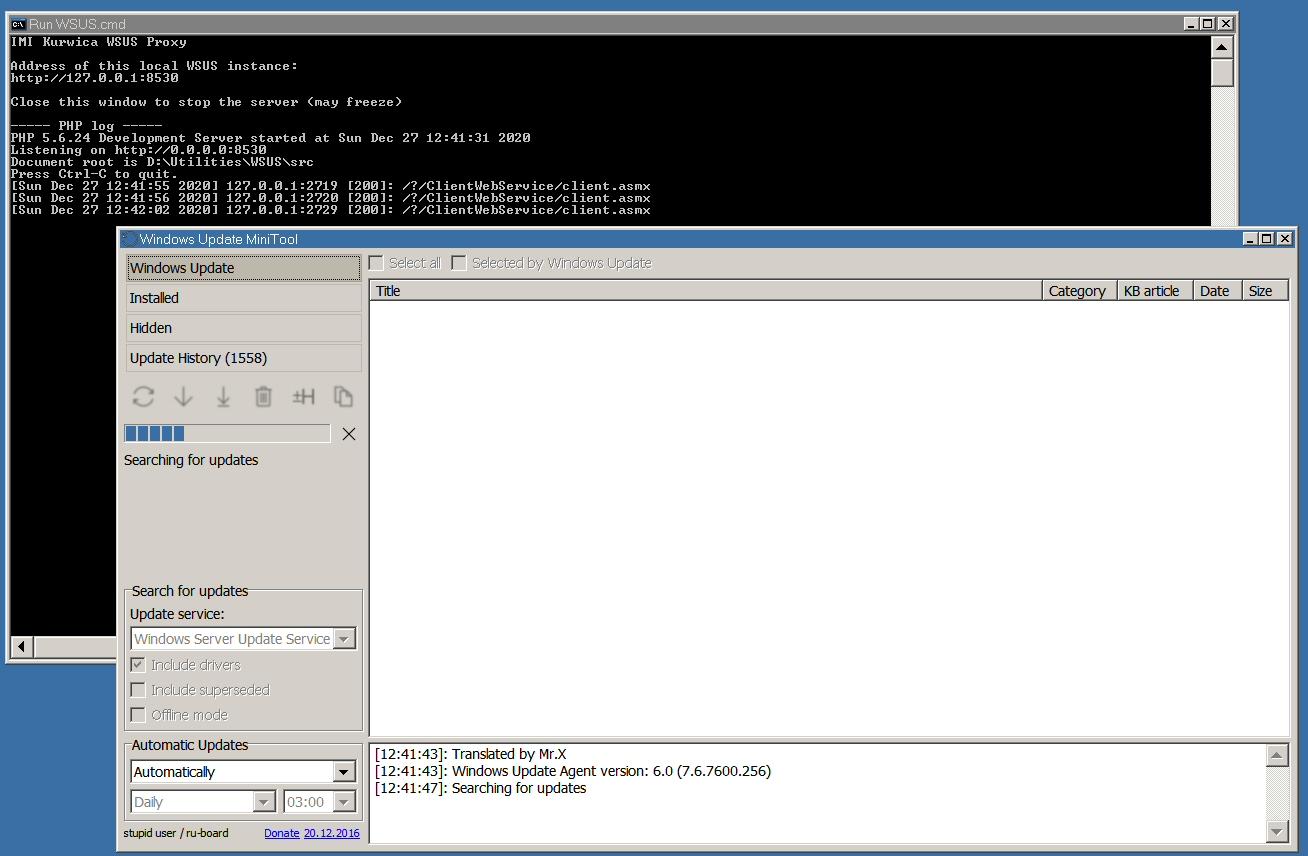
Thanks, I've tried using that and I'm getting the same result as you are, the MiniTool is scanning but not finding anything. -
Beware of Office 2010 Updates!
Dave-H replied to Dave-H's topic in Pinned Topics regarding Windows XP
You're using the Windows Update MiniTool I assume, not IE8? Can I ask what proxy setting you're using now, I can't see some posts on the MDL forum as I'm not a member. I was using http://wsus.update-old-wins.fr.nf/? as the proxy. Has that now been superseded? -
Beware of Office 2010 Updates!
Dave-H replied to Dave-H's topic in Pinned Topics regarding Windows XP
That never worked for me, and one of the symptoms was that it didn't fail immediately as it normally does now, but just scanned forever and never found anything. I've never had it actually work properly I'm afraid, and you may just be seeing the same problem I had. -
Beware of Office 2010 Updates!
Dave-H replied to Dave-H's topic in Pinned Topics regarding Windows XP
What issue does removing SP2 fix? Windows Update and Microsoft Update no longer work on XP, and haven't for a few months now. I'm afraid if you've managed to install at least SP2 that's good, but the subsequent updates you will have to get from the MS Catalogue now I suspect. People are working on a collection of the necessary updates, have a look here. -
Bummer. One of the really big annoyances with finding XP drivers now is the number of sites which say that drivers are XP compatible, when in fact they're not! Did you look into unpacking the file and installing from the INF file? There is just a slight chance that it's only the control panel software which won't run on XP, and the actual driver is OK.
-
Ah thanks, understood! He was giving out information that was out of date anyway, unless you've got an earlier version of Windows 10.
-
Thanks Jerry, your post seems to have been removed, but I still got the e-mail notification! Did you remove it because you realised it was out of date information (there is no longer a "Cortana" section in settings for instance)? If so, thanks anyway, but there is a strange thing that if I looks at the "Locations" settings you mention, which are still there, Cortana is not listed there at all. Surely it should be? My Microsoft Weather app is also now malfunctioning, after an update as usual, in that the live tile is now showing the wrong location, and not the location of the main app as it always has before. I have set the location there manually as my PC has no geolocation facility. The live tile is now showing the weather for somewhere several miles away! If I change the weather app location to somewhere completely different, the live tile still doesn't match it, showing a different place! Just how hard can it be for Microsoft to get this system working properly?!
-
Yes, that really annoys me too, but it's sometimes the only option now to get hold of old drivers! I don't trust those driver downloaders either, I always imagine that they're full of spyware at very least. That file is almost certainly big because it includes control panel software, not just the driver. If you can unpack the exe file you may well be able to install just the driver using an INF file in Device Manager.
-
This driver looks like a possibility. Supports that device ID and is supposedly Windows XP compatible. No guarantees, but worth a try!