Everything posted by 789
-
Could you upload the final version of the FDV file set ? In 2007 I downloaded Fred Vorck's package, made a few install CDs, and haven't used HFslip since.
-
Isn't Win 2008 such service pack ?
-
Using Fred Vorck's package I modified and eliminated IE from w2k advanced server install files. Gives the w2k pro boot logo, in the registry ProductType is WinNT (as opposed to serverNT) but it sees four cores and four threads. Indicating, once again, that registry declarations are the only difference between server and workstation.
-
Any chance for an ATI Mobility Radeon 8790 w2k driver ?
-
-
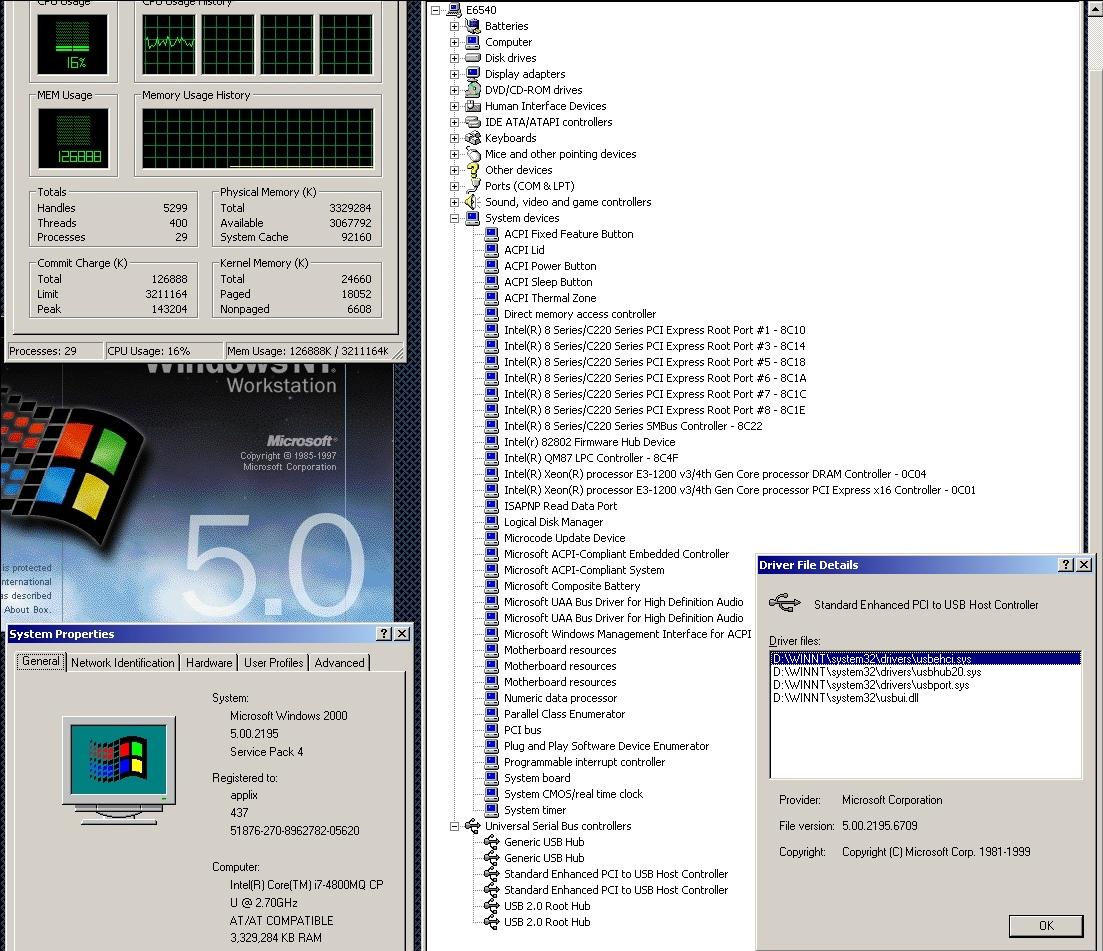
There is now graphics (to my surprise) vbem, I discovered that w2k legacy driver works, I just need to copy the .inf file into that directory. And it is 1920x1080. Since I don't let windows go online, I could almost use the machine, running w2k; but why ? I tried on that uu rollup. There is some good in it, but I should be allowed to pick what to upgrade (and I would like to know what I am updating and why). As it is, following the "update," file explorer is unable to copy and paste (that startup picture is awful), OS can now see four cores; vbem's PnP driver works; no memory stick, no SDcard, no USB CD-drive. I am now trying to modify the w2k server install source, using Fred Vorck's method, to make it IE-less. First, run Intel's chipset package for QM87, then update those USB drivers: from the chipset packs pick the "I" directory and install both windows and intel drivers http://driverpacks.net/driverpacks/windows/xp/x86/chipset/12.09 usbhub20.sys is re-installed, but it is causing no more problem; now usb mouse functions. Interestingly, under NT 4, usb mouse functions out-of-the-box. ==================== late development: We now have USB, memory stick, external CD. (eventually I might just learn how to install an operating system)
-
Learning from other people's trials, I deleted usbhub20.sys. W2k started up. Applied chipset update provided by Intel. Then updated the usb drivers using the chipset drivers provided by DriverPacks. Now usb mouse works, memory stick doesn't. Realtek HD audio works. There is no video driver.
-
Attached pictures might explain your USB predicament. Dell Latitude e6540: I removed SSD card and replaced HDD; changed BIOS to "ATA." Using my trusted w2k CD, started the procedure. It went well until first picture occured. W2k checked hard drive, gave the option to partition, format, etc. The installation completed ---the usbhub20.sys is actually installed where it should be. Following reboot blue screen showed up. It seems w2k does not know what to do with the USB that is in these machines. In my opinion, lack of USB should not be a reason for blue screen, but we know that Microsoft is always looking for excuse for blue screen. So, before anything else, we need a usbhub20.sys that functions in 2013. Then I would like to see if you can find a video driver. (until installation got to usbhub20.sys, usb mouse actually functioned) https://www.experts-exchange.com/questions/20597937/Does-Windows-2000-support-USB-V2-0.html
-
My w2k install cd contains sp4. I made it years ago, using Fred Vorck's instructions. By "legacy" mode I meant ATA. As it is my laptop is set to legacy boot, for the sake of dual booting. "inaccessible boot device" means your w2k doesn't like the type of partition. Have you tried making a 2000mb FAT partition ?
-
Now that you mentioned it, I tested my w2k intall CD on my Latitude e6540 to see what happens. In legacy mode it proceeded, examined my machine and asked to reformat c:\ drive, which is an SSD card. I stopped there. So, there is hope for your project. I installed ahci-enabled XP on the same machine, and it functions.
-
-
Thank you. With the help of VBEMP there is now true color 1280x1024. Not full screen but a lot more than 640x480.
-
This morning I installed NT 3.51 on an IBM z60m laptop. http://www.notebookreview.com/notebookreview/lenovo-thinkpad-z60m-review-pics-specs/ It functions, now I need a driver for ATI radeon x300 card.
-
-
Really; somehow you think I made wind 95/98 a financial success; I put wind 95 on 95% of desktops ? There was a several million dollar ad campaign and road show to promote Windows 95; I have not seen one NT 3.51 ad. The stores had stacks of Windows 95 installation packages, OS/2 packages, not one NT 3.51. Not one computer with NT 3.51 pre-installed. Yes, servers had the option of NT, but not the household machines. And for five years the whole planet wandered in the MS dos 7 deadend street to nowhere; it took Microsoft that much time to weave into the NT 3.51 code their nefarious purposes.
-
NT 3.51, the best MS ever had. nt351 shots Released in May 1995, but MS did not promote it, did not install it on anybody's desktop or laptop. They wanted us to wander for the next five years in the DOS 7 deadend street to nowhere.
-
After reading this thread, I reinstalled XP just to see, using as Dell original XP cd (no service pack), on a Thinkpad z60m which has a valid XP sticker on it, and I managed to activate before. I read you instructions, tried and tried, but it is 32777; so I resorted to force and modified oobetimer (it works charmingly) I have IBM, Toshiba, Dell, HP installation CDs, so activation is not needed; but.......
-
Thank you.
-
https://archive.org/details/Make_PE3_42 https://archive.org/download/Make_PE3_42/Make_PE3_42.exe Could someone tell me how to (if possible) increase the size of X drive ?
-
that is all there is; take what you can get
-
https://www.dell.com/support/home/ca/en/cabsdt1/drivers/driversdetails?driverId=5XD8K
-
https://downloadcenter.intel.com/download/22875/Intel-HD-Graphics-driver-for-Windows-XP32-Embedded https://downloadmirror.intel.com/22875/eng/WinXP32.zip
-
Does anyone know from where to download ahcix86.sys or how to disable native SATA support in BIOS ? found one--- http://www.sysfiles-download.com/phome/?phome=DownSoft&softid=2165&pathid=0&pass=fb92fd764ef001a1d4385d7429dff2b4&p=:::
-
PCA UMA sytem board AMD V-160 processor, 2.4GHz, 512-MB L2 cache, 1066MHz, 3.2GT/s, single core, 25W 250GB, 7200rpm hard-drive The host is obviously different, and I get the blue screen Is there a way to boot the machine in Linux and copy whatever files needed, to the right places ? Other question: So the live XP cd which I made a few years ago on the Toshiba Satellite A110, does not work either, because the motherboard is different ?
-
First I tried to boot from the installation CD. It did not work. All I got was a blue screen Then I removed the hard-drive, put it in the older laptop; installed w2k on it; then put it back in the new machine; tried to boot, expecting safe mode; no; only got a blue screen, again..... Neither does the live XP CD work. I can boot the Presario DOS 7, using a memory stick.