jaclaz
Content Type
Profiles
Forums
Events
Everything posted by jaclaz
-
It's just a matter of adding (or editing) the entries in menu.lst according to what works in command line, like, as we saw on post #68: http://www.msfn.org/board/topic/156859-drive-order/?p=1041375 Probably you want to have: jaclaz
-

New XP install does not recognize new partition on HDD
jaclaz replied to oldtiger64's topic in nLite
Yep. , now it is much more clear. If you reduced the "thing" that you see as C: from the original 604 Gb to roughly 524 Gb in order to create the 80 Gb "thing" that you see as W:, then the "W: thing" begins past the 128 Gb mark in any case, no matter if the "C: thing" is actually at the beginning of the disk or not (usually it comes after the "system" partition, which should be normally 100 Mb in size). The issue is detailed here: http://support.microsoft.com/kb/303013/en-us It is possible - for any reason - that the EnableBigLBA setting is not in the Registry of the Setup CD you made nlite should have made that set properly, but you never know. But there is also another problem. The "system" partition (that MS insists on calling the other way round) is actually the "boot" partition, see: http://www.multibooters.co.uk/system.html Basically what you see as "system" and without a drive letter assigned is a primary partition with an ID of 0x27 (this is a "special" partition ID that makes Windows 7 NOT assign a drive letter to it), which is actually a NTFS formatted volume inside a partition that is marked as "Active" (and that would normally have a partition ID of 0x07). Windows XP knows nothing about a partition with ID 0x27, and this is very likely to create issues when installing, once the other issue has been solved. Bear with me, please. Right now your PC boot sequence is the following: BIOS->MBR->bootsector of the Active partition (the "no drive letter", "system" partition with ID 0x27)-> BOOTMGR ( residing also on the "no drive letter", "system" partition with ID 0x27)->choices in \boot\BCD( residing also on the "no drive letter", "system" partition with ID 0x27)-> WINLOAD.EXE (residing on the "C: thing")-> Windows 7 The normal booting sequence of XP is instead: BIOS->MBR->bootsector of the Active partition (which cannot be of type 0x27, and it is usually at the same time "system" and "boot" volume, and that in your case will probably correspond to the "W: thing" )->NTLDR (residing on the "W: thing")->choices in BOOT.INI (also residing on the "W: thing")->Windows XP kernel (also residing on the "W: thing"). In other words, even once we will manage to have the XP install "see" the "W: thing" you should NOT proceed to install. IF you do install in that situation AND the XP install gives no issues, you will lose the possibility of booting to the Windows 7 (and it might be tricky to fix the situation), while IF you do install in that situation BUT the XP install has any issue, you will have a completely NON bootable system, i.e. both XP and 7 will fail loading) All MS OS installs are "predatory" in the sense that they take over the boot sequence, altering it along the lines of what they think is "best". Of course when you install a later OS (let's say a Windows 7 after having installed the XP) the setup has an automatic option to "import" the existing previous OS booting, but obviously a previous OS knows nothing about a later one and simply writes the "own" boot sequence. A procedure is given here (option 2): http://www.sevenforums.com/tutorials/8057-dual-boot-installation-windows-7-xp.html BUT it is NOT advised (by me) to follow that method, as it gives you not any control on drive letter assignment (in the XP) and it is more generally "risky" and needing tools that I (personally) do not recommend. Still it is useful as a reference. Right now you did what is detailed on that guide under "option 2" up to point 5, I believe. Questions: 1) What do you see right now at that step? (I need to understand what is the situation now, before suggesting you how to go on). 2) Can you (if needed) re-create the .iso (with or without nlite)? 3) Do you have a PE of some kind (please describe) or the Windows 7 install DVD? jaclaz -
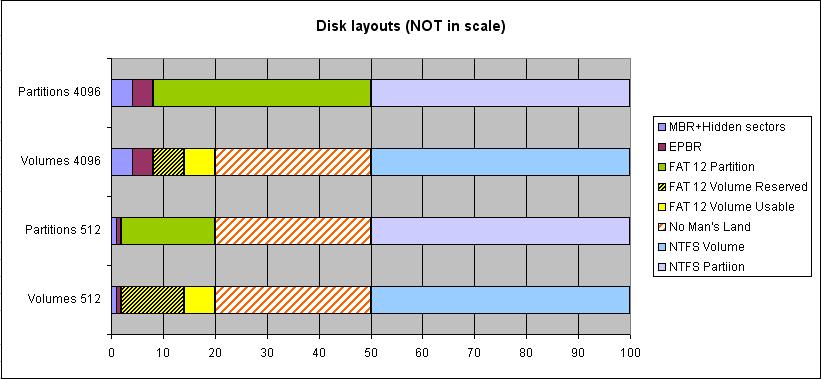
Good. I have no idea why this happens , though with the latest versions of Switcher this should be not much of an issue (once outside the testing phase), as the output/feedback of the batch, even in the case of a complete switch/unmount/remouint should fit in a single window (without scrolling), we could even shave off some (unneeded) output of the batch like this part: that all in all is just "cosmetic", and thus gaining 4 lines of text, and remove the "ECHO" about the actual dsfo command and it's output, regaining another two lines. Probably (but cannot swear by it) the scan happens on one of the two interfaces (but not on the other) because the Windows 8.x "senses" *something wrong* on the FAT12 partition/volume. When the interface is 512, the situation is AFAICU "fully kosher", in the sense that the volume and the partition sizes and position match (though there is an abnormal number of reserved sectors in the volume). When the interface is 4096 instead the volume is much smaller than the partition (though it has just one reserved sector, please read as "normal"), so it is IMHO more likely that the scan is triggered on the 4096 interface. See the attached image. Yep . jaclaz

-
P55 INF driver ver:9.1.1.1014 last real support for win2k Pro
jaclaz replied to mcollins's topic in Windows 2000/2003/NT4
Hmmm, as I see it, between US$ 0 and US$ 1.5 million there are quite a few shades of gray. I mean, if we are talking real money, with anything between US$ 20,000 and US$ 200,000 you can have *anything* among (just ideas): a custom developed chipset driver a custom developed motherboard (actually several hundreds of them) that program "fixed" to run in a more stable and less "picky" way Colinux http://www.colinux.org/developed to your exact requirements/needs But there are several companies around specialized in "replacement hardware for the industry" that sell "custom made" motherboards/systems that can run *any* OS, typically they cost twice or thrice a typical "commercial" desktop, but nothing that cannot be actually afforded. As an example (and NOT an endorsement/recommendation), this thingy here: http://www.nixsys.com/nx-l90.html with ALL options, fastish processor (Intel P4 3.06GHz 512 Cache - 533MHz FSB ), max possible RAM of 2 Gb, 2x320 Gb hard disks, Gigabit NIC, Geforce dual video card, and a Windows 2000 license totals less than US$ 1200. I believe that trains are not increasing their traveling speed at the same rate PC's increase their performance, so that if you managed to use that crazy piece of software on 2002 hardware for more than 10 years, such a motherboard can run it for the next ten. jaclaz -
Can't extract .exe file with Universal Extractor
jaclaz replied to Maleny's topic in Software Hangout
BIOS drivers? Can you post a link to the exact page where you got them and/or post the exact model for what they are meant? jaclaz -
jaclaz
-
Possibly when you run it this way it "loses" the right Directory info when it spawns the new CMD.EXE. Try adding an explicit setting for the directory, right at the beginning jaclaz
-
Or get a professional tool MADE IN USA for a mere US$ 4.10 (was 12.99 ) you save 68% hurry, while supply lasts.... hxxp://www.amazon.com/24-Pin-STARTER-BRIDGE-WITHOUT-MOTHERBOARD/dp/B00K38IKRY Points of note : jaclaz
-
P55 INF driver ver:9.1.1.1014 last real support for win2k Pro
jaclaz replied to mcollins's topic in Windows 2000/2003/NT4
And - out of curiosity - what do you do in your free time (I mean when you are not busy managing your nuclear plant )? Seriously , there are reports of people (sometimes using a trick or two) installing and using Windows 2000 on later chipsets, like the p67: http://www.msfn.org/board/topic/153915-p67-chipset-ahci-mode-with-w2k/ h67: http://www.msfn.org/board/topic/158910-windows-2000-on-intel-i-series-chipset-and-not-a-sigle-boot-up-was-gi/ and z77: http://www.msfn.org/board/topic/157238-win2k-on-intel-z77/ besides p55: http://www.msfn.org/board/topic/145958-can-a-core-i5-760-quad-core-run-on-windows-2000/ without any reported stability problem, but yes, if you mean the official Intel Chipset drivers that's about it, though I seem to remember that a 9.2. *something* still supports 2K jaclaz -
No prob , happy to see you are not only well , but still having the will (or recklessness ) of experimenting with new old PC's. jaclaz
-
Well, no real need to suppose, "adding" means "adding at the bottom". If you prefer, edit the BOOT.INI in such a way that it's last line reads: Or, given that your current one looks like this: Edit it so that it looks like this: At next boot, no matter if you are currently booting the XP (through the NTLDR) or the 7 (through BOOTMGR) you should have an added choice to choose "grub4dos". Make sure that the BOOT.INI has a decent timeout value, like 10 seconds or more. jaclaz
-
Researchers Find Safest Place to Hide From Zombies
jaclaz replied to Monroe's topic in General Discussion
as if *any* other disease that can be transmitted from person to person would work differently .... Personally I like better the conclusions of a known paper on the matter: https://web.archive.org/web/20090701000000*/http://www.mathstat.uottawa.ca/~rsmith/Zombies.pdf jaclaz -
Good that it works fine double clicking, as at the end of the day it will be it's actual usage. Try (to understand what the issue is when Run as Admin is used) to add a few lines like: ECHO Checkpoint#1&PAUSEbefore a few groups of commands and see on which Checkpoint it Pauses last (or what is displayed until the last prompt for the press any key closes the window). jaclaz
-
Yep. JFYI, this would do as well: (everything should be as simple as possible, but not simpler ) jaclaz
-
A4. And here is a link to a camel and to a dromedary. jaclaz
-
@cdob @all Once there will be agreement on the patch, maybe better suited than dd would be hexalter: kuwanger.net/misc/hexalter.shtml possibly even using an ips file. jaclaz
-
New XP install does not recognize new partition on HDD
jaclaz replied to oldtiger64's topic in nLite
Do you mean that you can see "other" *partitions* but not the "W:" one? Strictly speaking the "W:" is not a partition it is a drive letter assigned to a volume, or even more exactly it is a mounpoint for the volume implicitly created inside the partition you created. Even if the XP setup can see that volume, it will assign to it by default a different letter (much "lower", like E: , provided that you have the hidden windows7 partition, a "normal" largish partition as C: and a DVD drive with letter D: ) But, depending on the size of the hard disk and on where (towards the beginning or the end of the disk) you created the partition you may be affected by the so-called LBA48 barrier, roughly around 128Gb. In any case installing an XP on a disk where 7 has been already installed needs a couple tricks to later allow for dual booting. Can you post some more details on your hardware and describe EXACTLY how you created the added 80 Gb partition? jaclaz -
Sure , the launch of Windows 10 is imminent! ... just about the right introduction to Dooms Day.... jaclaz
-
it's a NEW day, so I'm kind of a new member
jaclaz replied to larryb123456's topic in Introduce Yourself!
No notoriously-not-new naive nonresident needs noting narcissistic nonsense ... jaclaz -
replace OEM factory wim in WinRE
jaclaz replied to Yzöwl's topic in Unattended Windows Vista/Server 2008
The matter is "touched" (though not exactly answering your questions) here: http://www.msfn.org/board/topic/128727-cant-access-repair-my-pc-option-via-f8-startup/ starting from around here: http://www.msfn.org/board/topic/128727-cant-access-repair-my-pc-option-via-f8-startup/?p=950736 Particularly, one of the given links: http://www.svrops.com/svrops/articles/winvistare.htm should be of use. jaclaz -
Good. Right now the :do_elevate is: you can try with: Is that the effect you want? Both double clicking and RunAsAdmin should work though possibly the first should make use of the ":do_elevate" and the second go "direct", but you need anyway to try... The issue (in theory as I haven't tested yet) with the "second" (actually "third") partition/volume would be different depending on the OS running and the actual bootsector in use. The additional volume would behave just like the NTFS volume did in previous tests at least in theory: under XP: If interface is 512 and bootsector is 512 then volume would be normally visible/accessible/etc. If interface is 512 and bootsector is 4096 then volume can be normally "switched" (&GOTO #1) If interface is 4096 and bootsector is 4096 then volume would be normally visible/accessible/etc. If interface is 4096 and bootsector is 4096 then volume can be normally "switched" (&GOTO #3)under 8.1 (which probably means Vista and later): If interface is 512 and bootsector is 512 then volume would be normally visible/accessible/etc. If interface is 512 and bootsector is 4096 then volume can be normally "switched" (&GOTO #1) If interface is 4096 and bootsector is 4096 then volume would be normally visible/accessible/etc. If interface is 4096 and bootsector is 512 then volume canNOT be "switched" (stuck )The switching (where possible) would most probably create some issues (though nothing that cannot be solved) with drive letter assignments, so it would be easier to have a "fixed" situation #1, also because there would the need for 1 EPBR (for the 512 interface) instead of 2 EPBR's (one for the 512 interface and one for the 4096). The above would apply only if that volume was normally formatted with any of the available filesystems, or anyway if NTFS, if we pre-format via batch we would have to make (just like we do for the first FAT12 Partition) a "dual-mode" formatting, which opens a (small) can of worms, as once excluded NTFS we have available: FAT 12 (but only up to 32 Mb) i.e. "good" only if the first FAT12 partition is up to 32/7=4 Mb FAT16 (but possibly only over 16 Mb), i.e. "good" only if the first FAT12 partition is over 16/7=2 Mb FAT 32 (but only over roughly 268 Mb), i.e. "good" only if the first FAT12 is over 268/7=38 Mb (but then the first FAT12 partition would be a first FAT16 partition)(I have no idea/have not checked what could be done with exFAT) It would be I believe acceptable however to limit the range of sizes for the first partition to 3-32 or 4-32 (instead of the current 1-32) and "force" a FAT16 filesystem on this second partition, this way (which would not require switching) would "restore" the lost area, possibly minus 1 Mbyte wasted by the EPBR to keep the volume "Mb aligned" provided that it makes sense (probably unneeded as a 4kb alignment would do nicely as well). Still some tests should be made to verify that *something else* (the way mount manager *sees* this setup under different OS/interface) gets in the way of this otherwise nicely laid out plan... ... the good news are that at least in theory this added volume could be post-fitted to an existing "dual disk" without modifying the existing data... There would be in any case no "risks" of damages for the contents of the volume, of course, they would be either fully accessible or not accessible. jaclaz
-
it's a NEW day, so I'm kind of a new member
jaclaz replied to larryb123456's topic in Introduce Yourself!
Hmmm , (small caliber) dogguns may go pew-pew-pew, but here we are talking of gundogs, which are another thing. jaclaz -
Naah, the real fun is not in just solving the puzzle, it is into creating it beforehand . @Dave-H Find attached Switcher 010, it should be a tadbit less verbose, skipping not really needed operations. jaclaz Switcher010.zip
-
Hmmm. Q. Anyone with good memory remembers the name of those four legged animals with one or two humps that are suited to transport one or two people or some goods across desert areas? A1. You mean a camel or a dromedary? A2. Why don't you use a Jeep instead? A3. Elephants have 4 legs and additionally a trunk, they can carry more than two people or more goods. jaclaz
-
it's a NEW day, so I'm kind of a new member
jaclaz replied to larryb123456's topic in Introduce Yourself!
Hmmm. Can you teach an old new dog new tricks? And now, for NOapparent reason a lolcatdog : Welcome new member, DejaVu Larry! jaclaz