Everything posted by gamehead200
-
-
OK. PARE
-
If you continue, I'm gonna give you the biggest beating of your life that's gonna leave your entire body feeling SORE!
-
Stop spamming!!! PORE
-
-
FILK http://en.wikipedia.org/wiki/Filk
-
I don't know if it can get any clearer than this: http://flyakite.msfn.org/ Ummmmm... I'll leave this for someone else to answer. No problem.
-
It was 33C in Montreal today!!!!! It felt like 42!!! I was dying of heat outside. Had to stay indoors or at least in a place with a nice cool breeze. For all of you folks using the Fahrenheit scale... Was 91F, felt like 108F!
-
-
No, it doesn't matter. As long as the naming is consistent, you should be fine.
-
[ Moved to Funny Farm. ] FORK
-
Do any other USB devices work on your computer? If not, either you need updated drivers or the ports are fried. If the iPod doesn't work on another computer, then it's possible that either something is wrong with the cable or the iPod itself.
-
Either that or the ports are fried... I've had similar problems... Check your cables, try your devices on different ports/computers.
-
Does the iPod work on another USB port or on another computer? I've had a similar problem before and it turned out that my USB ports were fried...
-
I just added 4 of my computers...
-
What'd you think it was, porn? And if it was, why would it be an IM window? People call me "Swar", short for my last name. And yes, I turned 18 two days ago, and am therefore legal in Quebec.
-
http://www.msfn.org/board/index.php?showtopic=100720 Right at the bottom of that.
-
This might help you: http://flyakite.msfn.org/ As well as this: http://gosh.msfn.org/
-
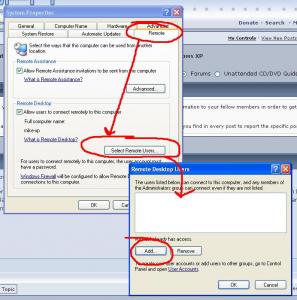
Is your user "bran" an administrator? If not:
-
Does the PSU only have SATA connectors? If it doesn't: http://store.pchcables.com/duseatapoad.html
-
Hey guys, I'll be going off to university in about a month and a half, and I'd like to get a few things straightened out before I leave. One thing I'd like to know is the following: I'm setting up a server which I'll have connected to the university's network (with an active internet connection) using one NIC and to another internet connection from a local ISP using another NIC. My question is... How does Windows choose which connection to use when trying to connect to something? Say, for instance, I'd like to download the latest release of Debian using uTorrent. The university's network blocks all P2P traffic, so if uTorrent/Windows tries connecting through that connection, an error message will probably be returned, however, it will work through the other connection. Is there any way to force Windows to use a certain NIC to connect to the Internet (apart from unplugging the cable out of one of them) or does it usually try to use the first "Local Area Connection?" I hope I haven't confused anyone...
-
Did you try removing it while in Safe Mode? You might also want to disable System Restore before removing it.
-
1. Yes. It should be in the Tweaks option of nLite. 2. You can include as many drivers as you want. Windows should automatically find the latest driver for your device while it installs itself. You can remove drivers that you don't want with nLite, but I don't see the need to do so unless you want to save a bit of space. 3. Not sure. Someone else might be able to answer this one.
-
yes I have found that in my computer once I deleted it for sure, I never seen that icon before, Though this was a few years ago, But yeah, I still keep and eye out for that. Wow, you fell for that? That "teddy bear" is part of the operating system, lmao! http://www.hoax-slayer.com/teddy-bear-virus-hoax.html
-
Are you using the OEM CD that came with your Dell or another XP CD?