mazin
Content Type
Profiles
Forums
Events
Everything posted by mazin
-
When I integrated SP1 into my orig XPCD, I've got SP1.cab in i386. When I integrated SP2 into my XPCD-SP1, I've got both SP1.cab and SP2.cab in i386. I can't tell if SP1.cab is not necessary in the second CD (XPCD-SP2).
-
EVEREST: /VERYSILENT /SP-
-
[RELEASE] Windows Installations Starter
mazin replied to ripdajacker's topic in Application Installs
@ ripdajacker Have you got a solution for those commands: copy, delete, and regedit? Or, maybe I'm applying them the wrong way! Thanks. -
excuse but how can i register silently tuneup 2006
mazin replied to zekoi's topic in Application Installs
As advised in other posts, I apply my info to both HKCU and HKLM. Windows Registry Editor Version 5.00 [HKEY_LOCAL_MACHINE\SOFTWARE\TuneUp\Utilities\5.0] "Company"="yours" "RegCode"="yoooooooooooooooooooours" "UserName"="yours" [HKEY_CURRENT_USER\SOFTWARE\TuneUp\Utilities\5.0] "Company"="yours" "RegCode"="yoooooooooooooooooooours" "UserName"="yours" -
Administrative Tools - All shortcuts missing...
mazin replied to zedox's topic in Unattended Windows 2000/XP/2003
I think it's under this key: [HKEY_CURRENT_USER\Software\Microsoft\Windows\CurrentVersion\Explorer\Advanced] -
@ Dago I know that four files can be edited to change the boot screen: 1- ntkrnlmp.exe 2- ntkrnlpa.exe 3- ntkrpamp.exe 4- ntoskrnl.exe What's that ntoskrnlSP.exe? @ T D I think if there is SP1.cab or SP2.cab (or both) in i386, they should be edited, too. @ all I prepared the DDF scripts for re-cabbing those CABs. If someone happens to need them, just let me know.
-
[help] How to shut down system from dos with countdown
mazin replied to Nepali's topic in Unattended Windows 2000/XP/2003
@ Takeshi That "jibberish" code is simply some other symbols relevant to those characters appearing on your keyboard. Surprisingly, that "jibberish" code is meant to write the following into the COM file: @ gunsmokingman Nice GUI. -
I think ie6 sp1 is a standalone package in your case. You install it by running the EXE with silent switches.
-
excuse but how can i register silently tuneup 2006
mazin replied to zekoi's topic in Application Installs
Execuse me. Are you talking about TuneUp Utilities 2006? -
Restarting Windows? Go to: Start --> Run --> type: cmd --> type: shutdown /? All switches are listed there.
-
In WINNT.SIF, you don't specify the partition. TargetPath=\Windows is quite enough.
-
WillyPad can change your REG file to INF file, then wrap it in an EXE. When you run the EXE, the INF file gets executed. Also, you can add files to the whole package. For me, WillyPad is the greatest source to learn INFology.
-
Is there any tool that convert .inf -2-> .reg ?
mazin replied to xtremee's topic in Unattended Windows 2000/XP/2003
@ xtremee You probably found some interesting INF files and want to partially exploit them. Honestly I know how to transform REGs to INFs, but not the opposite. As of now, you can run a CMD script to install an INF file then export the imported REG keys to a REG file(s). Example: Suppose you installed Power.inf to apply some power policies of your own. Also, Power.inf contains values that are imported under "HKCU\Control Panel\PowerCfg" and "HKLM\SOFTWARE\Microsoft\Windows\CurrentVersion\Controls Folder\PowerCfg". Then, your CMD should be: -
Haven't got it!!
-
@ PsiMoon314 I downloaded and installed WindowsXP-KB875506-v2-x86-ENU (5.1.2600.2833) on a system with original msgina.dll (5.1.2600.2180). I applied the reg file as in your post. Thanks.

-
[RELEASE] Windows Installations Starter
mazin replied to ripdajacker's topic in Application Installs
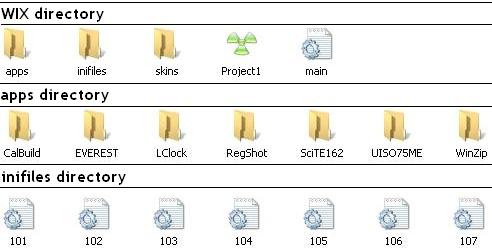
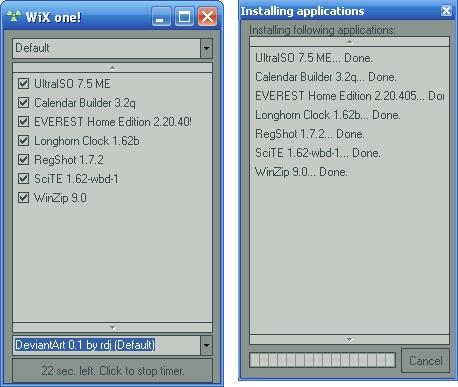
Testing Results. I ran WIX for testing purposes on a running XP-Pro-SP2. I tested WIX for seven applications of different commands to see what's working and what's not. All codes below work fine except those underlined. Here's my folder structure and WIX when finished. As you can see, INIs are named so that they execute in the order I want them to.
-
Easy! You can do it with a CMD script or a ready-made utility, or both.
-
[RELEASE] Windows Installations Starter
mazin replied to ripdajacker's topic in Application Installs
Thanks, man. I'll try it now. < EDIT > Would you please post the INIs for those BRICOs shown in your pic from the first post? Is it a single INI or separated ones? Thanks. -
Glad you liked it. CRUSH is the word.
-
SETUP throws its boot files into C:\$WIN_NT$.~LB
-
I think it's used without a slash (/)
-
@ Angelico_Payne Look here for details.
-
Open msgina.dll in Resource Hacker. Go to: Dialog -- > 20100 --> 1033 1- Hide Dialog. (to see the whole text clearly) 2- Replace all text there with this in the quote box below. 3- Compile Script. 4- File --> Save. 5- Close Resource Hacker. 6- Re-cab msgina.dll (makecab msgina.dll) 7- Replace the original msgina.dl_ with the newly cabbed one. You are done!
-
In my previous installs, the main reason behind "Setup cannot copy file blahblah" was the bad burn.
-
Execuse me, guys. I haven't read the main guide for long. What's that /silent ?