Leaderboard



Popular Content
Showing content with the highest reputation on 12/16/2024 in Posts
-
still working with $DAYJOB, and for builds because there is lack of upstream changes. BTW I do plan for an update to my legacy browsers addressing some NSS related bugfixes and cert updates, but no ETA at the moment.5 points
-
When I modded Nvidia drivers, rebuilding with CFF was enough to pass the Windows check, without the rebuilding they simply didn't load. Must be a more sophisticated check in your case.2 points
-
And what if you recalculate? Rebuild the header?2 points
-
I don't think so, I wouldn't even try on a good installation, you may ruin it, WARNING: REBASE MUST BE USED TO CLEAN UP ONLY WINDOWS 7 SYSTEMS https://msfn.org/board/topic/174816-windows-7-resetbase-backport/#findComment-11122712 points
-
@roytam1 The files mailnews.win32-20240127-e95fad7d-uxp-35252384aa-xpmod.7z, icedove.win32-20240127-id-656ea98-uxp-35252384aa-xpmod.7z, bnavigator.win32-20240127-e95fad7d-uxp-35252384aa-xpmod.7z and iceape.win32-20240127-id-656ea98-ia-93af9a0-uxp-35252384aa-xpmod.7z do not exist on your server -> 404 Not Found2 points
-
I suppose most of you are familiar with the technique for extending the XP API for a particular program by inserting a custom system DLL in the same folder as the program and editing it's import table so that a file to which it is linked is renamed to that of the custom system DLL. My custom DLL is xpspkernel32.dll from OneCore API 3.03 renamed to kernel32.dll along with it's dependencies ntext.dll and kernelbase.dll. In the case of the McAfee Viruscan CLI scanner v7.02 for Windows 7 this technique cannot work because scan.exe performs an integrity check on itself, and closes with a message saying the executable has been modified. An alternative approach that I thought I might try is to redirect API calls to the system DLL using manifests to make the local folder the top of the search order for loading the DLL Here is the default search order for loading a DLL: The directory from which the application is loaded C:\Windows\System32 C:\Windows\System C:\Windows The current working directory Directories in the system PATH environment variable Directories in the user PATH environment variable Using information provided at this web page I was able to create experimental manifests to study how this can be done. The secret appears to be using a dll-manifest and an exe-manifest that work together. First you must run the Manifest Tool version 5.2.3790.2076 (mt.exe) which can be found in the Microsoft SDK 7.0A in Visual Studio 10 or as a separate download. The path in Visual Studio is C:\Program Files\Microsoft SDKs\Windows\v7.0A\bin\mt.exe. the command to be executed in the local folder containing the custom DLL is: mt.exe -tlb:custom.dll -dll:custom.dll -out:custom.dll.manifest In my example it would be mt.exe -tlb:kernel32.dll -dll:kernel32.dll -out:kernel32.dll.manifest The output has to cleaned up by adding linebreaks and indention. Here is the finished result for kernel32.dll.manifest: <?xml version="1.0" encoding="UTF-8" standalone="yes"?> <assembly xmlns="urn:schemas-microsoft-com:asm.v1" manifestVersion="1.0"> <file name="kernel32.dll" hashalg="SHA1"> </file> </assembly> using the example provided by Ove Halseth in the above mentioned article this is the scan.exe.manifest that I used: <?xml version="1.0" encoding="UTF-8" standalone="yes"?> <assembly xmlns="urn:schemas-microsoft-com:asm.v1" manifestVersion="1.0"> <assemblyIdentity type="win32" name="scan.exe" version="1.0.0.0" /> <dependency> <dependentAssembly> <assemblyIdentity type="win32" name="kernel32.dll" version="5.1.2600.16384" processorArchitecture="x86"/> </dependentAssembly> </dependency> </assembly> Executing scan.exe from the commandline causes it to open without error messages and then it closes, so I suppose the technique works, but scan.exe must have built in protection against DLL redirection which is a well known technique for virus writers. Error Messages The procedure entrypoint InitializeCriticalSectionEx could not be located in the dynamic link library KERNEL32.dll This is the error message produced without modifications to the local folder due to kernel32.dll v5.1.2600.7682 not being able to supply the following imports: CompareStringEx GetLocaleInfoEx InitializeCriticalSectionEx LCMapStringEx Generate Activation Context failed for F:\Internet Downloads\McAfee VirusScan CLI Scanner\cls-w32-702-l\scan.exe.Manifest. Reference error message: The operation completed successfully. This is an entry in the eventlog caused by not entering the assemblyIdentity version of the dependency as the version of the custom DLL The system cannot execute the specified program. This error message results from incorrect syntax of the manifest files Notes assemblyIdentity name can be anything assemblyIdentity version can be any four digit number separated by full stops assemblyIdentity name for the dependency must be the file name of the custom DLL assemblyIdentity version for the dependency must be the version number of the custom DLL The manifest files must be the name of the file they are linked to including it's ending Here is an article by Microsoft titled Assembly Manifests that goes into some detail of the syntax required.1 point
-
I do manifest a little differently, I have it in two parts, and the dlls that are loaded are in a separate folder. Using mpc-be as an example. The first file is called mpc-be.exe.manifest and is located next to mpc-be.exe its contents: <?xml version='1.0' encoding='UTF-8' standalone='yes'?> <assembly xmlns='urn:schemas-microsoft-com:asm.v1' manifestVersion='1.0'> <dependency> <dependentAssembly> <assemblyIdentity type='win32' name='share' version='1.0.0.0' processorArchitecture='x86' /> </dependentAssembly> </dependency> </assembly> The second share.manifest is located in the "share" folder along with the dll, its contents: <?xml version="1.0" encoding="UTF-8" standalone="yes"?> <assembly xmlns="urn:schemas-microsoft-com:asm.v1" manifestVersion="1.0"> <noInheritable/> <assemblyIdentity type="win32" name="share" version="1.0.0.0" processorArchitecture="x86" /> <file name="advapi32.dll" /> <file name="advapibase.dll" /> <file name="bcrypt.dll" /> <file name="dwmapi.dll" /> <file name="dxva2.dll" /> <file name="kernel32.dll" /> <file name="kernelbase.dll" /> <file name="ntext.dll" /> <file name="propsys.dll" /> <file name="shell32.dll" /> <file name="shellbase.dll" /> <file name="ws2_32.dll" /> <file name="ws2_base.dll" /> <file name="comctl32.dll" /> </assembly>1 point
-
yeah, once I can get a proper time slot doing so.1 point
-
At work, I already have to use Official Chrome. We can only use Official Edge (corporate default) or Official Chrome at work (unless a lab bench). At home, my list of 8 to 15 or so "problem sites" only only ONLY all work in OFFICIAL CHROME. (I was quite suprised that I could drop all the way down to v94 [didn't try older]). They USED TO all work in Official Ungoogled. They USED TO all work in 360Chrome v13.5. They USED TO all work in Official Pale Moon. They USED TO all work in Mypal/New Moon/Serpent. I really really really REALLY REALLY REALLY will only use ONE web browser. I really really really have NO INTEREST in "this browser for this, that browser for that". Why not use the latest? Because I have an IMMENSE DISLIKE for the "modern GUI". One size never fits all. That's why there are HUNDREDS of different browsers, abides by the whole "to each their own". And let's face it, even history demonstrates how GUI changes can downright kill something like Firefox. Pre-Quantum/Photon market share was around 10%. Post-Quantum/Photon market share is an abysmal 2-3%.1 point
-
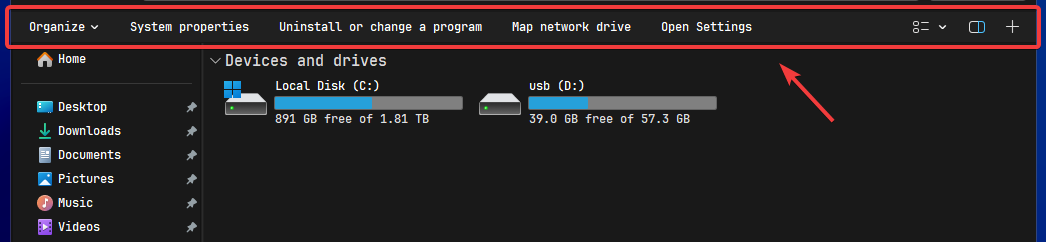
Hey, is there a way to hide this bar when using the Win7 Command Bar? I believe it's called Ribbon. If not, could this be added as a feature request?
 1 point
 -
Is @roytam1 on vacation? He certainly deserves one, so I have no problem if he is. I never thought we really needed weekly browser updates - or even monthly, unless some significant new feature is added or security flaw is fixed. Personally, I'd be fine with quarterly updates! But usually, each week there's either an update or a post telling us otherwise. And he's held to that pattern for so long, it stands out when the pattern breaks. So I was just a bit concerned.1 point
-
I'm a bit late, but a new post popped up in the Avast Forum saying that as of October 1st 2024, they're no longer gonna test updates on Windows XP. As you probably know, the last version of Avast to run on Windows XP is version 18.8, however that one has been receiving not only definitions updates to update the various detections but also occasional patches when new security flaws were identified in the internal modules/components. Up until October 2024, Avast tested all those updates on every version of Windows starting from Windows XP upwards, however they're no longer gonna do that. This means that they're still gonna release definition updates and eventual security updates for version 18.8, but nobody from the Avast team will test them on XP, so they might or might not work and they're gonna rely on user feedbacks for this. To be fair, I'm a bit surprised to see such an announcement given that version 18 from 2018 is supposed to be supported for 10 years like other versions of Avast, so until the end of 2027 and it's the last x86 version before they moved to x64, so I thought they were still gonna continue testing up until the end of support. On the other hand, I do understand that resources and time are limited, so as long as they're still gonna push updates and they're gonna listen to user feedback, I'm "fine" with that. I also appreciate the openness about this as they clearly stated that they're not gonna have XP machines to test this, rather than just rolling out updates and saying "sorry" afterwards like what some other companies have done. We'll see what the future holds, but for now I haven't noticed any issue / incompatibility in any of the last updates. So far so good. What I can say, however, is that if you're using Avast and if you notice anything unusual on your XP, please reach out to the support team so that they can fix it, 'cause unfortunately they're no longer testing it.1 point
-
Not just banks. Been having issues with other logins as well (US Postal Service is one, I have a list somewhere). IceCat (based on Firefox v115) is also NOT working for several of my must-have--no-alternatives web sites. So I've just sold my soul! I CAN get ALL of my must-have web sites to work with OFFICIAL CHROME v97 !!! (v94 also works!) They "don't like" me running Ungoogled v122 (v130 also does NOT work for my bank) and they think that's going to get me to "upgrade". Nah! I'll now have to see how long Official Chrome v97 lasts me, lol. I swear, keeping up with browser upgrades has become a FULL TIME JOB.1 point
-
Could be a faulty transformer on the inverter board since all the colours are present, and the glowing tint may come from the CCFL bulbs.1 point
-
Agree on this one, and I suggest @Klemperto try on another computer (not only card!). Better not use yours, to avoid the possible damage. Who knows the reason!?1 point
-
From what I understood, all colours are there, they are just with a nasty tint/shade all over them.1 point
-
Or: Unplug the power, press and hold the power button for 30-40 seconds.1 point
-
finally i get sound: from: but: 1 - after several minutes i get audio(start windows audio); 2 - the explorer is in memory, but the desktop isn't showed1 point
-
Thanks for the links! I totally forgot about looking there for possible command line options.1 point
-
Thanks! Good to know.1 point
-
Unfortunately, I didn't. But thanks! Any further information on that?1 point
-
Inside your programme folder of Serpent 52 is a subfolder named browser where you have to extract the omni.ja file to a folder in which the hudservice.js file can be found under chrome\devtools\modules\devtools\client\webconsole\.1 point
-
Thank you very much for clarification! I already thought that my New Moon installation was faulty.1 point
-
Thanks for your report! I totally forgot to mention this issue. Same problem in my installation. Once opened and closed then, the Browser Console can't be opened again. So, I can confirm your observation. But it is very annoying that the Browser Console opens automatically every time the browser is started as soon as it is called up just once.1 point
-
Hello @roytam1! I am running your latest version of New Moon 28 installed from the file palemoon-28.10.7a1.win32-git-20240127-d849524bd-uxp-35252384aa-xpmod.7z. When opening the Browser Console (Ctrl + Shift + J) and closing then, it will open automatically every time you start the browser again. I have tried everything possible, but this stupid Browser Console now has a life of its own. That seems to me to be an issue that wasn't there before. I noticed this issue in my dirty profile but even in a clean profile, the same issue happens. Maybe, you can reproduce and hopefully fix it.1 point