Leaderboard




Popular Content
Showing content with the highest reputation on 11/21/2024 in all areas
-
No, just tried, it's still there.2 points
-
I do every task such as testing software, downloading files, or surfing the web in my real Windows XP machine. I never had a serious infection. The reason I created this thread was indeed to present, collect and preserve all possible security programmes which are still available for Windows XP to secure such a real machine and protect it against malicious threats.2 points
-
I checked the homepage of Spybot - Search & Destroy again, and the last release compatible with Windows XP does indeed appear to be version 2.4. Here is a quote on this from the link posted above to the page with the heading Spybot 2.5 Compatibility:2 points
-
For me, ESET never was, not only it marked legit copy protection game files as "viruses", it also deleted important files on my XP pc and put them to "quarantine" forever, I was not surprised to see it still does! To be fair, I gave it a chance in the past. I remember, I even lost my online registration for the DVD check of Sacred 2 (based on securom). As for your OT question, I fail to understand, why would you be interested, if you discarded ESET anyway? I could only guess, but If you want to be recruited or renew some previous pre-1991 arrangements, I'm sure there's no need to go to Bratislava, and I'm definitely not the one to talk to! NOD32 "Such file could contain valuable information, and losing it is certainly not what you’d wish for" https://hetmanrecovery.com/recovery_news/how-to-return-files-if-eset-nod-deleted-or-placed-them-in-quarantine.htm2 points
-
@MilkChan Try this one, good luck Dietmar https://ufile.io/vknb4j2p1 point
-
We don't allow members to delete their accounts themselves because doing that would probably destroy all the forum content associated with the account (as being banned does, of course). This would probably make a nonsense of any threads which the user had contributed to, and we would potentially lose useful information from the forum.1 point
-
It says it's OBSOLETE, yes, written in Capslock. https://browserleaks.com/tls1 point
-
What I did, I manually searched for instances of webstore that include working links with analytics/reporting. Then damaged the links. https://chrome.google.com/webstore/detail/ 666ps://chrome.google.com/webstore/detail/1 point
-
From what I see, it's just an imported icon from resources.pak. Why? Because I blocked the internet. It can't fetch anything.1 point
-
That might work, I cannot claim to have attempted. All I know is that I would *never* use any web browser that has that PERMANENT HOSTED APP present. To each their own, of course. I'm not hiding anything from Google, per se. I just believe in PRIVACY RIGHTS OF THE CONSUMER. It's SAD to me that most consumers don't care any more. First they came for the socialists, and I did not speak out—because I was not a socialist. Then they came for the trade unionists, and I did not speak out—because I was not a trade unionist. Then they came for the Jews, and I did not speak out—because I was not a Jew. Then they came for me—and there was no one left to speak for me. —Martin Niemöller1 point
-
So much for Firefox team promises! Did you try Microsoft App verifier? https://learn.microsoft.com/en-gb/windows-hardware/drivers/devtest/application-verifier1 point
-
Welcome. An app? I didn't know MSFN has an app now.1 point
-
I get that crap even with my LAN cable OFF, after I cleared up the cache. Do you know where it's physically located?1 point
-
I second that, Biostar's quality is OK now. It's not Fujitsu Siemens, of course. More like a rather very budget segment. I have A Biostar with H110 and a Kabylake chip, works very well. Soldering job is very good.1 point
-
And yeah, I always knew he wasn't American. Next time someone wants to mimic Americans, ask D.Draker how and what to write.1 point
-
Link, please, I wanna try.1 point
-
Also, I should add, I do NOT support DISABLING client hints !!! I prefer, and recommend to all, to SPOOF THEM INSTEAD. Do not DISABLE them, but SPOOF them to the most recent version of CHROME to best blend in with the crowd. You SHOOT YOURSELF in the "privacy-conscious foot" to DISABLE them. Been over this 100 times. Not sure why it's not SINKING IN to some of you folks, lol.1 point
-
see https://forum.palemoon.org/viewtopic.php?f=70&t=308471 point
-
Forum rules have been updated to remove the following: - screenshot/image size limitations - account deletions due to inactivity Both of these were due to issues in the past that are generally not present any longer. Screenshot size due to olden days of dial-up users. Account deletions due to previous software versions table size and other database related limitations.1 point
-
No, I dont, https://forum.blu-ray.com/showthread.php?t=142009 https://www.hometheaterforum.com/community/threads/identifying-blu-ray-vc-1-discs.237950/1 point
-
VC-1 is disabled by default in LAV?!?!?! Are they crazy? It's the default format for BluRay disks. How is this possible? Probably, you wanted to say it's disabled in MPC-BE, the enemy of old OS? I just can't comprehend who would want to compromise the common BluRay disk standard playback...1 point
-
They bumped up to the minimum demand to Chrome/Edge/Firefox 124, lol. Basically, update your browser every two weeks now. Supermium and Thorium are obsolete. https://pq.cloudflareresearch.com/1 point
-
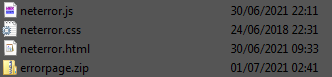
This functionality can be restored by adding the errorpage.zip folder from, let's say any 12th version, I din't see any "Chinese telemetry web sites" inside that folder. There are 3 files inside. neterror.css neterror.html neterror.js None of these had "telemetry". That said, I used it from the 12th version, just extract with UniExtractor and add errorpage.zip to the root browser directory (where chrome.dll is located). I'm now adding a screenshot of the files inside. I don't think the files were modified by anyone, one of them is even from 2018, though I don't exactly remember where I got them, probably Dixel gave them to me.
 1 point
 -
No need. Now better?1 point
-
Of course it does! If the player doesn't work , it shows blank black page without play arrow button, also without the length of the video, like on his original screen.1 point
-
And people took their time to explain.1 point
-
This seems strange. I'm not sure I understand why you asked all those questions, if you clearly weren't going to publish anything. Just posting for the sake of posting?1 point
-
Nope, no plans to. People want something they can just download and run. They want the work done "for them". The process also takes some trial-and-error for drivers (especially for some laptop webcams) and MSFN Members do not have the patience for trial-and-error DIY that requires time on their end. There is also quite a bit of trial-and-error for .net framewoks and other things that Win10 doesn't install (or uninstall) by default until you go into Settings -> Programs and Features. My install does all of these installs (and unistalls [XPS Printer comes to mind]) right from the first install. There has been times where I will install a "hotfix update", but for the most part I do not believe in up-to-date OSs, the hype and propaganda for "security" is just that, hype and propaganda. The typical MSFN Member does not share that belief, they want auto-update, they want every hotfix that Win Update throws at them, they loose sleep if they run an OS from 2016 without any updates post-2016. The XP crowd is probably the exception - but even most of them want "stuff" like POSReady which I myself do not support.1 point
-
Maybe he just trains his skills? I knew a guy who only used a huge hosts file with his XP machine instead of FW, the file was so huge, it slowed down his PC to a crawl, he edited it every couple of days or so,1 point
-
In my firewall Windows 10 Firewall Control XP from Sphinx, custom rules can be created to block or allow certain IPs. So if you want to use a programme which tries to connect to a server and you want to prevent that, it is very easy to control its connections by creating such a rule.1 point
-
Hello @Andalu! Have a look into this post: https://msfn.org/board/topic/178377-on-decommissioning-of-update-servers-for-2000-xp-and-vista-as-of-july-2019/?do=findComment&comment=1221841 There you find a link to an attachment down below. The link https://www.fileeagle.com/software/470/Process-Explorer/16.26/ doesn't work anymore. Alternatively, you can download it from here: http://process-explorer.findmysoft.com/1 point
-
Your screenshot was obviously taken from Process Hacker. The System Information window of Process Explorer looks a bit different.1 point
-
FileHippo used to be a good source for old programme versions. Unfortunately, that has changed. What you download there lately are only downloaders. Total crap! I have been avoiding this site for a long time.1 point
-
I am still using the official last XP-compatible version Sandboxie 5.22. I checked Sandboxie's compatibility in terms of Windows XP, too. Indeed, the developer David Xanatos compiled a special, last XP-compatible version Sandboxie 5.40 after it had become open source. This version does not need a licence anymore. Here is a download link: https://github.com/sandboxie-plus/Sandboxie/releases/download/v5.40/SandboxieInstall32_xp.exe However, I do have a licence, therefore, I am not really interested in.1 point
-
Process Hacker 2 Process Hacker is a free, powerful, multi-purpose tool that helps you monitor system resources, debug software and detect malware. The software installs its own driver into the system which significantly expands the search capabilities of the active processes and allows you to detect processes hidden by different viruses and applications. Process Hacker displays processes in a tree structure and divides them into categories that are highlighted in different colors for easier identification. The software offers many possibilities for various actions with processes including viewing detailed information about them and terminating process in different ways to bypass the rootkits and security apps. Process Hacker allows you to view and manage services that can not be displayed in the service console, identify software that has active connections to the network, and receive real-time information about disk access. Also, Process Hacker displays a graph and detailed statistics on the use of the system resources in real time, namely, memory usage, resource consumption of each processor core, reading and writing data. Although the version 2.38 was listed as the last XP-compatible one, the last stable version 2.39 is still compatible with Windows XP (and Vista). Features: Main features: Detection of hidden and malicious processes Termination of any process Display of full statistics processes Display of system performance graphs Viewing services, network connections and disk activity More features are described here: https://processhacker.sourceforge.io/archive/website_v2/features.php Homepage: https://processhacker.sourceforge.io/ Version number: 2.39 (r124) Date of release: 29.03.2016 System requirements: Windows XP SP2)/Vista/7/8/10, 32-bit or 64-bit Release notes: Reviews: https://www.malwarebytes.com/blog/news/2018/11/advanced-tools-process-hacker https://download.cnet.com/Process-Hacker/3000-2094_4-10971791.html https://www.pcworld.com/article/457252/review-process-hacker-is-task-manager-on-steroids.html Download links: Installer: https://sourceforge.net/projects/processhacker/files/processhacker2/processhacker-2.39-setup.exe/download https://github.com/winsiderss/systeminformer/releases/download/v2.39/processhacker-2.39-setup.exe Portable: https://sourceforge.net/projects/processhacker/files/processhacker2/processhacker-2.39-bin.zip/download https://github.com/winsiderss/systeminformer/releases/download/v2.39/processhacker-2.39-bin.zip Screenshots: I use Process Hacker since 2010. It's one of the first programmes I usually install in a new Windows system. I always start this programme automatically on Windows start-up. I use Process Hacker to control all loaded processes, services and drivers. One click and I know what is going on in the background of my system. Terminating crashed processes or process trees can be done in a quick and clear way. All services and drivers which are added or deleted will reported via a systray notification. This tool is like an additional security layer besides any antimalware real-time protection. Process Hacker, like Total Commander, is one of the most used programmes in all my Windows systems. I tried a lot of task managers and I know them all. IMHO, Process Hacker is the best of all. Cheers, AstroSkipper1 point
-
Of course! Sandboxie belongs to the topic of this thread and is already on my internal list. It was installed in all my Windows XP partitions from the very first. I use the last XP-compatible version 5.22 and I love it. I use it regularly for testing tools I do not trust at first sight. In the past, the best news about Sandboxie was that it no longer required a licence and was declared open source in 2020. https://web.archive.org/web/20200425220152/https://community.sophos.com/products/sandboxie/f/forum/119641/important-sandboxie-open-source-code-is-available-for-download1 point
-
:OT I am an experienced Android user for many years. And of course, I use an antivirus app there. On my smartphone and on all tablets. BTW, most of my posts, I write from my tablet as I am doing at the moment :END OF OT1 point
-
Hello @Cixert! Thank you for testing! That means the last XP-compatible version 1.6.2 of Spybot - Search & Destroy is now obsolete, and the database can no longer be updated in any way. Right?1 point