Leaderboard




Popular Content
Showing content with the highest reputation on 08/25/2024 in Posts
-
Second Part: "I would like to expand about server-side browser fingerprinting. Server-side fingerprinting is a collection of techniques used by web servers to identify which web client is making a request based on network parameters sent by the client. By web client I mean the type of client, as in which browser or CLI tool, and not a specific user like what a cookie identifies." "TLS fingerprinting: How it works, where it is used and how to control your signature..." https://lwthiker.com/networks/2022/06/17/tls-fingerprinting.html4 points
-
What kind of drawback is it? The last weeks, I had been using Mypal 68.14.3b, and all in all, I couldn't observe any serious problems. Today, I have updated to Mypal 68.14.4b. I should mention at this point that I use all your releases with an xul.dll file rebased on the base address of 0x6af00000 to try to improve the terrible memory hunger of Mypal 68. As a further and quite effective measure, especially in multiprocess mode, I automatically perform every 10 minutes a memory minimization by a legacy custom button. In this way, I free Mypal 68 from occupied RAM memory (and that's not even that little) that it does not want to release on its own, even though it no longer needs it. I wonder if such a feature could be optionally implemented in Mypal 68 under the Options → Performance tab, i.e. a checkbox with an input field to minimize memory every x min where x is set by the user. In the end, this would automatically call up the already existing minimize memory function, which all Firefox browsers natively have, periodically. In any case, Mypal 68 (and thus Firefox) must be restricted as far as RAM consumption is concerned. Especially on old, weak computers that are only equipped with a small amount of RAM.3 points
-
Disable hardware acceleration as a test to see if eBay tabs still crash or not! Check all relevant settings regarding hardware acceleration in about:config! Especially media and codecs related ones. Tab crashes are very often related to the hardware acceleration as reported by users. Of course, there may also be other reasons. Check also your graphics card drivers and all related settings! Furthermore, try to block on eBay as much as possible by uBlock Origin! And provide your hardware specs regarding CPU, RAM and graphics card, and the used OS! PS: All test should be done in a brand new and clean profile to ensure that the used profile isn't faulty.3 points
-
No. Actually, these crashes can't be related to these two prefs settings. I use both for a longer time and didn't notice any tab crashes. TBH, I have never seen this messsge before. This must be caused by someting different. And the crappy eBay website doesn't work well in Mypal 68 for some time. I did an order on eBay yesterday using Mypal 68, and it wasn't a pleasure. You should use uBlock Origin in any case especially if accessing such bloated websites. Do you use Mypal 68 in single- or multi-process mode? Do you use a new, clean profile? Please provide more detailed information when posting issues!2 points
-
Then try this one, much newer driver. Works on Vista (despite what nvidia says) https://drivers.softpedia.com/get/GRAPHICS-BOARD/NVIDIA/NVIDIA-GeForce-iCafe-Graphics-Driver-37260-64-bit.shtml2 points
-
With all nVidia officially distributed drivers, I noticed they start to throttle after some time spent in a game, Perhaps, they simply don't want to exchange bad cards, if they go kaput under load? Anyways, Guru3d is a somewhat good source. Giving a link just as an example. https://forums.guru3d.com/threads/nvidia-please-read-major-drop-in-performance-with-new-drivers-446-14-vs-460-79-benchmarks.435665/2 points
-
You're welcome, glad we could help, enjoy your setup!2 points
-
Set both prefs dom.max_script_run_time and dom.max_ext_content_script_run_time to the value of 0 via about:config!2 points
-
It's Intel telemetry (spying), just disable it. Don't even think to waste your time looking for drivers.2 points
-
HTTP/2 fingerprinting wasn't there 20 years ago, it's a relatively new method for web fingerprinting, This article includes the on-topic Client Hints. "HTTP/2 fingerprinting is a method by which web servers can identify which client is sending the request to them1. It can identify the browser type and version, for instance, or whether a script is used. The method relies on the internals of the HTTP/2 protocol which are less widely known that those of its simpler predecessor HTTP/1.1. In this post I will first give a short description of the HTTP/2 protocol, then provide details on how a web server can use the protocol’s various parameters to identify the client. Finally, I will list methods of checking and controlling a client’s HTTP/2 signature." https://lwthiker.com/networks/2022/06/17/http2-fingerprinting.html2 points
-
Sandboxie is a must-have utility with many security and non-security uses. This topic will focus on the compatibility and the uses of Sandboxie under WinXP. Postings about Sandboxie under other older operating systems (e.g. Windows Vista) are also welcome. Download links: 1) Windows XP 32bit (SP2 and SP3), SSE2 Sandboxie v5.40 (WinXP, SSE2, 9Apr2020) is the last version for Windows XP 32bit (SP2 and SP3), SSE2. It can be downloaded from: https://github.com/sandboxie-plus/Sandboxie/releases/download/v5.40/SandboxieInstall32_xp.exe v5.40 is freeware and was created by David Xanatos, based on the source code of v5.40 released by Sophos. v5.40 does not require registration or activation. v5.40 (9Apr2020) is of special interest because many Windows XP users may think that v5.22 (30Oct2017) is the last version of Sandboxie for Windows XP, maybe based on the info at Wikipedia: "Windows XP SP3 and Windows Vista SP2 were supported [=by Sophos] up to version 5.22, after which their support [=by Sophos] was dropped." https://en.wikipedia.org/wiki/Sandboxie The subsequent developer David Xanatos, however, had created in April 2020 the above special edition v5.40 for Windows XP, which is a little gem. v5.40 by David Xanatos works great under Windows XP (32-bit) on computers with an SSE2 CPU (= Pentium 4 and higher). Do NOT attempt to install v5.40 on an SSE-only CPU (e.g. Pentium 3). 2) Windows XP SP2 and SP3, SSE-only Sandboxie v5.22 (30Oct2017) is the last version for Windows XP SP2 and SP3, SSE-only (e.g. Pentium 3). 32-bit installer: https://web.archive.org/web/20180107162521if_/https://www.sandboxie.com/attic/SandboxieInstall32-522.exe 32+64-bit-installer [but not for Windows XP x64]: https://web.archive.org/web/20171109032037if_/https://www.sandboxie.com/SandboxieInstall.exe 64-bit installer: https://web.archive.org/web/20180107162355if_/https://www.sandboxie.com/attic/SandboxieInstall64-522.exe v5.22 is a limited trial version by Sophos, with the following limitations of the trial version: - it does not expire, but a nag screen will appear after 30 days - you may create several sandboxes, but you cannot use several sandboxes at the same time - you cannot use the Forced Programs and Forced Folders features - registration was for a time-limited subscription, requiring re-activation - you cannot register or activate v5.22 at Sophos anymore1 point
-
ResolutionChanger Hello everyone! I'm excited to introduce ResolutionChanger, a command-line utility designed to help you manage and modify display settings on Windows systems efficiently. Whether you're a power user looking to automate display settings or someone who needs to frequently switch between different resolutions, this tool has you covered. Features ResolutionChanger offers a variety of features to make managing your display settings straightforward and hassle-free: List Monitors and Settings: Quickly display all connected monitors along with their current resolution, color depth, and refresh rate. Set Resolution, Color Depth, and Refresh Rate: Adjust the display settings of any connected monitor, including resolution, color depth (bits per pixel), and refresh rate. List Available Display Modes: See all possible display modes (combinations of resolution, color depth, and refresh rate) for a selected monitor. Error Handling: Provides detailed error messages to help you troubleshoot any issues during the execution of commands. Efficient Checks: Automatically skips redundant settings changes, saving time and avoiding unnecessary operations. Usage Examples Here are some examples of how to use ResolutionChanger: List Current Settings for All Monitors: ResolutionChanger.exe /list Set Monitor 1 to 1920x1080 Resolution: ResolutionChanger.exe /set 1 1920 1080 Set Monitor 2 to 1280x720 Resolution with 32-bit Color Depth: ResolutionChanger.exe /set 2 1280 720 32 Set Monitor 2 to 1280x720 Resolution, 32-bit Color Depth, and 60 Hz Refresh Rate: ResolutionChanger.exe /set 2 1280 720 32 60 List All Available Display Modes for Monitor 1: ResolutionChanger.exe /modes 1 How It Works ResolutionChanger leverages the Windows API to interact with connected displays, allowing you to query and set display settings programmatically. It offers a simple command-line interface, making it perfect for use in scripts or batch files for automating display configuration tasks. System Requirements ResolutionChanger is compatible with: Windows 2000 and later versions 32-bit and 64-bit architectures Requires no external dependencies – fully self-contained. Download and Installation You can download the latest version of ResolutionChanger from the link below: https://github.com/GeorgeK1ng/ResolutionChanger/releases To install, simply extract the archive and run the appropriate executable (x86 for 32-bit systems or x64 for 64-bit systems). For easier access from any command prompt, consider copying the executable to the C:\Windows\System32 directory. This allows you to run ResolutionChanger.exe from any location without specifying the full path.1 point
-
Again why no GTX950, so installed as 960.1 point
-
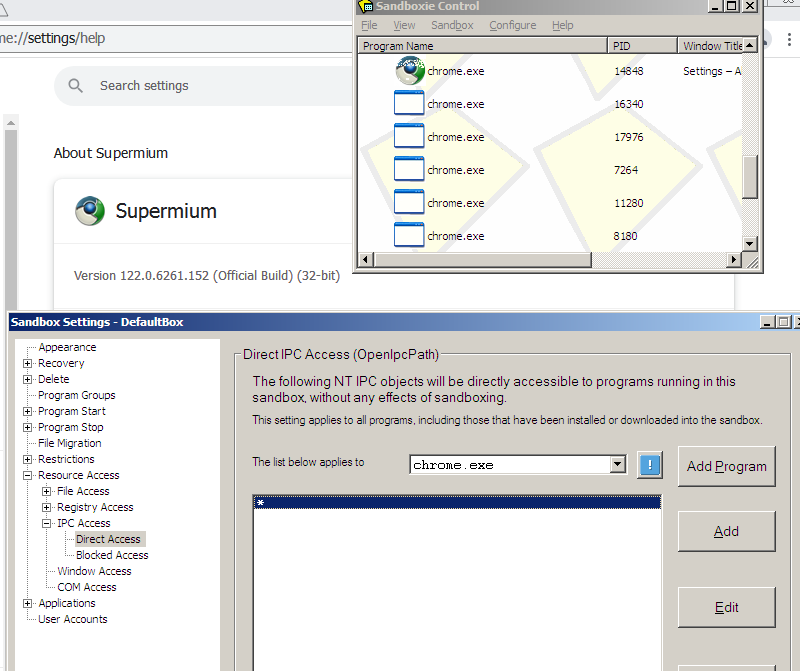
I confirm mui cache is touched, sandoxie no matter. To see what else is touched I will later on test with RegistryChangesView and update this post. I tested a few programs, but beyond mui cache, couldn't find anything else. I wonder what causes this (and if there may be other registry items that can be touched). In terms of causes, configuring sandboxie [GlobalSettings] automatically asks you if you want to grant access to stuff like virtuawin, 7zipShellEx, fontchache, LogitechSetPoint and similar processes that may touch on every windows process. Of those, 7zipShellEx and fontchache have direct IPC direct access (if you aid yes to the previous question) and virtuawin, strokeit and others have IPC Windows Access [by the way, I see here a strange [#] itemI can't recognize and will get rid of to see what breaks or doesn.t]. For my use I have set up a mozilla sandbox that, after granting access to apps I do use in normal browsing and profile manipulation works fine (in fact, more stably than out of the sandbox as per my perception), except for the openwith extension when trying to connect to chrome, which I run in a separate sandbox. That is cool to me, but may be an inconvenience to others. I have finally a generic restrictive sandbox to test new versions of already tried software - for trying new stuff I always use a VM. Overall, it is a great addition. It ain't perfect, but surely reduces attack surface. Cheers again.1 point
-
Hi @Multibooter, thanks for this thread. It's maybe a placebo thing, but I feel mypal68 and serpent52 (both with e10s) run more stably in a sandbox than without it. I still grant them access to my RAM profiles and usual download places, and sandboxie (restrictions-star/run access) allows me to approve specific programs to run (pdf printer, batch files I use to build my profiles, etc) them. With the settings posted by @XP++ AND the reg files suggested in the first post by you and @modnar (including reboot) I can run supermium fine (I agree in that granting IPC access is a big no, but that is the case running said program without a sandbox, anyway). In my case, the reason why the chrome sandbox remains active is because chrome.exe keeps running after closing the browser, and then two core sandboxie items remain active, even after killing chrome.exe (I do it through a batch file). Cheers!1 point
-
After SAB version 7.11.1 I'm having a problem with Widgets. When you click on the widget icon the window opens to the left and as you move the mouse to it the window closes. Taskbar at the top and auto hide is selected1 point
-
Still no, sorry It is implementation detail. Each X days update is checked (on logon/unlock/time change), downloaded and installed during logon. Server may not give latest version to auto-update; 3.7.11 is not auto-updated atm. bul*****. Can't reproduce. You may have some other taskbar "enhancement" app?1 point
-
347.90 is a unique, unlocked developer driver without throttling; I found it a long time ago. https://msfn.org/board/topic/184793-gtx-980ti-unity-crashes-vista-x64/?do=findComment&comment=1246223 "runs even better it now runs at 240 fps ... before that it would run at 120 to 140 fps" https://msfn.org/board/topic/184793-gtx-980ti-unity-crashes-vista-x64/?do=findComment&comment=12462091 point
-
Thanks, that I know, but there's a software driver and Intel ME management interface, isn't it the same as the PCI controller driver, no?1 point
-
Yeah, but wouldn't system think it now has a fully functional device and is allowed to communicate with Intel ME through it, no? Like OS communicates with BIOS.1 point
-
365.19 has a very slow performance comparing to 347.90. 365.19 is the point where they started to shift onto Pascal. Try 347.90 yourself, see the difference.1 point
-
Looks like he has an OEM-locked branded device. Like in the recent case with Dell GTX1080. https://msfn.org/board/topic/186395-3d-video-card-not-working-windows-7-sp1-x64/1 point
-
Welcome to MSFN @iviteo1 point
-
Update notification! As already reported, the Root Certificates have been updated and are now from 28-05-2024. Here again a screenshot: I totally forgot to update my self-created, offline Root Certificate Updaters in the section 11.2.4. Downloads related to Root Certificate Updates (in the first post of this thread). I have just made up for that. Cheers, AstroSkipper1 point
-
Hi @iviteo, hello from Belgium and welcome to MSFN! I wish you to enjoy the forums! Have a nice day. hpwamr1 point
-
You also claimed that you were blocking the "like" function, not only photos. You're right, I agree about the boycott, I even think I already suggested it many years ago. I'm deadset serious about faking my fingerprints, make them multiple, randomise, not to block completely, but make them similar to the most common ones, I don't know what others want. I didn't post my pic. at cloudflare, I posted it at MSFN, what does it have to do with the topic discussion?1 point
-
Indeed right, I somehow managed to get through it with faking canvas with Ungoogled, not a solution though.1 point
-
I can't even test the captcha, on Vista it blocks me immediately, that said, I'm certain it wants to see the "good" CH result. Why? Because if I block CH via --disable-features=UserAgentClientHint, I immediately get the same result on 7, too!
 1 point
 -
How then you explain it works on Win7?1 point
-
A good example of how Client Hints "give up" the OS you're on, thus blocking you on Cloudfare. https://github.com/win32ss/supermium/issues/7971 point
-
Supermium can work by enabling IPC access, but I'm not sure if it's safe
1 point
-
Thanks, but I specifically pointed out to Chrome only browsers in the topic's title.1 point
-
No problem, as may already know, ClientHints are invoked by javascript, so search for the area around the browser navigator. There are also many other useless entries like navigator.userAgentData Navigator.usb.get Navigator.bluetooth.get navigator.userAgentData is the one responsible.1 point
-
Thanks for the feedback, I tried Catsxp 125.4.5.4, had no errors observed,1 point
-
Then try to modify one of @heinoganda's releases ProxHTTPSProxy REV3d, ProxHTTPSProxy REV3e or my package ProxHTTPSProxy's PopMenu 3V1. All of them can be found with their download links in the section 11.1. Archived Downloads {obsolete} and 11.2.1.1. Downloads related to ProxHTTPSProxy of my main article. AFAIK, all versions were built with Python 3.4. And this is the download link of ProxHTTPSProxy REV3e's and ProxHTTPSProxy's PopMenu 3V1's source code: https://www.mediafire.com/file/s9027bdxffodbna/cryptography-2.8-py3.4_openssl-1.1.1d.rar/file1 point
-
Try ProxHTTPSProxyMII 1.3a! It is an old version created by the original developer. Here is a download link: http://www.proxfilter.net/proxhttpsproxy/ProxHTTPSProxyMII 1.3a.zip Or ProxHTTPSProxyMII 1.5. Download link: http://jjoe.proxfilter.net/ProxHTTPSProxyMII/files/ProxHTTPSProxyMII 1.5 advanced 34cx_freeze5.0.1urllib3v1.22Win32OpenSSL_Light-1_0_2o-1_1_0h.zip AFAIK, both versions were built with Python 3.4. More can be read in my main article. There are further links for information. BTW, these versions are pure proxies without the PopMenu and my self-created programmes. They are original releases from their developers.1 point
-
@Anbima and @w2k4eva! Any in-depth consideration of certificate issues in 360Chrome are browser-specific issues and are actually rather off-topic here. In any case, this here is not a 360Chrome browser thread. Such issues should be discussed in one of the countless Arctifoxie 360Chrome threads. And just for clarification, this has happened several times there in the past, without any real solutions. 360Chrome 13.x had problems with certain sites and their certificates from the very first. This will never be solved as this ported browser has not been developed further for years. The only way to solve certificate problems in these browser versions is to use ProxHTTPSProxy. On some problematic sites, the Windows 2000 compatibility mode also helps to show the padlock and green, secure HTTPS connection under Windiws XP. I have tested all this myself, and it works. Or use a more modern Chrome browser in Windows XP as, for example, Thorium which does not show such issues!1 point