Leaderboard




Popular Content
Showing content with the highest reputation on 12/25/2023 in Posts
-
Thank you Dave! Now all is fine. You're always very helpful! Every website dreams of having a moderator like you. Please accept my cordial wishes for the upcoming New Year!4 points
-
OK then! VPNCheck Pro is a lightweight security application designed specifically for helping you automatically log in via OpenVPN, PTPP and L2TP connections. It comes with support for DNS leak fixes, closing options upon VPN crashes, virtualization support for VMware and Virtualbox, as well as local IP changes and notifications when the VPN goes offline. Supprorts Windows Vista 32/64 bit, Windows XP https://www.softpedia.com/get/Security/Security-Related/VPNCheck-Pro.shtml http://www.guavi.com/vpncheck_pro.php4 points
-
"...was reported on Friday, November 24, by Benoît Sevens and Clément Lecigne, two security researchers with Google's Threat Analysis Group (TAG)." Source>By Sergiu Gatlan (who has covered cybersecurity, technology, and other news beats for more than a decade.) https://www.bleepingcomputer.com/news/security/google-chrome-emergency-update-fixes-7th-zero-day-exploited-in-2023/ "Google is aware that an exploit for CVE-2023-6345 exists in the wild," the company said. https://chromereleases.googleblog.com/2023/11/stable-channel-update-for-desktop_28.html3 points
-
Thanks again for listing this tool! I have installed VPNCheck Pro in my Windows XP partition since 2017. The currently installed version is VPNCheck Pro 1.5.6.0 although there is already a more recent version 1.6.0.0. Thus, I have updated today. Thanks again, @Saxon!3 points
-
As of now, seems like they finally started to roll out patches. But what do they mean by "emergency patches"? Are those only temporary? Not full? "Google releases emergency patches for eighth Chrome zero-day of 2023" By Steve Zurier. https://www.scmagazine.com/news/google-releases-emergency-patches-for-eighth-chrome-zero-day-of-20233 points
-
Correction: Clément Lecigne is actually from Switzerland. What do you folks think, is this scary enough? Skia is used for 2D rendering, not good at all.3 points
-
I checked the Supermium page, there's no version for XP. "Chromium fork for Windows Vista, 7 and 8." https://github.com/win32ss/supermium3 points
-
AstroSkipper, I give up. There's simply nothing you don't already know!3 points
-
As an alternative to the glitchy TAP. IP Hider Pro for Windows XP. Updated: 2017 Supported On Windows Vista, Windows XP https://www.softpedia.com/get/Network-Tools/IP-Tools/IP-Hider-Pro.shtml Only 5 IP in trial mode. s3 points
-
You're welcome. However, I am not the creator of this build. I only gave you a download link to the already compiled installer. But I am glad that it works for you and you could connect to a FastestVPN server. This special version OpenVPN 2.5.4 for Windows XP supports some stronger ciphers which is very important to establish VPN connections in these days.2 points
-
Observing the background processes, noticing new and possibly malicious threats and getting systray notifications when new drivers or services are installed, all that can be done by Process Hacker. Here is a quotation from Process Hacker's homepage: And here is my assessment: That's what I call a security programme at its best. If you don't know what's going on in your system, you don't need to worry about security and possible measures. Then you will just have to blindly trust other programmes and leave the security of your system to them. I personally would never do that. But, to each their own!2 points
-
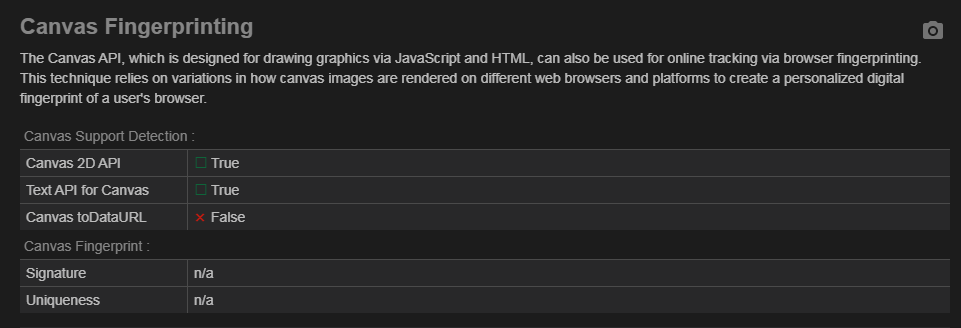
And this is what military experts like D.Draker get. Canvas toDataURL ×False Canvas Fingerprint Signature n/a Uniqueness n/a
 1 point
 -
Then it's strange you were not aware of this simple setting which is there for ages. privacy.resistFingerprinting1 point
-
The extensions you use in Edge are not relevant to this topic. And you are wrong, canvas is very important, like @UCyborgwrote - it's even used by youtube.1 point
-
Windows 2000 does not work storport driver. So, it is difficult :31 point
-
That's a good question! My guess (that's all it is) is that elektroda.pl is downloading an HTML page, but (as is so typical nowadays) a blank one with a bunch of Javascript that downloads the "real" page data asynchronously and builds the page dynamically. And if the Javascript closes the connection prematurely, you get the "secure connection failed" message. That could be totally wrong but that's all I can come up with. But it would explain why @adata has problems a minute or two after successfully getting in. (BTW, an unsupported cipher returns a somewhat different error page - one I'm way too familiar with.)1 point
-
Same said of prior visits, same day, same browser.1 point
-
What is it with all these user-agent-based blocks all of a sudden? First Intel, then Xitter, elektroda.com.... I thought UA-based blocking was "old school" and everyone was supposed to be checking your browser's Javascript capabilities nowadays, but it seems UA blocking (and thence spoofing) is making a comeback for some stupid reason. (Although some - e.g., Xitter - seem to be using a combination; see @mina7601's recent post for example....) It's especially galling to see a ridiculous UA like just the word "Chrome" get past way too many of these stupid UA blocks, as if, "oh, you're using Chrome? Well, welcome; we don't even care what version you're running! But you over there, running Firefox - you'd better be running the very latest version, or a bas with you!" It's beginning to look like we should all just start spoofing Chrome 109 (last Win 7 version) even if our browser has no relationship with Chrome at all, and be done with all this UA nonsense.1 point
-
You do realize that this is NOT A GOOD THING. Another way to say this is that they know EXACTLY who you are, that 190,855 people have visited and they know *EXACTLY* which one of those 190,855 people is YOU.1 point
-
@D.Draker Should be fixed now!1 point
-
Thanks for pointing to IP Hider Pro! I have had this programme installed in my system for years and know it very well. However, I haven't used it for a long time as I have configured the VPN connections of my VPN services natively via L2TP and PPTP.1 point
-
@Milkinis @XPerceniol and those who never used OpenVPN under Windows XP! OpenVPN is one of different VPN protocols. The OpenVPN 2.5.4 executable is a VPN client programme to connect to special VPN servers. There are many VPN service providers. Only a few offer servers free of charge, most of them offer servers which have to be paid for. The user has to download special OpenVPN configuration files from these VPN service providers which have to be loaded by an OpenVPN client programme such as OpenVPN 2.5.4. These config files can additionally be edited to match the user's needs if you are familiar with the OpenVPN protocol and the used syntax which in turn depends on the installed OpenVPN version. And here is a link to many different documents about OpenVPN: https://community.openvpn.net/openvpn And (actually) just for testing purposes, here is a service called VPNBook which offers free VPN servers: https://www.vpnbook.com/freevpn In addition, here is a short guide how to setup OpenVPN to use VPNBook under Windows XP: https://www.vpnbook.com/howto/setup-openvpn-on-windowsxp Cheers, AstroSkipper1 point
-
I think it's the question to the supervisor. But their spelling is indeed funny.1 point
-
New build of Serpent/UXP for XP! Test binary: Win32 https://o.rthost.win/basilisk/basilisk52-g4.8.win32-git-20231223-3219d2d-uxp-a907bc3c17-xpmod.7z Win64 https://o.rthost.win/basilisk/basilisk52-g4.8.win64-git-20231223-3219d2d-uxp-a907bc3c17-xpmod.7z source code that is comparable to my current working tree is available here: https://github.com/roytam1/UXP/commits/custom IA32 Win32 https://o.rthost.win/basilisk/basilisk52-g4.8.win32-git-20231223-3219d2d-uxp-a907bc3c17-xpmod-ia32.7z source code that is comparable to my current working tree is available here: https://github.com/roytam1/UXP/commits/ia32 NM28XP build: Win32 https://o.rthost.win/palemoon/palemoon-28.10.7a1.win32-git-20231223-d849524bd-uxp-a907bc3c17-xpmod.7z Win32 IA32 https://o.rthost.win/palemoon/palemoon-28.10.7a1.win32-git-20231223-d849524bd-uxp-a907bc3c17-xpmod-ia32.7z Win32 SSE https://o.rthost.win/palemoon/palemoon-28.10.7a1.win32-git-20231223-d849524bd-uxp-a907bc3c17-xpmod-sse.7z Win64 https://o.rthost.win/palemoon/palemoon-28.10.7a1.win64-git-20231223-d849524bd-uxp-a907bc3c17-xpmod.7z Official UXP changes picked since my last build: - Issue #2405 - Add a pref to disable CSP reporting. (f1f9dde29e) - No Issue - Add full-screen-api.ignore-widgets pref to about:config. (4b68ef14db) - Bug 1868901 (94a892fcbf) - [layout] Always check against fragment length in nsTextFrame (8fe53f59d0) - [XPCOM] Compare return value of readlink in nsLocalFileUnix::GetNativeTarget (8b5c0a9cd9) - [dom] Better handling of aborted websocket workers. (bcbe73119f) - Bug 1736385 - Make sure thread is alive in CacheIOThread::ThreadFunc (600142110d) No official Pale-Moon changes picked since my last build. No official Basilisk changes picked since my last build. My changes picked since my last build: - [SSUAO] follow-up rev 4b5b374f, going down to fx102 for best result for now. (3dcf458bd0) Update Notice: - You may delete file named icudt*.dat inside program folder when updating from old releases. * Notice: From now on, UXP rev will point to `custom` branch of my UXP repo instead of MCP UXP repo, while "official UXP changes" shows only `tracking` branch changes.1 point
-
Hmm I might check1 point
-
Could you please repost this? It is archived and I cannot download this. I would like to try this1 point
-
Do you refer to the systray icon(s) or the main programme view when talking about a three-in-one view? In my main programme view, I see all of this information about processes, RAM, and CPU. And I have configured Process Hacker to see two separate icons in my systray, one for used RAM and one for the CPU history.1 point
-
Very interesting! TBH, I wasn't a great social media fan in the past. I do have an old Twitter account, though, but migrating to a German non-profit organisation sounds indeed very good. Especially regarding the circumstance that I am German and located in Germany. Thanks for pointing me to that!1 point
-
Of course! Sandboxie belongs to the topic of this thread and is already on my internal list. It was installed in all my Windows XP partitions from the very first. I use the last XP-compatible version 5.22 and I love it. I use it regularly for testing tools I do not trust at first sight. In the past, the best news about Sandboxie was that it no longer required a licence and was declared open source in 2020. https://web.archive.org/web/20200425220152/https://community.sophos.com/products/sandboxie/f/forum/119641/important-sandboxie-open-source-code-is-available-for-download1 point
-
:OT I am an experienced Android user for many years. And of course, I use an antivirus app there. On my smartphone and on all tablets. BTW, most of my posts, I write from my tablet as I am doing at the moment :END OF OT1 point
-
Hello @Cixert! Thank you for testing! That means the last XP-compatible version 1.6.2 of Spybot - Search & Destroy is now obsolete, and the database can no longer be updated in any way. Right?1 point
-
it's made in china just like the last working and stable web browsers for XP. google, intel, nvidia, M$... and many others who don't support XP anymore are not chinese companies AFAIK Read this quotation from my introductory post containing the conditions for posting here in this thread: No more off-topic posts in my thread! This is my last warning. AstroSkipper1 point
-
2008WindowsVista I support your effort to keep these drivers alive. As you know Intel has a convoluted database that is hard to search for the drivers or they intentionally deprecate it and remove older versions (to save space) and only leave newer versions killing off support for older ones. I think these drivers are hidden from Z77 chipsets on the Intel website but should work. If not I'll back port them when I get a chance. I decided to help back up the Vista Drivers for integrated Intel HD Graphics for (Sandy Bridge / Ivy Bridge) Chipsets Z68 / Z77. Backup of the download page works although the download links are destroyed by Intel so I found a way to directly link them as long as WayBackMachine exists these files will never be lost. Archived for information purposes only and you can't directly download the files through this archive page. http://web.archive.org/web/20171008141948/https://downloadcenter.intel.com/download/20758/Graphics-Intel-HD-Graphics-Driver-for-Windows-Vista Vista 32-Bit Intel HD Graphics Drivers direct link to download file. http://web.archive.org/web/20171008142049/https://downloadmirror.intel.com/20758/a08/GFX_Win7_32_8.15.10.2761.exe Vista 64-Bit Intel HD Graphics Drivers direct link to download file. http://web.archive.org/web/20171008142245/https://downloadmirror.intel.com/20758/a08/GFX_Win7_64_8.15.10.2761.exe Now I haven't tested these recently but I seem to recall using Vista 64-bit Intel HD Graphic drivers on my Z68 and Z77 systems back in the 2012 time frame. The final test is did they retain the Windows 7 HDCP so even Vista can play Blu-ray movies properly or if this was just a basic graphics drivers. I'll have to test these later to see if they work but these new download links will ensure they will never be deleted even if Intel secretly removes them one day from their own server. I suggested people archive the two Vista 32/64 Bit direct download links as a bookmark in case MSFN goes down you can still find them. Readme file: http://web.archive.org/web/20171008143938/https://downloadmirror.intel.com/20758/eng/GFX_8.15.10.2761_readme.txt1 point