Leaderboard



Popular Content
Showing content with the highest reputation on 06/02/2023 in all areas
-
I have moved the conversation to this thread:2 points
-
Very good! Congratulation! You see no abstract labyrinth! It's not my package, and the installation should be done following my guide in any case. It was hard work to write it and also very time-consuming, BTW.1 point
-
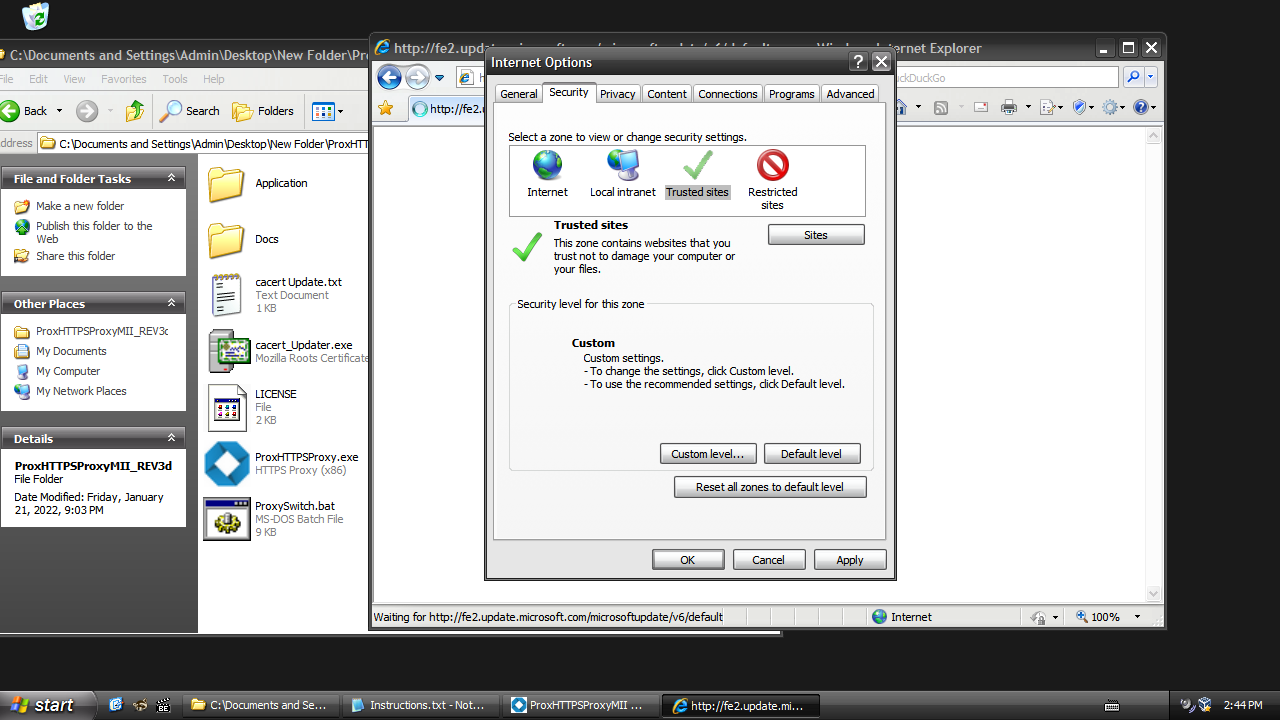
Okay everything is working now after applying the patched wuaueng.dll file.😱 I would also add the Internet Explorer settings to the "Restore_WU_XP_DE.7z" tool too. 😏 The slider bar to set the Trusted Zone to High was not visible for me. Only after i pressed on the "Default level" it showed up. 😒
 1 point
 -
That person later posted, “Norton says my Protection updates are ‘current.’” How is that relevant to Windows XP? Because Norton users running Windows XP or Vista were moved to Maintenance Mode at the same time (5 years ago). EOL for Norton versions 22.14 and earlier was announced 3 years ago, but the final Maintenance Mode version 25.15.5 for Windows XP was actually more recent than that. If it is still receiving definition updates, then it is every bit as “supported” as Avast 18.8, Malwarebytes 3.5.1, and another well-known antivirus that I won’t mention by name because the Gestapo would feel compelled to attack me as always. Norton’s support website appears to be in disarray at this time, so the links I have provided all lead to old Norton Community posts. AstroSkipper has already expressed his disinterest in Norton, and my own experience was limited to removal of a “free trial” from my Vista PC long ago. Would I encourage someone running XP to purchase a Norton license in 2023? No - but I feel exactly the same way about Malwarebytes Premium! I would seek out a free solution because definitions are liable to be cut off most any time now anyway. I should mention that Norton already threatened to cut off definitions on February 28, 2021, but later changed its mind. If anyone reading this is actually using Norton on XP (or even Vista, which would be the same version), please speak up!1 point
-
Yay! Finally I'm able again to run D3D9 games and programs in Windows Vista Extended Kernel using the newer version of the Intel HD Graphics 4000 driver! So, I used WineD3D to do this. I copied the WineD3D d3d8.dll, d3d9.dll, and wined3d.dll files to System32, replacing the original ones. I also renamed the igdumdim64.dll and igdumdim32.dll files in System32 and SysWOW64. WineD3D works by emulating Direct3D 8 and 9 into OpenGL. However, it is not perfect and there are still some crashes. What it can do: Open the Intel HD Graphics control panel Play video files using Windows Media Player Play Chess Titans by running the chess.exe file located in the C:\Program Files\Microsoft Games\Chess folder Use screen savers (except Ribbons, crashes with code 0xc00000fd) Play D3D9 casual games and other light 3D rendering activities that are done by the D3D9 API What it cannot do: Use the Windows Aero theme Run DxDiag Perform D3D9 benchmarks Open Games from the Start menu (this might be a bug) Play D3D9 demanding games and other heavy 3D rendering activities that are done by the D3D9 API Other bugs: The video playback sometimes slowing down and not syncing with the audio in Windows Media Player if the video resolution is higher than 480p or if the Windows Media Player is maximized Windows Explorer crashes upon closing the Windows Photo Viewer Some fullscreen games don't revert the screen resolution when exiting fullscreen mode, going to desktop by pressing Windows logo key, or switching between windows. They only revert the screen resolution after quitting the game DXVK's D3D9 also most likely will work in Windows Vista Extended Kernel, even much better than WineD3D. However, DXVK only works on graphic cards with Vulkan API, and Intel HD Graphics 4000 doesn't support Vulkan. Proof: GTA San Andreas also works successfully on WineD3D. But if the Visual FX Quality is too high, the game will become very slow and unplayable, especially when in Red County. And the intro's FMV only plays the audio but still can be skipped. Unlike when using the native D3D9 which the game keep runs smoothly even with highest graphics quality on the same hardware and also can play the intro's FMV videos perfectly. Hope the DXVK's D3D9 will improve the performance so much and become faster and better graphics quality than the native D3D9.1 point
-
I think there is no need to backport Firefox ESR versions newer than 78 for XP/Server 2003, as feodor2 said (more problems like inability to use single processes [multi-process are just for 2010s PCs and no one with them uses XP], no Flash Player support past v85). Even Firefox 102ESR-based web browsers (FX102 released in 2022!) doesn't have much better JS compatibility than 78 (tested on Waterfox G5, open.fm does not render correctly with it, unlike Opera GX or other chromium based browsers). I hope in future, MyPal 68 will have gradually better compatibility with 2021+ Javascript codes. So if you expected Proton UI on XP, it's unlikely to happen.1 point
-
Windows XP SP2 has both functions(NtWaitForKeyedEvent, NtReleaseKeyedEvent ) :31 point
-
How so? A bit contradictory, don't you agree? You wrote yourself your decade old 980ti works fine. What was "planned" in it? Or you want an eternal videocard? Perhaps start looking towards Romanian video cards then? What's the Crash file doin in your game folder then? Even its name kinda suggests it can do bad things to you. Could it be your super funny joke about Service pack No. 1866? The games might actually rely on that info. EDIT. No, I'm not interested in low to mid range cards, so no driver for 2060, sorry, perhaps ask the others?1 point
-
I told you, the driver is very special, it's a developer driver without the artificial FPS lock at poor values, like they do for ordinary peasants. This story is endless, they do it on purpose, you can find videos. From time to time, they leak developer drivers, once in a blue moon.1 point
-
You're welcome! Must be a bad tutorial you found! You also need to add the device name at the bottom of the file. The driver is fully compatible with all 900 series. As for your question, I run 2019.4.26 absolutely trouble free, but I'm on Intel and Tiatn X. Are you sure your hardware's fine? Maybe a defect? The 980 card should be almost a decade now.1 point
-
Try WinSCP 5.1.8 (portable). Run it by ImportPatcher to see what is missing.1 point