All Activity
- Past hour
-

Firefox 52 no longer working on XP
Dave-H replied to Dave-H's topic in Browsers working on Older NT-Family OSes
OK, I tried disabling the current Firefox profile (by renaming its folder and making a new empty folder with the same name). Firefox still didn't start, with the same immediate error. I think that means the issue is nothing to do with anything in the profile. -

My Browser Builds (Part 5)
VistaLover replied to roytam1's topic in Browsers working on Older NT-Family OSes
r3dfox (and firefox) will still upgrade the connection to HTTPS, even if the relevant setting, HTTPS-Only Mode, under "about:preferences#privacy", has been manually set to "Don’t enable HTTPS-Only Mode" ... https://support.mozilla.org/en-US/kb/https-only-prefs https://support.mozilla.org/en-US/kb/https-upgrades I had to first enable HTTPS-Only Mode in all windows, and then configure an exception just for "o.rthost.win" ... -
As I don't think that it is fair to report this to yt-dlp, as I'm using your builds under Windows 7 (and the officials aren't valid for this), and so, just in case, the fault is in this build, I want to tell that your latest, this is 2026.01.19.143412, but not the previous, this is 2026.01.18.152406, there is a problem with DNS resolving. Instead request the OS to resolve an A DNS record (this is the IPv4 IP) for the host of the video, requests a ?65? DNS record (question mark, 6, 5, question mark), that is absolutely invalid (there is no such record in the standard and so replies the Google DNS server). I use my own DNS resolver and so I can inspect what is going on with DNS requests and so I'm seen it and reporting it. Where is the fault coming? I don't have the knowledge to tell. Just that in the 18th of January, it works OK. Regards. EDIT: just to add up, I double checked the hash and file download isn't corrupted. EDIT2: now that I think about it... 65 matches to the decimal value of the character A (capital A)... Might be some sort of UTF or ASCII thing? DNS is pure ASCII (or maybe ANSI), so no clue what has been introduced this issue.
-
My Browser Builds (Part 5)
VistaLover replied to roytam1's topic in Browsers working on Older NT-Family OSes
The article I linked to, https://habr.com/ru/articles/856602/ is, supposedly, intended for free-tier users, with an addition in the end "For paid CloudFlare users" ; but I'm not sure disabling ECH works anymore, as this statement from June 2025 indicates: https://github.com/win32ss/supermium/issues/1485#issue-3189002561 ... - Today
-

My Browser Builds (Part 5)
roytam1 replied to roytam1's topic in Browsers working on Older NT-Family OSes
VK crash is known even in upstream, so far there is no solution or workaround. better using chrome-based browser for this. -

My Browser Builds (Part 5)
Egorkaru replied to roytam1's topic in Browsers working on Older NT-Family OSes
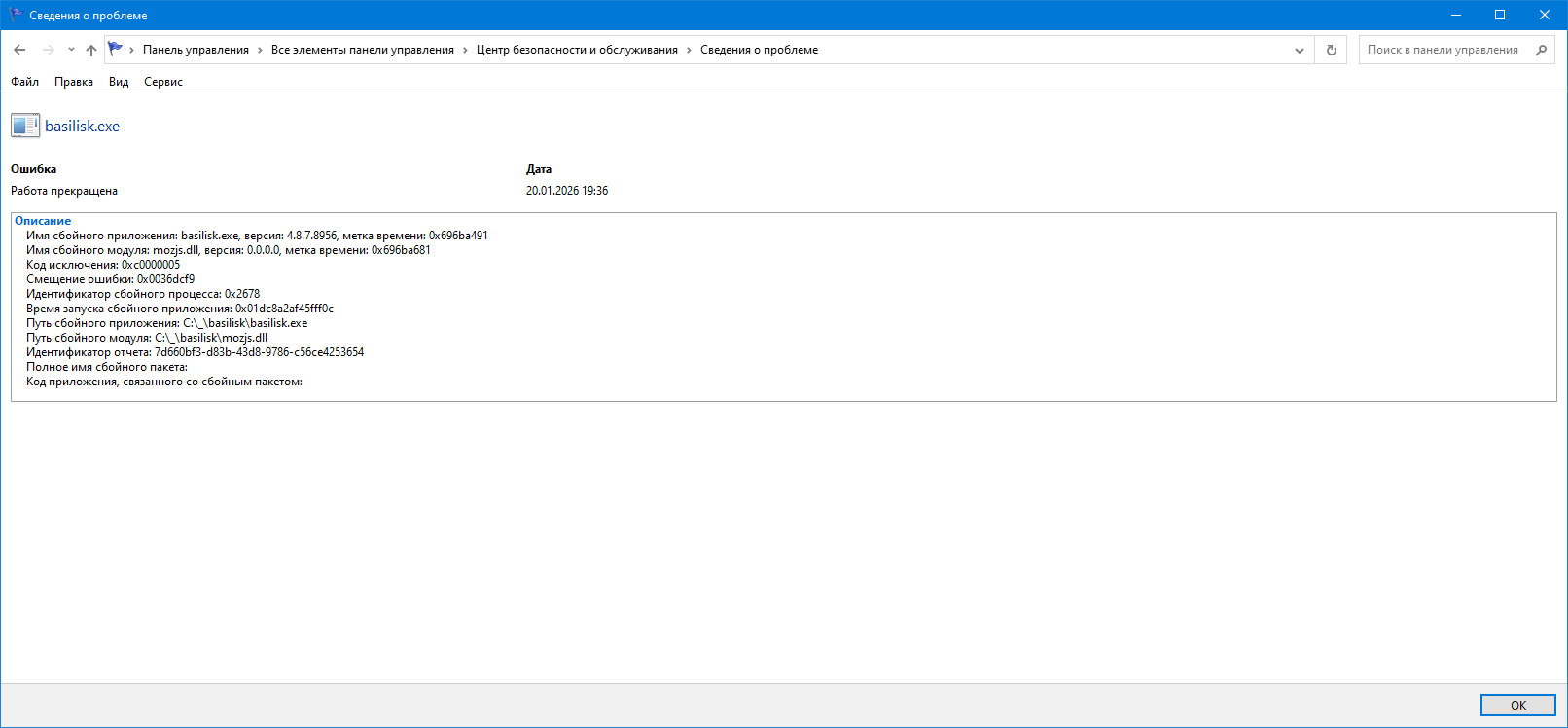
basilisk52-g4.8.win32-git-20260117-3219d2d-uxp-aace8fa8c0-xpmod crashes when opening https://vk.com:
-
My Browser Builds (Part 5)
Egorkaru replied to roytam1's topic in Browsers working on Older NT-Family OSes
Opening website http://o.rthost.win over an unsecured HTTP connection was also interrupted after the first 16 KB. I tested in the r3dfox browser under Windows 10 (x64). -
My Browser Builds (Part 5)
roytam1 replied to roytam1's topic in Browsers working on Older NT-Family OSes
IIRC there is no sophisticated settings about HTTPS in cloudflare free-tier so I have no control about ECH. -
 Or generally on old machines with a single-core processor. After restarting my computer, it additionally installs or updates some modules like, for example, NNSNAHS (Network Activity Hook Server Service) which makes starting much worse. Now, I get a popup that no firewall is installed for a short time, and Panda gets deactivated. A further one minute later, it finally activates itself. So the start was extended by at least another minute. Not good.
 -
There is no noticeable increase in startup time with 22.03.05 on my machine, it seems perfectly normal as it was before Panda was installed, so I can only assume that it just doesn't run well on your particular hardware.
-
My Browser Builds (Part 5)
VistaLover replied to roytam1's topic in Browsers working on Older NT-Family OSes
@Egorkaru. can you not access the PLAIN HTTP version of http://o.rthost.win/ (obviously, on a browser that doesn't enforce HTTPS) ? I found some relevant issues in the Supermium issue tracker: https://github.com/win32ss/supermium/issues/1485 https://github.com/win32ss/supermium/issues/997 and, possibly, https://github.com/win32ss/supermium/issues/1005 @roytam1, it appears you have ECH enabled: https://dns.google/resolve?name=o.rthost.win&type=HTTPS perhaps disabling it could restore access in Russia ? -
Firefox 52 no longer working on XP
Dave-H replied to Dave-H's topic in Browsers working on Older NT-Family OSes
I did wonder about extensions, I haven't changed those on FF 52 for years, but they do update themselves so it's possible that an incompatibility has crept in. It won't run in Firefox 'safe mode' either though, which I thought was supposed to not load any extensions or plugins. I'll try with a new clean profile which should eliminate this possibility. -
Today, I have uninstalled Panda Free Antivirus 21.01.00 and installed Panda once again but via their online installer. The version installed by their online installer is 22.03.05. The online installer downloads the legacy installer FREEAV_LGC.exe (117MB) and not the common FREEAV.exe (161MB) under Windows XP. Unfortunately, the version 22.03.05 needs much longer for starting when booting Windows XP. It is round about 5 to 6 minutes on my old machine. The culprit is the process PSANHost.exe which places very high demands on the CPU, up to 99%. The previously installed version 21.01.00 only needed 2 minutes. I'll keep the currently installed version a while just for testing purpose but I think I'll go then back to version 21.01.00. The next days, I'll use to see how this version behaves in my system doing all the things I usually do.
-

Firefox 52 no longer working on XP
NotHereToPlayGames replied to Dave-H's topic in Browsers working on Older NT-Family OSes
I'm not seeing it imported either. Not sure if this is even possible, but do you have an extension or plugin generating imports that Firefox itself is not importing? Again, not even sure if this is possible (but I know it can be done in Edge [corporate environment]). -
My Browser Builds (Part 5)
VistaLover replied to roytam1's topic in Browsers working on Older NT-Family OSes
... Sadly, I suspect those have been blocked even before ALL the free "VPNs"; Putin doesn't like to leave loopholes , does he? ... -
My Browser Builds (Part 5)
roytam1 replied to roytam1's topic in Browsers working on Older NT-Family OSes
I can't remove cloudflare here because it needs to be existed for caching traffics and there is no free alternative for this. you may find some free web proxies to access my site instead? -
Firefox 52 no longer working on XP
roytam1 replied to Dave-H's topic in Browsers working on Older NT-Family OSes
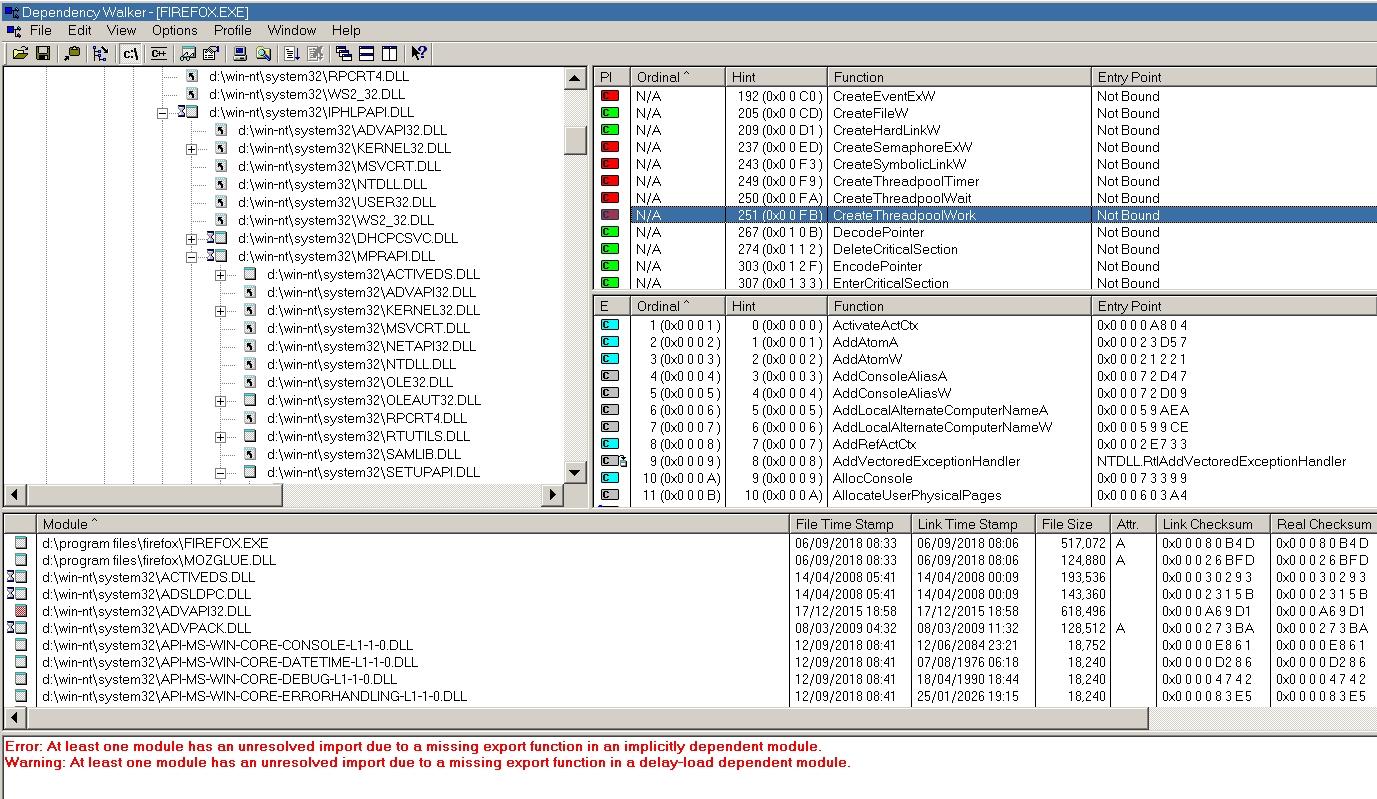
you may need to collapse whole tree and expand one by one to see who uses unsupported kernel32/advapi32 APIs. BTW here neither firefox.exe nor xul.dll import CreateThreadpoolWork and its friends here with firefox52.9esr. -
My Browser Builds (Part 5)
Egorkaru replied to roytam1's topic in Browsers working on Older NT-Family OSes
roytam1, please remove Cloudflare from website https://o.rthost.win. Cloudflare is blocked in Russia by Roskomnadzor. Because of this, opening website https://o.rthost.win on my SkyNet ISP in Saint Petersburg, Russia (https://skynet.ru) has been interrupted after the first 16 KB since December 2025. All free VPNs has been blocked by SkyNet ISP, and my mom won't give me money for paid VPNs. -
Firefox 52 no longer working on XP
Dave-H replied to Dave-H's topic in Browsers working on Older NT-Family OSes
Here's what Dependency Walker says. CreateThreadpoolWork is indeed showing an error, but so are several other functions, and they're not stopping it from running! Incidentally, why does it say 'Not Bound'? Should that actually be 'Not Found' or is that terminology correct? Sorry, I'm no expert on this sort of thing!
-
Blackwingcat Please update some files using ESU KB's windows2000-kb2508429-x86-custom-plk_949c1405efd680cf901db2748dbbec1de297dcfd.exe srv.sys 5.0.2195.7441 windows2000-kb2676562-x86-custom-plk_dcab96b4e7275a50644ce047299fcefc74e98c79.exe ntkrnlmp.exe, ntkrnlpa.exe, ntkrpamp.exe, ntoskrnl.exe v7473 windows2000-kb2758857-x86-custom-plk_f5cfc4c05068b39fdf86d6e2b021b87a8f8c6f2f.exe kernel32.dll v7505 windows2000-kb2876217-x86-custom-plk_e1e4f63016a50df3e2f8fd195a78134ba16ce082.exe ole32.dll v7551 windows2000-kb2992611-x86-custom-plk_e18cbdacd7826ac86fc9b25ba1eb877f332b5946.exe schannel.dll v7593 windows2000-kb3039066-x86-custom-plk_ce91eb9d39184f03580a4e3fbc372db93d473ffd.exe shell32.dll v7604
-
Firefox 52 no longer working on XP
Dave-H replied to Dave-H's topic in Browsers working on Older NT-Family OSes
Thanks everyone, and sorry for the delay in replying. I was having terrible problems accessing the site yesterday, which i hope is now fixed. @NotHereToPlayGames I ended up uninstalling Malwarebytes in Safe Mode because when I tried in normal mode, when I said yes to 'do you want to uninstall' the machine immediately rebooted! Rather than try again and probably have the same thing happen, I then tried in Safe Mode, and it immediately uninstalled, very quickly indeed. Why the machine rebooted, I have no idea. I doubt this has anything to do with Firefox now failing to run, but you never know! @schwups @NotHereToPlayGames I'm not running any form of extended kernel. @ED_Sln Firefox.exe looks to be OK. Very strange. Just to add that Firefox won't run in its own 'safe mode' either.
-
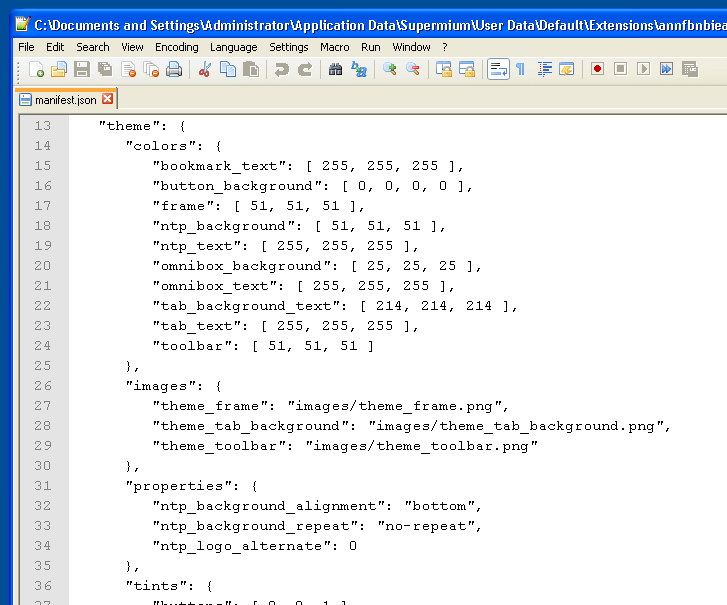
ps - If you download the .crx, all you have to do is modify the manifest.json *before* installing into Supermium and you can make the colors ANYTHING YOU WANT THEM TO BE. You don't have to "find" a theme that you like, you control your own destiny and CREATE the theme using the downloaded .crx as a "template". It can be easier if you find a "close enough" theme to what you WANT and then just modify to get it to EXACTLY what you want. That's what I've been doing ever since migrating from XP+360Chrome (where I embedded my own skin/theme) to 10+Chrome. For me, I really "hate" for Chrome to not LOOK LIKE everything else in XP. And that extends to 10 where "active" and "inactive" Chrome windows don't by default LOOK LIKE everything else in 10. This is a good source for all of the available "notations" that can be used - https://github.com/mike-u/EditChromeThemes
-

Firefox 52 no longer working on XP
ED_Sln replied to Dave-H's topic in Browsers working on Older NT-Family OSes
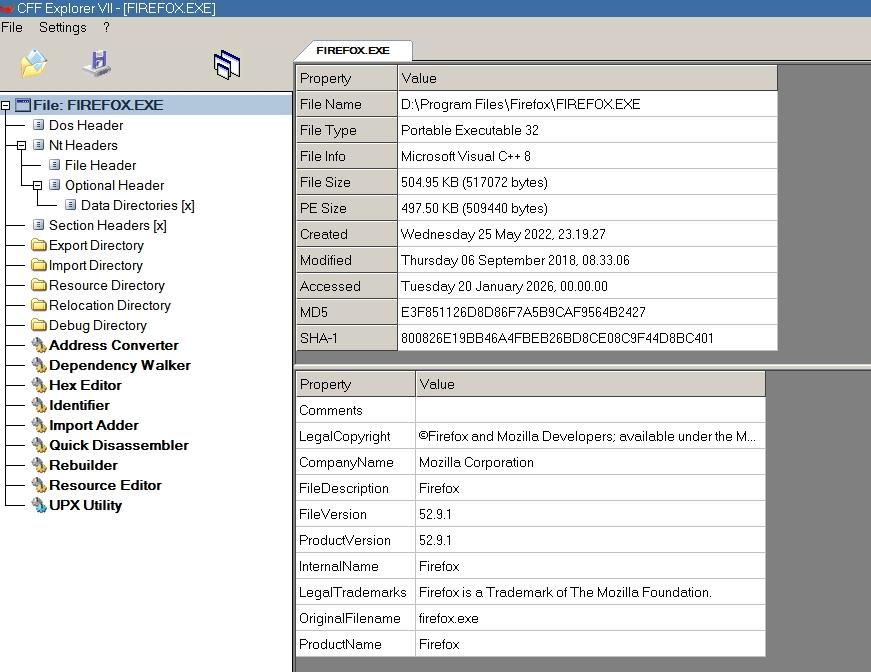
@Dave-H Check that the firefox.exe file has not been modified, it must have a valid digital signature and this SHA-1 hash: 800826E19BB46A4FBEB26BD8CE08C9F44D8BC401 -

Native (WDM) HD Audio driver for Windows 98se/Me
Deron416 replied to Drew Hoffman's topic in Windows 9x/ME
After some tests in WindowsMe, I found that if I launch ScanDisk and start scanning my hard drive while playing an MP3 file in WindowsMediaPlayer, the sound of the MP3 file being played becomes clear for a while. -
My Browser Builds (Part 5)
roytam1 replied to roytam1's topic in Browsers working on Older NT-Family OSes
upstream made their new release today, and 32bit build may have same issue I got in my last build. still need some more time on testing their builds. EDIT: issues we got happens in upstream as well. EDIT2: it seems that there is another individual is testing our cases and reporting them to upstream.