All Activity
- Today
-
 re: r3dfox and it being LibreWolf-ified, there is a way to PREVENT it from ramrodding most-recent uBO. I personally love uBO, but I also prefer the user to be in FULL CONTROL of what extensions they opt to run. You'll notice that the LibreWolf-ified r3dfox does not allow a uBO uninstall, and it reinstalls itself if you delete uBO from your profile. Again, nothing against uBO, but I'm no fan of The Nanny State, and that includes r3dfox deciding for itself that I have to run uBO because that is "them looking out for me". Long story short... (too late...) You can PREVENT that uBO from reinstalling itself "against your preference". Look for r3dfox's "policies.json" and remove the following, now you can remove uBO from the profile and it won't return without your consent. "ExtensionSettings": { "uBlock0@raymondhill.net": { "install_url": "https://addons.mozilla.org/firefox/downloads/latest/uBlock0@raymondhill.net/latest.xpi", "installation_mode": "normal_installed", "private_browsing": true } },
 -
ps - I feel like there's an OJ Simpson joke in there somewhere and whether or not I like the Ford Bronco or whether or not police footage should be a form of "entertainment".
-
Works for me. I wouldn't technically call it "riled up", but yeah, I can understand that general observation. If you really want my "exact" opinion, my view is this, I spent 'good money' to buy a computer, along with that purchase came a legal-legit "license" to use Windows, and it SHOULD be ANY d#mn VERSION of Windows that I so chose. If I take good care of the hardware and there isn't a scratch on it THIRTY YEARS into the future, then I *should* be "allowed" to install ANY version of Windows along the way, whether 2 or 20 versions went "unsupported" along the way, or whether I, the end user, opted to go BACK thirty years and install any version of Windows that went "unsupported" BEFORE my computer purchase, be that 2 versions ago or 20 versions ago. (ps - technically, I don't support "support" and not only disable it, but also never ever call "customer support". ie, I paid to use Windows, I did not "pay" to partially fund the salary of some tech support agent and the "right" to call that agent and that payment dictate the agent has to "support" my enquiry.) My view is that I paid for a "license" to use *ONE* version of Windows. And so long as I only use one version *per* computer purchase, then that SHOULD be fine and dandy. What I did not purchase alongside my computer purchase is a LAWYER to read through some d#mn mumbo-jumbo-legaleaze b#llsh#t "license agreement" and for the "interpretation" of that license agreement to take an entire court system to decipher. Be it a corrupt and biased court system favoring the company, or be it a corrupt and biased court system favoring "dei politics", or be it a corrupt and biased court system favoring their own "definition" of the word "is". But despite that "biased" view of the court system, I would prefer to think that "right" wins out over "money" at least some of the time.
-
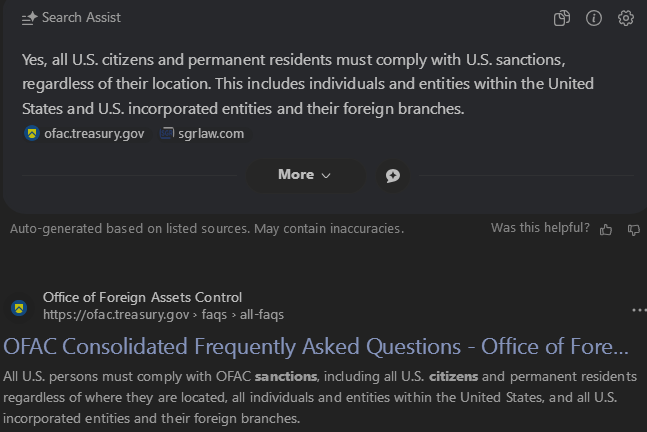
 Then you need to promptly delete everything you posted about the unlawful programme and start to obey your government. Probably, it's the right time to consult a lawyer. USA citizens - they do need to obey sanctions. "All U.S. citizens and permanent residents must comply with U.S. sanctions, regardless of their location. This includes individuals and entities within the United States and U.S. incorporated entities and their foreign branches." It's against the law, what you do! See the links. https://ofac.treasury.gov/faqs/11 https://www.sgrlaw.com/ttl-articles/860/
-
 I understand you weren't addressing me specifically, and your general observations may well be correct. Yet, I think it's rather telling of a person's character when they let something little like "Micro$oft" get them riled up. To be clear, I use many Micro$oft products, and I actually like some of them! But I haven't found much to like in Windows versions beyond 7 (well, 8.1 wasn't too bad). Unfortunately, neither 7 nor 8.1 is supported any longer. I have no problem with that - few companies can afford to support decades-old products - but M$'s business model depends on them not giving me the choice to remain on an unsupported OS, even though I knowingly accept any security risks from doing so. Thus, I choose both to visit sites like MSFN, in order to keep Win 7 going; and to mildly protest M$'s attempts to force me to pay them for an OS I strongly dislike, with that little dollar sign.
 -

Questions about Win386 support info in MS-DOS 7.1 data segment
PDU replied to PDU's topic in Windows 9x/ME
I solved this myself. 1) UDF1: INDOS_flag synonymous outside SDA. In all DOSCODE residential part, all UDF1 operation are coupled with the same operation to the INDOS flag. All INDOS flag operations are also coupled with UDF1, with only one reading operation. UDF2: A flag indicating critical device driver operation in progress. There are only two occurance (Set/Clear) in DOSCODE residential part on this flag. Between the two operation, only call device driver strat_proc and intr_proc. This only happens when operating some device, not all. 2) See above. -
 To avoid actions by Kaspersky blocking my occasional updates. The size of each update is about 800MB traffic and Kaspersky has to pay for the traffic. I assume that they are already in a difficult financial position because of the US embargo. If they survive I assume that My Ancient Version of Kaspersky will still get free, current signature updates in 2030.
 -
 why are you censoring the version number?
 - Yesterday
-
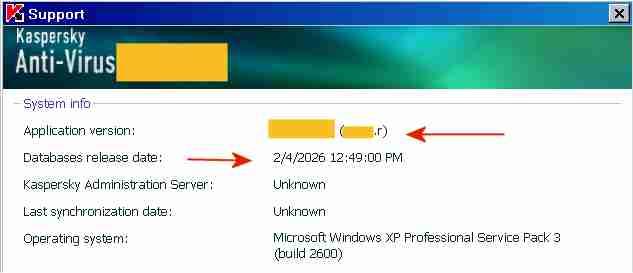
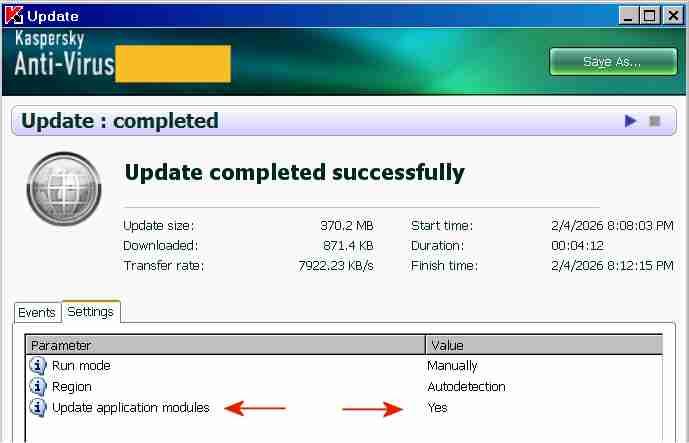
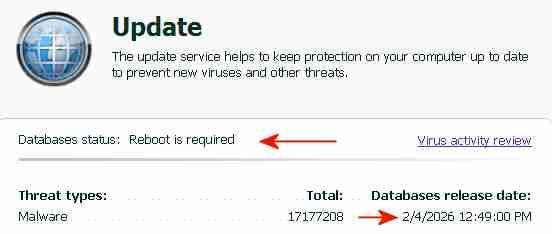
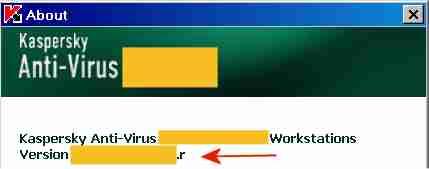
The "AutoPatches" for My Ancient Version of Kaspersky I succeeded in updating both the application modules and the signatures of My Ancient Version of Kaspersky with a single combined update, without a license key and without activation. By installing the final AutoPatches, My Ancient Version of Kaspersky has been updated to the ultimate final version, with the most recent program file digitally signed OK 26May2014. The screenshot above indicates the final AutoPatch "r" next to "Application version" and the Database release date "2/4/2026". Once knowing how-to, preparing future combined updates will be quite easy. The term "AutoPatches" by Kaspersky corresponds roughly to the term "Hotfix" by Microsoft. The screenshot above indicates "Update completed successfully" and "Update application modules: Yes". The signature updates were from a Kaspersky Lab update server, the application updates ("AutoPatches") were from my personal archive. Signature updates and application updates ("AutoPatches") were combined into a single update folder. The screenshot above indicates signatures of 2/4/2026 and the message: "Database status: Reboot is required". This message "Database status: Reboot is required" is displayed by My Ancient Version of Kaspersky when the update of the application modules via AutoPatches is pending. A tiny red square is added to the Kaspersky icon in the System Tray, indicating that AutoPatches are pending. During the reboot after the update, the Kaspersky driver updates and installs the program files contained in the AutoPatches and updates the registry, completely hidden and invisible to the user. StartUp Organizer, for example, which I use as a watch dog, does NOT notice any changes before, during and after the reboot. After rebooting and AutoPatching, the Kaspersky icon in the System Tray looks normal again, without a tiny red square. The successful installation of the AutoPatches is indicated in the About screen above by the display of "r" [=version of the AutoPatches] next to the Version (Note: the About screen is displayed by right-clicking on the Kaspersky icon in the System Tray -> About) and in the Support window (1st screenshot, at the top of this posting). Also, LastSuccessfulUpdate in the registry contains a hex value (Unix timestamp), which confirms that the update was successful. Furthermore, virus-checking with the updated application module and the new signatures works fine. The installation of the final AutoPatches plus a signature update of My Ancient Version of Kaspersky had faced three challenges: 1) The files of the final AutoPatches were removed from the Kaspersky Lab update servers and are most likely not available anywhere in the internet. 2) Kaspersky Lab does not provide license keys for My Ancient Version of Kaspersky anymore, which would permit multiple updates. My Ancient Version of Kaspersky is an unexpiring trial version and can only be updated once. An initial update with the final AutoPatches followed by a second update with current signatures is therefore not possible. Only one update is possible, either an update of the signatures from the Kaspersky Lab server or an update of the application module from my personal archive, but not both.. 3) The digital signature of the .xml file in the subfolder \index\ in the update folder impedes the combining of AutoPatches and current signatures into a single update folder. Before August 2019 the online updates from Kaspersky Lab of My Ancient Version of Kaspersky had consisted of three sub-folders: \AutoPatches\, \bases\ and \index\. After August 2019 no sub-folder \AutoPatches\ is created when downloading updates. The sub-folder \AutoPatches\ contained updates of the installed application modules, \bases\ contained the signature updates and \index\ contained only a .xml file validating \AutoPatches\ and \bases\. The .xml file in \index\ contains at the end a string which is an encoded digital signature generated using the private signing key of Kaspersky Lab. Changing text in the .xml file without updating the signature at the bottom will result in the error message "Invalid file signature" when trying to update. The final release of December 2012 of My Ancient Version of Kaspersky had been updated by several sets of "AutoPatches" supported by Kaspersky until 2017, identified by a letter of the alphabet appended to the build number of Kaspersky Anti-Virus. The last AutoPatch for My Ancient Version of Kaspersky is "r" and contains for example an updated basegui.dll, digitally signed OK 26May2014. The AutoPatches for My Ancient Version of Kaspersky were available from the Kaspersky Lab update servers until about 2018. When I tried to update in August 2019, all files of the AutoPatches for My Ancient Version of Kaspersky had been removed from the Kaspersky Lab update servers and My Ancient Version of Kaspersky could not be updated to release "r" (about 26May2014) anymore. The application modules of My Ancient Version of Kaspersky consequently remained those of the final release of December 2012, without any AutoPatches applied.. In addition Kaspersky Lab removed the text string which identified My Ancient Version of Kaspersky, from the digitally signed .xml file in \index\ downloaded from Kaspersky. Kaspersky Lab must have decided by August 2019 to definitely stop supporting My Ancient Version of Kaspersky, because they removed the application update files from their update servers and made it generally impossible to update the program with AutoPatches by removing the string permitting updates of My Ancient Version of Kaspersky from the digitally signed .xml in \index\. The final AutoPatches, including "r", probably also improve the Protection Components of My Ancient Version of Kaspersky. I have used My Ancient Version of Kaspersky only as an on-demand scanner, I have no need for the Protection Components. Nevertheless, I may eventually add the Protection Components to the installation, for further testing and to see whether activation is required to get the Protection Components to work. According to the User Guide of My Ancient Version of Kaspersky, if you select "Activate later" after installation, "you will have access to all the application's features, except for updates (only one application update will be available)".
-

Native (WDM) HD Audio driver for Windows 98se/Me
Drew Hoffman replied to Drew Hoffman's topic in Windows 9x/ME
Byte 0x42 bit 1 of config space (0x02 mask) is the Snoop flag for the ATI/AMD SB450/SB600. I am only setting that bit on those models currently, which are PID 0x437b and 0x4383, but yes I may need to do that for newer AMD chipsets as well. Looks like Mpxplay sets it for several other PCI IDs. You can test with WPCREdit if toggling that bit gives you better results. If you don't know which PCI device is the HD audio controller, it's the one with class 04 subclass 03. I should copy that entire list of PCI Config Quirks from mpxplay or the modern Linux snd-hda-intel. I had originally copied the few that were in the HDA.pas source code of Watler's driver but that list is clearly incomplete. I don't know if the Microsoft KB888111 bus driver sets all the snoop config bits but the HDA bus driver that's about to be merged into ReactOS sure does: https://github.com/coolstar/sklhdaudbus/blob/cf88f2020c836978660f3378917b0dd3274570c9/sklhdaudbus/fdo.cpp#L574 Also there still seem to be occasional race-condition bugs with stopping and then quickly starting streams on both VMware and real hardware. When changing tracks in Winamp 2.95 it may play silence or choppy like the r/w pointers have gotten out of sync and lapped each other. Sometimes the first system sound after stopping music will have a blip of music mixed in, sometimes the short click navigation sound is lost entirely on VMware but this seems to be better on real hardware. -
 I think inserting the brackets is logical and correct.
 -

Native (WDM) HD Audio driver for Windows 98se/Me
deomsh replied to Drew Hoffman's topic in Windows 9x/ME
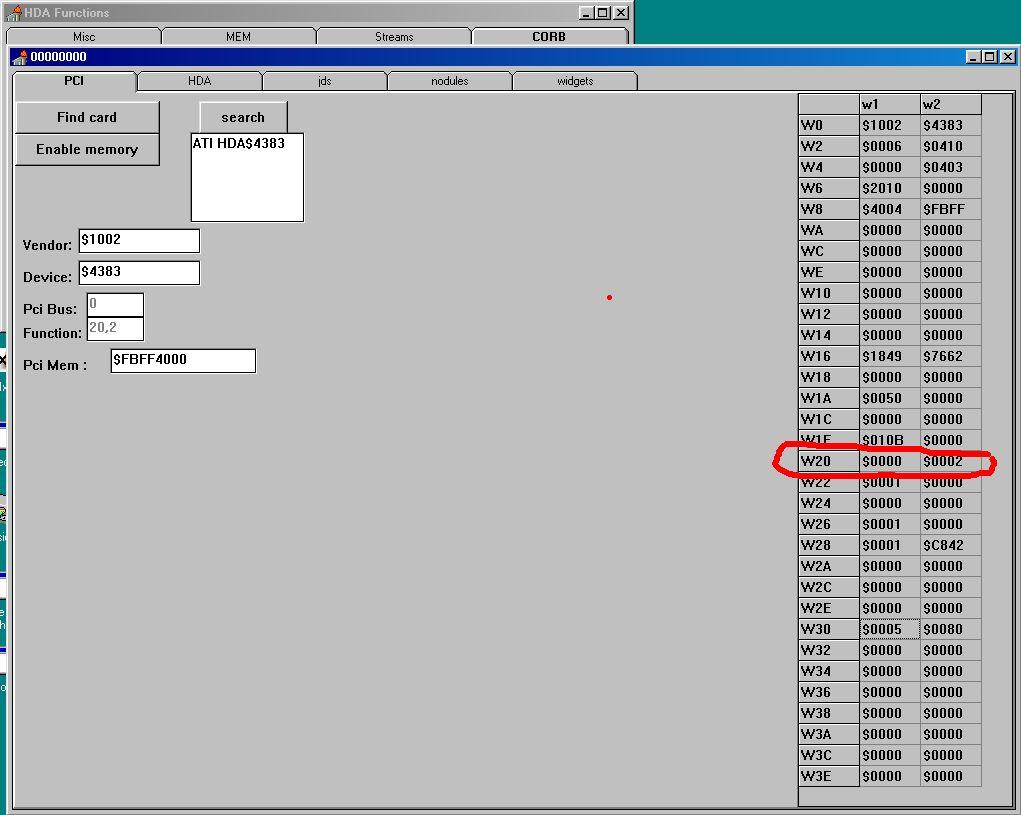
I tested latest version (WDMHDA Alpha-016) on 960GM-GS3 (AMD SB710) with codec ALC662. I got sound if listening to a music WAV-file in Mediaplayer, but first only ONE intermitting 'tone' or 'tic', and sometimes after replay a highly distorted sound, but no music. According to DXDIAG al tests from a software buffer are 'good' (said oke if I heard sound). For High Definition Audio AMD SB710 seems te be same as SB600. First I checked with Watler's tool INTELHDA.EXE (AHDA17O) at pci-level: Except for Pci-Mem same as (working) W20 $0000 $0002: Re: High Definition Audio « Reply #113 on: Dec 2nd, 2017, 4:57pm » QuoteModifyDelete Post Are the chickens happy again? I think I found something interesting with help of AHDA17L. I compared VERB response values and Register values in AHDA17L after starting Windows with and without HDA2.DLL or BUG.BAT (JUDAS21C). On the codec-level I found no real differences when starting Windows with BUG.BAT in comparison with HDA2.DLL only (apart from some minor volume-levels). Also no differences in HD Audio Controller Memory Mapped Registers. In the HD Audio Controller PCI Configuration Space Registers I found one different value in row W20. TEST: AHDA17L NO DRIVER: HDA2.DLL (98E): BUG.BAT (JUDAS21C): PCI W1:$ W2:$ W1:$ W2:$ W1:$ W2:$ W0 1002 4383 1002 4383 1002 4383 W2 0006 0410 0006 0410 0006 0410 W4 0000 0403 0000 0403 0000 0403 W6 2010 0000 2010 0000 2010 0000 W8 4004 F7FF 4004 F7FF 4004 F7FF WA 0000 0000 0000 0000 0000 0000 WC 0000 0000 0000 0000 0000 0000 WE 0000 0000 0000 0000 0000 0000 W10 0000 0000 0000 0000 0000 0000 W12 0000 0000 0000 0000 0000 0000 W14 0000 0000 0000 0000 0000 0000 W16 1849 7662 1849 7662 1849 7662 W18 0000 0000 0000 0000 0000 0000 W1A 0050 0000 0050 0000 0050 0000 W1C 0000 0000 0000 0000 0000 0000 W1E 010B 0000 010B 0000 010B 0000 W20 0000 0000 0000 0000 0000 0002 W22 0001 0000 0001 0000 0001 0000 W24 0000 0000 0000 0000 0000 0000 W26 0001 0000 0001 0000 0001 0000 W28 0001 C842 0001 C842 0001 C842 W2A 0000 0000 0000 0000 0000 0000 W2C 0000 0000 0000 0000 0000 0000 W2E 0000 0000 0000 0000 0000 0000 W30 0005 0080 0005 0080 0005 0080 W32 0000 0000 0000 0000 0000 0000 W34 0000 0000 0000 0000 0000 0000 W36 0000 0000 0000 0000 0000 0000 W38 0000 0000 0000 0000 0000 0000 W3A 0000 0000 0000 0000 0000 0000 W3C 0000 0000 0000 0000 0000 0000 W3E 0000 0000 0000 0000 0000 0000 When starting Windows with HDA2.DLL only and setting W20/W2 to 0002 enables sound immediately when playing a WAV-file in Sound Recorder. Reset to 0000 disables again, etc. When I counted right, this can be Misc Control 2 Register - R/W - 8 bits - [PCI_Reg: 42h] in the AMD SB700/710/750 Register Reference Guide. So I suspected the interface. I believe Watler's driver HDA2.DLL defaults to CORB/RIRB (Verbinterface=$1 in HDACFG.INI), but can be set to Immediate Command (ports). If I try Verbinterface=$0 I get no sound whatever with Watler's driver. So don't know if that will be a solution....
-
.thumb.jpg.e861836bb05fe824ad8ec1930061ee43.jpg) @ED_Sln Just to confirm that the flags works with the latest Ungoogled Chromium (144.0.7559.133). Regards
@ED_Sln Just to confirm that the flags works with the latest Ungoogled Chromium (144.0.7559.133). Regards -
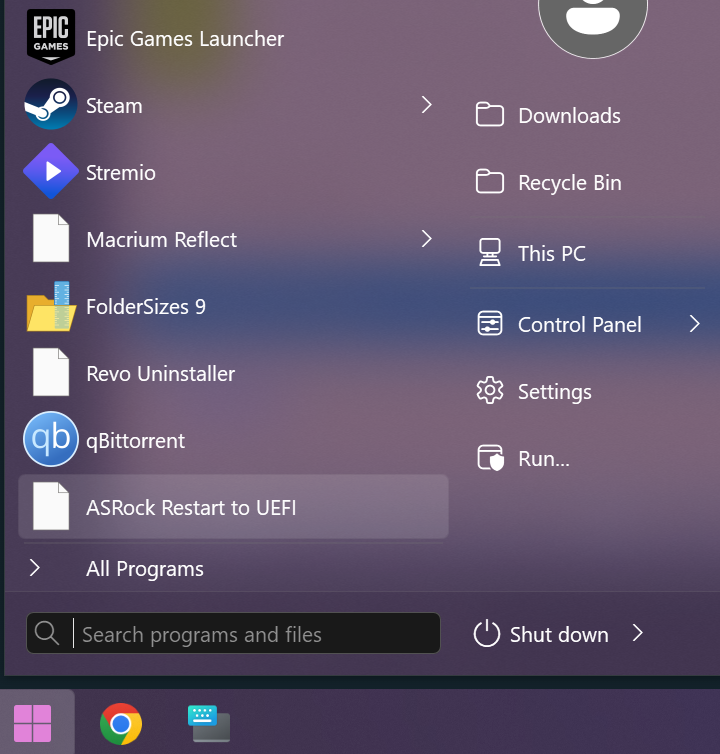
Have problems with icons, picture attached, how to fix that? Latest win 11.
-
 The version there is significantly lower. Even between 2-3 versions, the load can be higher. Check the CPU load in Task Manager. If it is close to 100%, install the h264ify extension or https://vorapis.pages.dev/#/home/download To disable the message about unsupported OS, do the following: reg add "HKLM\Software\Policies\Chromium" /v SuppressUnsupportedOSWarning /t REG_DWORD /d 1 /f
 - Last week
-
Hi George, thanks for the driver. It installed successfully.
-
 The developer's browser from the adjacent topic does not have such oddities.
 -
 I have updated my old guide about compiling Chromium. Now compiling is 100% problems-free. I will check what the effect will be with the e3kskoy7wqk patches—he hasn't published the compilation instructions yet, I wonder if, as before, applying the patches and following the standard compilation procedure will be enough. Edit: Compiling with e3kskoy7wqk working after disabling swiftshader/GLESL tests, but I see it generatings many warnings, probably because he restored old code with methods which triggers warnings in the latest compiler. But it looks like that will work. 22621 SDK is needed.
 -
Stuttering and freezing on YouTube is not a "bug". It's expecting too much of an old processor, an old OS, and backported browsers to NOT stutter and freeze. There are userscripts that can force h.264 and to force less-resource-hungry resolutions. Again, expecting too much is not a "bug", it's a "reality check". Another thing that I find helpful is to *INTENTIONALLY* "throttle" my internet speed. It does not cause "lags", it forces the streaming service to NOT send me UN-NEEDED 4K.
-
@Slavich Shazam has already been fixed. Stuttering and freezing of sound and video on YouTube is usually associated with a weak processor that lacks the power to process 1080 video, especially if it is VP9 and even more so AV1.
-
Bugs identified on Windows XP SP3: 1. Sound stutters on YouTube and when switching tabs. 2. Crash when launching Shazam. 3. 1080p YouTube videos stutter. 4. A menu appears with a reminder about the lack of support for Windows XP and Windows Vista (not a bug, but annoying on these operating systems). 5. When switching from one tab to another while listening to the radio online, the speed of the sound slows down, as if it is being stretched.
-

Native (WDM) HD Audio driver for Windows 98se/Me
defuser replied to Drew Hoffman's topic in Windows 9x/ME
It is not necessary that it is a VxD driver. WDM drivers of some sound cards also support FM under Windows 98 (at least) and this is done by the same (Main) device driver (DS1.SYS): -
I should have quit while I was ahead, lol.
-

Native (WDM) HD Audio driver for Windows 98se/Me
SweetLow replied to Drew Hoffman's topic in Windows 9x/ME
The fact that something built as .SYS does not prevent it from using .VXD interfaces. More I can say - it does not prevent from exporting .VXD interfaces. Look at ACPI.SYS for example. Yes, I assume. No. But Windows 9x kernel has enough functionality for any port trapping/injecting into DOS code/interrupt handling chaining you want to use in form of VxD interfaces. P.S. >I don't have much experience or knowledge of x86 assembly. Сalling of vxd interfaces are available in C code of drivers and almost all needed headers exist, of course -
Very true! its quite a godsend