Dave-H
Content Type
Profiles
Forums
Events
Everything posted by Dave-H
-
 Ah thanks, I didn't realise that you had to keep the two stores separate or one would over-write the other. I must remember that! The last version of wsusscn2.cab that I can get to work offline with WUMT is the version from November 2019. The next version, from July 2020, which is supposed to be the last SHA-1 signed version, just throws an error message, something like "no signature found". I know some people have had that version working, and I never determined why it didn't work for me.
 -
WUMT unless scanning offline using a wsusscn2.cab file only ever produced error messages for me, or scanned forever without ever finding anything. It also wiped my update history at one point, which is why I've never tried using it again! Fortunately I had a backup.
-
Yes indeed, the more the merrier! Option 1 has never worked for me, Option 2 does work as you know, Option 3 I don't know enough about.
-
Ah, understood! Is this a simpler and easier procedure than the one outlined here by @AstroSkipper ?
-
I can't actually read the MDL post as I'm not a member there, but the link says it's for Vista. Can I assume from the screenshots that it works on XP as well, whatever it is?
-
Enable AHCI mode on laptop with no AHCI switch in BIOS
Dave-H replied to we3fan's topic in Windows XP
AFAIK the device IDs come from the devices themselves, and cannot be changed. I'll be interested to hear if my driver works for you. It's a long shot, but you never know! You can add your device IDs to the INF file(s) of the driver, which may (or may not) get it to work with devices it wasn't actually intended for. -
ProxHTTPSProxy and HTTPSProxy in Windows XP for future use
Dave-H replied to AstroSkipper's topic in Windows XP
Here's ProxHTTPSProxyMII v1.5 Rev3e if anyone wants it. Credit to @heinoganda of course. Prox HTTPS Proxy MII v1.5 Rev3e Python 3.44 Original Files.7z -
Enable AHCI mode on laptop with no AHCI switch in BIOS
Dave-H replied to we3fan's topic in Windows XP
You're certainly right in saying that just because there's no AHCI switch in the BIOS doesn't mean that it isn't supported. My BIOS doesn't have a switch either. My driver is using atapi.sys. Whether my driver will work for you I cannot say of course, but here it is if you want to try it. Intel SATA AHCI Rapid Storage 10.1.0.1008.exe
-
Enable AHCI mode on laptop with no AHCI switch in BIOS
Dave-H replied to we3fan's topic in Windows XP
I don't think you can do that just in the registry, you need an AHCI driver for the SATA controller apart from anything else! If there is no option to enable AHCI in the BIOS, it could well be that it's not fundamentally capable of supporting it. There may be an updated version of the BIOS which does of course, if the hardware is capable. -
Which proxy program are you using, "ProxHTTPSProxy" or "HTTPSProxy"? The latter is a development of the former as far as I know, but they have very different control systems.
-
Root Certificates and Revoked Certificates for Windows XP
Dave-H replied to heinoganda's topic in Windows XP
Thanks for the heads up! -
Do you actually mean "can't install" or just "can't use"? Having a low powered computer shouldn't stop you installing IE8, or anything else, although obviously performance might well be poor. As you will presumably only be using IE8 to access Windows Update or Microsoft Update, does this matter? Surely you wouldn't use it for normal web use anyway, as most websites no longer work with it!
-
"Last" would imply that there will never be any subsequent version of the software which will still run on XP, which is not always going to be the case of course. I think "latest" is the best term to use, as it is now, even though the interpretation of "latest" can vary of course.
-
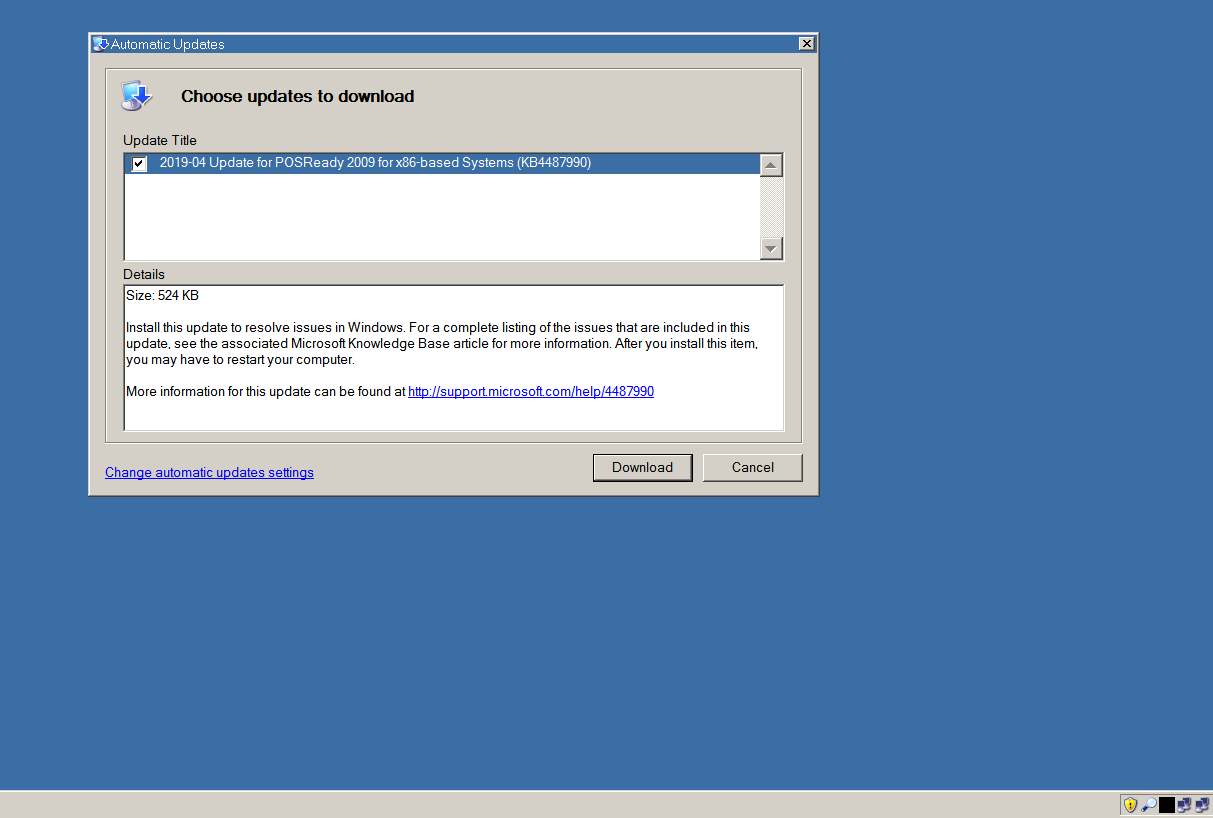
OK, I did my tests, with resounding success! As I thought, uninstalling KB4501226 did not produce a result, as it's no longer actually offered to POSReady 2009 systems. Uninstalling its predecessor, KB4487990 produced the desired result though, as you can see above. So, It's all working!
-
ProxHTTPSProxy and HTTPSProxy in Windows XP for future use
Dave-H replied to AstroSkipper's topic in Windows XP
Thank you so much for all that work! I'm sure this will be very useful to others in the future. The use of ProxHTTPSProxyMII when it was first ported to XP by @heinoganda, and now HTTPSProxy with its much improved control system, fixed a huge number of internet access incompatibilities for me in XP. I would heartily recommend to all XP users to use one or the other of them now as a matter of course! -
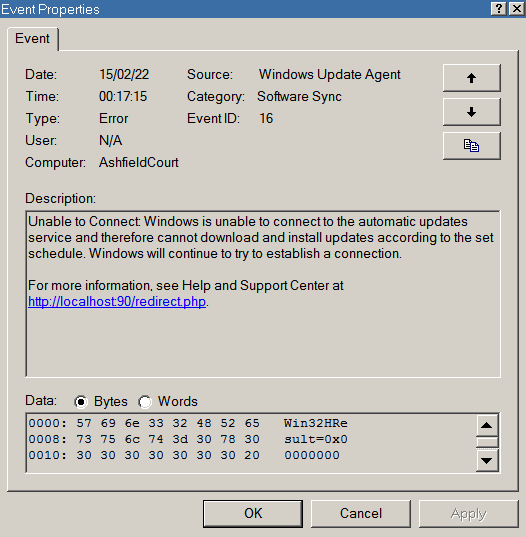
The "cannot connect" error message was back in my System Event Log this morning. I did have some connection problems earlier on though, so that could have caused it, I'll wait to see if it happens again tomorrow. If it doesn't reoccur, I will try the update uninstall test then.
-
No sign of the yellow shield after unhiding one of my hidden hardware updates, but I guess that's because it's an optional update. What I think I'll do now to test it is to uninstall the latest time zones update, as that will do no damage if there's a problem. The last one for POSReady2009 was KB4501226, on 11/06/19. That was widely considered to have been a mistake by Microsoft though, as support had ended, and it's not now available in the catalogue. I have got its installation file, but I suspect that if I remove it, it won't appear as an update as it's effectively been withdrawn for POSReady2009. The previous one was KB4487990, issued on 10/04/19. I will try removing that, and see if Automatic Updates prompts me to reinstall it.
-
Well my system is already set up exactly as yours is now, and has been for some time, that is to say with Automatic Updates set to "notify" mode. Presumably it was its checks which were generating the Event Log error messages, which seem to have now stopped, although I'll need another couple of days to confirm that. Does that mean that it's now working? As you say, I guess the only way to know for sure is to artificially trigger a missing update. I do have some hidden hardware updates, I could just try unhiding one of those I guess.
-
OK, I'll give that a try and report back. Since ticking "Automatically Detect Settings" in my Internet LAN settings I've not seen the Event Log error message, so that may well have fixed that. I'll have to leave it a few more days to be sure though, the messages were appearing every 24 hours.
-
Yes, I could do that, but I don't really want to risk it just for a speculative test! I have "Startup Delayer" installed and running for other reasons, so I could delay the service start with that. There's no native way of doing it in XP AFAIK. Thanks, that's very helpful and makes perfect sense. You say your Automatic Updates Control Panel applet doesn't work? Is it all greyed out, or does it not open at all?
-
wuauclt /detectnow appears to do nothing, and there's no event in the Event Viewer. I guess that means it's not working! It doesn't generate the error message either. I'll try changing the LAN settings. Obviously i'm not expecting the shield to pop up in the system tray again anytime soon, but it would be interesting to see if it's possible to get the automatic checks working again.
-
Thanks, but I was thinking more of whether @maile3241is getting the error messages, as they seem to already have automatic updates enabled. I'm not sure how it could show the yellow shield if it can't connect.
-
Well I do have HTTPSProxy running all the time, as I need it to display my e-mails properly in Eudora. So you're not getting the Event Log error messages?
-
I'm still seeing this in my System Event Log regularly. I still have automatic updates set to tell me if there are any! I guess this is because it can't use the proxy.
-
I think @xpandvistafanwas saying that they had already installed SP2 (for Office 2010) and it was the post SP2 updates that were taking a long time. I do remember that there was an awful lot of them!